
Fast Trading Mod (26.3, 1.20.1) – Trade Full Stacks at Once

 0


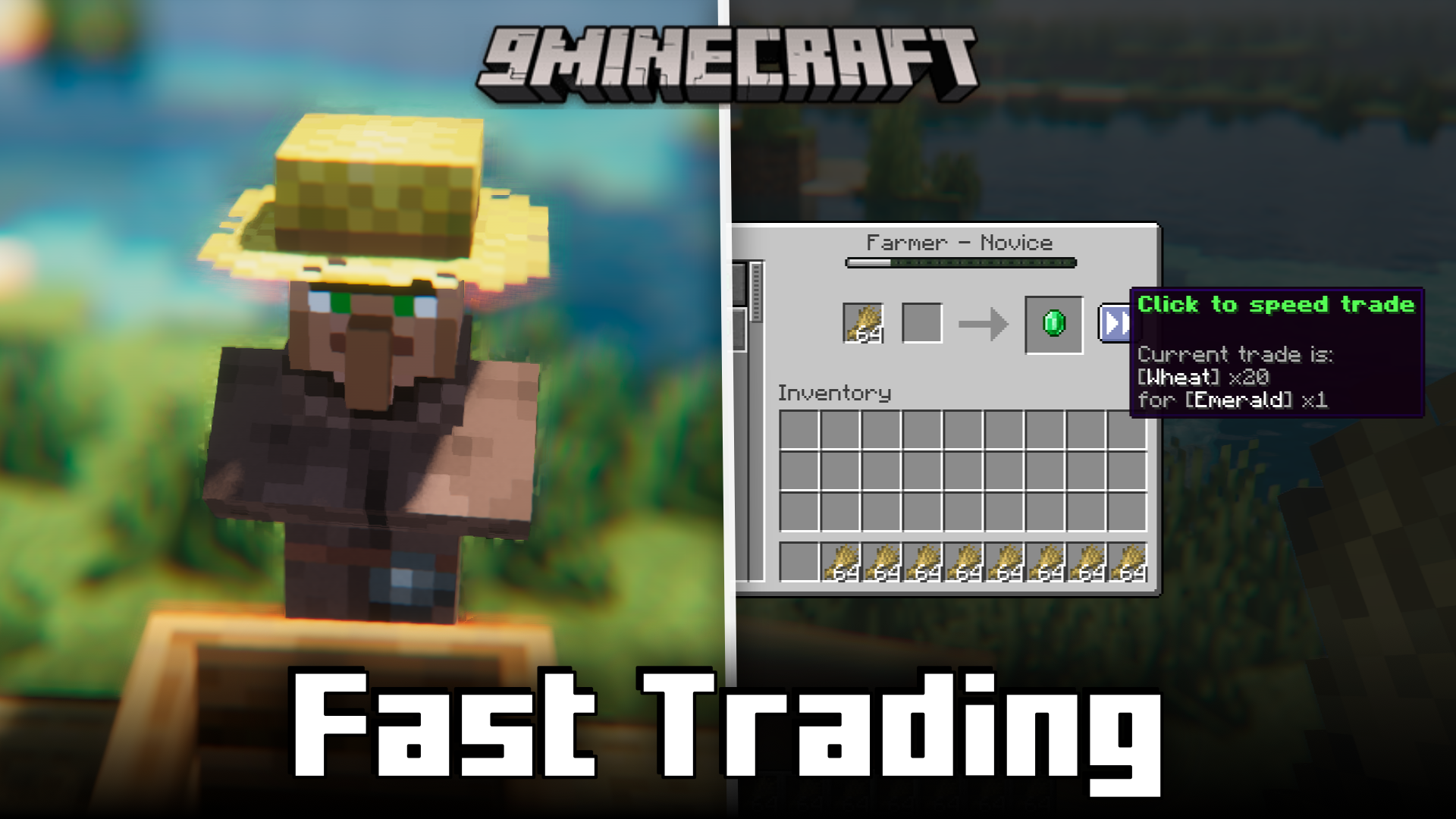
Fast Trading Mod adds a quick trade button to the villager trading menu in Minecraft. Normally, you click the same offer over and over until the trade locks. This mod lets you repeat the current trade with one click until the villager runs out of stock. You can also adjust the trade speed and set rules to stop trades when prices go up or new offers appear.
Features:
- Adds a quick trade button directly to the villager trading menu.
- Repeats the current trade with a single click until the offer is no longer available.
- Lets you set the tick delay between item moves to control how fast trades run.
- Offers two autofill options so you can use standard vanilla autofill or match items strictly.
- Lets you block fast trading when the result item is damageable or unstackable, or allow all trades.
- Stops automatic trading when a villager raises prices, changes prices, or unlocks new offers.
- Supports in-game settings through Mod Menu as well as manual edits in a JSON config file.
Configuration:
You can change these settings in-game with Mod Menu or edit the config/fasttrading.json file:
Ticks Between Actions: Sets the delay between moving items. Use any number greater than0.025(default:1).Autofill Behavior: Picks between standard vanilla autofill or exact item matching. Options areVanillaorStrict(default:Vanilla).Speed Trade Block: Sets when to block fast trading based on the result item. Options areResult is Damageable,Result is Unstackable, orAllow(default:Result is Damageable).Stop on Price Change: Stops trading when a villager’s price changes. Options areOn Increase,On Change, orNever(default:On Increase).Stop on New Offers: Stops trading when new trade offers appear. Options areYesorNo(default:No).
How to Install:
New to Minecraft? Follow our step-by-step guide to install Mods on your PC.View Guide
Requirements:




Fast Trading Mod Download Links
For Minecraft 26.3
For Minecraft 26.2
For Minecraft 26.1.2, 26.1.1, 26.1
For Minecraft 1.21.11
For Minecraft 1.21.10, 1.21.9
For Minecraft 1.21.8, 1.21.7, 1.21.6
For Minecraft 1.21.5
For Minecraft 1.21.4
For Minecraft 1.21.3, 1.21.2
For Minecraft 1.21.1, 1.21
For Minecraft 1.20.6
For Minecraft 1.20.2, 1.20.1, 1.20
For Minecraft 1.19.4
Click to rate this post!
[Total: 10 Average: 2.3]
You May Also Like
Picked for this page
 Hide Hands Mod (26.3, 1.20.1) – Hide Your Offhand or Main Hand
 Audio Player Mod (26.3, 1.20.1) – Put Your Own Audio Files on Music Discs
 All Arrows Infinity Fix Mod (26.3, 1.21.1) – Using “Infinity” with All Arrows
 Not Enough Trials Mod (26.2, 1.21.1) – Better Trial Chambers
 Random Bone Meal Flowers Mod (26.3, 1.20.1) – Biome-Free Flower Spawning
 The Plopper Mod (26.3, 1.20.1) – Item Collector Block
 Spice Of Fabric Mod (26.1.2, 1.20.1) – Food Containers
 Ender Dragon Fight Remastered Mod (26.2, 1.20.1) – Up in The Difficulty of the Final Boss
 Frostbyte’s Maximum Mobility Mod (26.3, 1.20.1) – Smooth Movement For Minecraft
 Eclipse’s Tweakeroo Additions Mod (26.3, 1.20.1) – A Guide To The New Features
 The Fletching Table Mod (26.3, 1.20.1) – Transform Your Arrows With Ease
 Glow Squids Actually Glow Mod (26.3, 1.20.1) – Underwater Brightness
Most viewed in Mods over the last 7 days
 Ala Industrial Mod (26.3) – Run Electric Power Grids and Automated Factories
 PleasureCraft Mod (26.3, 1.21.1) – Jenny Mod Remake for Fabric
 Jennycraft Mod (26.3, 1.20.1) – Virtual Girlfriend in Minecraft
 Fapcraft Mod (26.3, 1.12.2) – Comprehensive and Detailed Content
 Jenny Mod (Fapcraft) Official Complete Guide – How to use, Tutorial
 BangCraft Mod (1.20.1) – Jenny, Ellie and Elliot
 Fabric Loader (26.3, 1.20.1) – Fabric Installer for All Minecraft Versions
 The Shooting Star Demo Mod (26.3, 1.20.1) – Vaporize Terrain From Orbit
 Meteor Client Mod (26.3, 1.20.1) – Xray, HUD, Fly
 OptiFine HD (26.3, 1.20.1) – Run Faster, FPS Boost, Shaders Support
 Aristois Client Mod (1.21.4, 1.20.1) – World Class Minecraft Utility
 Prestige Client Mod (1.21.11, 1.21.4) – Powerful Ghost Features for Crystal & Sword PvP
More from Mods
 Far Lands Traveler Mod (26.1.2) – Survive the Long Trek to the Edge of the World
 Beli’s SkyLyrics Mod (1.21.11) – Sing Along to Desktop Tracks Projected in the Night Sky
 Explainstone and Songmelyn Mod (1.21.1) – Broadcast Custom Music Across Your Base
 Rockstar Shaders Mod (26.3) – Cast Ray-Traced Light Across Vast Distant Horizons
 ERYDON Mod (1.20.1) – Design Grand Courtyards with Carved Marble Pillars
 Infinity Bound Mod (1.21.1) – Snap Away Enemies with Legendary Superhero Gear
 Legacy Gecko Lib Fabric Mod (1.16.5) – Power Animated Creatures in Modpacks
 The Man from the Shadow Horror Mod (1.20.1) – Fight Hallucinations to Survive
 Shade & Saturation Slider Mod (26.2, 1.21.11) – Make Every Biome Vibrant
 Cataclysm X Yung’s Better Nether Fortresses Compat Mod (1.21.1, 1.20.1)
 Patchouli 9minecraft Mod (26.3) – Read Mod Guides Without Leaving Minecraft
 Paintings ++ 9minecraft Mod (26.3) – Pick the Exact Painting You Want

This post has no comments yet. Be the first — your comment will appear here.