
Biome Replacer Mod (26.3, 1.20.1) – Keep Only Biomes You Love

 0


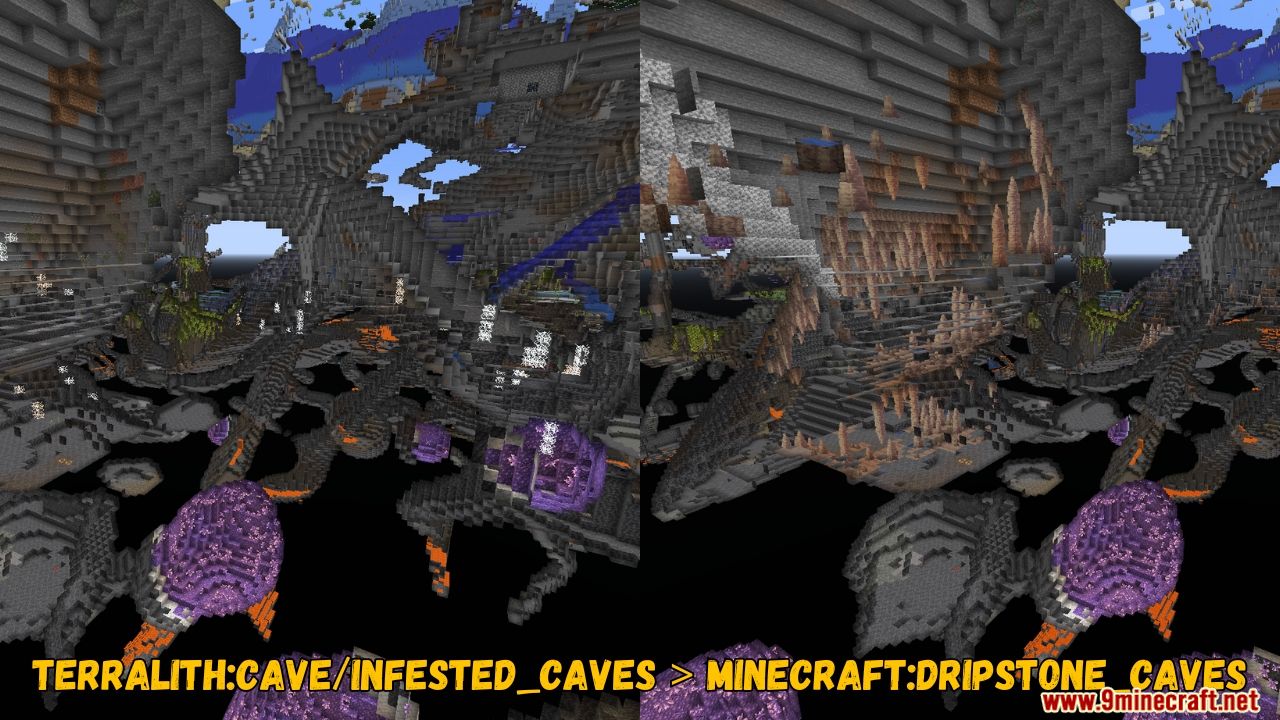
Biome Replacer Mod lets you swap or remove unwanted biomes in your Minecraft worlds through a simple config file. This utility mod works well with world generation datapacks like Terralith and mods that use TerraBlender or Blueprint without their own biome settings. You can replace single biomes, swap whole biome tags, remove biomes with a null keyword, or target specific dimensions while the base terrain shape stays the same. It runs on the server side with no client setup needed for multiplayer, and it runs once at world start so performance stays smooth.
Features:
- Simple Properties Config: Lets you edit one plain text file with clear rules to swap or remove biomes.
- Datapack Friendly: Makes it easy to tweak world generation datapacks like Terralith that do not include built-in biome settings.
- Server-Side Support: Runs on the server with no client setup needed unless you play in singleplayer.
- Zero Worldgen Lag: Runs only once when the world starts, so it does not slow down world generation.
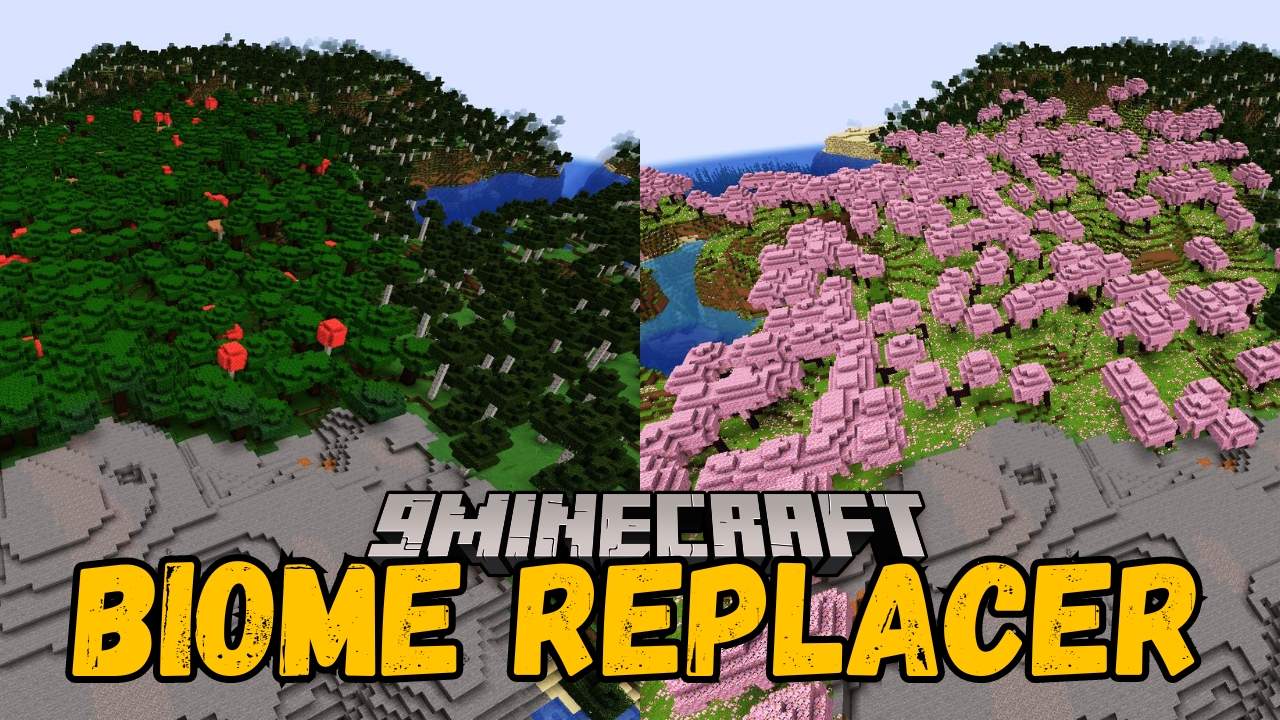
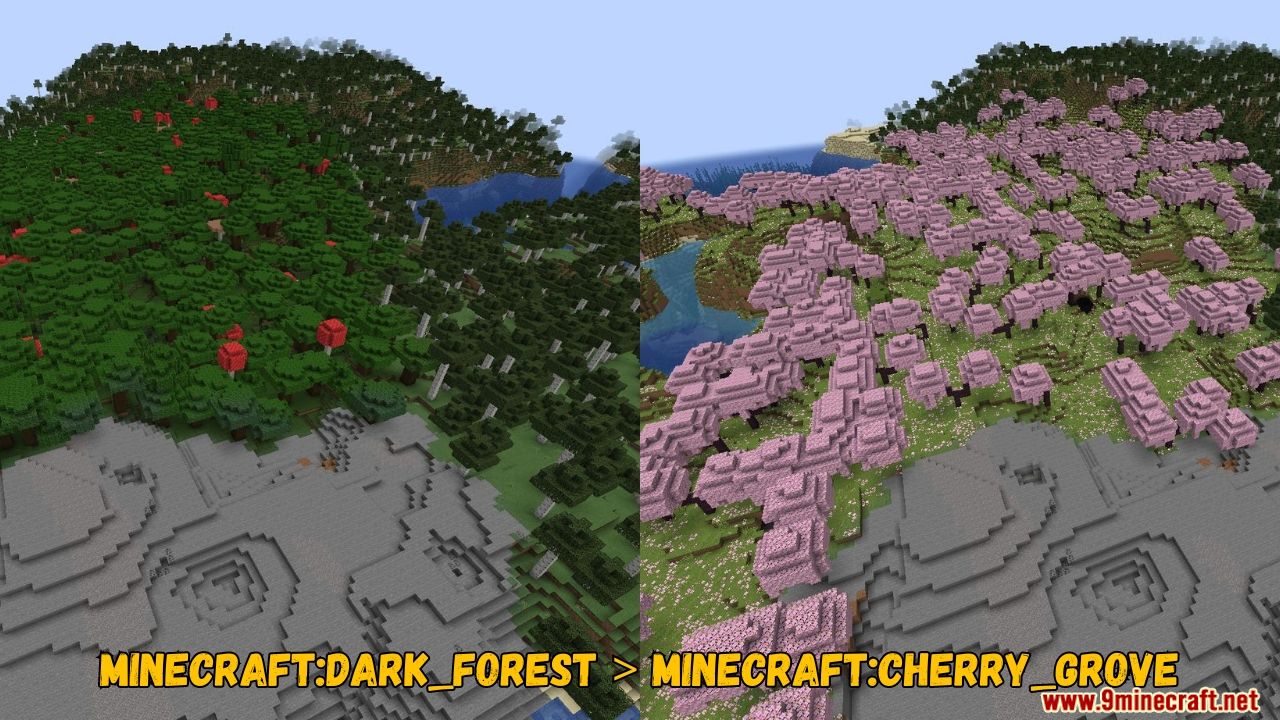
- Swaps any biome into another by pairing two biome IDs, such as turning dark forests into cherry groves.
- Supports biome tags like
#minecraft:is_forestso you can replace whole groups of biomes with one rule. - Removes unwanted biomes completely using the
nullkeyword, which works for single biomes and biome tags alike. - Targets individual dimensions with dimension headers, letting you change a biome in one dimension without affecting another.
- Works with modded biomes from TerraBlender and Blueprint libraries, letting you remove biomes from mods that have no config options.
- Stays safe alongside most world generation mods, though it cannot replace Biolith biomes.
- Keeps the original terrain shape intact, so it cannot turn oceans into land or make ocean-only worlds.
- Prints warning messages in chat whenever a config rule has a mistake or typo in a biome ID.
Configuration:
config/biome_replacer.properties: The configuration file where you write all biome replacement rules.old_biome > new_biome: Swaps one biome for another using their biome IDs, such asminecraft:dark_forest > minecraft:cherry_grove.#biome_tag > new_biome: Replaces every biome inside a biome tag at once, such as#minecraft:is_forest > minecraft:desert.biome_id > null: Removes a biome completely from world generation. Works with single biomes liketerralith:skylands_autumn > nullor tags like#terralith:skylands > null.[mod:dimension]: Limits all rules written under this header to one specific dimension, such as[minecraft:overworld]or[custom:dimension].
Example biome_replacer.properties rules:
minecraft:dark_forest > minecraft:cherry_grove
#minecraft:is_forest > minecraft:desert
terralith:skylands_autumn > null
#terralith:skylands > null

[minecraft:overworld]
minecraft:desert > null

[custom:dimension]
minecraft:desert > minecraft:badlands
How to Use:
- Launch your Minecraft client or server once with the mod loaded so it creates the config file automatically.
- Open the
configfolder and find thebiome_replacer.propertiesfile. - Add your replacement rules using the format
old_biome > new_biome, biome tags, thenullkeyword to remove biomes, or[mod:dimension]headers for specific dimensions, then save the file. - Load your world so the biome changes take effect during world generation.
- Check the chat for warning messages if a rule does not work, then fix any typos in your biome IDs and try again.
- Leave and re-enter your world on the client whenever you edit rules so the updates apply without restarting the whole game.
- Test any
nullremoval rules on a separate test world before using them on an important save, since removing vanilla or datapack biomes can cause crashes or mess up biome placement.
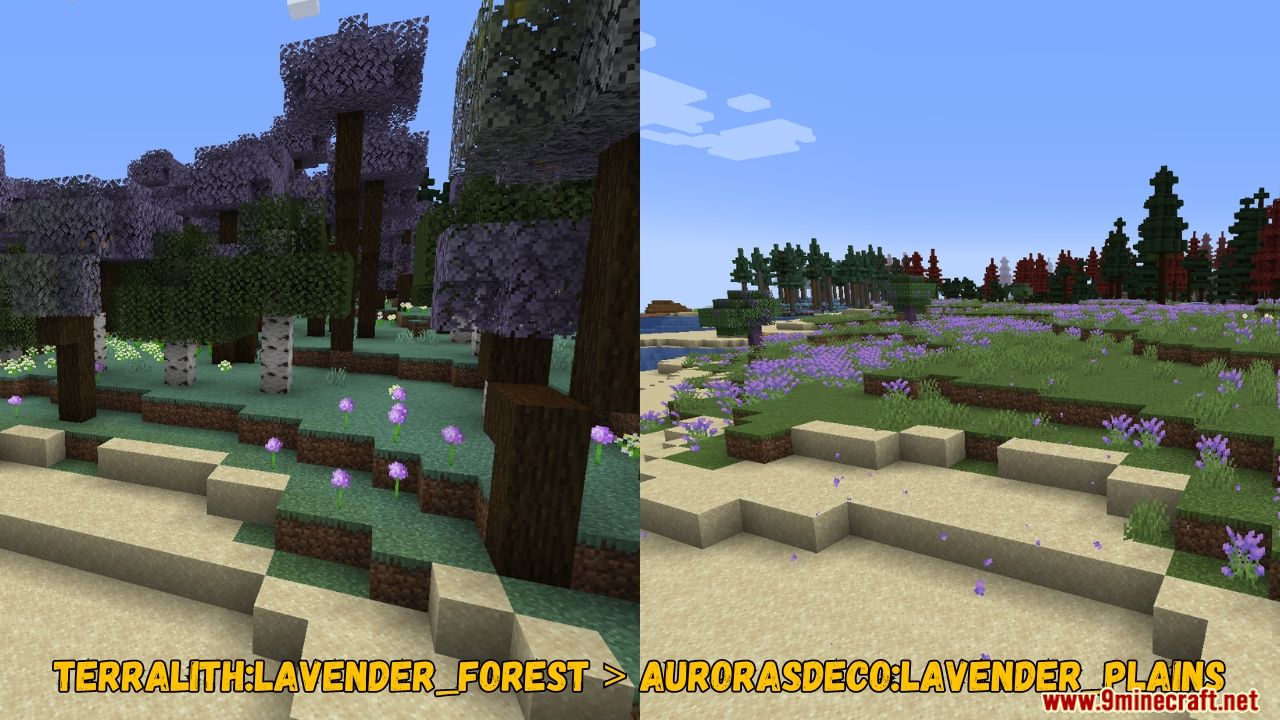
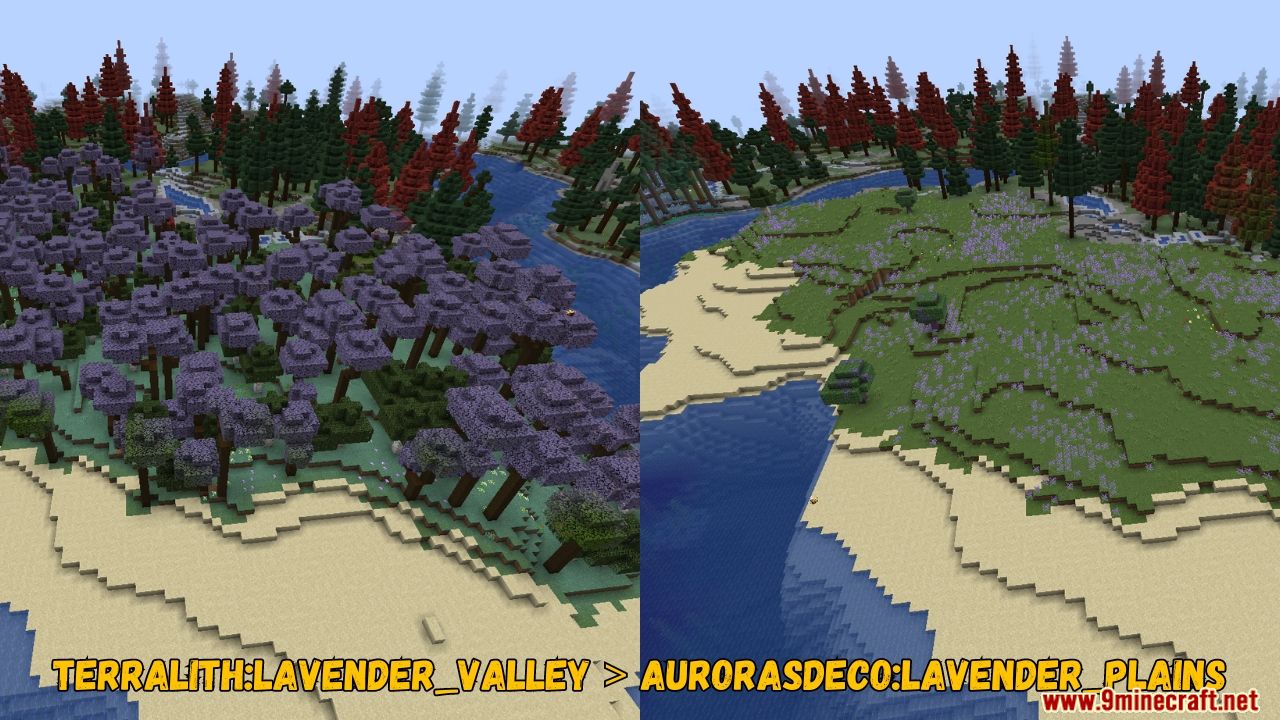
Screenshots:
How to Install:
New to Minecraft? Follow our step-by-step guide to install Mods on your PC.View Guide
Requirements:




Biome Replacer Mod Download Links
For Minecraft
26.3,
26.2,
26.1.2
All Versions Covered
26.3
26.2
26.1.2
26.1.1
26.1
For Minecraft
26.2,
26.1.2,
26.1.1
All Versions Covered
26.2
26.1.2
26.1.1
26.1
For Minecraft
1.21.11,
1.21.8,
1.21.7
All Versions Covered
1.21.11
1.21.8
1.21.7
1.21.6
1.21.5
1.21.4
1.21.3
1.21.2
For Minecraft
1.21.8,
1.21.7,
1.21.6
All Versions Covered
1.21.8
1.21.7
1.21.6
1.21.5
1.21.4
1.21.3
1.21.2
For Minecraft 1.21.5, 1.21.4
For Minecraft
1.21.1,
1.21,
1.20.6
All Versions Covered
1.21.1
1.21
1.20.6
1.20.5
1.20.4
1.20.3
1.20.2
1.20.1
1.20
1.19.4
For Minecraft 1.19.4 –> 1.20.6
For Minecraft
1.20.4,
1.20.3,
1.20.2
All Versions Covered
1.20.4
1.20.3
1.20.2
1.20.1
1.20
1.19.4
For Minecraft
1.19.2,
1.19.1,
1.19
All Versions Covered
1.19.2
1.19.1
1.19
1.18.2
For Minecraft 1.21.
You May Also Like
Picked for this page
 Distant Horizons Mod (26.3, 1.20.1) – See Mountains Miles Away
 Skin Layers 3D Mod (26.3, 1.20.1) – Render The Player Skin Layer in 3D
 Professions Mod (26.1.2, 1.21.1) – Receive Rewards by Repeating Actions
 Paradise Lost Mod (1.21.11, 1.20.1) – A Heavenly Land
 TelePass Mod (26.2, 1.20.1) – Teleport to a Player Using a Compass
 Journey Into The Light Mod (1.21.11, 1.20.1) – 8 new Dimensions and Over a Hundred of Mobs
 Item Alchemy Mod (26.3, 1.20.1) – Magic of Alchemy
 Critter Armory Mod (26.3, 1.20.1) – Armor Up Your Animals
 Entangled Mod (26.3, 1.20.1) – Link Blocks Across Worlds
 Structure Layout Optimizer Mod (26.3, 1.20.1) – Optimize Jigsaw Structures
 CC:C Bridge Mod (1.21.1, 1.20.1) – Enhance Minecraft Automation
 Create Automotives Mod (26.1.2, 1.20.1) – Drive Steam Powered Vehicles
Most viewed in Mods over the last 7 days
 Ala Industrial Mod (26.3) – Run Electric Power Grids and Automated Factories
 PleasureCraft Mod (26.3, 1.21.1) – Jenny Mod Remake for Fabric
 Jennycraft Mod (26.3, 1.20.1) – Virtual Girlfriend in Minecraft
 Fapcraft Mod (26.3, 1.12.2) – Comprehensive and Detailed Content
 Jenny Mod (Fapcraft) Official Complete Guide – How to use, Tutorial
 BangCraft Mod (1.20.1) – Jenny, Ellie and Elliot
 Fabric Loader (26.3, 1.20.1) – Fabric Installer for All Minecraft Versions
 The Shooting Star Demo Mod (26.3, 1.20.1) – Vaporize Terrain From Orbit
 Meteor Client Mod (26.3, 1.20.1) – Xray, HUD, Fly
 OptiFine HD (26.3, 1.20.1) – Run Faster, FPS Boost, Shaders Support
 Aristois Client Mod (1.21.4, 1.20.1) – World Class Minecraft Utility
 Prestige Client Mod (1.21.11, 1.21.4) – Powerful Ghost Features for Crystal & Sword PvP
More from Mods
 Archangel Client Mod (1.21.11) – Master Every PvP Duel with Clean Screen Stats
 Block Front Survival Patch Mod (1.21.1) – Wage Tactical Warfare in Survival
 Better Enchantment Bookshelf Placement Mod (26.2, 1.20.1)
 SimpleRPGCore Mod (1.21.4, 1.21.1) – Fight with Classic RPG Stats
 Bard RPG Series Plus by Fichte Mod (1.21.1, 1.20.1) – Buff Allies in Combat
 Fabric Gui ImGui Mod (26.3, 1.21.11) – Clean Custom Menus and In-Game Control
 Multi Item Lib Mod (1.20.1) – Wield Custom Gear with Flawless Hand Animations
 Universe3090 Mod (1.20.1) – Survive Corrupted Dimensions Filled
 Wireless Automate Mod (1.21.1) – Automate Base Logistics Without Messy Pipes
 Vaskars Opus Faction War Quests & Bosses Mod (1.21.11, 1.20.1)
 Multitools and More Mod (26.3, 1.20.1) – Clear Your Hotbar and Travel
 Luxium Let There Be Light Mod (1.20.1) – Stunning Lighting on Low-End Computers

This post has no comments yet. Be the first — your comment will appear here.