
Cave Spider Schematic (1.20.x) – Giant Vanilla Cave Spider Build

 0


Cave Spider Schematic gives you a large model of a cave spider to paste straight into your world. This build uses standard blocks, so it fits into a normal game without any extra mods. You can place it in an adventure map, a spooky cave area, or near a custom mob farm. The file makes it fast to copy the entire structure right where you want it.
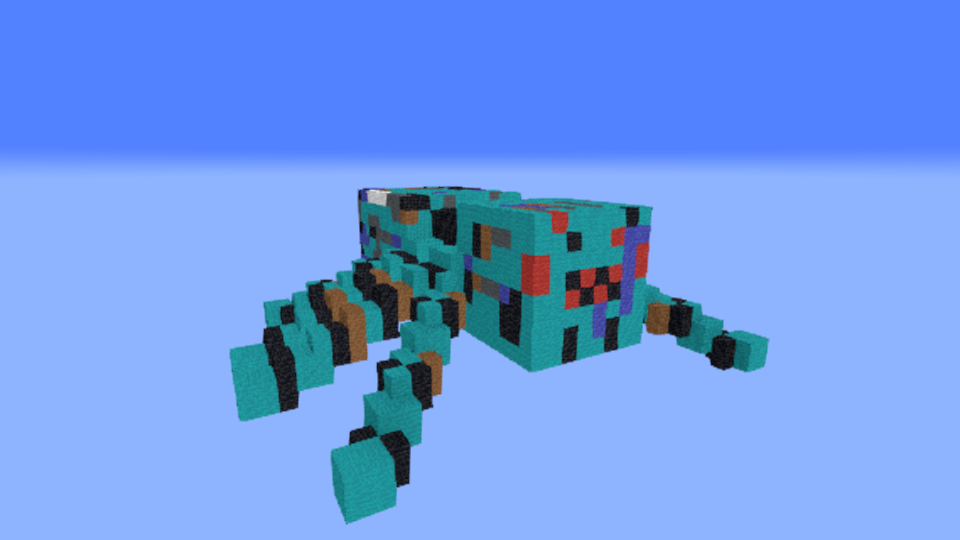
3D Preview & Editor:
Materials
8 types · 1,376 blocks
| Cyan Wool | 803 | Black Wool | 386 | Brown Wool | 69 | |||
| Gray Wool | 61 | Blue Wool | 38 | Red Wool | 10 | |||
| White Wool | 6 | Light Gray Wool | 3 | |||||
How to place this schematic
.schem This is a WorldEdit schematic. It pastes instantly on a server or single-player world that has WorldEdit (or FastAsyncWorldEdit).
| 1 | Install WorldEdit — as a plugin on the server, or as a mod for single player. |
| 2 | Drop the .schem file into plugins/WorldEdit/schematics (server) or config/worldedit/schematics (client). |
| 3 | Run //schem load <file name>. |
| 4 | Stand where you want it and run //paste. Add -a to skip air blocks. |
Features:
- Vanilla Blocks: Uses normal game blocks so you do not need any special mods to load the build.
- Perfect Size: Measures 28 blocks wide, 11 blocks high, and 34 blocks long.
- Contains exactly 1,376 blocks in total, making it a medium-sized build that loads quickly.
- Comes as a standard SCHEM file that works with common building tools.
- Saves you time so you do not have to build a giant spider block by block.
Schematic Specs:
 Minecraft1.20.x
 Dimensions28×11×34
 Total Blocks1,376
Cave Spider Schematic Download Links
For Minecraft 1.20.x
Click to rate this post!
[Total: 0 Average: 0]
You May Also Like
Picked for this page
 Fastest Kelp Farm Donut Smp Schematic (1.21.x) – Compact Redstone Kelp Farm Design
 Pokémon Temple Arena Japanese Litematica Schematic (1.21.x) – Large Asian Fortress With Fighting Rin
 Cactus Farm Schematic (1.21.x) – Compact Vertical Automatic Cactus Farm
 A Single Module of Cobble Farm Schematic (1.21.x) – Compact Vanilla Cobblestone Generator
 Bone Farm Schematic (1.21.x) – Quick And Easy Redstone Bone Farm
 Cobblestone Generator Farm Schematic (1.21.x) – Small Vanilla Redstone Farm Build
 Lox V7.1 Fixed Schematic (1.21.x) – Large Vanilla Redstone Build For Multiplayer Servers
 Blacksmith Tower Schematic (1.20.x) – Tall Vanilla Building Blueprint For Villages
 Small House 11 Schematic (1.20.x) – Tall And Compact Vanilla Home Build
 Sequential Double Dabble Schematic (1.21.x) – Binary To BCD Redstone Converter
 Spider Jockey Schematic (1.20.x) – Giant Spider Jockey Statue For Your World
 Small House 10 Schematic (1.20.x) – A Compact Vanilla Home Blueprint For Players
Most viewed in Schematics over the last 7 days
 Fastest Bonemeal Farm Donut Smp Schematic (1.21.x) – Fast Redstone Bonemeal Farm Build
 KelpFarmV9.9 Schematic (1.21.x) – Compact And Simple Seaweed Farm Build
 64 Module Cobblestone Farm Schematic (1.21.x) – Massive Automated Stone Gathering Build
 Gold Farm Schematic (1.21.x) – Automatic Nether Roof Gold Farm
 Villager Trading Hall Schematic (1.21.x) – Modern Shop Build For 48 Villagers
 Bamboo Farm Schematic (1.21.x) – Small Automated Redstone Bamboo Farm
 Minutes End Base Before Spoke Null End Video Schematic (1.21.x) – Giant Unstable SMP End Base Schema
 Best Railgun Tp Trap on Donutsmp Schematic (1.21.x) – Unescapable Multiplayer Redstone Trap Build
 36 Module Cobble Farm 18m per Hour Donut SMP Schematic (1.21.x) – Massive Automated Stone Generator
 Bamboss V2 800k Bamboo per Hour Schematic (1.21.x) – High Speed Automated Bamboo Farm Schematic
 Donut Smp Stash and Regear Schematic (1.21.x) – Large Storage And Regear Room Build
- Fastest Kelp Farm Donut Smp Schematic (1.21.x) – Compact Redstone Kelp Farm Design
More from Schematics
 Medieval Waterfall House Schematic (1.21.x) – Scenic Cliffside Survival Base
 Text Poke 3d Schematic (1.21.x) – Large 3D Text Build for Custom Worlds
 Grand Medieval Manor Schematic (1.21.x) – Large Lord’s Home with Teal Roofs
 Medieval Castle House Schematic (1.20.x) – Detailed Stone And Wood Survival Base
 Long Viking Home Schematic (1.21.x) – Traditional Norse Survival House For Your World
 Minecraft Hera Greek Mythology Statue Free Schematic (1.19.x) – Giant Greek Goddess Statue
 Medieval House by JustmeTheGamer Schematic (1.21.x) – A Cozy Two Story Medieval Home Schematic
 Medieval Garden Manor Schematic (1.21.x) – Elegant Medieval Manor With Teal Roofs
 Modern Purple Apartment Schematic (1.20.x) – Stylish Urban Living With Vibrant Purple Design
 Modern Green Apartment Schematic (1.20.x) – Stylish Urban Living for Modern Cities
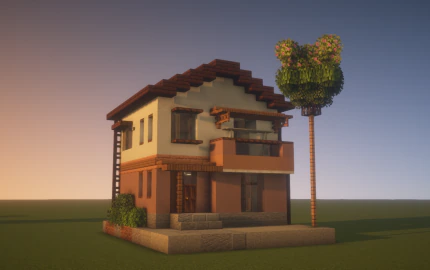 Cozy Family House Schematic (1.20.x) – Warm Suburban Home for Your Minecraft World
 Medieval Clock Tower Schematic (1.21.x) – Tall Stone Tower with Teal Spire

This post has no comments yet. Be the first — your comment will appear here.