


CheatBreaker Client (1.8.9, 1.7.10) – Free FPS Boosting Modpack
 48,813
 0
0


CheatBreaker Client is a modpack and FPS booster combined. In most cases, CheatBreaker more than doubles your normal Minecraft frames.

Features:
- PvP Optimization
- Stable FPS and reduced latency
- On-screen indicators such as
Keystrokes,CPS,Armor Status, andPotion HUD
- Client-side Anti-Cheat
- Blocks unauthorized mods and known cheat tools
- Allows servers to verify whether a player is using CheatBreaker
- Customizable HUD
- Enable or disable individual interface elements
- Drag-and-drop positioning for better screen layout
- Integrated Voice Chat
- Built-in voice communication between players
Mods:
- General Information
- Coordinates – Displays
XYZposition and facing direction - Direction HUD – Shows cardinal directions
- FPS – Displays current frames per second
- Ping – Shows server latency
- Memory Usage – Displays game memory consumption
- Server Address – Shows the connected server address
- Clock – Displays the current time
- Date – Displays the current date
- Playtime – Shows total playtime
- Coordinates – Displays
- Movement & Input
- ToggleSprint – Toggle sprint and sneak keys
- Keystrokes – Displays pressed movement keys, mouse buttons, and spacebar
- CPS – Displays clicks per second
- SPS – Displays swings per second
- Sprint Reset Counter – Counts sprint resets
- View Bobbing – Controls camera bobbing effects
- Perspective – Adjusts camera perspective behavior
- Combat & PvP
- Armor Status – Displays armor and held item durability
- Potion Effects – Shows active potion effects
- Potion Counter – Counts healing potions or soup in inventory
- Combo Counter – Counts consecutive hits within
2seconds - Reach Display – Shows hit distance on entities
- Hitboxes – Renders entity hitbox outlines
- Boss Bar – Displays boss name and health
- TNT Timer – Shows a timer above primed TNT
- Interface & HUD Customization
- Scoreboard – Move and customize the scoreboard
- Player List – Customize the tab player list
- Chat – Move and customize the chat window
- Titles – Toggle and reposition titles
- Pack Display – Displays active resource packs
- Visual Enhancements
- Crosshair – Replace the default crosshair
- Hit Color – Customize damage tint on entities
- Hurt Cam – Adjust camera shake on damage
- Particles – Modify particle appearance
- Motion Blur – Adds blur effects while moving
- Animations – Switch between legacy and modern animations
- Enchantment Glint – Customize enchantment shine and overlays
- FOV Changer – Adjust field of view in different scenarios
- Environment Changer – Client-side environment customization
- Block Overlay – Customize block outline and overlay
- Pack Tweaks – Modify specific texture behaviors
- Item Physics – Adjust item drop physics
- Utility & Privacy
- Nick Hider – Hides player identity client-side
- Name Tags – Displays usernames above players
- Auto Text – Bind text messages to keybinds
- Maps & Server-Specific
- Zan’s Minimap – Minimap with waypoint management
- Cooldowns – Displays server-defined item or ability cooldowns
- Hypixel Collection – Mods tailored for the
Hypixel Network
- Staff Mods
- Xray – Allows visibility through blocks
- Nametags – Displays player name tags through blocks
- NoClip – Enables movement through solid blocks
- BunnyHop – Builds momentum while jumping and moving
Settings:
- Input & Controls
- Keybind – Global keybind configuration
- Keybind Handling – Keybind behavior management
- Mouse – Mouse sensitivity and behavior
- Zoom – Zoom control settings
- Emote – Emote key and behavior settings
- Audio & Visual
- Audio – Global audio configuration
- Display – Screen and display options
- Render – Rendering configuration
- Scaling – UI and element scaling
- Default Color – Default color configuration
- Default Size – Default size configuration
- Performance
- FPS Boost – Performance optimization options
- FPS Limiting – Frame rate limit controls
- Interface & HUD
- HUD Editor – HUD layout and behavior
- In-Game Menu – In-game menu configuration
- Search – Settings search behavior
- Team View – Team overlay and display
- Content & Appearance
- Resource Pack – Resource pack management
- Cosmetic – Cosmetic customization
- Streaming & Social
- Streamer Mode – Privacy-focused streaming options
- Discord Rich Presence –
Discordstatus integration - Screenshot – Screenshot behavior and output
- General
- General – Miscellaneous client settings
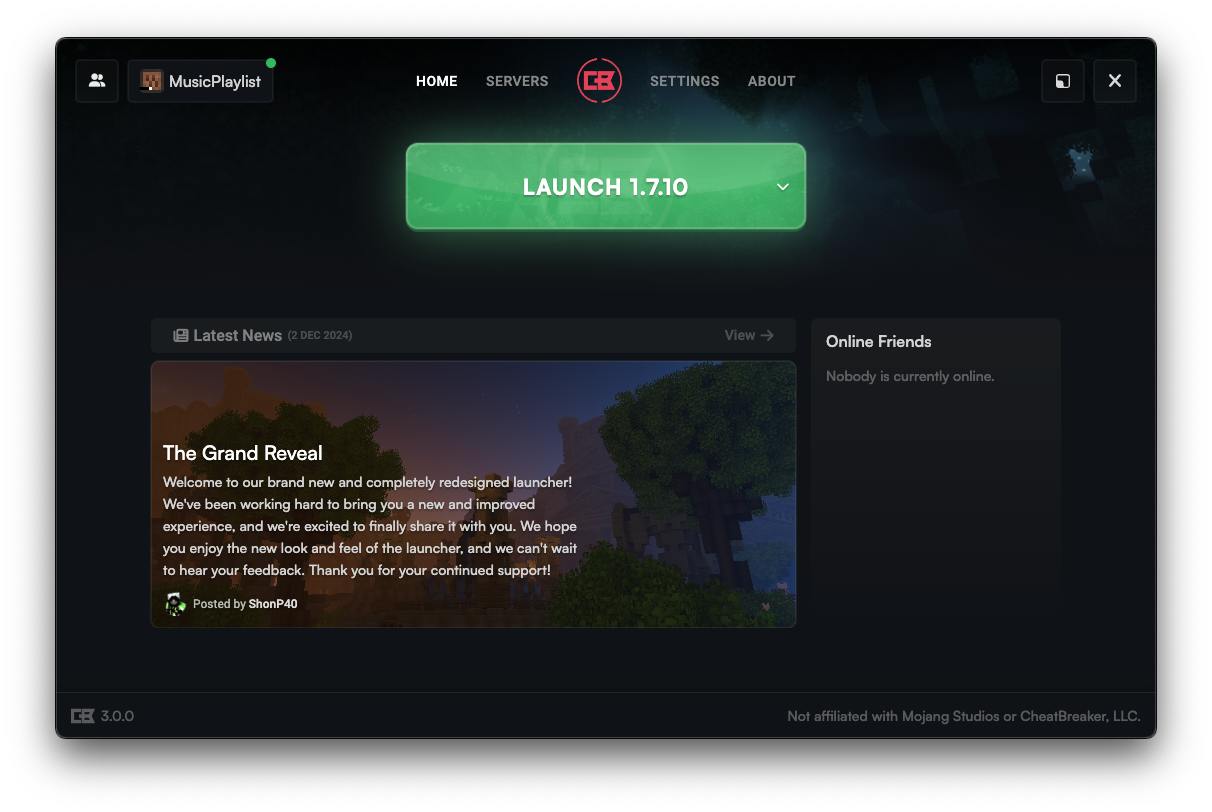
Screenshots:

Requirements:
CheatBreaker Client Download Links
Download from CheatBreaker Client Official Page
Click to rate this post!
[Total: 49 Average: 4]
You May Also Like




This post has no comments yet. Be the first — your comment will appear here.