
Cobble Gacha Expanded Cobblemon Gacha System by JMV Mod (1.21.1)
 0
 0

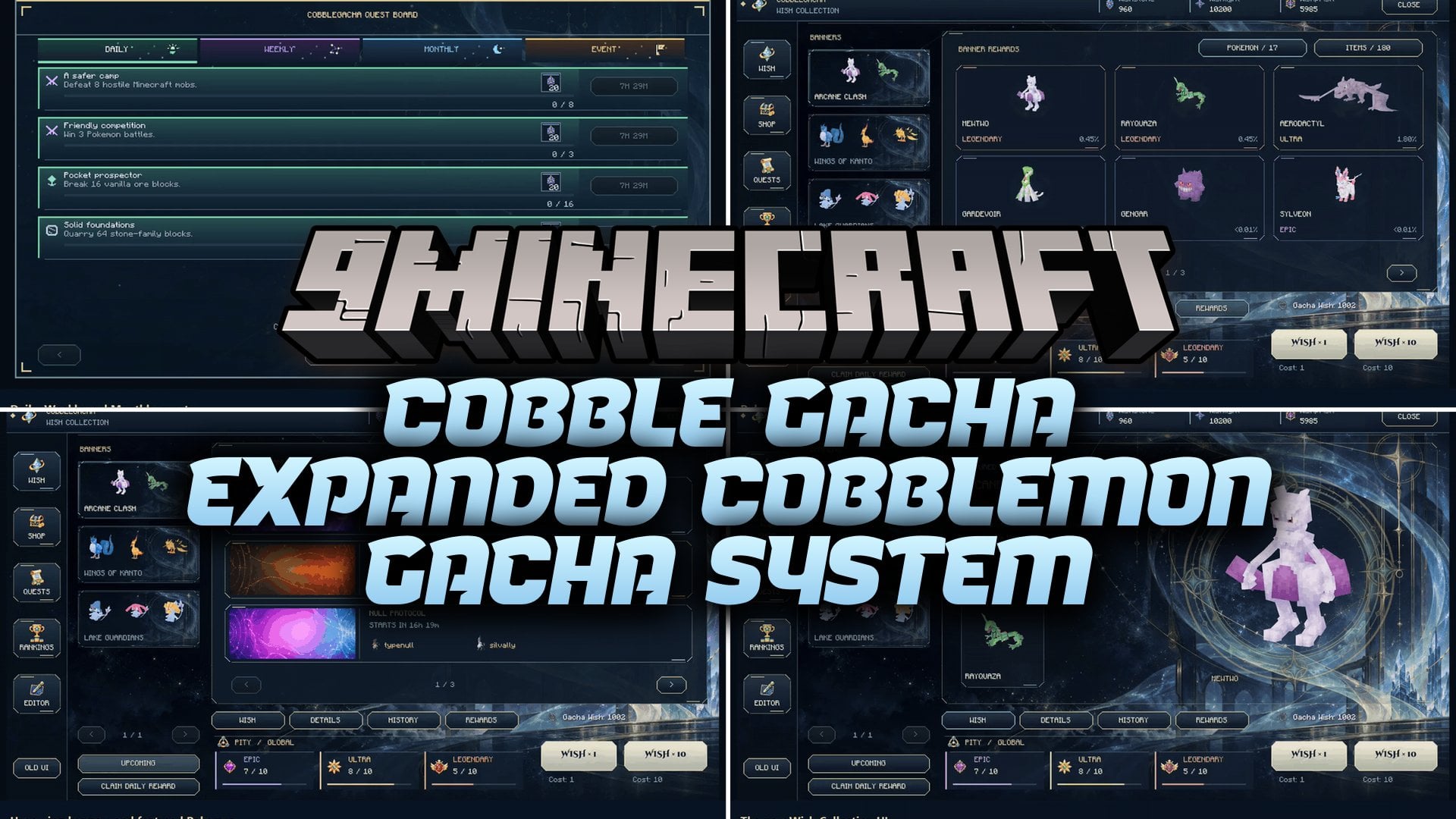
Cobble Gacha Expanded Cobblemon Gacha System by JMV Mod adds a full gacha, quest and reward system for Cobblemon. It works like the wish banners in games such as Genshin Impact and Wuthering Waves. You spend wishes on themed banners to pull Pokémon and items. You finish quests to earn more wishes, and you find extra rewards while you explore. Server owners can also manage banners, shops, quests and the economy through in-game editors.
Features:
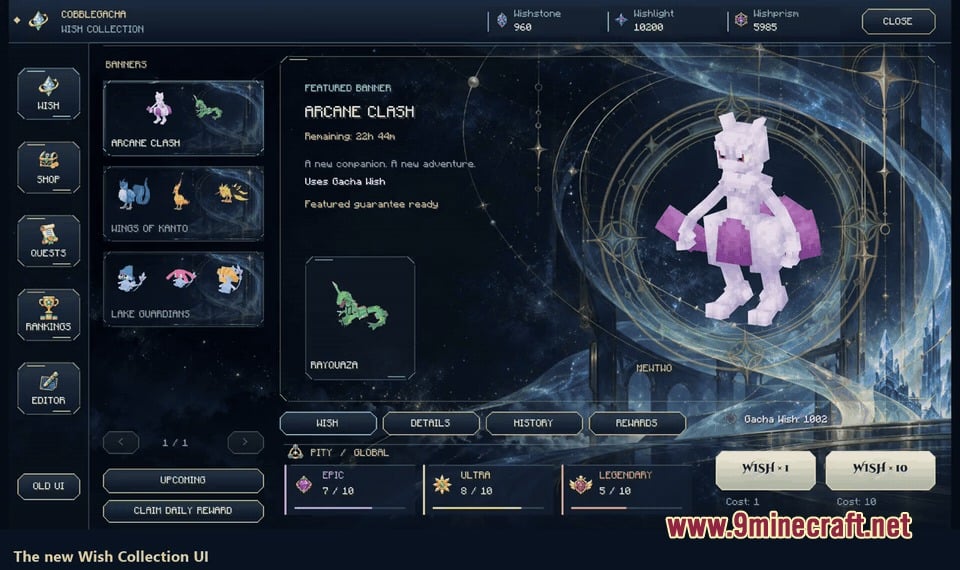
- Themed Banners: Run several Limited banners next to a permanent banner, with manual schedules or automatic rotation.
- Pity System: Tracks Epic, Ultra and Legendary pity separately, with 50/50 guarantees for featured Pokémon.
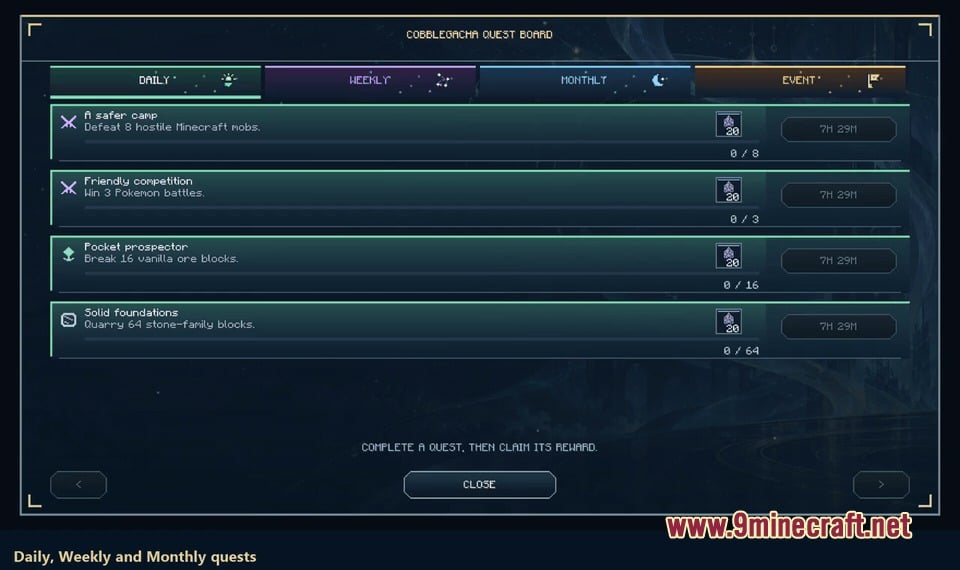
- Quest Board: Gives you Daily, Weekly, Monthly and Event quests that reward normal play.
- Wish Exchange: Lets you spend Wishlight and Wishprism on Pokémon and item offers in a shop.
- In-Game Banner Editor: Lets admins create banners, pick Pokémon and item reward pools, and set quantities, rate-ups, perfect IV rules, duration, wish type and animation.
- Chest Loot: Adds Gacha items to structure chest loot while keeping the normal loot intact.
- Pity can be shared Globally or per Wish Type, and each wish can have its own threshold.
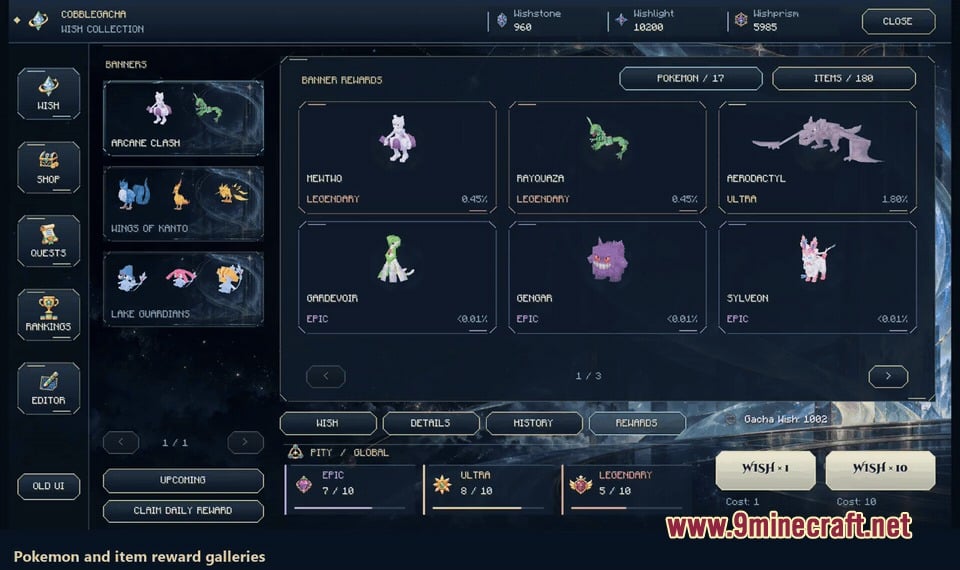
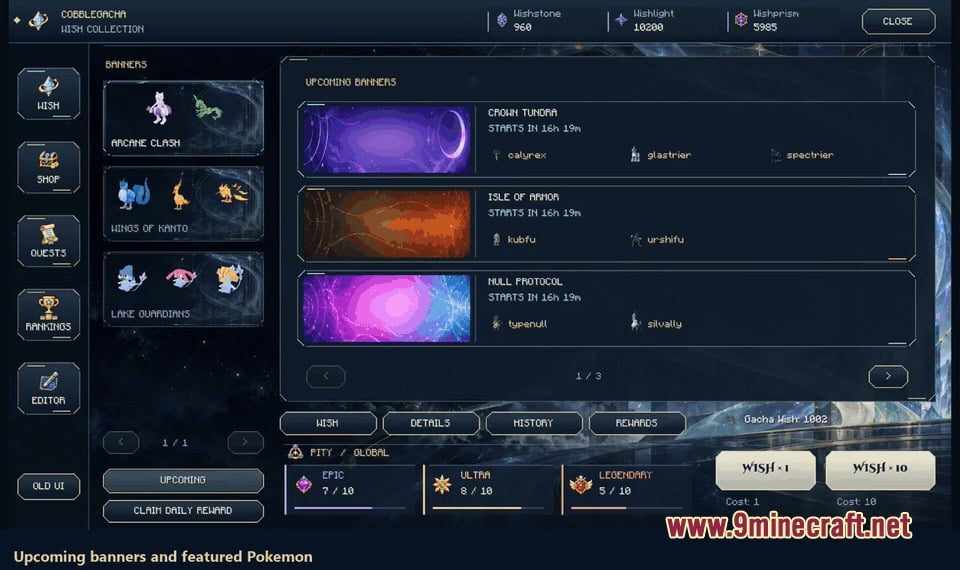
- You can browse Pokémon and item reward galleries, upcoming featured Pokémon and your pull history filtered by wish.
- Lets you switch between the new celestial menu and the old legacy menu, and it remembers your choice.
- Banner backgrounds come from built-in variants, bundled art or a custom image uploaded to the server, with live previews for fit, crop, zoom and effects.
- A read-only Chest Simulator previews loot results, and the mod also detects compatible modded chest tables.
- Rankings compare banked wishes and show 50/50 wins and early Legendary stats. Admins can turn public rankings off.
- Operators can search online and offline players, check their currencies, and Set, Add, Remove or Zero their banks.
- Includes daily login rewards and the Potential Prism, an item that upgrades a Pokémon’s IVs.
- Quest progress, claims and balances stay saved after reconnects and server restarts. Settings live in
config/cobblegacha/.
Wish Types:
- Gacha Wish: one of the four wish types a banner can use.
- Solar Wish: a wish type you can pick for any banner.
- Lunar Wish: another wish type for banners.
- Verdant Wish: the fourth wish type. A regular-wishes-only setting is also available.
Reveal Animations:
- Cosmic Capture: sends your wish through a cosmic reveal, then shows reward cards colored by rarity. Works with single pulls and ten-pulls.
- Pack Opening: builds up inside a foil pack, then opens into a stack of cards you reveal one by one, with Pokémon previews, music and effects. Works with single pulls and five-pulls.
- Pack colors: blue, violet, gold or crimson, based on the highest reward rarity in the pack.
Quests:
- Default rotations: four daily, ten weekly and ten monthly quests.
- Objectives: collecting, battling, evolving, hatching and training Pokémon, plus mining, harvesting and defeating hostile mobs.
- Rewards: Wishstone, a chosen wish type, Wishlight, Wishprism, items and Pokémon.
- Quest Workshop: groups objectives into categories, with filters, rewards and schedules for each quest.
- Balancing tool: helps admins set 30-240 wishes per month from recurring quests.
Currencies:
- Wishstone: earned from quests. The Wishstone Converter trades 160 Wishstone for one wish of your choice.
- Wishlight and Wishprism: shop currencies with purchase limits and weekly stock rules.
- Shop offers: live Limited-banner Pokémon show up in the shop on their own, and custom offers can set form, nature, ability, gender, shiny look, held items and IVs.
Commands:
/gacha: opens the gacha menu./gachamenu: also opens the gacha menu.
How to Use:
- Press G (default key), or type
/gachaor/gachamenuto open the menu. - Pick a live banner.
- Check which wish the banner needs before you pull.
- If you are an operator, open the Editor from the menu to change banners, shops and quests.
Screenshots:
How to Install:
New to Minecraft? Follow our step-by-step guide to install Mods on your PC.View Guide
Requirements:
Cobble Gacha Expanded Cobblemon Gacha System by JMV Mod Download Links
For Minecraft 1.21.1, 1.21
Click to rate this post!
[Total: 0 Average: 0]
You May Also Like
Picked for this page
 Gamble Rig Mod (1.21.10, 1.21.1) – Insane Gambling Control, DonutSMP 100% Win
 Cobblemizer Mod (1.21.1, 1.20.1) – Customize Your Pokémon
 Happy Go Lucky Mod (26.3, 1.20.1) – Random Adventures Await
 Sort It Out Mod (26.3, 1.20.1) – Organize Chests Instantly Everywhere
 Cobblemon Trainer Battle Mod (1.21.1, 1.21) – Challenge Custom NPC Opponents
 Advanced Wall Climber API Mod (1.21.11, 1.20.1) – Powerful Library for Wall Climbing
 End-Parasitize and Convert All Mod (1.20.1) – Survive A Magical Parasitic World
 Infused Power Mod (26.3, 1.20.1) – Turn Your Survival Gear Into Custom RPG
 Better Trident Model Mod (1.20.1, 1.20) – Fight with a Cooler Custom Trident
 Saffron Timber Heights Mod (26.2, 1.21.1) – Build a Peaceful Haven
 KubeJS Addon Blood Magic Mod (1.20.1, 1.20) – Script Altar and Forge Recipes
 Wandering Traveler Mod (26.3, 1.20.1) – RPG Style Title Banners When Entering
Most viewed in Mods over the last 7 days
 Ala Industrial Mod (26.3) – Run Electric Power Grids and Automated Factories
 PleasureCraft Mod (26.3, 1.21.1) – Jenny Mod Remake for Fabric
 Jennycraft Mod (26.3, 1.20.1) – Virtual Girlfriend in Minecraft
 Fapcraft Mod (26.3, 1.12.2) – Comprehensive and Detailed Content
 Meteor Client Mod (26.3, 1.20.1) – Xray, HUD, Fly
 Jenny Mod (Fapcraft) Official Complete Guide – How to use, Tutorial
 Let it Walk Mod (1.21.1) – Pilot Spider Tanks and Mechs Built From Your Blocks
 BangCraft Mod (1.20.1) – Jenny, Ellie and Elliot
 OptiFine HD (26.3, 1.20.1) – Run Faster, FPS Boost, Shaders Support
 Fabric Loader (26.3, 1.20.1) – Fabric Installer for All Minecraft Versions
 CatLean Client Mod (26.2, 1.21.11) – ThunderHack Recode Alternatives
 SchnurriTV Mod (1.12.2) – Characters and Features
More from Mods
 OptifiNeoforge Mod (26.2, 1.20.1) – Play NeoForge 1.21 Worlds with Your Own
 GemRender Mod (26.2, 1.20.1) – Hundreds of Animated 3D Models
 Hilt Mod (26.1.2, 1.21.1) – Keep Your NeoForge Mods Running Together
 Craftable Campfire Mod (1.20.1) – Craft Campfires Again After No Tree Punching
 Inmis Forge Neo Forge Mod (26.1.2, 1.20.1) – Carry More Loot with Upgradable
 Steamon Wilds Mod (1.21.1) – Find Cobblemon Habitats
 Etr Economy Mod (1.20.1) – Work Jobs, Earn Paper Cash, and Run Locked Player
 Arms ‘n Artifice Heavy Artillery Mod (26.1.2, 1.21.1)
 Huhutalk Mod (1.21.1, 1.20.1) – Text Your Maids From Anywhere Using a Virtual
 MGN’s Witch Hat by MagishanPixel Mod (1.21.1)
 Mana Sub Zero Mod (1.21.1) – Wear Warlock Armor and Wield a New Spell Chakram
 Cinnamoroll Friends Halloween Update Mod (26.3, 26.1.2)

This post has no comments yet. Be the first — your comment will appear here.