


Craftorithm Plugin (1.19.4, 1.18.2) – Spigot
 543
543
 0
0


Craftorithm Plugin is a plugin for managing recipes that operates on the BukkitAPI platform. With Craftorithm, you can effortlessly incorporate diverse original recipes and effortlessly handle tasks like synthesis restrictions and recipe deletion.
Features:
- Add shaped, shapeless, cooking, smithing, stone cutting, and anvil recipes
- Lossless and visual saving of items to configuration files
- In-game GUI to quickly add recipes
- Disable vanilla or plugin-added recipes
- Synthesis participation restrictions for items containing certain lore
- Synthesis restrictions for crafting table and forge crafting conditions
- Execute actions after players craft items
- Fast and convenient configuration
- And more…
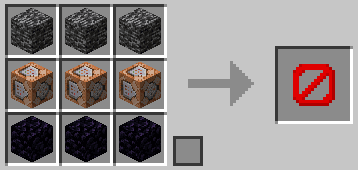
Add shaped recipe
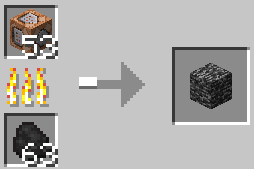
Add cooking recipe
Commands:
- /craft item save Save the item to the configuration file
- /craft item give Get the item from the configuration file
- /craft reload Reload the plugin
- /craft remove Disable a recipe
- /craft version View the current version of the plugin
- /craft run Run the action statement of the plugin
- /craft look View the list of recipes added by the plugin/view a recipe separately
- /craft create Open the GUI for creating recipes
Permissions:
- craftorithm.command.main Permission to use plugin commands
- craftorithm.anvil.color Permission to use color codes in the anvil
- craftorithm.command.item Permissions to use the command /craft item
- craftorithm.command.reload Permissions to use the command /craft reload
- craftorithm.command.remove Permissions to use the command /craft remove
- craftorithm.command.version Permissions to use the command /craft version
- craftorithm.command.run Permissions to use the command /craft run
- craftorithm.command.look Permissions to use the command /craft look
- craftorithm.command.create Permissions to use the command /craft create
How to Install:
New to Minecraft? Follow our step-by-step guide to install Plugins on your PC.View Guide
Craftorithm Plugin Download Links
For All Versions from Minecraft Spigot 1.13 to Minecraft Spigot 1.19.4
Click to rate this post!
[Total: 0 Average: 0]
You May Also Like
















This post has no comments yet. Be the first — your comment will appear here.