
Create Interactive Pantographs Mod (1.21.1) – Adjust Trains Without Disassembly
 8
 0

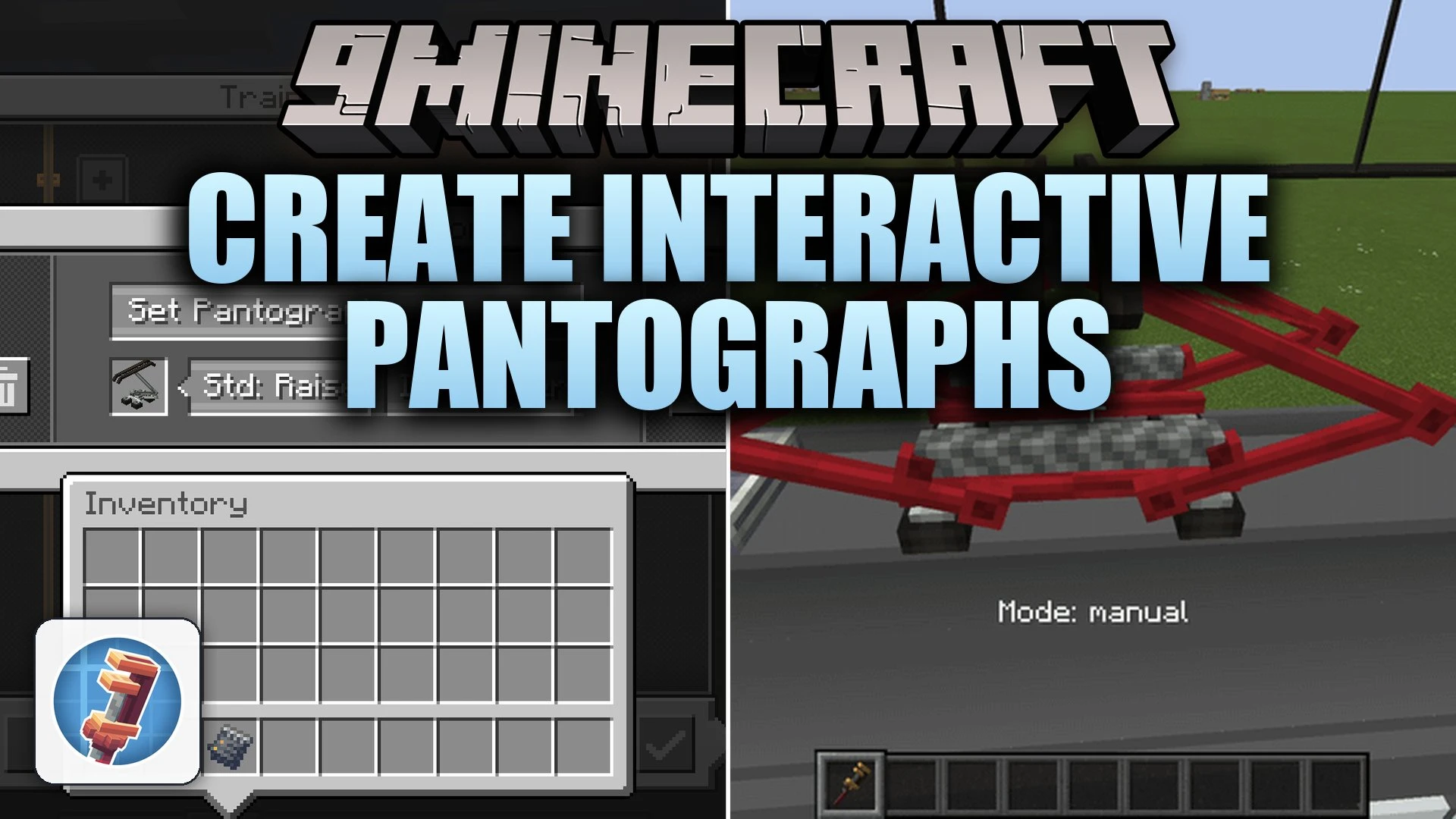
Create Interactive Pantographs Mod extends Create and Create: Electro Energetics with interactive pantographs on assembled trains. Normally, you cannot click or change pantographs once they become part of a moving contraption. This mod fixes that limitation and adds three operating modes for better train control.
Features:
- Assembled Contraption Interaction: Lets you interact with pantographs directly while they are attached to assembled trains.
- Three Operating Modes: Adds Manual mode, Automatic mode, and Schedule mode to customize how your train pantographs behave.
- Players can cycle through the modes at any time without taking the train apart.
- Works in multiplayer when installed on both the client and the server.
How to Use:
- Assemble your train contraption with a pantograph attached.
- Use a wrench on the pantograph or hold Shift and Right-Click it.
- Keep clicking to cycle through Manual, Automatic, and Schedule modes.
Screenshots:


How to Install:
New to Minecraft? Follow our step-by-step guide to install Mods on your PC.View Guide
Requirements:

Create Interactive Pantographs Mod Download Links
For Minecraft 1.21.1, 1.21
Click to rate this post!
[Total: 0 Average: 0]
You May Also Like
Picked for this page
 Enchantment Level Break Mod (26.3, 1.20.1) – Unleash God Level Spells
 Blade Addons Mod (1.21.8, 1.21.5) – Hypixel Skyblock Utility Mod
 Cobblemon Field Moves Mod (1.21.1, 1.20.1) – Get Bonus Items After Battles
 Saro’s Better Glass Mod (26.3, 1.20.1) – Watch Windows Shatter Into Realistic
 Digital Frontier Fusion Mod (1.21.1, 1.20.1) – Catch and Evolve Wild Digimon
 FalsePatternLib Mod (1.7.10) – Run Classic 1.7.10 Mods Without Modpack Crashes
 Litematica Material HUD & Chest Finder Mod (26.3, 1.21.11)
 Rotary Supply Line Mod (1.21.1) – Supply Town Workers Directly
 Hot’s Aerostuff Mod (1.21.1) – Pilot Custom Airships with Precision Mechanics
 Chalk Extras Mod (26.3, 1.21.1) – Mark Secret Paths and Coded Runes
 Create Nerfad Mod (26.3, 1.21.11) – Manufacture Diamonds in Surface Factories
 Code Defined Gui Mod (26.3, 26.1.2) – Custom In-Game Menus Built Without Image
Most viewed in Mods over the last 7 days
 Ala Industrial Mod (26.3) – Run Electric Power Grids and Automated Factories
 PleasureCraft Mod (26.3, 1.21.1) – Jenny Mod Remake for Fabric
 Jennycraft Mod (26.3, 1.20.1) – Virtual Girlfriend in Minecraft
 Fapcraft Mod (26.3, 1.12.2) – Comprehensive and Detailed Content
 Jenny Mod (Fapcraft) Official Complete Guide – How to use, Tutorial
 Meteor Client Mod (26.3, 1.20.1) – Xray, HUD, Fly
 BangCraft Mod (1.20.1) – Jenny, Ellie and Elliot
 OptiFine HD (26.3, 1.20.1) – Run Faster, FPS Boost, Shaders Support
 CatLean Client Mod (26.2, 1.21.11) – ThunderHack Recode Alternatives
 Fabric Loader (26.3, 1.20.1) – Fabric Installer for All Minecraft Versions
 SeedCrackerX Mod (26.3, 1.20.1) – Find Any World Seed
 SchnurriTV Mod (1.12.2) – Characters and Features
More from Mods
 Props Revival Mod (1.20.1) – Decorate Your Builds with Classic Decocraft
 Foremon Pokemon Workers & Automation for Cobblemon Mod (1.21.1)
 Architects Measuring Tape Mod (26.3, 1.21.1) – Plan, Measure, and Copy Builds
 Cataclysm’s Rise Mod (1.21.11, 1.20.1) – Craft Special Eyes to Hunt
 Miku Plushies Mod (1.21.1, 1.20.1) – Collect Talking Vocaloid Pets That Dance
 Scarablight Mod (26.3, 1.21.1) – Raise Wild Beetles and Ride Glowing Sun Scarabs
 Houseki Mod (26.3, 1.21.1) – Mine Real-Life Gems, Craft Power Drills
 True Infinity Bow Mod (26.3, 1.20.1) – Shoot Endless Arrows with Mending
 Neo Doors Mod (26.3, 1.20.1) – Lock Down Your Base with Automatic Sci-Fi Blast
 Combat Ascended Fabric & Forge Mod (1.21.1, 1.20.1) – Master Timed Combos
 Carian Style by Roinflam Mod (1.21.1, 1.20.1) – Fight with Elden Ring Spells
 Particular Blocks Mod (26.3) – Build Medieval Castles and Fantasy Cottages

This post has no comments yet. Be the first — your comment will appear here.