
Custom Disenchanter Mod (26.3, 1.20.1) – Remove and Save Specific Enchantments
 4
 0

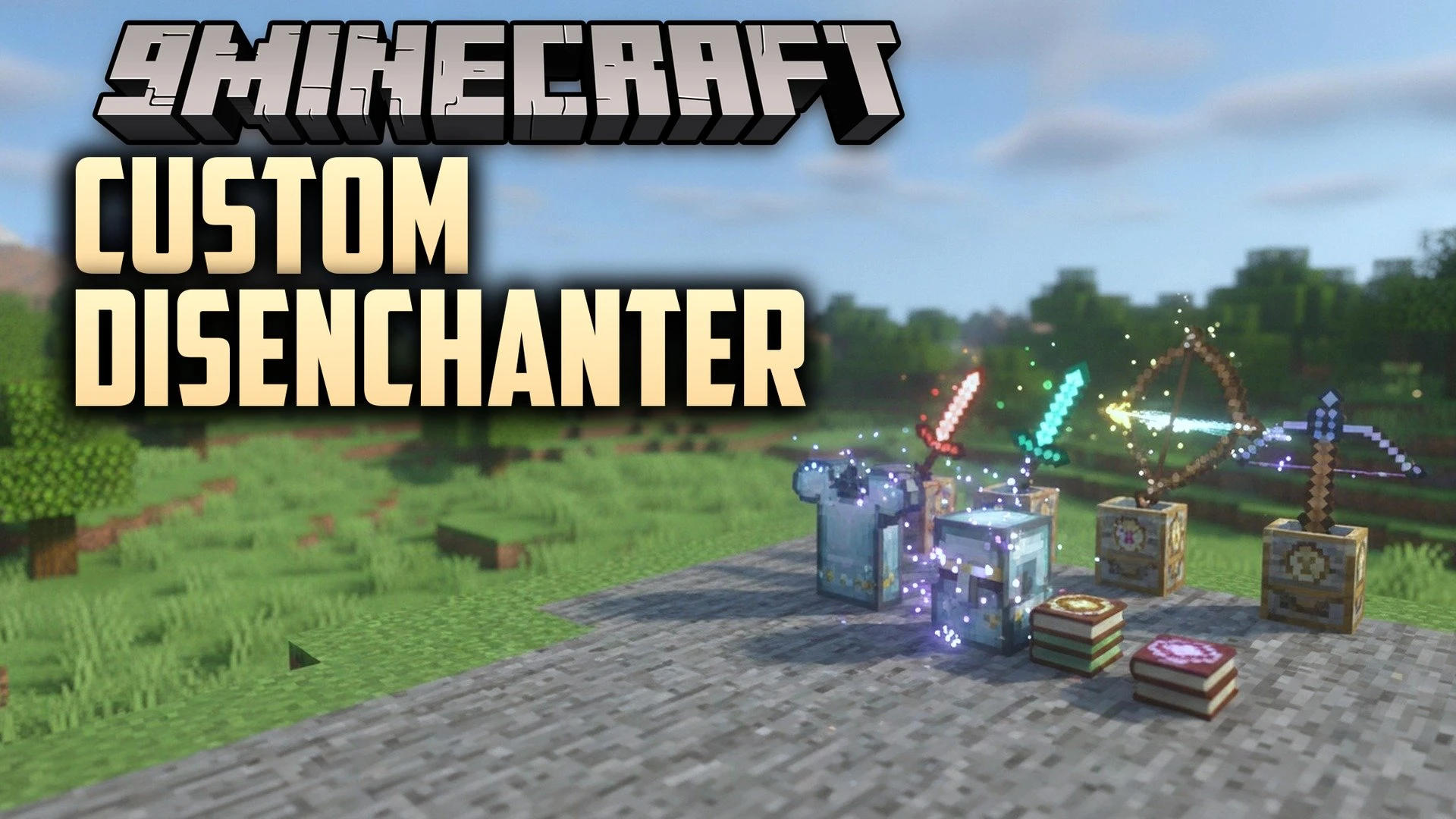
Custom Disenchanter Mod adds a special block that lets you remove specific enchantments from your gear. In vanilla Minecraft, a grindstone wipes out every enchantment on an item at once. This mod gives you full control to pick which enchantments stay on your tools and which ones come off. The removed enchantments transfer onto a plain book so you can save and reuse them later.
Features:
- Selective Removal: Lets you take off unwanted enchantments while keeping the good ones on your weapon, armor, or tool.
- Enchantment Saving: Moves the extracted enchantments onto a normal book in your inventory for future use.
- Includes a simple menu inside the Disenchanter Block to manage your enchanted items.
- Adds a custom Creative mode tab so you can find the block quickly.
- Keeps items safe inside the block’s inventory and works with hoppers for automation.
- Runs smoothly in both singleplayer worlds and multiplayer servers.
How to Use:
- Craft or grab a Disenchanter Block from the Creative menu and place it down.
- Keep at least one normal book in your player inventory to store the removed enchantments.
- Right-click the block to open the disenchanter menu.
- Put your enchanted item into the slot.
- Click on the specific enchantments you want to take off.
- Take back your updated item along with the newly enchanted book.
How to Install:
New to Minecraft? Follow our step-by-step guide to install Mods on your PC.View Guide
Requirements:



Custom Disenchanter Mod Download Links
For Minecraft 26.3
For Minecraft 26.2
For Minecraft 26.1.2, 26.1.1, 26.1
For Minecraft 1.21.11
For Minecraft 1.21.1, 1.21
For Minecraft 1.20.1, 1.20
For Minecraft 1.18.2
For Minecraft 1.16.5
For Minecraft 1.12.2
Click to rate this post!
[Total: 0 Average: 0]
You May Also Like
Picked for this page
 Connected Glass Mod (26.3, 1.20.1) – Build Borderless Windows
 World Pre Generator Mod (26.3, 1.20.1) – Stop Lag When Loading New Chunks
 ItemPhysic Lite Mod (26.3, 1.20.1) – Watch Dropped Gear Settle
 Held Item Info Mod (26.3, 1.20.1) – Track Gear Stats Mid Battle
 Just Enough Characters Mod (26.3, 1.20.1) – Find Any Item Using Pinyin
 No Death Animation Mod (26.3, 1.20.1) – Customize Death Screens and Remove
 Nameplate Mod (26.3, 1.20.1) – See Floating Mob Levels
 Blur Plus Mod (26.3, 1.20.1) – Clean Up Your Inventory Screens with Stylish Blur
 Uncrafting Recipes Mod (26.3, 1.20.1) – Turn Unwanted Items Back Into Rare Ores
 Repurposed Structures Farmer’s Delight Compat Mod (26.3, 1.21.1)
 Naturally Trimmed Mod (26.3, 1.20.1) – Find Decorated Gear Everywhere
 Wakes Reforged Mod (26.3, 1.20.1) – Water Trails
Most viewed in Mods over the last 7 days
 Ala Industrial Mod (26.3) – Run Electric Power Grids and Automated Factories
 PleasureCraft Mod (26.3, 1.21.1) – Jenny Mod Remake for Fabric
 Jennycraft Mod (26.3, 1.20.1) – Virtual Girlfriend in Minecraft
 Fapcraft Mod (26.3, 1.12.2) – Comprehensive and Detailed Content
 Jenny Mod (Fapcraft) Official Complete Guide – How to use, Tutorial
 Meteor Client Mod (26.3, 1.20.1) – Xray, HUD, Fly
 BangCraft Mod (1.20.1) – Jenny, Ellie and Elliot
 OptiFine HD (26.3, 1.20.1) – Run Faster, FPS Boost, Shaders Support
 Fabric Loader (26.3, 1.20.1) – Fabric Installer for All Minecraft Versions
 CatLean Client Mod (26.2, 1.21.11) – ThunderHack Recode Alternatives
 SeedCrackerX Mod (26.3, 1.20.1) – Find Any World Seed
 SchnurriTV Mod (1.12.2) – Characters and Features
More from Mods
 Jade Ars Nouveau Progress Bars Ritual Timers Source Jars & Imbuement Mod (1.21.1, 1.20.1)
 OfflineSkins 9minecraft Mod (26.3, 26.2) – Your Own Skin and Cape Offline
 Hands on Vanilla Mod (1.21.1, 1.20.1) – Craft and Smelt Directly
 X Yuzo Sound Mod (26.3, 1.21.11) – Crisp Audio Overhaul for UI, Weapons
 Motion Client Mod (1.21.11) – Master Crystal Fights on Anarchy Servers
 Nyrox Debug Client Mod (1.21.11) – Hunt Hidden Bases on Anarchy Servers
 Never Debug V2 Client Mod (1.21.11) – Find Hidden Bases on Anarchy Servers
 Chroma Projectile Trails Pretty Arrow & Potion Trails Mod (26.3, 1.20.1)
 Boffo Debug Client Mod (1.21.11) – Hunt Hidden Geodes and Bypass Anti-Cheat
 Colorful Blocks Mod (1.21.1) – Paint Concrete Blocks in Sixteen Million RGB Colors
 Throwing Discs Returning Blades That Pierce & Ricochet Mod (26.3, 1.20.1)
 Tailormade Mod (1.21.1) – Draw Custom Armor Skins Directly in Your World

This post has no comments yet. Be the first — your comment will appear here.