Hide Nametags Addon (1.21) – MCPE/Bedrock

 0
0  1 day ago
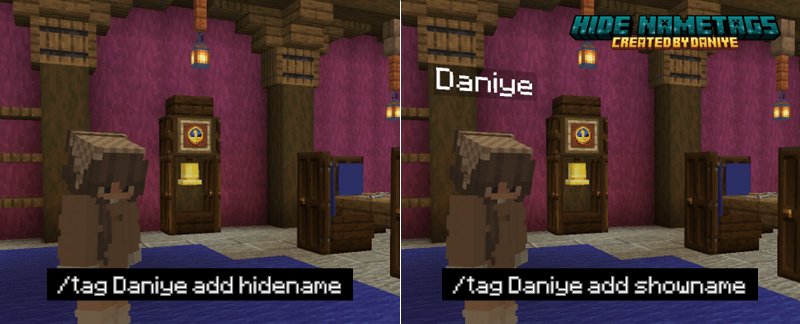
Hide Nametags Addon (1.21) allows you to hide player names using the /tag command. Hiding names makes the screen look cleaner when creating maps or organizing games. Administrators can use the command to hide or show names at any time. This feature removes the text above the character’s head to change the display.

Features:
- Hide player names.
- Show player names.
- Use the tag command.
- For map creators.
- For servers.
- Cleaner interface.
Screenshots:


Installation Note:
- You need to enable the Experimental Settings if the addon does not work.
How to install:
How To Install Mod / Addon on Minecraft PE
How To Install Texture Packs on Minecraft PE
How To Install Map on Minecraft PE
Hide Nametags Addon (1.21) Download Links
For Minecraft PE/Bedrock 1.21
mcaddon: Download from Server 1 – Download from Server 2
Click to rate this post!
[Total: 0 Average: 0]
You May Also Like