
Menu Tabs Mod (26.3) – Tweak Your Settings Without Backing Out to the Pause Menu
 9
 0

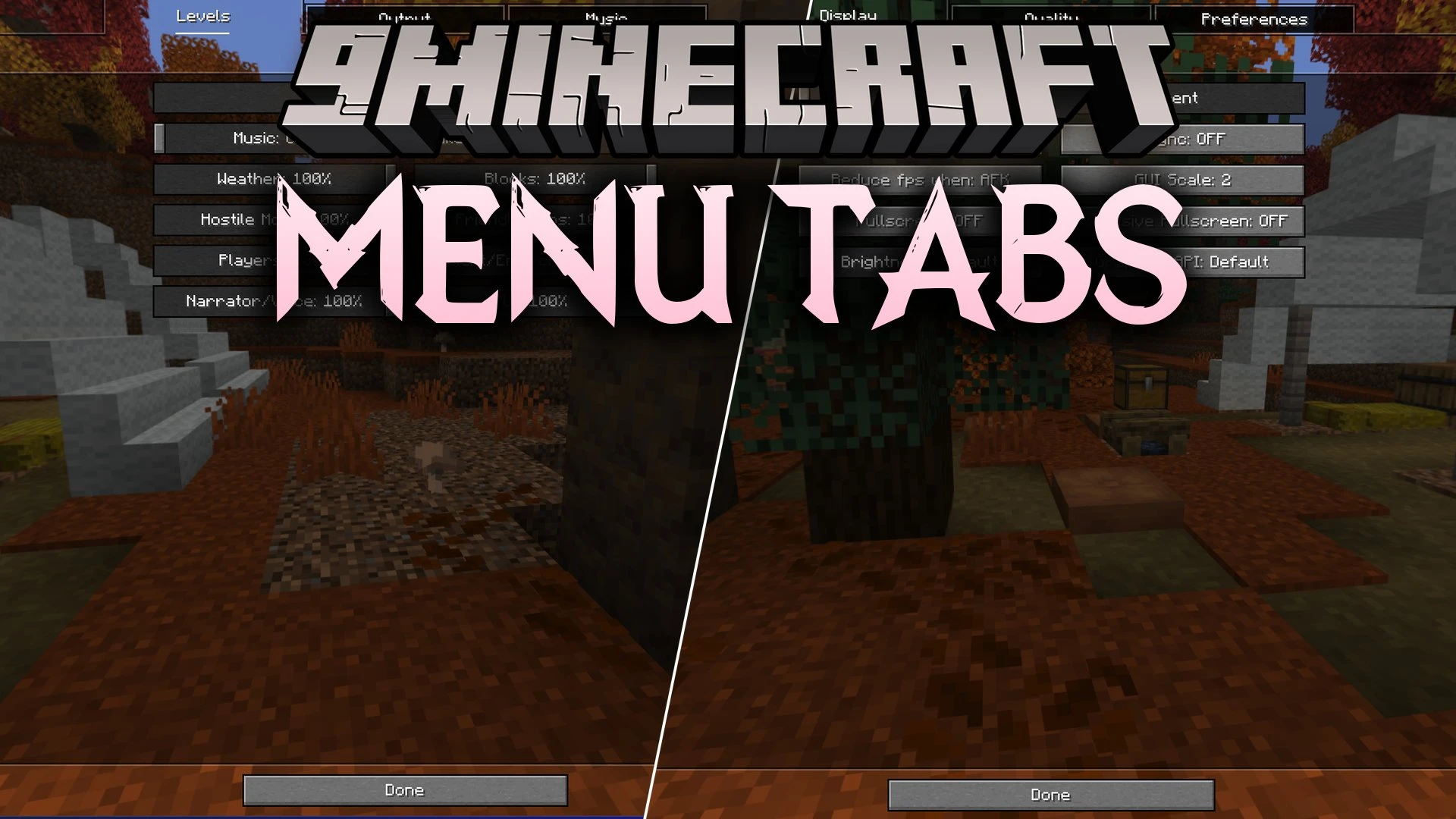
Menu Tabs Mod adds clean tabs across Minecraft settings screens. It splits options into tidy sections so you can jump between categories quickly. The layout keeps the classic vanilla look, so every screen feels familiar. You can flip through video sliders, music controls, and other preferences without backing out to the main pause menu each time.
Features:
- Native Interface: Places tabs directly at the top of settings screens while preserving the vanilla Minecraft art style.
- Organized Categories: Splits settings into distinct sections so you can locate specific options much faster.
- Fast Switching: Lets you click between available tabs instantly without exiting back to previous screens.
- Uncluttered Menus: Keeps the default visual layout clean and recognizable for any player.
- Works across common settings windows such as Video Settings and Music controls.
How to Use:
- Open the game and pause your world or stay on the title screen.
- Click into the Options menu.
- Click any tab at the top of the screen to switch straight to that settings section.
Screenshots:


How to Install:
New to Minecraft? Follow our step-by-step guide to install Mods on your PC.View Guide
Requirements:

Menu Tabs Mod Download Links
For Minecraft 26.3
Click to rate this post!
[Total: 0 Average: 0]
QUICK MINECRAFT SURVEY · ONE TAP
Mods & Modpacks
How do you feel about 'expert' modpacks that change recipes to be much harder and interconnected?
0 responses · See the full results →
You May Also Like
Picked for this page
 Sodium Extra Mod (1.21.11, 1.20.1) – Lag-Free Gameplay in Heavy Modpacks
 Durability Plus Mod (26.1, 1.20.1) – Track Gear Wear Before Tools Break
 Command Keys Mod (26.3, 1.20.1) – Execute Complex Chat Macros Instantly
 Infinite Storage Bundle Mod (1.21.11, 1.20.1) – Carry Thousands of Items
 Anvil Too Expensive Mod (26.1.2, 1.20.1) – Bypass Anvil Limits and Keep
 MCMod Splashes Plus Plus Mod (26.1.2, 1.20.1) – Read Funny Chinese Memes
 Feelix’s Stagecoach Mod (26.3, 1.20.1) – Travel Between Villages
 Yunbei Urban Construction Mod (1.21.1, 1.20.1) – Build Modern City Streets
 Unusual Biomes Mod (1.20.1) – Explore Rice Terraces, Volcano Islands
 Tensura Mod That Time I Got Reincarnated as a Slime Mod (1.16.5)
 Moonlight Core Mod (26.1.2, 1.20.1) – Keep Your Favorite Mods Running Smoothly
 MySQL JDBC Driver Mod (1.21.11, 1.21.1) – Connect Your Worlds Directly
Most viewed in Mods over the last 7 days
 Ala Industrial Mod (26.3) – Run Electric Power Grids and Automated Factories
 PleasureCraft Mod (26.3, 1.21.1) – Jenny Mod Remake for Fabric
 Jennycraft Mod (26.3, 1.20.1) – Virtual Girlfriend in Minecraft
 Fapcraft Mod (26.3, 1.12.2) – Comprehensive and Detailed Content
 Jenny Mod (Fapcraft) Official Complete Guide – How to use, Tutorial
 Meteor Client Mod (26.3, 1.20.1) – Xray, HUD, Fly
 BangCraft Mod (1.20.1) – Jenny, Ellie and Elliot
 OptiFine HD (26.3, 1.20.1) – Run Faster, FPS Boost, Shaders Support
 Fabric Loader (26.3, 1.20.1) – Fabric Installer for All Minecraft Versions
 SeedCrackerX Mod (26.3, 1.20.1) – Find Any World Seed
 CatLean Client Mod (26.2, 1.21.11) – ThunderHack Recode Alternatives
 Baritone Client Mod (26.3, 1.20.1) – Autominer, Build with AI, Xray
More from Mods
 City Builder for Mine Colonies Mod (1.21.1) – Oversee Your Settlement
 Adaptive Survival Mod (26.3) – Face Deadlier Monsters As You Grow Stronger
 Pc Craft Mod (1.21.1) – Run Modern Cities with Working Computers and Banks
 Ice and Fire Schools of Dragonsteel Mod (1.20.1) – Fight As a Dragonsteel Spell
 Waddle PvP Mod (26.3, 1.21.11) – Master Multiplayer Duels with Clear Combat
 Unstrip Mod (26.3, 26.1.2) – Never Ruin Wooden Builds with Accidental Axe Clicks
 Sable Hostile Takeover Mod (1.21.11, 1.21.1) – Enemy Patrols Hunt
 Mythic Moon Mod (26.3, 1.21.11) – Transform Into Werewolves or Hunt
 Real Temperature Mod (1.21.1, 1.20.1) – Brave Freezing Mountain Peaks
 Linear Bearing Recipe Mod (1.21.1) – Build Machinery Setups Without Resource
 Trails & Tales Backport Mod (1.12.2) – Explore Cherry Groves and Unearth
 Brecher’s Gym Trainers Cobblemon Mod (1.21.1) – Build Custom Gyms and Run

This post has no comments yet. Be the first — your comment will appear here.