
NBT Tooltips Mod (1.21.4, 1.20.1) – Inspect Complex Item Data Instantly

 0


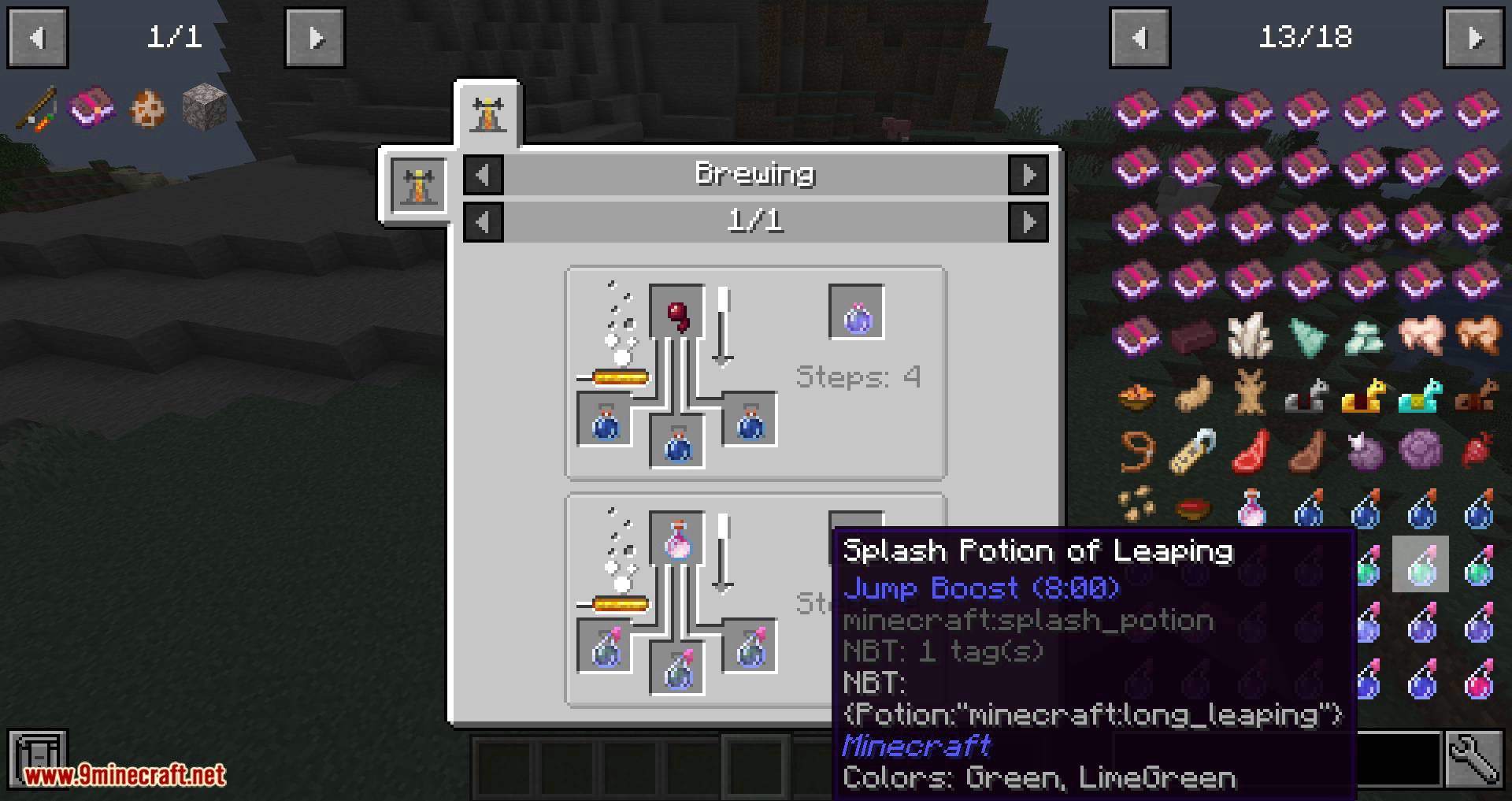
NBT Tooltips Mod displays NBT data directly inside item tooltips when advanced tooltips are active. It helps map and mod makers examine items and tiles easily. The mod runs entirely on the client side.

Features:
- Shows NBT tags inside item tooltips when you press F3+H to turn on advanced tooltips.
- Presents longer tags in an auto-scrolling view so you can read everything without cluttering the screen.
- Lets you press SHIFT to pause the scrolling view or ALT to speed it up.
- Configures default scrolling speeds and the maximum number of visible tag lines at once.
- Provides multiple presentation formats for tooltips, defaulting to a custom human-readable and color-coded format.
- Includes configurable keybinds in the controls menu to copy NBT tags straight to your system clipboard using json or other formats.
- Opens a config menu with extra toggling options, and works best alongside ModMenu for editing configuration files.
How to Use:
- Press F3+H on your keyboard to turn on advanced tooltips in the game.
- Hover your crosshair over any item or tile to see its NBT data appear inside the tooltip.
- Hold SHIFT to pause the scrolling text or hold ALT to speed up the scroll speed for long tags.
- Press your assigned keybind in the controls settings to copy the NBT tag to your clipboard.
- Open the config menu to adjust presentation formats, default scroll speeds, and line limits.
Screenshots:


How to Install:
New to Minecraft? Follow our step-by-step guide to install Mods on your PC.View Guide
Requirements:

NBT Tooltips Mod Download Links
For Minecraft 1.16.5
Fabric version: Download from Server 1
For Minecraft 1.20.4
Fabric/Quilt version: Download from Server 1 – Download from Server 2
For Minecraft 1.21.1, 1.21
Fabric version: Download from Server 1 – Download from Server 2
For Minecraft 1.21.4, 1.21.3
Fabric version: Download from Server 1 – Download from Server 2
For Minecraft 1.20.2
Fabric/Quilt version: Download from Server 1 – Download from Server 2
For Minecraft 1.20.1
Fabric/Quilt version: Download from Server 1 – Download from Server 2
For Minecraft 1.19.3
Fabric version: Download from Server 1 – Download from Server 2
For Minecraft 1.19.2
Fabric version: Download from Server 1 – Download from Server 2
For Minecraft 1.19
Fabric version: Download from Server 1
For Minecraft 1.18.2
Fabric version: Download from Server 1
For Minecraft 1.17.1
Fabric version: Download from Server 1
How do you usually learn how a complex mod works?
24 responses · See the full results →
You May Also Like
Picked for this page
 Player Tracking Mod (26.3, 1.20.1) – Find And Raid
 Additional Lanterns Mod (26.3, 1.20.1) – Lamps Made from New Materials
 ViaVersion Mod (1.21.11, 1.20.1) – Let Any Version Join Your Minecraft Server
 Eldritch Mobs Mod (1.21.11, 1.20.1) – Mobs More Dangerous, Exciting
 Searchables Mod (26.3, 1.20.1) – Find Any Item in Modpacks
 Profundis Mod (1.21.4, 1.20.1) – 9 New Quality Cave Biomes
 Arcane Lanterns Mod (26.3, 1.20.1) – The Power of Light
 Coords Mod (26.3, 1.20.1) – Shows Player Coordinates In Overlay
 Brick Hopper Mod (26.3, 1.20.1) – Perfect for Rustic or Medieval Builds
 Improved Grindstone Mod (26.1.2, 1.20.1) – Enhanced Enchantment Management
 PBOSB Mod (1.21.1, 1.20.1) – Projectiles Bounce Off Slime Blocks
 Create: More Drill Heads Mod (1.21.1, 1.20.1) – 6 Types of Drill Heads
Most viewed in Mods over the last 7 days
 Ala Industrial Mod (26.3) – Run Electric Power Grids and Automated Factories
 PleasureCraft Mod (26.3, 1.21.1) – Jenny Mod Remake for Fabric
 Jennycraft Mod (26.3, 1.20.1) – Virtual Girlfriend in Minecraft
 Fapcraft Mod (26.3, 1.12.2) – Comprehensive and Detailed Content
 Jenny Mod (Fapcraft) Official Complete Guide – How to use, Tutorial
 BangCraft Mod (1.20.1) – Jenny, Ellie and Elliot
 Fabric Loader (26.3, 1.20.1) – Fabric Installer for All Minecraft Versions
 Meteor Client Mod (26.3, 1.20.1) – Xray, HUD, Fly
 The Shooting Star Demo Mod (26.3, 1.20.1) – Vaporize Terrain From Orbit
 OptiFine HD (26.3, 1.20.1) – Run Faster, FPS Boost, Shaders Support
 Aristois Client Mod (1.21.4, 1.20.1) – World Class Minecraft Utility
 Prestige Client Mod (1.21.11, 1.21.4) – Powerful Ghost Features for Crystal & Sword PvP
More from Mods
 Ipla Mod (26.3, 1.20.1) – Showcase Your Favorite Items
 MesdagPortLib Mod (1.20.1) – Run Modern Minecraft Mechanics on Older Versions
 Hellion’s API Mod (1.21.11, 1.21.1) – Play Hellion Series Addons Without Crashes
 Terrestria Mod (26.3, 1.20.1) – Highly Detailed Biomes
 Tre’s Tack Library Mod (1.20.1) – Outfit Your Horses with Fully Detailed Tack
 YDM’s coreX Library Mod (1.20.1) – Loot RPG Gear with Random Names
 Gunpowder Recipe Mod (26.3, 1.20.1) – Gunpowder is Craftable
 Villager Timetable Mod (26.3, 1.20.1) – Master Villager Schedules
 Artemis Laboratory Blocks Mod (26.3, 1.20.1) – Lab Blocks And Dynamic Decorations
 Fabric ORM Jimmer Mod (26.3, 1.20.1) – Prevent Sudden Server Crashes
 Cafe Core Mod (26.2, 1.21.1) – Bypass Anvil Limits and Tame Pets in Seconds
 GTNH’s Forgelin Mod (1.7.10) – Play Kotlin-Powered Mods on Minecraft 1.7.10

This post has no comments yet. Be the first — your comment will appear here.