
Player Use Counter Mod (26.3, 1.21.11) – Track Enemy Totems and Golden Apples
 0
 0

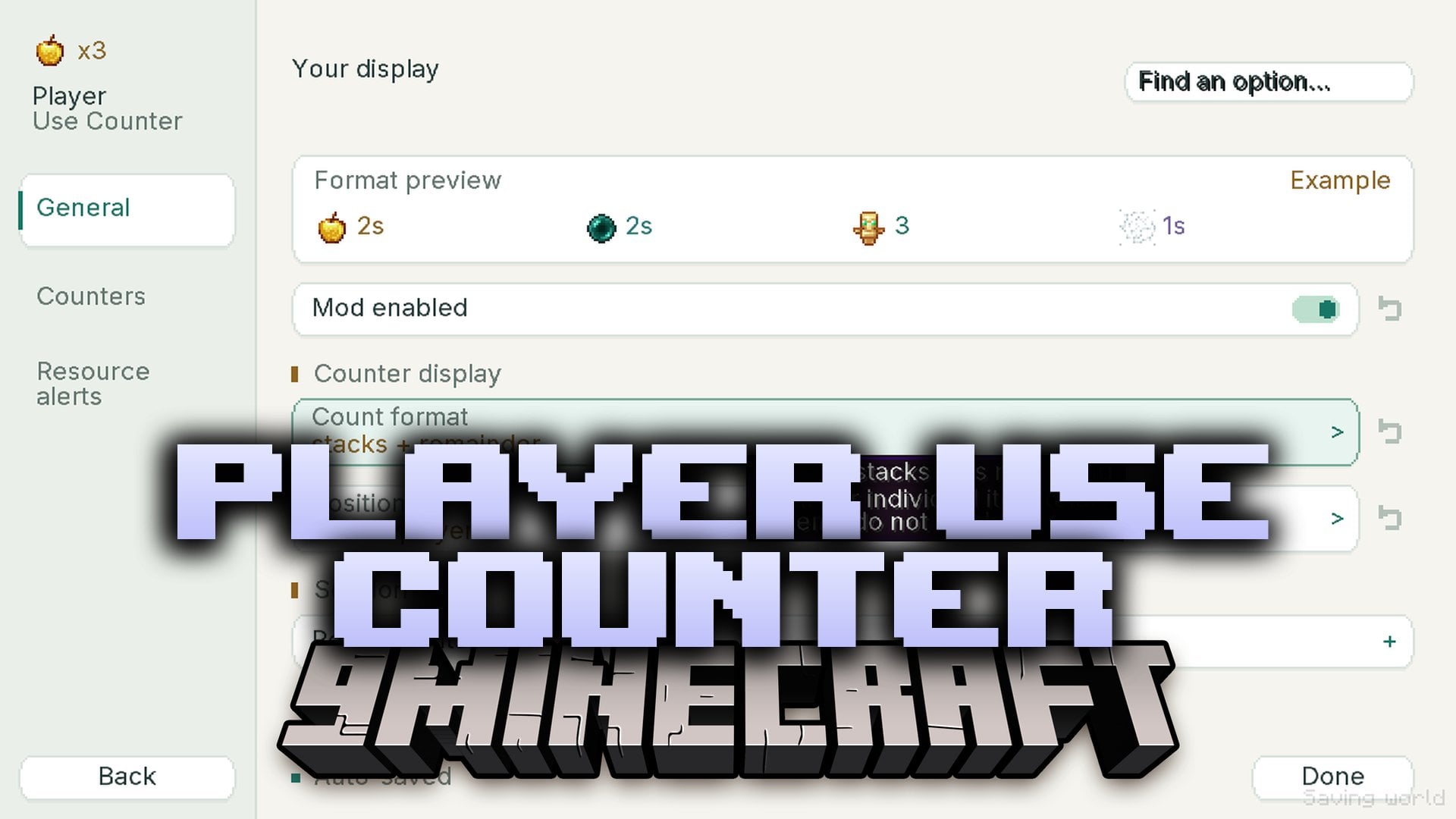
Player Use Counter Mod displays how many golden apples, ender pearls, totems, and cobwebs other players use in combat. These counters appear right beside players or above their nametags. The mod watches visible actions in the world rather than reading hidden inventories, helping you keep track of enemy supplies during a fight.
Features:
- Live Item Tracking: Shows item icons and usage counts for golden apples, ender pearls, totems of undying, and cobwebs.
- Automatic Duel Alerts: Detects opponents from incoming combat events without making you type in player names.
- Custom Display Formats: Displays either individual item amounts or full stacks alongside estimated remaining items.
- Shows one alert notification at a time using a queue system, a timer bar, and a custom duration.
- Resets a player’s counter automatically when you see them die, while totem pops keep the count going.
- Marks golden apple and cobweb counts with a
~symbol because they are estimates based on observed actions. - Keeps tracking actions even when you look away, as long as the server sends the event data to your client.
- Lets you set custom alert thresholds and optional starting-stock estimates for your opponents.
- Keeps resource alerts active even if you choose to hide the floating counter labels.
Commands:
/usecounter: Opens the settings menu to toggle the mod, adjust individual counters, or change label positions.
How to Use:
- Enter combat with another player to automatically start tracking their item usage and receiving duel alerts.
- Press F10 (or your rebound key in Minecraft Key Binds) to manually reset all current counts and duel alerts.
- Type
/usecounterin chat or open Mod Menu and select the mod to adjust count formats, starting-stock estimates, and alert thresholds.
How to Install:
New to Minecraft? Follow our step-by-step guide to install Mods on your PC.View Guide
Requirements:

Player Use Counter Mod Download Links
For Minecraft 26.3
For Minecraft 26.2
For Minecraft 26.1.2, 26.1.1, 26.1
For Minecraft 1.21.11
Click to rate this post!
[Total: 0 Average: 0]
You May Also Like
Picked for this page
 Macaw’s Doors Mod (26.3, 1.20.1) – Style Every Room Entrance
 Toms Mobs Mod (26.3, 1.20.1) – Encounter Wild Animals and Bosses
 NoWheel Mod (26.3, 1.20.1) – Stop Accidental Slot Swaps
 Trinkets Mod (26.3, 1.20.1) – Equip Extra Accessories in Dedicated Slots
 Origins: Mario Mod (1.21.11, 1.21.1) – Leap High and Stomp Enemies
 Shulkers Drop Two Shells Mod (26.3, 1.20.1) – Craft Shulker Boxes Faster
 Control Flex Controller Support Mod (26.3, 1.20.1) – Play Big Modpacks
 LPCTools Mod (26.3, 1.20.1) – Auto Filler, Liquid Cleaner
 Didigetrobbed Mod (26.3, 1.20.1) – Catch Thieves and Protect Your Multiplayer
 Vanilib Mod (26.3, 1.21.1) – Run Choculaterie Mods Smoothly Without Launch
 Weather Detector Mod (1.21.1, 1.20.1) – Let Rain, Snow, and Thunder Trigger
 Bedbugs Mod (26.3, 1.20.1) – See the Hidden Monsters Keeping You Awake at Night
Most viewed in Mods over the last 7 days
 Ala Industrial Mod (26.3) – Run Electric Power Grids and Automated Factories
 PleasureCraft Mod (26.3, 1.21.1) – Jenny Mod Remake for Fabric
 Jennycraft Mod (26.3, 1.20.1) – Virtual Girlfriend in Minecraft
 Fapcraft Mod (26.3, 1.12.2) – Comprehensive and Detailed Content
 Jenny Mod (Fapcraft) Official Complete Guide – How to use, Tutorial
 Meteor Client Mod (26.3, 1.20.1) – Xray, HUD, Fly
 BangCraft Mod (1.20.1) – Jenny, Ellie and Elliot
 OptiFine HD (26.3, 1.20.1) – Run Faster, FPS Boost, Shaders Support
 Fabric Loader (26.3, 1.20.1) – Fabric Installer for All Minecraft Versions
 SeedCrackerX Mod (26.3, 1.20.1) – Find Any World Seed
 CatLean Client Mod (26.2, 1.21.11) – ThunderHack Recode Alternatives
 SchnurriTV Mod (1.12.2) – Characters and Features
More from Mods
 Politics by Krona04 Mod (1.21.1, 1.20.1) – Found Nations, Collect Taxes
 OFFICEROOMS Mod (1.20.1) – Survive Over Ninety Floors of Backrooms Office Horror
 Elsewood Mod (1.20.1) – Grow Giant Trees and Gather Seven New Wood Sets
 Tiefbau Geology & Mining Mod (1.21.1) – Mine Five Thousand Blocks Deep
 Arcane Framework Library for the Almanac Mods (1.21.1, 1.20.1)
 Kinesis Lib Mod (1.20.1) – GPU Particles and Model Slice Visual Effects Engine
 Building Trades Mod (26.3) – Build Working Homes with Real Wiring and Plumbing
 Celestial Ascent Mod (1.21.1) – Fight Ten Evolving Bosses Across Two New
 SWEM Ranch Hands Mod (1.21.1) – Hire NPC Workers to Run Your Dream Horse Ranch
 No Enchantments Mod (26.3, 1.21.11) – Pure Survival Combat Without Any
 Nerf End No Elytra & Shulker Box Mod (26.3, 1.21.11) – Keep Survival Grounded
 Dynamic Biome Weather Mod (26.3, 1.20.1) – Watch Storms Change As You Travel

This post has no comments yet. Be the first — your comment will appear here.