
ProbeJS Mod (1.21.1, 1.20.1) – Write Modpack Scripts Without Guesswork
 697
 0


ProbeJS Mod extends KubeJS with type files that bring IntelliSense and fast auto-complete into VSCode. It gives you ready-made code snippets for items, fluids, and recipes so you can write modpack scripts with fewer mistakes. The mod works with TypeScript Native to deliver fast completions even inside large packs like ATM10. It also adds an in-game menu where you can change settings, watch dump progress, and convert script imports. On top of that, these clean type files help AI coding tools like DeepSeek and GPT write accurate KubeJS code. You only need KubeJS and VSCode to build modpack scripts faster.
Features:
- Type Generation: Creates accurate type declaration files straight from your loaded game so KubeJS scripts get IntelliSense and auto-complete.
- TypeScript Native Support: Works with
tsgo, a Go-based TypeScript compiler that runs 10x faster and uses less memory than standard TypeScript. It gives under 500ms item literal completions and instant class or event completions even in big modpacks like ATM10. - In-Game Menu: Opens a simple menu inside Minecraft where you can change mod settings and watch the file dump progress.
- Code Import Converter: Turns
require()statements intoJava.loadClass()inside the menu so your scripts work smoothly withtsgo. - Creates VSCode-style code snippets for items, fluids, server recipe events, and custom item properties like food, NBT data, stack sizes, and effects.
- Lets you insert recipe JSONs straight into your scripts as you edit.
- Shows rich item displays inside the editor to make items easier to see.
- Supplies clear type data so AI tools and agents like DeepSeek and GPT can generate accurate KubeJS code.
- Targets VSCode for snippets and full editor support, while other code editors can still read the declaration files for basic auto-complete.
Commands:
/probejs: opens the in-game menu where you can change mod settings, convertrequire()toJava.loadClass(), and dump type files.
How to Use:
- Open VSCode and add Microsoft’s
TypeScript (Native Preview)extension along with the ProbeJS VSCode Extension so your editor can read the generated files. - Join a Minecraft world and type
/probejsin chat to open the in-game menu. - Click the dump button in the menu to generate type files from your loaded game; the menu shows the progress as it runs.
- Open your
.minecraftfolder in VSCode to see active auto-complete and snippets while you edit KubeJS scripts. - Open the menu and click the dump button again whenever you want to refresh the generated type files.
- Restart VSCode if it does not react to file changes right away; this forces the extension and language server to refresh.
Screenshots:
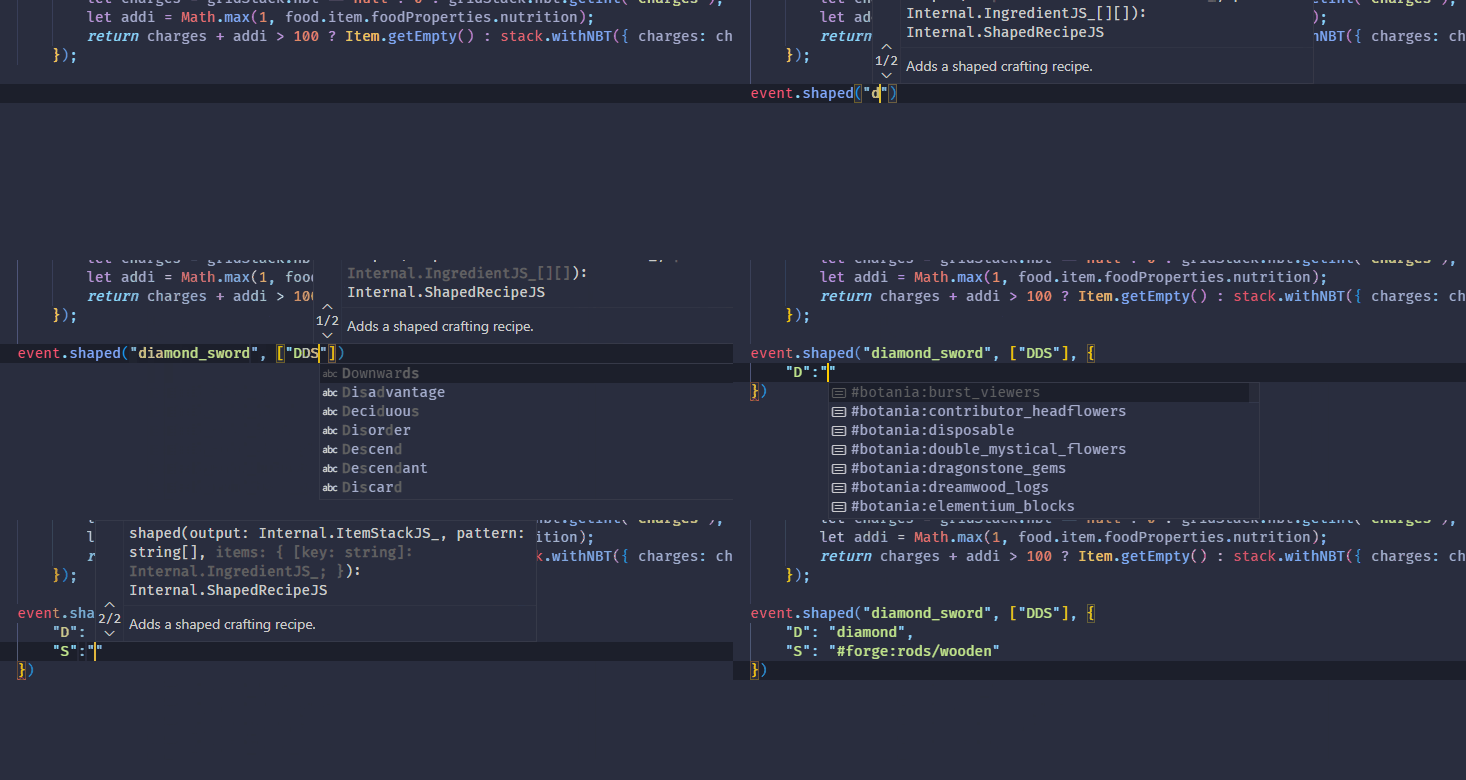
Auto-completions for KubeJS scripts
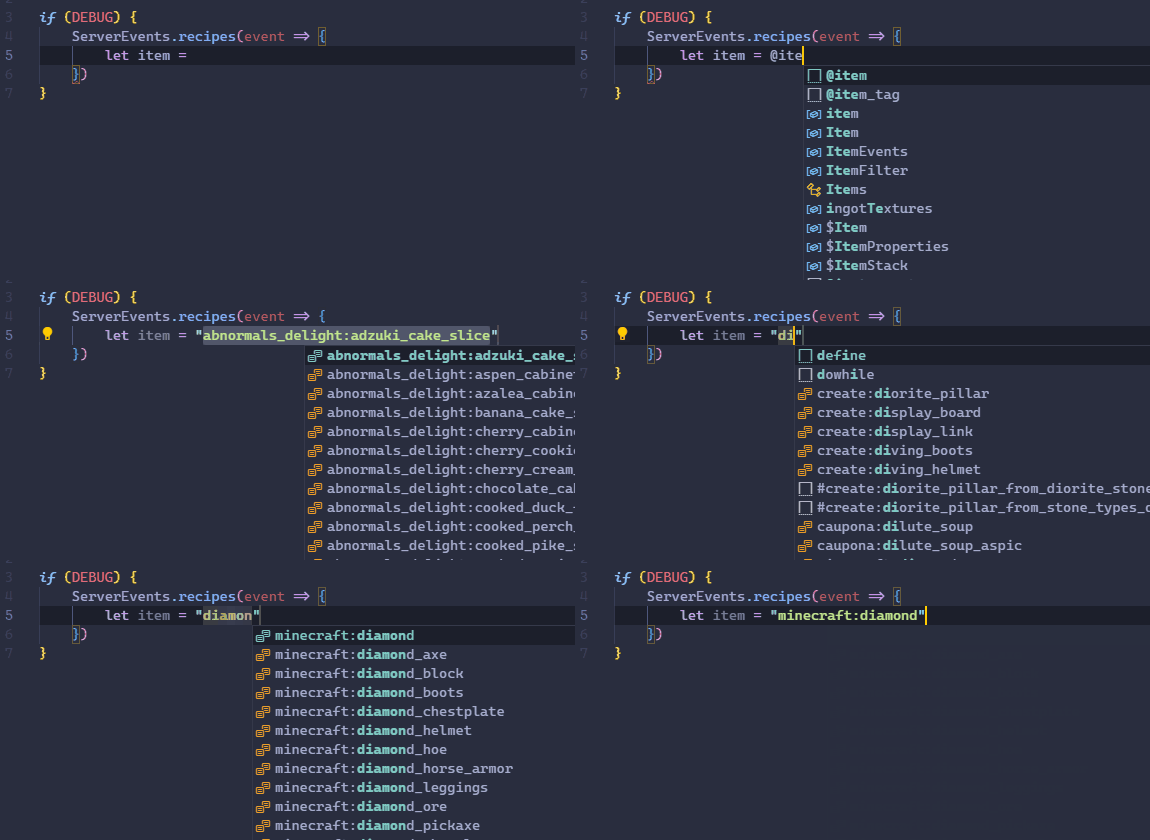
Code snippets for item, fluids and etc.
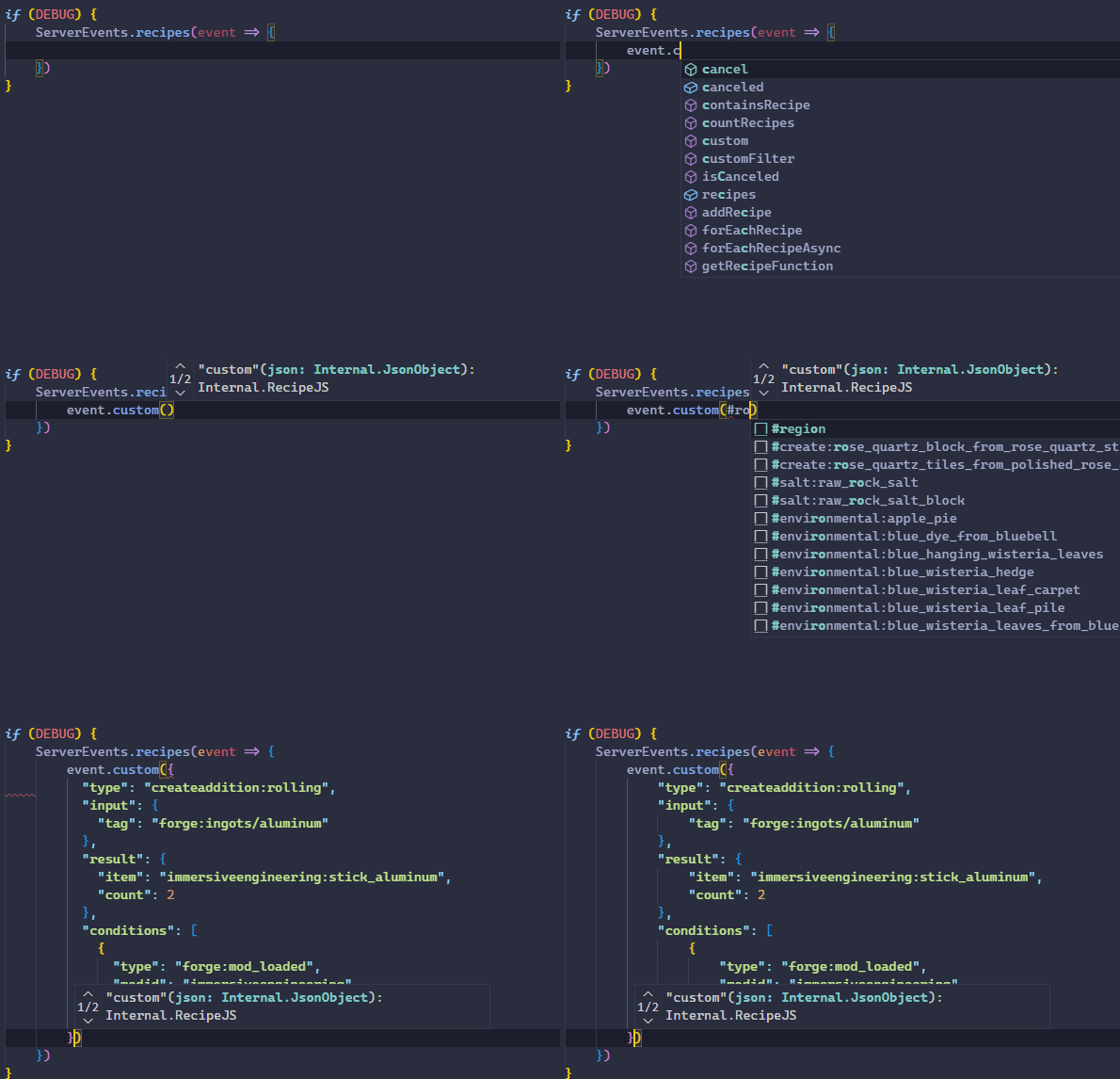
Also supports direct insertion of recipe JSONs
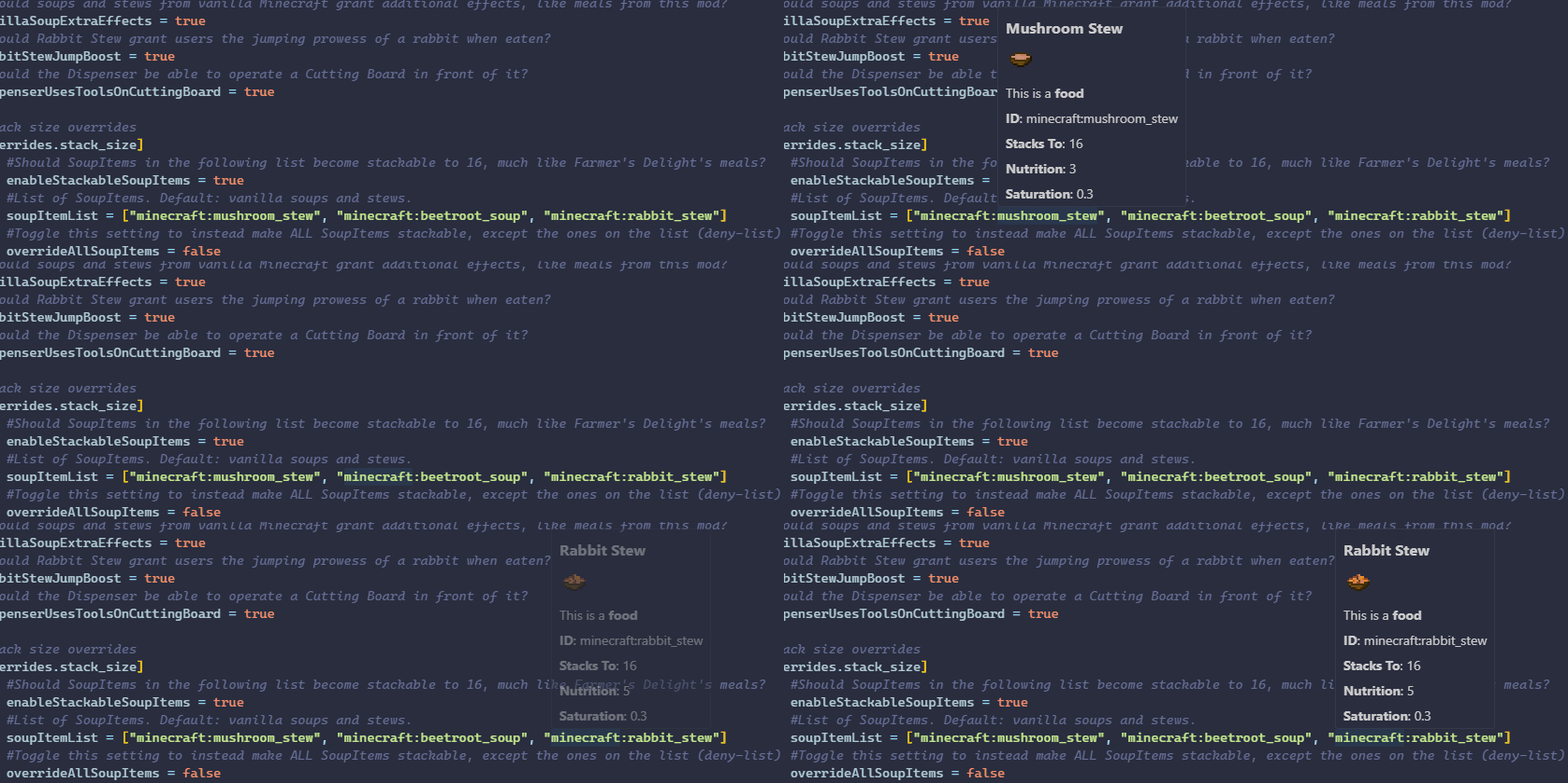
Rich item display
How to Install:
New to Minecraft? Follow our step-by-step guide to install Mods on your PC.View Guide
Requirements:
ProbeJS Mod Download Links
For Minecraft 1.21.1, 1.21
NeoForge version: Download from Server 1 – Download from Server 2
For Minecraft 1.20.1, 1.20
Forge/NeoForge version: Download from Server 1 – Download from Server 2
Fabric version: Download from Server 1 – Download from Server 2
For Minecraft 1.19.2
Forge version: Download from Server 1 – Download from Server 2
Fabric version: Download from Server 1 – Download from Server 2
For Minecraft 1.18.2
Forge version: Download from Server 1 – Download from Server 2
Fabric version: Download from Server 1 – Download from Server 2
For Minecraft 1.16.5
Forge version: Download from Server 1 – Download from Server 2
How often do you play pre-made modpacks instead of making your own?
43 responses · See the full results →
You May Also Like
Picked for this page
 Yes Steve Model Mod (26.1.2, 1.20.1) – Characters, Girlfriends
 Awesome Dungeon Ocean Mod (26.2, 1.20.1) – Underwater Dungeons & Temples
 Conduits Prevent Drowned Mod (26.3, 1.20.1) – Peaceful Underwater Cities
 Rapid Leaf Decay Mod (26.3, 1.20.1) – Realistic Decaying
 Item Collectors Mod (26.3, 1.20.1) – Automatic Object Collectors with Defined Range
 TrashSlot Mod (26.3, 1.20.1) – Get Rid of Unwanted Items
 UtilitiX Mod (1.21.1, 1.20.1) – Random Content That You May Need
 TNTUtils Mod (26.2, 1.20.1) – More Control Over Explosions
 OctoLib Mod (1.21.11, 1.20.1) – Library for SSKirillSS Mods
 Block Runner Mod (26.3, 1.20.1) – It’s Time to Use Paths to Run Faster
 Doctor Who: Weeping Angels Mod (1.21.11, 1.20.1) – Do Not Blink
 Json Things Mod (26.2, 1.20.1) – Simplified Content Creation
Most viewed in Mods over the last 7 days
 Ala Industrial Mod (26.3) – Run Electric Power Grids and Automated Factories
 PleasureCraft Mod (26.3, 1.21.1) – Jenny Mod Remake for Fabric
 Jennycraft Mod (26.3, 1.20.1) – Virtual Girlfriend in Minecraft
 Fapcraft Mod (26.3, 1.12.2) – Comprehensive and Detailed Content
 Jenny Mod (Fapcraft) Official Complete Guide – How to use, Tutorial
 BangCraft Mod (1.20.1) – Jenny, Ellie and Elliot
 Fabric Loader (26.3, 1.20.1) – Fabric Installer for All Minecraft Versions
 The Shooting Star Demo Mod (26.3, 1.20.1) – Vaporize Terrain From Orbit
 OptiFine HD (26.3, 1.20.1) – Run Faster, FPS Boost, Shaders Support
 Meteor Client Mod (26.3, 1.20.1) – Xray, HUD, Fly
 Aristois Client Mod (1.21.4, 1.20.1) – World Class Minecraft Utility
 Baritone 9minecraft Client Mod (26.3, 26.1.2) – Mine and Build Bases Hands-Free
More from Mods
 Cafe Core Mod (26.2, 1.21.1) – Bypass Anvil Limits and Tame Pets in Seconds
 GTNH’s Forgelin Mod (1.7.10) – Play Kotlin-Powered Mods on Minecraft 1.7.10
 Nodeflow Mod (26.1.2, 1.21.1) – Wire Custom Redstone Logic on Visual Graph
 Winter Client Mod (1.21.11) – Survive Ruthless PvP on Anarchy Servers
 LARP Client Mod (1.21.11) – Dominate Crystal PvP on Anarchy Servers
 Berlin Client Mod (1.21.11) – Hunt Stashes and Win Crystal Fights
 Kaleidoscope Cookery Refabricated Mod (26.3, 1.20.1) – Cook Hearty Meals
 Minecraft MusicBox Mod (1.21.12) – Play Your Favorite Songs While Mining and Building
 MTR Navigation Mod (1.21.1) – Plan Railway Trips and Never Miss a Train Stop
 TheHouse Mod (1.21.11) – Host Casino Tables and Track Every Bet in Real Time
 CinematicInteractions Mod (1.21.1) – Watch Your Hands Work at Every Crafting Table
 Earth Platform Mod (1.21.1) – Travel Across Real Continents in a True Scale World

This post has no comments yet. Be the first — your comment will appear here.