


Small Town Hall Schematic (1.21.x) – Compact Japanese Village Building

 0
0 

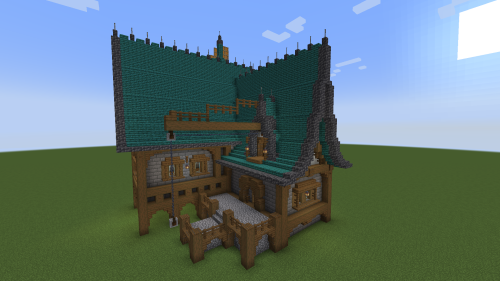
Small Town Hall Schematic gives you a quick way to add a Japanese-style meeting place to your village. It uses blocks from the Create mod to build a compact structure with a dark roof and a golden bell. You can place this small building right in the middle of your town to give your villagers a nice central spot.
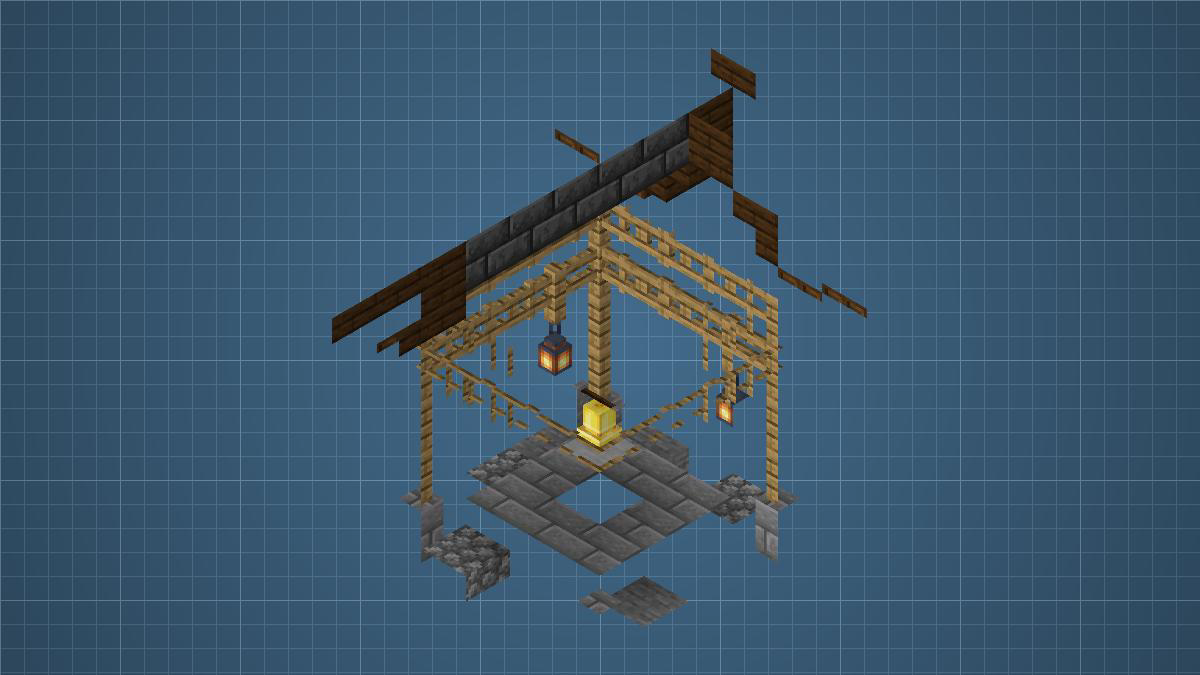
3D Preview:
Features:
- Compact Size: The building fits into a small 7 by 9 by 7 block space, so you can easily put it in crowded villages.
- Japanese Design: Adds a traditional look with a dark roof, wooden frames, and hanging lanterns.
- Features a bright golden bell in the center to ring and gather your villagers.
- Uses exactly 126 blocks to finish the entire structure.
- Includes a solid stone floor that connects well to dirt or gravel paths.
Schematic Specs:
 Minecraft1.21.x
 Create Mod6.0.10
 Dimensions7×9×7
 Total Blocks126
 Top Blocks Used
Oak Fence Gate 22Deepslate Brick Stairs 20Oak Fence 18Dark Oak Stairs 16Dark Oak Slab 14
How to Use:
- Save the downloaded file into the schematics folder inside your Minecraft directory.
- Open your game and grab the Schematic item from the Create mod.
- Load the town hall file and place it on the ground to see a blue outline.
- Use a Schematicannon next to it with some gunpowder and the required blocks to build it automatically.
Requirements:

Small Town Hall Schematic Download Links
For Minecraft 1.21.x
Click to rate this post!
[Total: 0 Average: 0]
You May Also Like




This post has no comments yet. Be the first — your comment will appear here.