
Smooth Font Mod (1.12.2, 1.11.2) – Read Every Sign Clearly
 29,792
 0

Smooth Font Mod draws all in-game text smoothly so every word stays crisp and easy to read at any screen scale. It improves default Minecraft fonts, unicode text, resource pack fonts, and most text from other mods, including signs, tooltips, and books. Even tiny letters, uneven scales like x0.75 or x1.25, and signs viewed from sharp side angles stay clean with no setup needed. You can also switch game text to any font installed on your computer or load external TrueType, OpenType, and Type1 font files directly. This mod runs only on the client side, so servers do not need it, and it works in modpacks.
Features:
- Custom Computer and External Fonts: Lets you switch game text to any font installed on your computer, or load external TrueType, OpenType, and Type1 font files from custom folders.
- Sharp Text at Every Scale: Keeps letters clean when shrunk down (especially unicode fonts) or set to uneven scales such as x0.75 and x1.25.
- Clear Side-Angle Reading: Displays words on signs and other surfaces clearly even when you view them from sharp side angles.
- Works Automatically Everywhere: Runs with no setup needed on default Minecraft fonts, unicode fonts, resource pack fonts, and most text from other mods like item tooltips and books.
- Unlocks the Large GUI scale option while playing in unicode font mode.
- Supports larger font sizes and reduces blur on low-resolution fonts.
- Adjusts letter brightness automatically so text is easier to read.
- Uses multicore CPUs to build font images faster and includes a quicker texture loading option.
- Converts custom font images to grayscale and compresses them to keep memory use low (about 15MB at 32px+20% settings) with almost no drop in speed.
- Reads default Minecraft and resource pack font images on demand so they use no extra memory.
- Includes Quality priority mode, Performance priority mode, and an Optimization only mode that speeds up a standard font renderer.
- Runs only on the client side, so servers do not need it, and works in modpacks.
Commands:
/sfont renderers: Prints a list of all font renderer classes managed by this mod./sfont precision <high | normal | vanilla> <font renderer id>: Sets the letter width precision for a specific font renderer and saves it to the config file. Usehighfor the best width quality,normalfor balanced quality with better text width compatibility, orvanillafor default-style quality and maximum unicode text width compatibility./sfont <disable | enable> <font renderer id>: Temporarily turns smooth text rendering off or on for a specific font renderer during your current session without saving the change to the config file.
Configuration:
externalFontsPaths: Lists folder names inside your main Minecraft directory where the mod looks for external font files. It checksfontfilesby default, and you can add extra folders such asfont.unaffectedClasses: Lists font renderer class names that permanently skip smooth text rendering.
How to Use:
- Launch Minecraft to get smooth text automatically across default fonts, unicode text, resource pack fonts, and most mod text with no setup needed.
- Press the HOME key in-game to open the Smooth Font Mod settings menu, where you can check live text previews and change rendering options.
- Open the font list inside the menu to pick any font installed on your computer and adjust its size.
- Switch between Quality priority mode, Performance priority mode, and Optimization only mode to balance text sharpness and speed.
- To use external font files without installing them on your computer, create a new folder named
fontfilesinside your main Minecraft folder (the same folder that hasmodsandconfig). - Drop TrueType, OpenType, or Type1 font files into the
fontfilesfolder so they show up in the in-game font list. - To load external fonts from extra folders, add those folder names under
externalFontsPathsin the config file. - If text from another mod looks off, run
/sfont renderersto see its font renderer ID, then change its width mode with/sfont precisionor turn off smooth rendering temporarily with/sfont disable(or permanently by adding its class name tounaffectedClassesin the config file).
Screenshots:
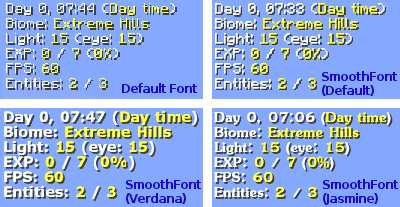
Comparison with Large GUI and x0.5 scaled characters:
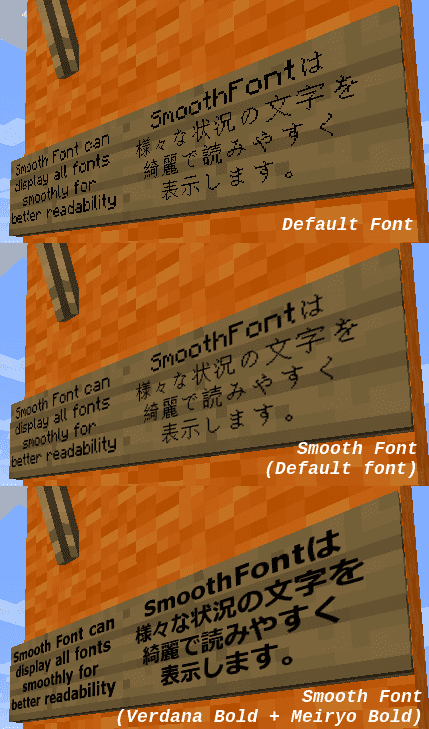
Text on the sign at oblique viewing angles:
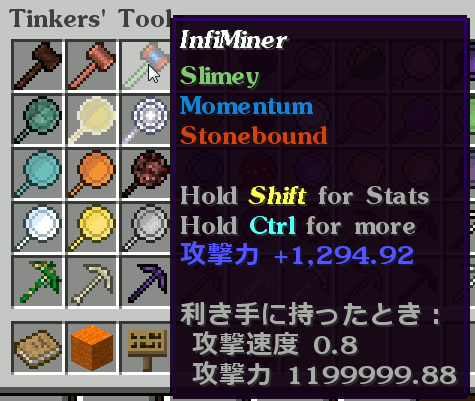
Better readablility of tooltip text:
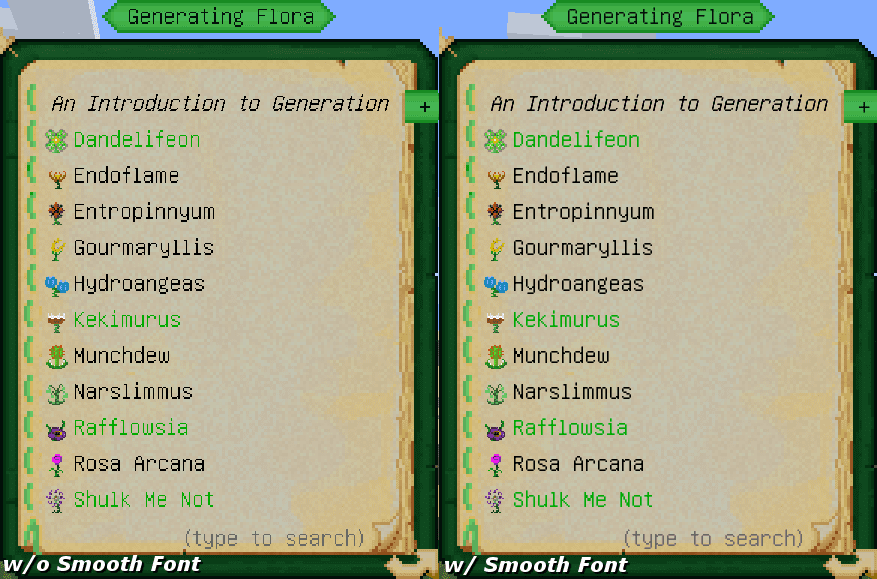
Lexica Botania
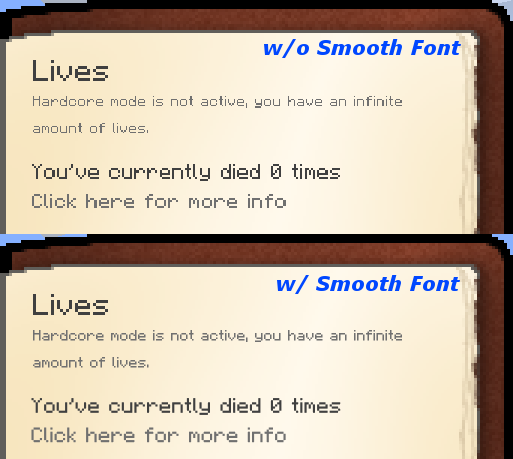
HQM
How to Install:
New to Minecraft? Follow our step-by-step guide to install Mods on your PC.View Guide
Smooth Font Mod Download Links
For Minecraft 1.7.10
For Minecraft 1.8.9
For Minecraft 1.10.2
For Minecraft 1.11.2
For Minecraft 1.12.2
What is your favorite type of Minecraft mod?
26 responses · See the full results →
You May Also Like
Picked for this page
 Enderman Overhaul Mod (1.21.11, 1.20.1) – Hunt Endermen for New Loot
 Euphoria Patches Mod (26.3, 1.20.1) – Watch Auroras in Your World
 Custom Portals Mod (26.2, 1.20.1) – Fast Travel Between Locations
 Better McDonald’s Mod (26.3, 1.20.1) – Food & Drink Additions
 DarkBlades Mod (26.3, 1.20.1) – End Game Weapons and Armor
 Better Boat Movement Mod (26.3, 1.20.1) – Allows Boats to Step Up Blocks During Travel
 Sturdy Trees Mod (1.21.11, 1.20.1) – Makes Trees Harder To Chop Down
 Wan’s Ancient Beasts Mod (1.21.1, 1.20.1) – Hatch and Ride Your Own Prehistoric
 Similsax Transtructors Mod (26.1.2, 1.20.1) – Makes Building More Fun
 Woodlands Extra Mod (1.21.1, 1.20.1) – Overhauled Biomes
 Pigs Have Litters Mod (1.21.11, 1.20.1) – Making Pigs Have Litters on Breed
 Fast Recipes Mod (1.20.1) – Never Freeze Again When Opening Crafting Tables
Most viewed in Mods over the last 7 days
 Ala Industrial Mod (26.3) – Run Electric Power Grids and Automated Factories
 PleasureCraft Mod (26.3, 1.21.1) – Jenny Mod Remake for Fabric
 Jennycraft Mod (26.3, 1.20.1) – Virtual Girlfriend in Minecraft
 Fapcraft Mod (26.3, 1.12.2) – Comprehensive and Detailed Content
 Jenny Mod (Fapcraft) Official Complete Guide – How to use, Tutorial
 BangCraft Mod (1.20.1) – Jenny, Ellie and Elliot
 Fabric Loader (26.3, 1.20.1) – Fabric Installer for All Minecraft Versions
 The Shooting Star Demo Mod (26.3, 1.20.1) – Vaporize Terrain From Orbit
 Meteor Client Mod (26.3, 1.20.1) – Xray, HUD, Fly
 OptiFine HD (26.3, 1.20.1) – Run Faster, FPS Boost, Shaders Support
 Aristois Client Mod (1.21.4, 1.20.1) – World Class Minecraft Utility
 Prestige Client Mod (1.21.11, 1.21.4) – Powerful Ghost Features for Crystal & Sword PvP
More from Mods
 HandLib Mod (26.3, 1.21.1) – Keep Your Multiplayer World Stable
 Happy Ghasts Boost Mod (26.1.2, 1.20.1) – Fly Across Vast Distances at Top Speed
 LiquidBounce Client Mod (26.3, 1.20.1) – LiquidLauncher, A Free Client
 Create Hand Made Mod (1.21.1) – Craft Create Recipes By Hand in Your Workshop
 Seed Map for Xaero Mod (26.1) – See Rare Biomes and Dungeons Before You Travel
 MCPersist Mod (26.3) – Keep Your World Online for Friends Even After Logging Off
 Minecraft Java MCP Server Mod (1.21.11) – Command Your World Through External AI Tools
 Arcanism Mod (26.2) – Build Magic Factories and Program Custom Spells
 Archangel Client Mod (1.21.11) – Master Every PvP Duel with Clean Screen Stats
 Block Front Survival Patch Mod (1.21.1) – Wage Tactical Warfare in Survival
 Better Enchantment Bookshelf Placement Mod (26.2, 1.20.1)
 SimpleRPGCore Mod (1.21.4, 1.21.1) – Fight with Classic RPG Stats

This post has no comments yet. Be the first — your comment will appear here.