
World List Trash Can Plugin (26.3, 1.20.1) – Clear Ground Lag Without Losing
 1
 0

World List Trash Can Plugin collects swept ground items and sends them straight to a player’s personal home chest instead of deleting them forever. When a server wipe happens, valuable dropped gear stays safe inside the world owner’s private trash bin so nobody loses hard-earned items or steals them from a public menu. It also clears out crowded mob areas, blocks chat spam, and deletes stuck arrows to keep the server running fast.

Features:
- Personal World Trash Bins: Players can link a chest in their own world to catch all dropped items during a server cleanup.
- Public Trash Overflow: Any items that do not fit into a full home chest automatically move over to the public server trash bin.
- Trash Blacklists: Players can block specific junk items from filling up their personal bin and send those straight to the public bin instead.
- Custom Cleanup Alerts: The countdown timer can show warnings in chat, on the screen title, on the action bar, and on a color-changing boss bar with different sound effects every second.
- Crowded Mob Cleanup: Automatically removes or kills animals, monsters, and custom modded mobs when too many gather in one tight spot.
- Logs every item taken out of the public trash bin so server staff can see who grabbed what.
- Limits how fast players can type in chat or run commands, and gives players a toggleable drop defense mode to prevent accidental item drops.
- Quickly removes arrows fired by skeletons or Infinity bows that cannot be picked up.
- Stops players from jumping on farmland and ruining crops.
- Works with Folia servers, supports multiple languages, and can act as a standard server-wide cleaner if personal world bins are turned off.
Commands:
/wtc reload: Reloads the plugin settings./wtc GlobalTrash: Opens the public trash bin menu./wtc help: Shows the list of commands./wtc ban: Opens the blacklist menu for the local world trash bin./wtc Look: Lets you right-click a mob to check its type for the cleanup list./wtc GlobalBan: Opens the blacklist menu for the public trash bin./wtc add [WorldName] [Quantity]: Sets the maximum number of trash bins allowed in a specific world./wtc DropMode: Turns the accidental item drop defense mode on or off.
Configuration:
%WTC_ClearTime%: Placeholder that shows the time remaining until the next item sweep.WorldListTrashCan.BanGui: Permission to open the personal home trash bin blacklist menu (on by default).WorldListTrashCan.GlobalTrashOpen: Permission to open the public trash bin (on by default).WorldListTrashCan.help: Permission to view the help list (on by default).WorldListTrashCan.DropMode: Permission to toggle item drop defense mode (on by default).WorldListTrashCan.GlobalBan: Permission to open the public trash bin blacklist menu (off by default).WorldListTrashCan.Look: Permission to right-click and check mob types (off by default).
How to Use:
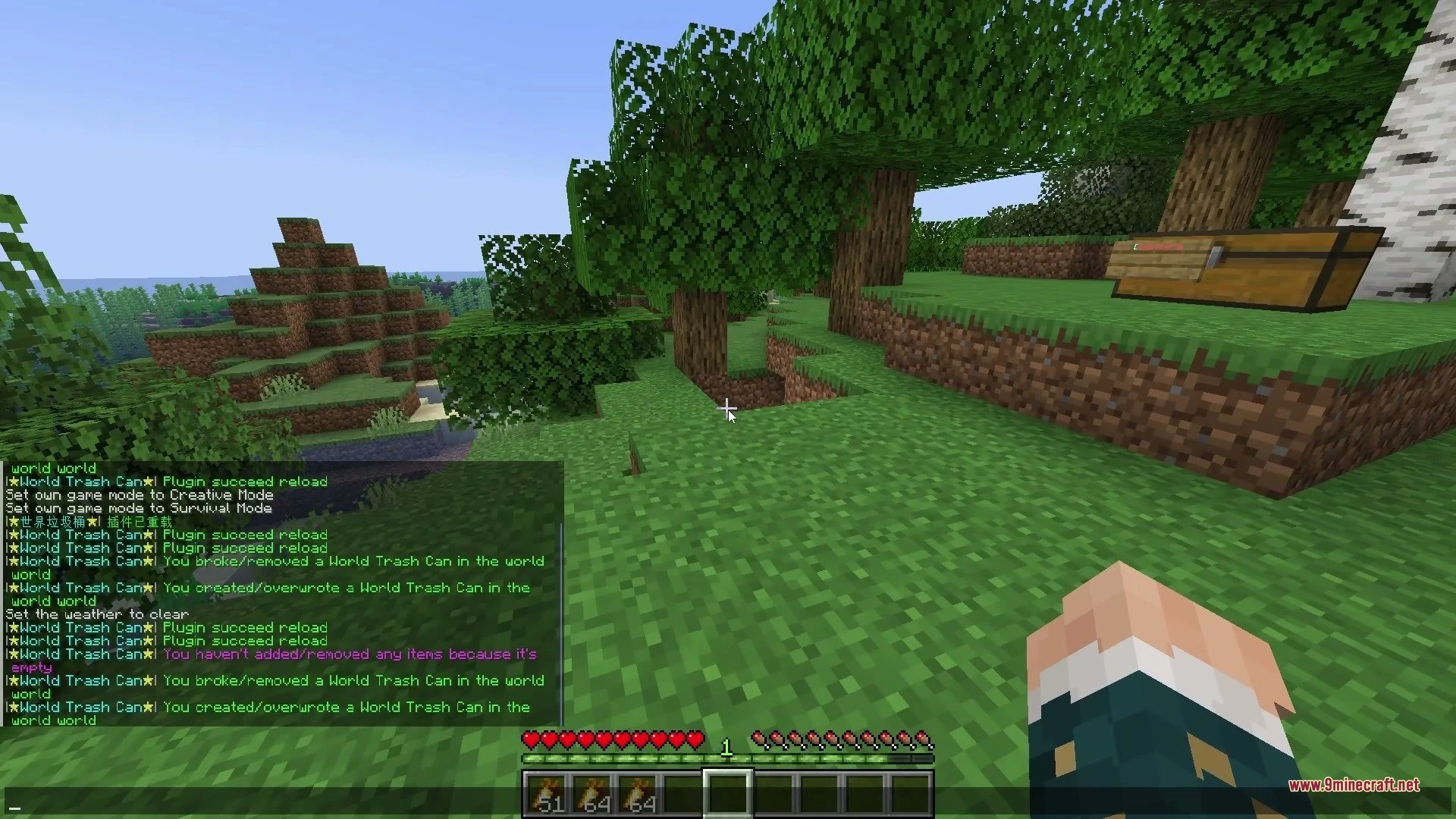
- Place a normal chest on the ground inside your personal world.
- Hold a sign and Right-Click the chest to place the sign on it.
- Type the trash bin keyword from the settings file (default is
[世界垃圾桶]) on the sign. - Wait for the sign text to change color, which confirms your chest is now ready to catch swept items in that world.
Screenshots:


How to Install:
New to Minecraft? Follow our step-by-step guide to install Plugins on your PC.View Guide
World List Trash Can Plugin Download Links
For Minecraft
26.3,
26.2,
26.1.2
All Versions Covered
26.3
26.2
26.1.2
26.1.1
26.1
1.21.11
1.21.10
1.21.9
1.21.8
1.21.7
1.21.6
1.21.5
1.21.4
1.21.3
1.21.2
1.21.1
1.21
1.20.6
1.20.5
1.20.4
1.20.3
1.20.2
1.20.1
1.20
1.19.4
1.19.3
1.19.2
1.19.1
1.19
1.18.2
1.18.1
1.18
1.17.1
1.17
1.16.5
1.16.4
1.16.3
1.16.2
1.16.1
1.16
1.15.2
1.15.1
1.15
1.14.4
1.14.3
1.14.2
1.14.1
1.14
1.13.2
1.13.1
1.13
1.12.2
1.12.1
1.12
All Versions Covered
26.3
26.2
26.1.2
26.1.1
26.1
1.21.11
1.21.10
1.21.9
1.21.8
1.21.7
1.21.6
1.21.5
1.21.4
1.21.3
1.21.2
1.21.1
1.21
1.20.6
1.20.5
1.20.4
1.20.3
1.20.2
1.20.1
1.20
1.19.4
1.19.3
1.19.2
1.19.1
1.19
1.18.2
1.18.1
1.18
1.17.1
1.17
1.16.5
1.16.4
1.16.3
1.16.2
1.16.1
1.16
1.15.2
1.15.1
1.15
1.14.4
1.14.3
1.14.2
1.14.1
1.14
1.13.2
1.13.1
1.13
1.12.2
1.12.1
1.12
Click to rate this post!
[Total: 0 Average: 0]
You May Also Like
Picked for this page
 Geyser Plugin (26.3, 1.20.1) – Bring Console and Phone Players
 TAB Plugin (26.3, 1.20.1) – Animate Ranks and Server Info
 Image Frame Plugin (26.1.2, 1.20.1) – Build Custom Art Galleries Together
 PlayerKits 2 Plugin (26.1.2, 1.20.1) – Claim Starter Gear Instantly
 Grim Anticheat Plugin (26.3, 1.20.1) – Stop Hackers Without False Lag Bans
 BetterGUI Plugin (26.1.2, 1.20.1) – Build Custom Shops and Menus Players Love
 BuildPaste Plugin (26.3, 1.20.1) – Build Castles Fast Without Any Hassle
 DiSky Plugin (26.1.2, 1.20.1) – Bring Discord Bots Directly to Chat
 Multiverse-Inventories Plugin (26.3, 1.20.1) – Keep Inventories Safe
 Multiverse Netherportals Plugin (26.3, 1.20.1) – Fixes Portal Links Across Worlds
 Multiverse Portals Plugin (26.3, 1.20.1) – Create Custom Teleportation Portals
 Luck Perms Plugin (26.3, 1.20.1) – Keep Your Server Fair with Clear Player Ranks
Most viewed in Plugins over the last 7 days
 WorldEdit Plugin (1.21.11, 1.20.1) – Easy In-Game Minecraft Map Editor
 Lightning on Death Plugin (26.3, 1.21.1) – Every Death Gets a Dramatic Thunder
 Ultimate Donut SMP Plugin (26.2, 1.21.11) – Everything Players Need to Trade
 Genius Shop Plugin (26.2, 1.21.1) – A Busy Marketplace Where Players Trade
 Citizens Plugin (1.21.10, 1.20.1) – Bring Custom NPCs to Life
 Casino Core Plugin (26.2, 1.21.1) – Turn Your Spawn Into a Casino Players Love
 Dynmap 9minecraft Plugin (26.3) – A Live Google-Maps-Style View of Your Whole Server
 Oraxen Plugin (1.21.11, 1.20.1) – Transform Your Ideas into Custom Items And Blocks
 Chunky Border Plugin (26.3, 1.20.1) – Keep Players Inside Safe Zones
 Dox Chat Plugin (26.3, 1.21.1) – Local Chat Where Players Only Hear Nearby
- Multiverse Netherportals Plugin (26.3, 1.20.1) – Fixes Portal Links Across Worlds
 Hvs V Plugin (26.2, 1.20.1) – Hide, Grab the Axe, and Turn the Tables on Hunters
More from Plugins
 FakePlayer CE Plugin (1.20) – Keep Server Farms Running Even When Friends Log Off
 Jext Reborn Plugin (1.14) – Play Brand New Songs Together at Every Jukebox
 Clan CL Plugin (26.3, 1.21.1) – Build Powerful Teams with Shared Bases and Banks
 Channel Chat Plugin (1.21.11, 1.21.1) – Stop Screen Spam with Clan Rooms
 Karmacore Plugin (26.3, 1.20.1) – Fuel Fierce Server Rivalries
 L Claim Plugin (26.3, 1.20.1) – Build Protected Towns and Trade Peacefully
 Aegis Guard Modern Land Protection & Economy Plugin (26.3, 1.20.1)
 RaspberryJuice Plugin (1.21) – Turn Your World Into a Shared Coding Playground
 AtlasPractice Plugin (1.8.8) – Give Players Nonstop Ranked Duels and Arena Battles
 King in Yellow Plugin (26.3, 1.21.11) – Terrify Server Players with Cosmic
 Join Book by Nis Plugin (1.21.11, 1.21.1) – Welcome New Players
 Displaymotion Plugin (1.21.4) – Amaze Players with Custom Animations and No Client Mods

This post has no comments yet. Be the first — your comment will appear here.