
Xaero’s Map 3D Mod (26.2, 1.20.1) – View Your World Map As an Angled 3D Terrain
 8
 0

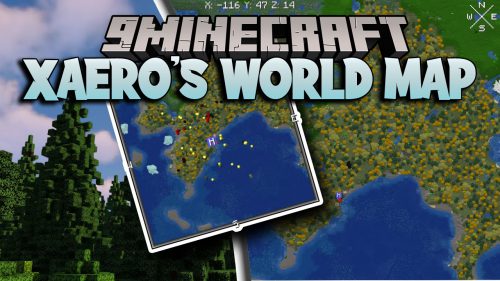
Xaero’s Map 3D Mod extends Xaero’s World Map and Diorama with an angled 3D terrain view. It draws your map as a 3D landscape that you can still drag and zoom. All your waypoints, mob dots, and the player arrow stay right on the ground they mark. Meanwhile, your regular minimap and original map controls work just like before.

Features:
- 3D Terrain Toggle: Adds a 3D button in the left column of the world map to switch between the angled 3D terrain and the classic flat view.
- Synced Waypoints: Keeps manual and bed waypoints matched between both map mods, so adding, moving, recoloring, or deleting a marker updates both sides.
- Places waypoints, mob dots, and the highlighted block under your cursor directly onto the 3D ground where they belong.
- Matches the original day and night brightness settings so the 3D landscape darkens at night just like the flat map.
- Follows your chosen cave mode and depth settings while leaving the cave view unshaded.
- Keeps your normal dragging, zooming, keybinds, and ESC key behavior unchanged, and leaves the minimap untouched.
- Shows maps from other dimensions in the standard flat view since the 3D terrain only holds the dimension you are currently in.
How to Use:
- Open your world map in the game.
- Click the 3D button in the left column to switch the map into 3D terrain.
- Drag and zoom the map with your mouse just like you normally do.
- Click the 3D button again to return to the flat map view, or press ESC to close the map.
Screenshots:


How to Install:
New to Minecraft? Follow our step-by-step guide to install Mods on your PC.View Guide
Requirements:




Xaero’s Map 3D Mod Download Links
For Minecraft 26.2
For Minecraft 26.1.2, 26.1.1, 26.1
For Minecraft 1.21.11
For Minecraft 1.21.8, 1.21.7, 1.21.6
For Minecraft 1.21.4
For Minecraft 1.21.1, 1.21
For Minecraft 1.20.1, 1.20
Click to rate this post!
[Total: 0 Average: 0]
You May Also Like
Picked for this page
 Catalogue Mod (26.2, 1.20.1) – Search and Sort Your Mods
 Simple Fog Control Mod (26.3, 1.20.1) – Clear Distant Horizons Without Fog
 Pro Placer Mod (26.3, 1.20.1) – Build Faster and Bridge Without Any Delay
 Loot Journal Mod (26.1.2, 1.20.1) – Track Every Item You Collect
 Boat Break Fix Mod (26.2, 1.20.1) – Stop Fatal Boat Falls and Glitches
 Daily Dad Mod (26.2, 1.20.1) – Get a New Dad Joke Every Time You Join
 Better Gamma Mod (26.3, 1.20.1) – See Clearly in Dark Caves and Shadows
 Muffin’s Picnic Mod (1.21.11, 1.20.1) – Carry Extra Loot on Every Journey
 Poly Weather Mod (26.3, 1.21.1) – Make It Snow in Any Biome
 Stacked Blocks Farmers Delight Mod (26.3, 1.20.1) – Block Stacking
 Dont Drop Your Compass Mod (26.3, 1.20.1) – Never Lose Your Recovery Compass
 Sift Dimension Backport Mod (26.3, 1.20.1) – Explore the Sculk Realm
Most viewed in Mods over the last 7 days
 Ala Industrial Mod (26.3) – Run Electric Power Grids and Automated Factories
 PleasureCraft Mod (26.3, 1.21.1) – Jenny Mod Remake for Fabric
 Jennycraft Mod (26.3, 1.20.1) – Virtual Girlfriend in Minecraft
 Fapcraft Mod (26.3, 1.12.2) – Comprehensive and Detailed Content
 Jenny Mod (Fapcraft) Official Complete Guide – How to use, Tutorial
 Meteor Client Mod (26.3, 1.20.1) – Xray, HUD, Fly
 BangCraft Mod (1.20.1) – Jenny, Ellie and Elliot
 OptiFine HD (26.3, 1.20.1) – Run Faster, FPS Boost, Shaders Support
 CatLean Client Mod (26.2, 1.21.11) – ThunderHack Recode Alternatives
 Let it Walk Mod (1.21.1) – Pilot Spider Tanks and Mechs Built From Your Blocks
 Fabric Loader (26.3, 1.20.1) – Fabric Installer for All Minecraft Versions
 SeedCrackerX Mod (26.3, 1.20.1) – Find Any World Seed
More from Mods
 Sleepframe Unfocus Limiter Mod (26.3, 1.20.1) – Cap Background FPS
 Create Realistic Tree Cutter Mod (1.21.1) – Fell Real Physics Trees
 Dynamic Lights Items & Entities Mod (26.3, 26.1.2) – Light Up Dark Caves
 Barely Prospecting Mod (26.3, 1.20.1) – Pan Silt and Hammer Stone
 Let’s Do Every Compat Mod (1.21.1) – Craft Matching Wood Furniture
 Akicater’s Microblocks Mod (26.3, 1.20.1) – Carve Tiny Blocks
 Inventory Tabs Next Mod (26.3, 1.21.11) – Switch Between Nearby Chests
 Akilib Mod (26.3, 1.20.1) – Core Library Powering Custom Block Models
 Poly Reflex Mod (26.3) – Slash Input Lag with Direct GPU Frame Syncing
 Kind’s Crystal Optimizer Mod (26.3, 1.21.1) – Instant Crystal Combos in PvP
 Citadel Fix Mod (1.20.1) – Bypass Blocked GitHub Checks on Startup
 Evolved Mekanism Extras Mod (1.21.1, 1.20.1) – Build Bigger Mekanism Factories

This post has no comments yet. Be the first — your comment will appear here.