
Low Render Distance Mod (26.3, 26.1.2) – Shrink View And Simulation Range
 9
 0

Low Render Distance Mod lets you lower Minecraft’s Render Distance and Simulation Distance all the way down to 1 chunk, well past the vanilla minimums of 2 and 5 chunks. This mod works directly inside the vanilla Video Settings menu as well as Sodium’s settings screen, and it also pairs cleanly with Bobby. At 1 chunk, Minecraft draws only a single chunk visually while chunks stay loaded within a 2-chunk radius, and smaller Simulation Distance values pull the active range for mobs, crops, and redstone closer to your player. It runs purely on the client side, while multiplayer servers still control Simulation Distance so that part applies only in singleplayer worlds.
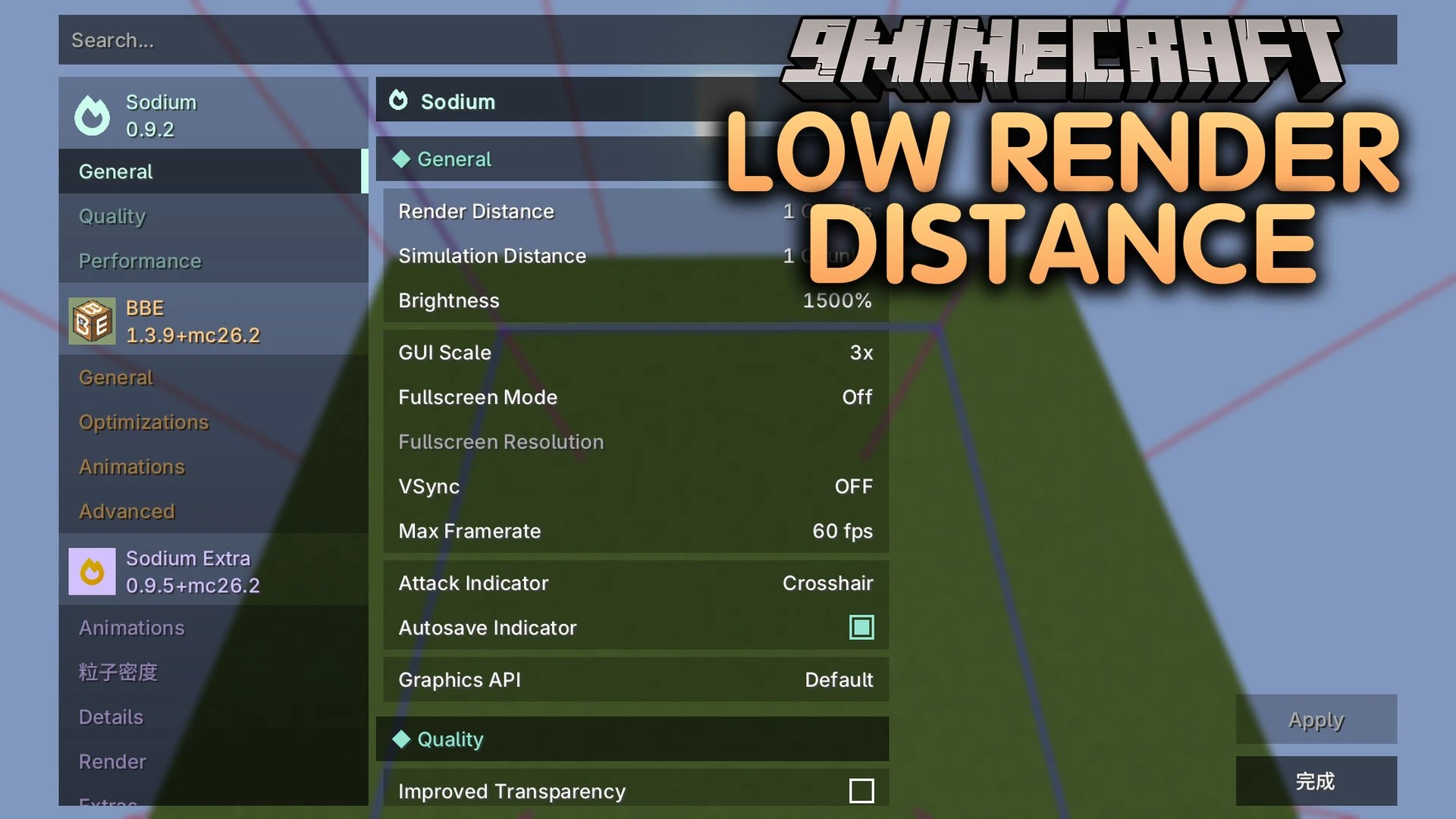
Features:
- 1-Chunk Render Distance: Lowers the Render Distance slider down to 1 chunk instead of stopping at the vanilla 2-chunk floor.
- 1-Chunk Simulation Distance: Unlocks Simulation Distance values all the way down to 1 chunk instead of the vanilla 5-chunk limit.
- Vanilla, Sodium, and Bobby Ready: Works straight inside the standard Minecraft Video Settings screen, Sodium’s video options menu, and alongside Bobby.
- Client-Side Only: Installs cleanly on your game client with no server-side files needed.
- Draws only 1 chunk visually at the lowest setting while Minecraft still keeps chunks loaded in a 2-chunk radius around your player.
- Applies the lowered Simulation Distance strictly in singleplayer worlds because multiplayer servers dictate Simulation Distance on their own.
- Reduces how far away mobs, crops, and redstone contraptions stay active when you lower Simulation Distance, so keep farm distances in mind before dropping it to 1 chunk.
Vanilla vs. Lowered Slider Limits:
| Setting | Vanilla Minimum | Mod Minimum | Multiplayer Behavior |
|---|---|---|---|
| Render Distance | 2 chunks | 1 chunk | Applies on client |
| Simulation Distance | 5 chunks | 1 chunk | Controlled by server |
How to Use:
- Pause your game with Esc, open Options, and go to Video Settings (using either the vanilla menu or Sodium’s Video Settings screen if Sodium is installed).
- Drag the Render Distance slider below the normal 2-chunk minimum all the way down to 1 chunk; Minecraft now draws only 1 chunk while still loading chunks in a 2-chunk radius.
- In a singleplayer world, drag the Simulation Distance slider below the vanilla 5-chunk minimum down to 1 chunk if you want tighter tick distance around your character.
- Watch nearby farms, crops, mobs, and redstone machines after lowering Simulation Distance, because anything outside that smaller active radius pauses and can break farm loops.
- On multiplayer servers, keep in mind that you can lower Render Distance on your client (including alongside Bobby), while the server continues to control Simulation Distance.
How to Install:
New to Minecraft? Follow our step-by-step guide to install Mods on your PC.View Guide


Low Render Distance Mod Download Links
For Minecraft
26.3,
26.2,
26.1.2
All Versions Covered
26.3
26.2
26.1.2
26.1.1
26.1
How much RAM do you usually allocate to a modded Minecraft profile?
36 responses · See the full results →
You May Also Like
Picked for this page
 Kotlin for Forge Mod (26.3, 1.20.1) – Unlock More Unique Mods
 Dark Paintings Mod (26.3, 1.20.1) – Decorate Bare Base Walls
 ExpandAbility Mod (26.3, 1.20.1) – Defy Fluid Movement Rules
 Simple Fog Control Mod (26.3, 1.20.1) – Clear Distant Horizons Without Fog
 Universal Graves Mod (26.3, 1.20.1) – Never Lose Your Loot After Death
 Enchants Plus Mod (26.3, 1.21.1) – Survive Any Lethal Hazard
 Camera Tweaks Mod (26.3, 1.20.1) – Scout Your World From Afar
 Polymer Mod (26.3, 1.20.1) – Modded Servers in Vanilla
 Fast NBT Mod (1.20.1) – Speeds Up Game Data Reading
 Pokebelt Cobblemon Mod (1.21.1) – Store All Your Catching Balls
 Camerao Mod (26.3, 1.21.11) – Frame Cinematic Build Shots with Freecam
 Hands on Furniture by Pocky-l Mod (1.21.1, 1.20.1) – Stock Fridges And Drawers
Most viewed in Mods over the last 7 days
 Ala Industrial Mod (26.3) – Run Electric Power Grids and Automated Factories
 PleasureCraft Mod (26.3, 1.21.1) – Jenny Mod Remake for Fabric
 Jennycraft Mod (26.3, 1.20.1) – Virtual Girlfriend in Minecraft
 Fapcraft Mod (26.3, 1.12.2) – Comprehensive and Detailed Content
 Meteor Client Mod (26.3, 1.20.1) – Xray, HUD, Fly
 Jenny Mod (Fapcraft) Official Complete Guide – How to use, Tutorial
 BangCraft Mod (1.20.1) – Jenny, Ellie and Elliot
 OptiFine HD (26.3, 1.20.1) – Run Faster, FPS Boost, Shaders Support
 CatLean Client Mod (26.2, 1.21.11) – ThunderHack Recode Alternatives
 Fabric Loader (26.3, 1.20.1) – Fabric Installer for All Minecraft Versions
 Patched Mod (26.3, 1.20.1) – Edit Game Files Without Breaking Packs
 Meteor Client Addons (26.3, 1.20.1) – Modify Almost Anything in Meteor
More from Mods
 Quest Event Bridge Mod (1.21.1) – Track Villager Trades For KubeJS
 Create Fly Deco Unofficial Port Mod (26.3, 26.1.2) – Outfit Factories
 Uranium Lag Mod (1.20.1) – Survive Minecraft With Brutal Frame Drops
 Abyssal Descent Resources Mod (1.20.1) – Custom Mining Tiers And Core Modpack
 Tiny Soldiers Clay Soldiers Inspired Mod (1.21.11, 1.21.1)
 QMD Mod (1.12.2) – Build Particle Accelerators, Collide Beams
 Paradox Second Chance Mod (26.2) – Rewind Time As A Ghost To Stop Hardcore Death
 Star Struck by The_Letter_A Mod (26.3, 1.20.1) – Chart Changing Skies
 Optimum Loading Screens Mod (26.2, 1.20.1) – Animated Resource Pack Art
 Offline Skins Reloaded Mod (26.3, 1.20.1) – Swap Custom Looks And Capes Even
 New Minerals Go Beyond Netherite Mod (26.3, 1.21.11) – Mine Six Rare Ores
 Orbital Arsenal Mod (26.3, 1.20.1) – Call Down Massive Space Strikes

This post has no comments yet. Be the first — your comment will appear here.