


Real Filing Cabinet Mod (1.12.2, 1.11.2) – Stop Building Chest Walls
 2,013
2,013
 0
0

🌐 Read this article in your language! Choose your preferred language below.
Or pick the one you like:
Real Filing Cabinet Mod adds a unique storage system to Minecraft. Unlike regular chests that hold many different items, this mod lets you store massive quantities of a single item type in special folders, offering nearly limitless space for the things you collect the most.

Features:
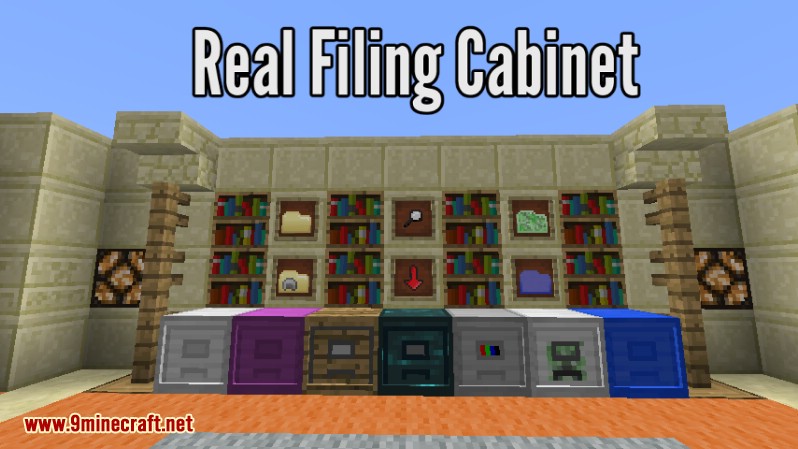
The Filing Cabinet
- Adds a new storage block, the Filing Cabinet, with 8 slots.
- These slots only accept Filing Folders, not loose items.
- You can open and close the cabinet by clicking it with an empty hand.
- Break a cabinet with a pickaxe to move it, and it will keep all its contents. Any upgrades will drop separately.
- Works with many item and fluid transfer mods, like Refined Storage and Applied Energistics 2.
Filing Folders
- Filing Folder: Stores large amounts of stackable items and blocks.
- Durability Folder: Holds items that have durability, like tools, weapons, and armor.
- Mob Folder: Captures and stores non-boss mobs inside the folder.
- Fluid Folder: Picks up and stores fluids directly from the world.
- Mystery Folder: An uncraftable folder found in dungeon chests that gives you a random item.
Helpful Tools
- Magnifying Glass: Shows you what’s inside a filing cabinet. You can also use it to remove upgrades.
- Whiteout Tape: Cleans out an empty folder so you can use it for a different item.
- Master Key: Locks a filing cabinet so other players can’t use it.
- Key Copy: Creates a copy of a Master Key to let friends access your locked cabinets.
Cabinet Upgrades
- Creative Upgrade: Allows for infinite extraction of items from any folder inside.
- Crafting Upgrade: Automatically crafts the item set in the filter, using materials from other folders in the cabinet.
- Ender Upgrade: Syncs folders with the cabinet, letting you access its contents from anywhere with a copy of a folder.
- OreDict Upgrade: Allows folders to accept different versions of the same ore, like Tin from various mods.
- Mob Upgrade: Automatically sucks nearby mobs into a corresponding Mob Folder inside the cabinet.
- Fluid Upgrade: Turns the cabinet into a fluid tank, allowing you to pipe fluids in and out.
- Life Upgrade: Brings the cabinet to life! It grows arms and feet and wanders around to pick up nearby items, mobs, or fluids it can store.
How to Use:
- To store a folder, right-click the cabinet while holding the folder.
- To take a folder out, Shift + right-click an open cabinet with an empty hand.
- To extract specific items automatically, place an Item Frame on the cabinet.
- Put the item you want to extract into the Item Frame. This will act as a filter for pipes and hoppers.
- To manually fill a bucket with fluid from a cabinet, just click the cabinet with an empty bucket.
Screenshots:

How to Install:
New to Minecraft? Follow our step-by-step guide to install Mods on your PC.View Guide
Real Filing Cabinet Mod Download Links
For Minecraft 1.10.2
For Minecraft 1.11.2
For Minecraft 1.12.2
Click to rate this post!
[Total: 0 Average: 0]
You May Also Like

















This post has no comments yet. Be the first — your comment will appear here.