
AutoTag Mod (1.20.1, 1.19.2) – Use Modded Items Anywhere

 0


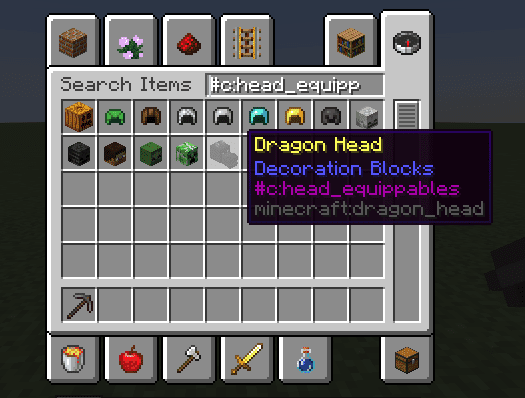
AutoTag Mod automatically fills common item, block, and other tags whenever a world loads. It checks simple code rules to sort both vanilla and modded content into shared groups, such as c:armor for armor pieces and c:head_equippables for items you can wear in the head slot. Not every mod puts its items into shared tags on its own, so this mod improves compatibility across mods without long manual lists. It works as a purely technical tool that adds no new items or blocks, and it helps anyone who puts together modpacks or adjusts tags for recipes.
Features:
- Automatic Tagging: Fills common item, block, and other conventional tags based on code rules every time a world loads.
- Broad Mod Support: Covers content from all loaded mods along with vanilla items, so mods can share tags in recipes without long manual lists.
- Bundles all armor pieces into the
c:armortag, making it easy to add every piece of armor to a tag or mod setting. - Places every item you can equip in the head slot into the
c:head_equippablestag. - Runs as a purely technical mod and adds no new items, blocks, or extra content to the game.
- Supports a blacklist option through datapacks so you can keep specific entries out of automatic tags.
How to Install:
New to Minecraft? Follow our step-by-step guide to install Mods on your PC.View Guide
AutoTag Mod Download Links
For Minecraft 1.20.1, 1.20
Fabric version: Download from Server 1 – Download from Server 2
For Minecraft 1.19.4
Fabric version: Download from Server 1 – Download from Server 2
For Minecraft 1.19.3
Fabric version: Download from Server 1 – Download from Server 2
For Minecraft 1.19.2, 1.19.1, 1.19
Fabric version: Download from Server 1 – Download from Server 2
For Minecraft 1.18.2
Fabric version: Download from Server 1 – Download from Server 2
You May Also Like
Picked for this page
 Zombie Awareness Mod (1.21.11, 1.20.1) – You Can Not Hide
 Better Than Mending Mod (26.3, 1.20.1) – Repair Item by Experience
 Pickle Tweaks Mod (26.1.2, 1.20.1) – Never Break Your Tools Again
 Litematica Printer Mod (26.3, 1.20.1) – Redstone-Aware Fast Block Auto Placement
 Cosmetic Armor Reworked Mod (1.21.11, 1.20.1) – Your Style with Max Armor
 Player Tracking Mod (26.3, 1.20.1) – Find And Raid
 Toro’s Auto Mine Mod (26.3, 1.20.1) – Automatically Mine While Being AFK
 All Arrows Infinity Fix Mod (26.3, 1.21.1) – Using “Infinity” with All Arrows
 Unbound Fov Mod (1.21.11, 1.20.1) – Extreme FOV Limits
 Adaptive Performance Tweaks (Bundle) Mod (26.3, 1.20.1) – Support Server Performance
 CTD Mint Mod (26.3, 1.20.1) – Simple Minecraft Currency System
 Shared Health Mod (26.3, 1.20.1) – Linked Player Health System
Most viewed in Mods over the last 7 days
 Ala Industrial Mod (26.3) – Run Electric Power Grids and Automated Factories
 PleasureCraft Mod (26.3, 1.21.1) – Jenny Mod Remake for Fabric
 Jennycraft Mod (26.3, 1.20.1) – Virtual Girlfriend in Minecraft
 Fapcraft Mod (26.3, 1.12.2) – Comprehensive and Detailed Content
 Jenny Mod (Fapcraft) Official Complete Guide – How to use, Tutorial
 BangCraft Mod (1.20.1) – Jenny, Ellie and Elliot
 Fabric Loader (26.3, 1.20.1) – Fabric Installer for All Minecraft Versions
 Meteor Client Mod (26.3, 1.20.1) – Xray, HUD, Fly
 The Shooting Star Demo Mod (26.3, 1.20.1) – Vaporize Terrain From Orbit
 OptiFine HD (26.3, 1.20.1) – Run Faster, FPS Boost, Shaders Support
 Aristois Client Mod (1.21.4, 1.20.1) – World Class Minecraft Utility
 SchnurriTV Mod (1.12.2) – Characters and Features
More from Mods
 Hammers 3×3 Mod (1.21.8, 1.20.1) – Carve Caves with One Swing
 Huge Structure Blocks Mod (26.3, 1.20.1) – Pushing Limits With Huge Structure Blocks Mod
 Rctapi Fix Mod (1.21.1) – Fight Cobblemon Trainers Without Any Server Crashes
 Better Title Screen Mod (26.3, 1.20.1) – Adding Custom Text Messages
 Log Cleaner Mod (26.3, 1.20.1) – Cleans Old and Unused Log Files
 Brick Variety Mod (26.3, 1.20.1) – More Brick Variants
 Fast Xp Mod (26.3, 1.21.1) – Faster XP Bottle Usage
 Cherry Villages Mot’s Structures Mod (26.3, 1.21.11) – Find Fresh Settlements
 XinexLib Mod (1.21.1) – Keep Your Ultreon Studios Mods Running
 Libvulpes – Fixed Mod (1.12.2) – Launch Rockets with Fewer Bugs
 Freelook Perspective Mod (26.3, 1.21.1) – Watch Your Back While Sprinting
 FAUNA Engine Mod (1.21.1, 1.20.1) – Powering Legendary Dragons

This post has no comments yet. Be the first — your comment will appear here.