


Extra Buttons Mod (1.21.1, 1.20.1) – Create Player-Aware Contraptions

 0
0 

Extra Buttons Mod adds several new button and switch-like blocks to Minecraft. These new items include large panel buttons, toggle buttons that light up, and special detector rails for minecarts. This mod is great for creating detailed stations or just having more fun with redstone contraptions.
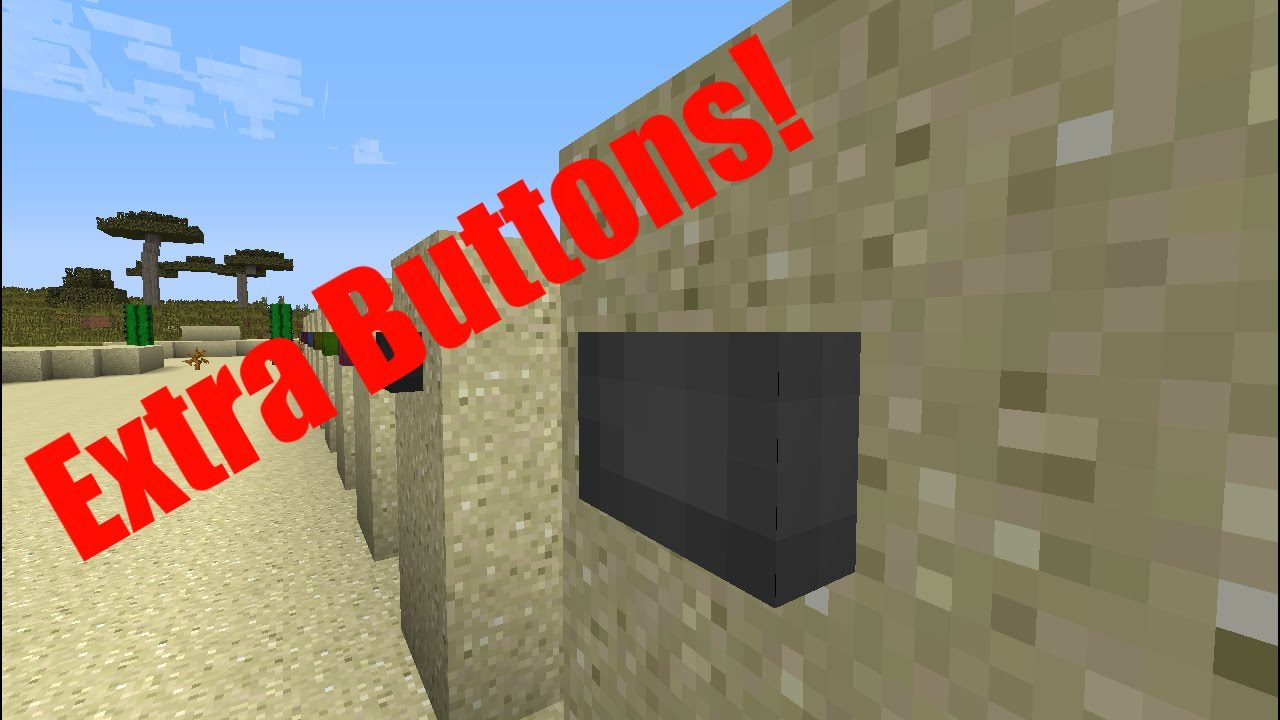
Features:
- Panel Buttons: Adds larger stone and wood buttons that are easier to press or hit with an arrow.
- Illuminated Toggle Buttons: Introduces buttons that work like light switches, staying on or off until pressed again. They come in 16 colors and glow when active.
- Capacitive Touch Block: A special block that sends a redstone signal when you touch any of its six sides.
- Player Detector Rail: A detector rail that only activates when a minecart with a player inside rides over it.
- Player Powered Rail: Combines a powered rail and a player detector. It stops empty carts but pushes them forward when a player gets in, while also emitting a redstone signal.
- Delay Button: A special button that can be set to four different redstone signal delay times.
How to Use:
- To change the delay on the Delay Button, sneak and right-click it with an empty hand.
- This will cycle through the four available delay settings.
Blocks and Recipes:
Stone Panel Button: A larger, easier-to-hit version of the stone button.
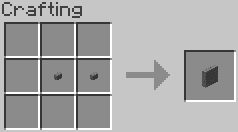
Wood Panel Button: A larger, easier-to-hit version of the wood button. Also provides a larger target for arrows.
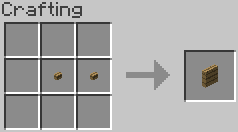
Capacitive Touch Block: A button with no mechanical action. Any part of the 6 surfaces can be ‘pressed’ to emit a temporary Redstone signal in all directions. An alternative to trapped chests as an easy to hit switch while moving quickly down the rail.
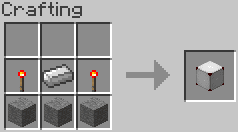
Illuminated Toggle Buttons: Buttons that act as toggle switches (hold their state until activated again). Comes in 16 colors and illuminate when active. The pre-1.7.2 version does not alter light levels, 1.7.2+ version does. Recipes pre-1.7.2 and 1.7.2+.
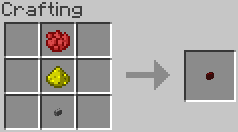
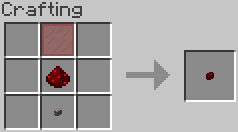
Player Detector Rail: A version of detector rail that only triggers when a player is in the cart.
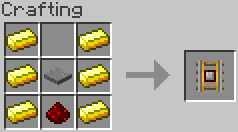
Player Powered Rail: Combines powered rail and the Player Detector Rail into a single track. Holds empty carts stationary, and propels carts when a player gets into them, along with emitting a Redstone signal.
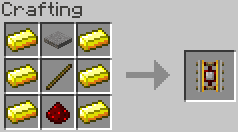
Delay Button: A higher-tech button that can be configured for 4 different delay values. Sneak+Right Click while empty-handed to cycle through they delay values.
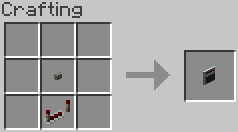
Configs:
- This mod creates a standard Forge configuration file that will let you change block IDs in case of conflict.
- If there are any blocks in this mod that you would rather not have, you can set its ID to “-1” in the configuration to disable it.
How to Install:
New to Minecraft? Follow our step-by-step guide to install Mods on your PC.View Guide
Extra Buttons Mod Download Links
For Minecraft 1.7.10
Forge version: Download from Server 1
For Minecraft 1.14.4
Forge version: Download from Server 1
For Minecraft 1.15.2
Forge version: Download from Server 1
For Minecraft 1.17.1
Forge version: Download from Server 1
For Minecraft 1.18.1
Forge version: Download from Server 1
For Minecraft 1.19
Forge version: Download from Server 1
For Minecraft 1.19.2, 1.19.1
Forge version: Download from Server 1 – Download from Server 2
For Minecraft 1.19.3
Forge version: Download from Server 1
For Minecraft 1.19.4
Forge version: Download from Server 1 – Download from Server 2
For Minecraft 1.20.1
Forge/NeoForge version: Download from Server 1 – Download from Server 2
For Minecraft 1.20.2
NeoForge version: Download from Server 1 – Download from Server 2
For Minecraft 1.20.4
NeoForge version: Download from Server 1 – Download from Server 2
For Minecraft 1.20.6
NeoForge version: Download from Server 1 – Download from Server 2
For Minecraft 1.21.1, 1.21
Forge version: Download from Server 1 – Download from Server 2
NeoForge version: Download from Server 1 – Download from Server 2
Fabric version: Download from Server 1 – Download from Server 2
You May Also Like









This post has no comments yet. Be the first — your comment will appear here.