
Resource Reloader Mod (1.12.2) – Skip Long Freezes While Editing Packs
 224
 0


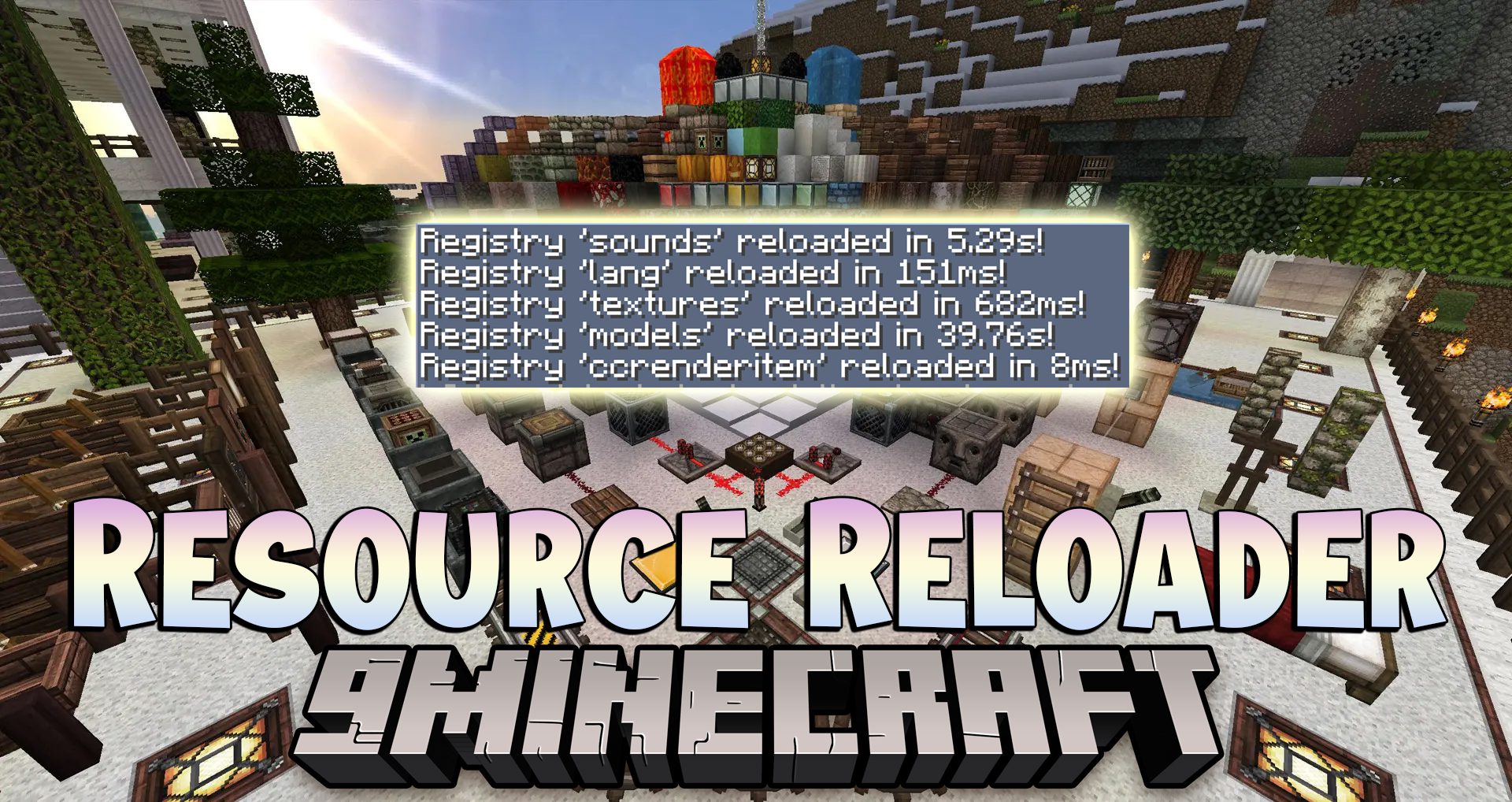
Resource Reloader Mod lets you reload single game resources instead of a full F3+T reload. This mod adds simple chat commands that refresh individual registries or groups of registries. It saves time when you test changes to textures, language files, sounds, and models.
Features:
- Adds a chat command to reload a single resource registry or a group of registries instead of running a full F3+T reload.
- Displays a full list of available registries and groups when you press Tab after typing the command.
- Reloads individual registries fast, which works best for textures, language files, and sounds.
- Reloads whole groups of registries with group tags, which works best for models.
- Single registry reloads can sometimes cause missing item models or messed-up textures, while whole group reloads can be slower because groups are new to Forge and not many mods support them.
Commands:
/reload_resources textures: Reloads a single resource registry, such as textures./reload_resources #models: Reloads a whole group of registries, such as models.
Press Tab after typing /reload_resources to view all available registries and groups.
How to Use:
- Open your in-game chat and type
/reload_resourcesfollowed by a space to prepare the command. - Press Tab to see the full list of available registries and groups.
- Choose a single registry like
/reload_resources texturesfor textures, language files, or sounds, or choose a group tag like/reload_resources #modelsfor models. - Press Enter to run the command and reload only the selected resources instead of running a full F3+T reload.
How to Install:
New to Minecraft? Follow our step-by-step guide to install Mods on your PC.View Guide
Resource Reloader Mod Download Links
For Minecraft 1.12.2
Forge version: Download from Server 1 – Download from Server 2
Click to rate this post!
[Total: 0 Average: 0]
You May Also Like
Picked for this page
 NoFog Mod (26.2, 1.20.1) – Increased Render Distance
 Variants and Ventures Mod (26.3, 1.20.1) – New Dangers in Every Biome
 Polymorph Mod (1.21.11, 1.20.1) – Crafting Modded Items without Conflict
 Paradise Lost Mod (1.21.11, 1.20.1) – A Heavenly Land
 Leashable Players Mod (26.2, 1.20.1) – Leash Your Friends
 Clickable Advancements Mod (26.3, 1.20.1) – Open Advancement from Chat
 EXP Counter Mod (26.3, 1.20.1) – Customizable Information
 Actual Fishing Mod (1.21.11) – Real Fishing Challenges
 Cozary Red Panda Mod (1.21.11, 1.20.1) – Adds Adorable Pet Red Pandas
 Enchantable Mace Mod (1.21.11, 1.21) – Allows Sword Enchantments On Maces
 Lexiconfig Mod (1.21.11, 1.20.1) – Simplify Mod Configurations
 Full Slabs Mod (1.21.10, 1.20.1) – Vertical And Mixed Slabs
Most viewed in Mods over the last 7 days
 Ala Industrial Mod (26.3) – Run Electric Power Grids and Automated Factories
 PleasureCraft Mod (26.3, 1.21.1) – Jenny Mod Remake for Fabric
 Jennycraft Mod (26.3, 1.20.1) – Virtual Girlfriend in Minecraft
 Fapcraft Mod (26.3, 1.12.2) – Comprehensive and Detailed Content
 Jenny Mod (Fapcraft) Official Complete Guide – How to use, Tutorial
 BangCraft Mod (1.20.1) – Jenny, Ellie and Elliot
 Fabric Loader (26.3, 1.20.1) – Fabric Installer for All Minecraft Versions
 The Shooting Star Demo Mod (26.3, 1.20.1) – Vaporize Terrain From Orbit
 Meteor Client Mod (26.3, 1.20.1) – Xray, HUD, Fly
 OptiFine HD (26.3, 1.20.1) – Run Faster, FPS Boost, Shaders Support
 Aristois Client Mod (1.21.4, 1.20.1) – World Class Minecraft Utility
 Prestige Client Mod (1.21.11, 1.21.4) – Powerful Ghost Features for Crystal & Sword PvP
More from Mods
 Gunpowder Recipe Mod (26.3, 1.20.1) – Gunpowder is Craftable
 Villager Timetable Mod (26.3, 1.20.1) – Master Villager Schedules
 Artemis Laboratory Blocks Mod (26.3, 1.20.1) – Lab Blocks And Dynamic Decorations
 Fabric ORM Jimmer Mod (26.3, 1.20.1) – Prevent Sudden Server Crashes
 Cafe Core Mod (26.2, 1.21.1) – Bypass Anvil Limits and Tame Pets in Seconds
 GTNH’s Forgelin Mod (1.7.10) – Play Kotlin-Powered Mods on Minecraft 1.7.10
 Nodeflow Mod (26.1.2, 1.21.1) – Wire Custom Redstone Logic on Visual Graph
 Winter Client Mod (1.21.11) – Survive Ruthless PvP on Anarchy Servers
 LARP Client Mod (1.21.11) – Dominate Crystal PvP on Anarchy Servers
 Berlin Client Mod (1.21.11) – Hunt Stashes and Win Crystal Fights
 Kaleidoscope Cookery Refabricated Mod (26.3, 1.20.1) – Cook Hearty Meals
 Minecraft MusicBox Mod (1.21.12) – Play Your Favorite Songs While Mining and Building

This post has no comments yet. Be the first — your comment will appear here.