
Bamboo Renderer Mod (1.21.11) – Boost Your Shader FPS with Frame Generation
 4
 0

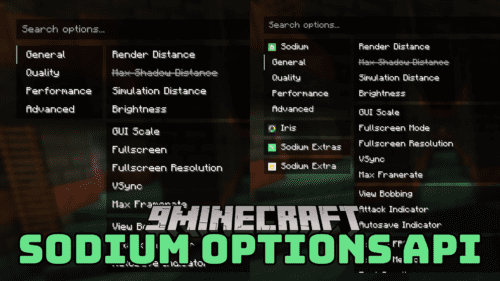
Bamboo Renderer Mod generates extra frames between your game’s normal frames to boost FPS by up to 1.8x. These generated frames need much less computer power than standard rendering, especially when you play with shaders turned on. The mod runs after OpenGL rendering, so it works well with Iris Shaders and optimization mods like Sodium, ImmediatelyFast, and Gnetum. It helps players who get 40 to 60 FPS reach near 100 FPS, and it requires Reese’s Sodium Options to turn the main feature on.

Features:
- Frame Generation: Creates extra frames between real game frames to boost average FPS by up to 1.8x with only a small visual trade-off when moving the camera.
- Shader & Mod Compatibility: Processes frames after OpenGL rendering, allowing it to work alongside Iris Shaders and any optimization mod like Sodium, ImmediatelyFast, and Gnetum.
- Uses much fewer computer resources than normal Minecraft rendering, which helps a lot when running shaders.
- Works best for players getting 40 to 60 FPS with shaders who want smoother gameplay near 100 FPS.
- Comes turned off by default to prevent errors until you switch it on through the Reese’s Sodium Options menu.
- Works properly with G-Sync on Nvidia GPUs, though V-Sync should be turned off to avoid conflicts.
- Not recommended if your base game runs below 30 vanilla FPS, as low frame rates can make the edges of blocks and mobs look transparent.
How to Use:
- Make sure you have Reese’s Sodium Options installed, as frame generation is disabled by default to prevent errors.
- Open your video settings menu and turn off V-Sync (Vertical Sync) so it does not conflict with the frame generation.
- Find the frame generation setting inside the Reese’s Sodium Options menu and switch it on to boost your FPS.
How to Install:
New to Minecraft? Follow our step-by-step guide to install Mods on your PC.View Guide
Requirements:


Bamboo Renderer Mod Download Links
For Minecraft 1.21.11
Click to rate this post!
[Total: 0 Average: 0]
You May Also Like
Picked for this page
 Structured Crafting Mod (26.3, 1.20.1) – Build Working Item Factories
 Show Me Your Skin Mod (26.2, 1.20.1) – Wear Full Armor Without Hiding Your Skin
 GPU Tape Mod (26.2, 1.20.1) – Play Demanding Worlds Without Lag Spikes
 Fuji Mod (26.3, 1.20.1) – Manage Your Multiplayer Server with Advanced Admin
 Wool Buttons Mod (26.3, 1.20.1) – Bypass Sculk Sensors with Silence
 From The Shadows Reborn Mod (1.20.1, 1.20) – Face Deadly Terrors in Dark Caves
 Through The Lily Pads Gently Mod (26.3, 1.20.1) – Sail Through Swamps
 Client Harvest Mod (26.2, 1.20.1) – Harvest Crops with a Single Click
 Charged Charms Mod (26.3, 1.20.1) – Cast Powerful Spells Every Fight
 Crystal Carpet Addition Mod (26.3, 1.20.1) – Control Game Rules with Precision
 Fast Bench for Fabric Mod (1.16.5) – Craft Bulk Items Instantly Without Lag
 Direct Auth Mod (1.21.1, 1.20.1) – Protect Your Player Account and Items
Most viewed in Mods over the last 7 days
 Ala Industrial Mod (26.3) – Run Electric Power Grids and Automated Factories
 PleasureCraft Mod (26.3, 1.21.1) – Jenny Mod Remake for Fabric
 Jennycraft Mod (26.3, 1.20.1) – Virtual Girlfriend in Minecraft
 Fapcraft Mod (26.3, 1.12.2) – Comprehensive and Detailed Content
 Jenny Mod (Fapcraft) Official Complete Guide – How to use, Tutorial
 Meteor Client Mod (26.3, 1.20.1) – Xray, HUD, Fly
 OptiFine HD (26.3, 1.20.1) – Run Faster, FPS Boost, Shaders Support
 BangCraft Mod (1.20.1) – Jenny, Ellie and Elliot
 Fabric Loader (26.3, 1.20.1) – Fabric Installer for All Minecraft Versions
 SeedCrackerX Mod (26.3, 1.20.1) – Find Any World Seed
 Patched Mod (26.3, 1.20.1) – Edit Game Files Without Breaking Packs
 CatLean Client Mod (26.2, 1.21.11) – ThunderHack Recode Alternatives
More from Mods
 Cattail Mod (1.21.1) – Invite Friends Into Your Private World Without Extra Software
 TweakSwitch Mod (1.21.11) – Switch Your Texture Packs Instantly Without Pausing the Game
 Create Aeronautics Ultimine Compatibility Mod (1.21.1)
 AtomLib Mod (1.21.1) – Open Crisp In-Game Menus with Soft Blurred Backdrops
 3D Multiplayer Decoration Mod (26.3) – Share Custom 3D Furniture with Friends
 Astucy Client Modules Mod (26.1) – Rearrange Your In-Game HUD While Playing
 CommandHistoryRemover Mod (1.21.12) – Type Sensitive Commands Without Leaving Traces
 SiliconShaders Mod (26.3) – Explore Sunlit Builds and Reflective Waters on Your Mac
 DEADLANDS Mod (1.21.11) – Scavenge and Survive in a Ruined Post-Apocalyptic World
 MCAEF MCA Reborn 7.7.1 Unofficial Patch Mod (1.20.1) – Epic Combat for Villagers
 Atari Kafa Core Shared Library for Atari Kafa Mods (26.3, 1.21.1)
 Omnira Mod (1.21.1) – Craft Custom Spells and Power Your Machines with Pure Mana

This post has no comments yet. Be the first — your comment will appear here.