
Chest Upgrade Bigger Chests Upgrades a Searchable Chest Network & an Auto Sorter Mod (26.3, 26.1.2)
 0
 0

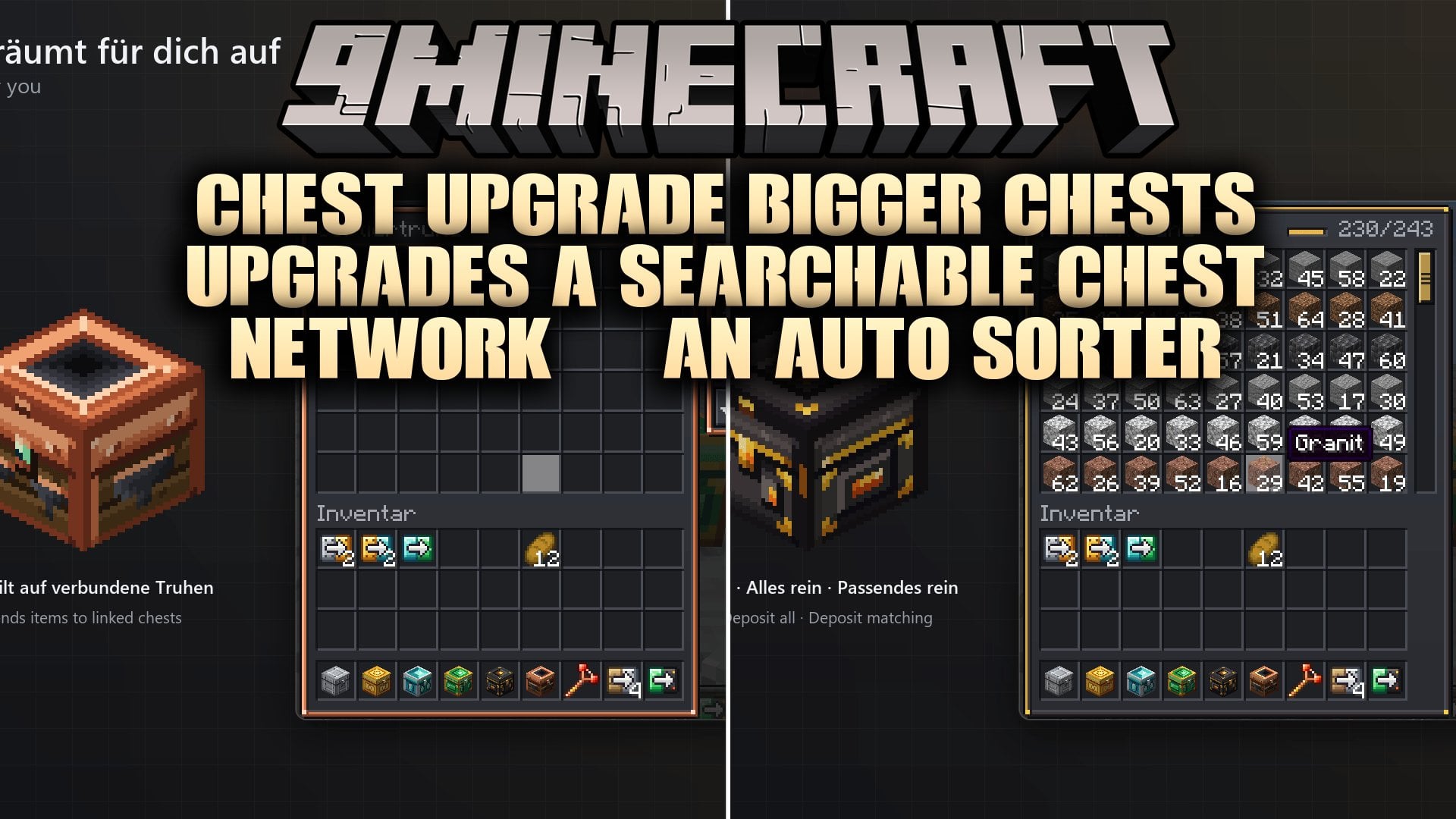
Chest Upgrade Bigger Chests Upgrades a Searchable Chest Network & an Auto Sorter Mod adds five bigger chest tiers, instant upgrade kits, and a linked storage network to Minecraft. It includes Iron, Gold, Diamond, Emerald, and Netherite chests that hold up to 243 slots in a single block. You can upgrade placed chests without emptying them, link your storage together to search for items through walls, and use a Sorter Chest to organize everything without building huge redstone contraptions. This mod works well for survival bases and multiplayer storage rooms.
Features:
- Five Chest Tiers: Adds Iron, Gold, Diamond, Emerald, and Netherite chests that scale up to 243 slots, which equals 4.5 double chests in one block.
- In-Place Upgrade Kits: Lets you right-click a placed chest with a kit to turn it into the next tier while keeping all items, custom names, rotation, and network links inside.
- Searchable Chest Network: Allows you to link chests together using a Linker item, press V, and type an item name to make the matching chests light up through walls.
- Auto Sorter Chest: Moves items automatically into linked chests that already hold those exact items without needing redstone wires or item filters.
- Includes sort buttons on the right side of every chest menu for quick inventory organization.
- Gives every chest tier a custom hand-drawn texture and a matching color accent inside its menu.
- Lets you scroll through big chest menus using the mouse wheel, a draggable scrollbar, or the Page Up and Page Down keys.
- Adapts the chest menu to show only as many rows as fit on your screen so all 243 slots work on any window size or GUI scale.
- Displays a fullness counter in the header of every chest menu, such as 230/243.
- Works with hoppers, droppers, and comparators just like a vanilla chest.
- Lets you rename chests in an anvil to display the custom name at the top of the chest menu.
- Drops all stored items on the ground if a chest is broken.
- Makes the Netherite Chest blast-proof when placed and immune to burning in lava when dropped as an item.
- Closes the chest menu for any other players viewing it right before an upgrade happens to prevent item loss or duplication.
- Shows a short warning message without using up your upgrade kit if you right-click a chest with the wrong tier kit.
Chest Tiers:
- Iron Chest: Holds 54 slots across 6 rows, features a riveted iron texture, requires a stone pickaxe to mine, and is crafted with 8 iron ingots around a vanilla chest.
- Gold Chest: Holds 81 slots across 9 rows, features an ornate gold texture, requires an iron pickaxe to mine, and is crafted with 8 gold ingots around an Iron Chest.
- Diamond Chest: Holds 108 slots across 12 rows, features crystal inlays, requires an iron pickaxe to mine, and is crafted with 8 diamonds around a Gold Chest.
- Emerald Chest: Holds 162 slots across 18 rows, features an emerald lock texture, requires an iron pickaxe to mine, and is crafted with 8 emeralds around a Diamond Chest.
- Netherite Chest: Holds 243 slots across 27 rows, features dark netherite with glowing gold, requires a diamond pickaxe to mine, and is crafted with 4 netherite ingots in the corners and 4 obsidian on the sides around an Emerald Chest.
Upgrade Kits:
- Wood to Iron Kit: Turns a normal single vanilla chest into an Iron Chest, crafted with 8 iron ingots around a wood plank.
- Iron to Gold Kit: Turns an Iron Chest into a Gold Chest, crafted with 8 gold ingots around a wood plank.
- Gold to Diamond Kit: Turns a Gold Chest into a Diamond Chest, crafted with 8 diamonds around a wood plank.
- Diamond to Emerald Kit: Turns a Diamond Chest into an Emerald Chest, crafted with 8 emeralds around a wood plank.
- Emerald to Netherite Kit: Turns an Emerald Chest into a Netherite Chest, crafted with 4 netherite ingots and 4 obsidian around a wood plank.
How to Use:
- Craft a new chest tier at a crafting table, or craft an Upgrade Kit using a wood plank surrounded by the next tier’s materials.
- Right-click a placed chest with the matching Upgrade Kit to upgrade it instantly without taking your items out.
- Open any big chest and use your mouse wheel, the scrollbar, Page Up, or Page Down to scroll through the rows, and use normal shift-click, drag, or double-click controls to move items.
- Use the buttons on the right side of the chest menu to sort your items.
- Link your storage chests together with the Linker item, then press V and type an item name like “iron” to highlight the chests holding that item through walls.
- Place a Sorter Chest and put items inside to automatically send them into linked chests that already contain matching items.
Screenshots:


How to Install:
New to Minecraft? Follow our step-by-step guide to install Mods on your PC.View Guide
Requirements:

Chest Upgrade Bigger Chests Upgrades a Searchable Chest Network & an Auto Sorter Mod Download Links
For Minecraft 26.3
For Minecraft 26.2
For Minecraft 26.1.2, 26.1.1, 26.1
Click to rate this post!
[Total: 0 Average: 0]
You May Also Like
Picked for this page
 Restricted Portals Mod (1.21.11, 1.20.1) – Lock Dimensions Behind Crafting
 Actually Additions Mod (1.21.1, 1.12.2) – Build a Wireless Tech Base
 Simple Health Indicator Mod (26.3, 1.20.1) – See Player Health on Any Server
 Vault Patcher Mod (26.3, 1.20.1) – Translate Hard Coded Mod Text
 Collector’s Album Mod (26.3, 1.20.1) – Collect Rare Cards From Defeated Mobs
 BizCub Death Note Mod (26.3, 1.21.1) – Eliminate Other Players Just
 One-Step Dyed Shulker Boxes Mod (26.3, 1.20.1) – Craft Colored Shulker Boxes
 Gilded Sherds Mod (26.3, 1.20.1) – Craft Luxurious Gold Decorated Pottery
 Salt’s Animal Farm Mod (26.3, 1.20.1) – Raise Happier Livestock for Bigger Farm
 Drawers OG Storage Drawers & Bulk Storage Mod (26.3, 1.20.1)
 Sky Block Item List Mod (26.3, 26.1.2) – Look Up Any SkyBlock Recipe
 Paint Literally Anywhere PLA Mod (26.3, 26.1.2) – Turn Every Block
Most viewed in Mods over the last 7 days
 Ala Industrial Mod (26.3) – Run Electric Power Grids and Automated Factories
 PleasureCraft Mod (26.3, 1.21.1) – Jenny Mod Remake for Fabric
 Jennycraft Mod (26.3, 1.20.1) – Virtual Girlfriend in Minecraft
 Fapcraft Mod (26.3, 1.12.2) – Comprehensive and Detailed Content
 Jenny Mod (Fapcraft) Official Complete Guide – How to use, Tutorial
 Meteor Client Mod (26.3, 1.20.1) – Xray, HUD, Fly
 OptiFine HD (26.3, 1.20.1) – Run Faster, FPS Boost, Shaders Support
 BangCraft Mod (1.20.1) – Jenny, Ellie and Elliot
 Fabric Loader (26.3, 1.20.1) – Fabric Installer for All Minecraft Versions
 SeedCrackerX Mod (26.3, 1.20.1) – Find Any World Seed
 CatLean Client Mod (26.2, 1.21.11) – ThunderHack Recode Alternatives
 Patched Mod (26.3, 1.20.1) – Edit Game Files Without Breaking Packs
More from Mods
 MC Jacob Edition Mod (26.1.2) – Fight Evil Pumpkin Robots in Haunted Dungeons
 Voxel Roll Mod (26.1.2) – Host Tabletop RPG Campaigns with Turn-Based Dice
 Cobblemon Utility Items No Recipes Mod (1.21.1) – Max Out Pokemon Stats
 World or Collors Mod (26.1.2) – Explore Colorful Pink Water Biomes on New Mounts
 Bubble Up Mod (26.2, 1.21.11) – Turn Simple Water Bubbles Into Throwable Combat
 The Star Wars Mod (26.2) – Wield Custom Lightsabers and Master the Force
 Voltforge Mod (1.21.1) – Build Massive Factories, Nuclear Reactors
 Mob Spawn Checker MSC Mod (1.21.1, 1.20.1) – Pinpoint Why Mobs Are Failing
 ChosenLib Mod (1.21.1) – Build New Fabric Projects Faster with Reusable Code
 SkillTreeCore Mod (1.20.1) – Core Library for Custom RPG Skill Tree Menus
 CRM Mod (26.1.2, 1.20.1) – OpenGL Rendering API for Easy Cross-Version Mod
 Cryptic Registry Mod (1.20.1) – Save Modpack Space and System Resources

This post has no comments yet. Be the first — your comment will appear here.