


Clarity Client Mod (26.1.2) – Take Control of Every Fight with Advanced Automation
 2
2
 0
0

Clarity Client Mod equips you with two separate control interfaces and over one hundred thirty gameplay modules. You can switch options through an in-game click screen or manage profiles in an external web browser while the game runs. This client brings tools for combat, movement, automation, and visual overhauls without needing extra rendering setups.

Features:
- Dual Interfaces: Gives you an in-game sidebar and a browser dashboard on localhost.
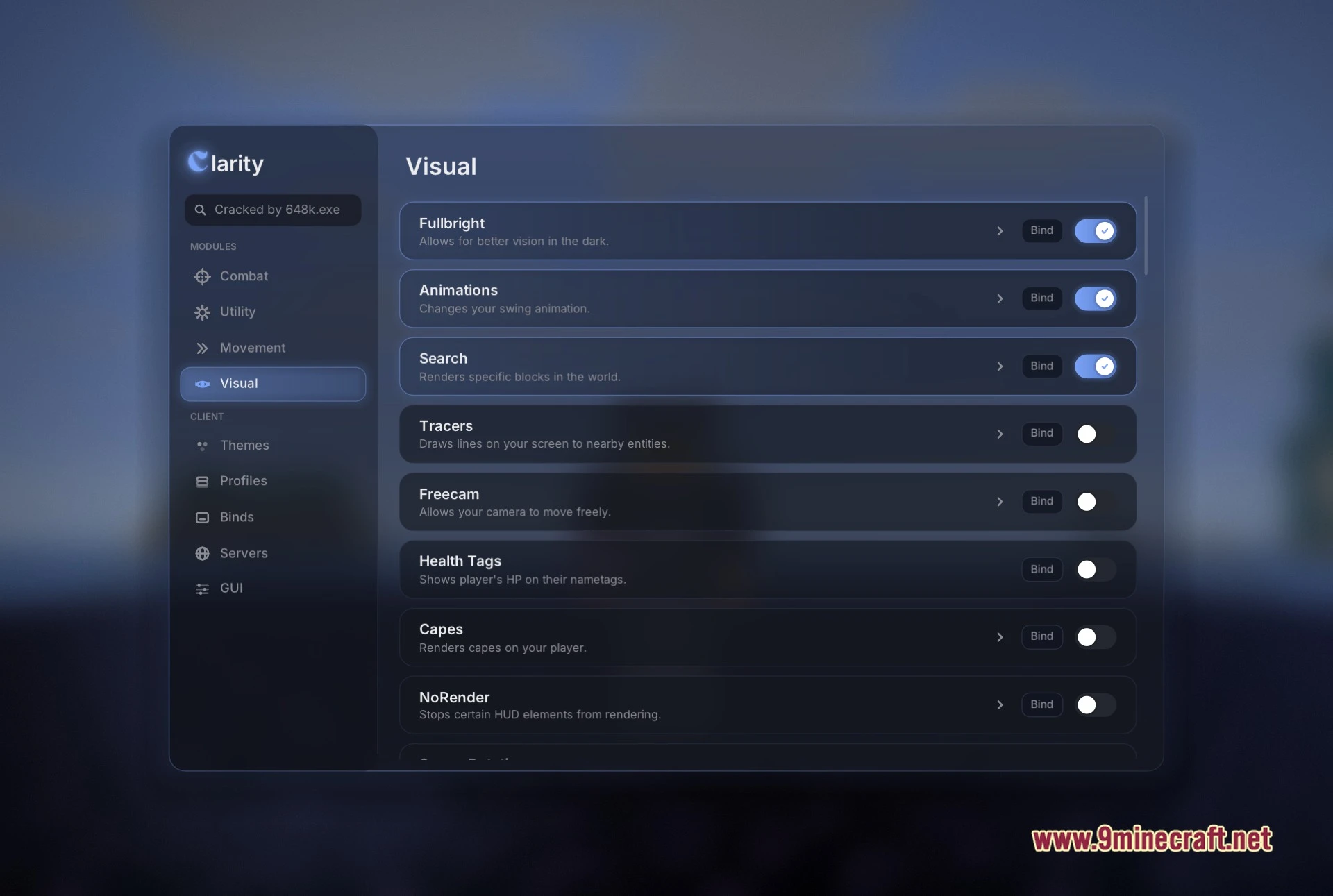
- Five Layout Styles: Lets you pick between Simple, Classic, Compact, Meteor, and Wurst menu designs.
- Audio-Reactive Visuals: Includes a Music Beats mode that reacts to audio playing on your computer.
- Server-Specific Profiles: Saves custom presets and key binds for different multiplayer servers.
- Custom Themes: Lets you adjust colors for backgrounds, borders, and accents alongside custom wallpapers.
- Shows a clear one-line description on every module row in the menu.
- Includes dedicated toggle buttons and keybind selectors for quick access.
Combat Modules:
- Triggerbot swings your weapon automatically when an opponent enters your crosshair.
- Aim Assist helps keep your sights locked on target during battle.
- Kill Aura attacks nearby entities around you on its own.
- Shield Breaker knocks down enemy shields during fights.
- Piercing lets you strike opponents or place blocks through obstacles.
- Reach extends how far you can hit entities and touch blocks.
- Backtrack delays enemy movement packets so you can land hits at older positions.
- Auto Crystal, Auto Anchor, and Auto Trap handle explosive crystal PvP setups.
Utility Modules:
- Auto Armor and Auto Tool put on the right equipment automatically.
- Chest Stealer empties chests instantly into your inventory.
- Fast Place speeds up block placement.
- Inventory Cleaner discards unwanted clutter from your bags.
- Silent Totem and Hover Totem help manage off-hand totem protection.
- Name Protect hides your gamertag on screen.
Movement Modules:
- Fly and Speed boost your travel speeds across the world.
- Inventory Walk keeps your character walking while you look through menus.
- NoFall prevents falling damage when dropping from heights.
- Anti Hunger reduces stamina drain during long journeys.
- Anti Push stops water, mobs, and blocks from shoving your character.
Visual Modules:
- Freecam detaches your camera to scout caves and structures safely.
- Fullbright lights up dark areas without torches.
- Storage ESP highlights chests, barrels, and containers through solid walls.
- Player ESP and Tracers draw clear markers toward other players.
- Custom Crosshair and Motion Blur change how your screen looks and feels.
- Skin Changer and Capes let you try cosmetic outfits in-game.
How to Use:
- Open the in-game click screen to view the module sidebar and adjust categories.
- Open a web browser and go to
localhost:7420to manage your profiles and themes. - Click the toggle switch on any module row to turn that feature on or off.
- Click the arrow next to a module to open its specific sliders and options.
- Press the Bind button on any module row to assign a keyboard hotkey.
Screenshots:


How to Install:
New to Minecraft? Follow our step-by-step guide to install Mods on your PC.View Guide
Requirements:


Clarity Client Mod Download Links
For Minecraft 26.1.2
Click to rate this post!
[Total: 1 Average: 5]
You May Also Like
Picked for this page
 Wurst Client Mod (26.3, 1.20.1) – The Best Bypass for Minecraft
 A Good Place Mod (26.3, 1.20.1) – Stylish Block Placement
 Nemo’s Inventory Sorting Mod (26.3, 1.20.1) – Tidy Up Your Inventory
 Tech Reborn Mod (26.3, 1.20.1) – Build Your Own Tech Empire
 Tomate0613 Zipline Mod (26.1.2, 1.20.1) – Adds Zipline Holders
 Rich Modern Client Mod (1.21.11) – Powerful Modules for Anarchy, 2b2t Servers
 Day Dream Mod (26.2, 1.20.1) – Strategic Time Management
 Experience Bottler Mod (26.3, 1.20.1) – Maximize Your Progression
 RayzorPlay01 Inv View Mod (26.3, 1.20.1) – Police Your Server’s Items
 Health Bars by Fuzs Mod (26.3, 1.21.1) – See Every Mob’s Exact Health
 Clangor Mod (26.3, 1.20.1) – Hear Custom Audio for Every Weapon Swing and Hit
 Flex HUD Mod (26.3, 1.21.11) – Monitor Vital Survival Stats and Info Right
Most viewed in Clients over the last 7 days
 Baritone 9minecraft Client Mod (26.3, 26.1.2) – Mine and Build Bases Hands-Free
 Meteor Client Mod (26.2, 1.20.1) – Xray, HUD, Fly
 Lunar Patcher (v10) – Using Lunar Client for Free
 CatLean Client Mod (26.2, 1.21.11) – ThunderHack Recode Alternatives
 DoomsDay Client (26.1.2, 1.20.1) – Best Free Injectable Client
- Baritone Client Mod (26.2, 1.20.1) – Autominer, Build with AI, Xray
 OptiFine HD 9minecraft (26.3) – Run Smooth Shaders Without the Lag
 Aristois Client Mod (1.21.4, 1.20.1) – World Class Minecraft Utility
 9minecraft Xray Client (26.3, 1.20.1) – The #1 Ore Finder of 2026
 System Client Mod (1.21.11, 1.21.1) – Powerful CPVP Ghost Client
 4E Client Mod (1.21.11, 1.21.1) – ChunkFinder, Base Finding for DonutSMP
- Wurst Client Mod (26.3, 1.20.1) – The Best Bypass for Minecraft
More from Clients
 Noxx Client Mod (1.21.11) – God Mode PvP Tools
 Radon Backport Client Mod (1.21.1) – Next-Level PvP Utility Client
 Water Client Mod (1.21.1) – Clean & Powerful PvP Tools
 Bromine Client Mod (1.21.1) – Xenon Renamed
 MeiLaa Plus Client Mod (1.21.11) – Upgraded Krypton Client
 AstraWare Client Mod (1.21.4) – Upgraded Astralux Client
 Pulse Remake Client Mod (1.21.11) – The Giant Returns
 Arnis Tool (26.3, 1.20.1) – Generate Cities from OpenStreetMap to Minecraft
 Xenon Plus Client Mod (1.21.1) – A Very Good Alternative to Krypton Client
 Raven Reloaded Client Mod (1.8.9) – Bypass Hypixel, BlocksMC
 Fluid Client (1.8.9) – The Best Free Premium, FPS Boosting
 Zoomies Client Mod (1.21.1) – Lightweight PvP Utility

This post has no comments yet. Be the first — your comment will appear here.