
DMZ Form Forge Custom Transformations Mod (1.20.1) – Craft Your Own Dragon Ball
 2
 0

DMZ Form Forge Custom Transformations Mod extends DragonMine Z with custom player transformation crafting. Players of the same race usually receive identical transformations throughout the story mode. This mod lets you build a personal form and choose exactly where your power goes. You pick custom aura colors, adjust physical sizes, and assign individual body traits. Your custom name appears on the form selection wheel for all players on the server to see.
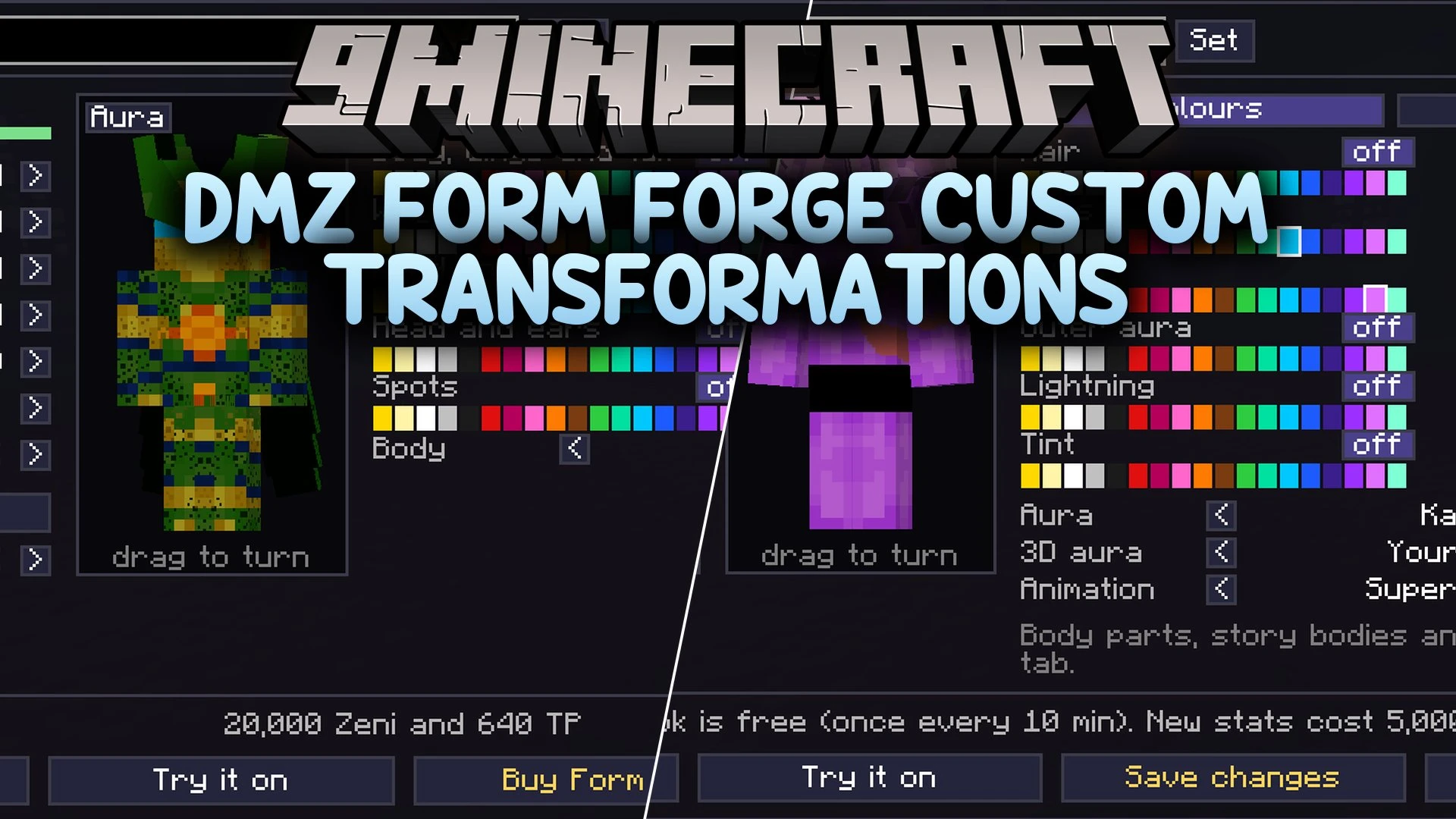
Features:
- Custom Stat Distribution: lets you spread your power pool across Strength, Strike, Ki Power, Defense, and speed.
- Visual Customization: offers color choices for hair, eyes, auras, secondary outer auras, lightning sparks, and body tints.
- Drain Control: lets you reduce Ki drain for a lower stat budget, increase Ki drain for more power, or drain health points instead of Ki.
- Body Borrowing: lets you apply the visual body of any unlocked story form that you have mastered to 75 percent.
- Two Progression Tiers: unlocks Form I after completing the Buu saga and unlocks Form II once Form I reaches complete mastery.
- Form Preview: provides a free 15-second trial in the transformation or an aura toggle switch directly on the preview menu.
- Adjusts your character size to make you slightly smaller or larger than your base form.
- Lets you add race-specific pieces including tails, wings, skin textures, plates, spots, and hair.
- Permits custom naming so other players can see your chosen title on the form selection wheel.
- Updates the Ki HUD to show your custom form name and timer alongside normal transformations.
- Keeps visual edits free of charge while stat edits cost a small amount of TP.
- Works alongside DMZ Sparking so its transformations appear in the body list.
- Lets server players without the mod join games and use a simpler chest menu.
- Includes server files in
serverconfig/formforge-server.tomlto set unlock quests, TP costs, form strength, and color lists.
Commands:
/forge: opens the form creator menu to design or preview transformations.
How to Use:
- Type
/forgein chat to open the transformation creator interface. - Pick your visual details, including aura styles, hair types, race parts, and body colors.
- Allocate your available stat budget across Strength, Strike, Ki Power, Defense, and speed.
- Toggle the preview aura or start the 15-second free test to see the transformation in action.
- Complete the Buu saga questline to purchase and equip your created form with TP.
- Train and master your custom form completely to unlock the stronger Form II stage.
Screenshots:


How to Install:
New to Minecraft? Follow our step-by-step guide to install Mods on your PC.View Guide
Requirements:

DMZ Form Forge Custom Transformations Mod Download Links
For Minecraft 1.20.1, 1.20
Click to rate this post!
[Total: 0 Average: 0]
QUICK MINECRAFT SURVEY · ONE TAP
Mods & Modpacks
Where do you primarily download your mods and modpacks from?
29 responses · See the full results →
You May Also Like
Picked for this page
 Snowballs Freeze Mobs Mod (26.3, 1.20.1) – Stop Charging Mobs in Their Tracks
 Gravestone Mod (26.3, 1.20.1) – Death Is No Longer the End
 Cobblemon Spawn Alerts Mod (1.21.1, 1.21) – Never Miss a Rare Pokemon Spawn
 Starch Scorch Blaze Mod (1.21.1, 1.20.1) – Fight Spreading Wildfires
 Fire&Flight Mod (1.20.1) – Raise Dragon Hatchlings and Dominate the Open Skies
 Judaism Datapack Mod (26.3) – Follow Kosher Laws and Observe the Weekly Sabbath
 Tumbler and Torsion Mod (1.21.1, 1.20.1) – Protect Your Chests and Pick Any Lock
 Cursed Fate Ten Shadows Mod (1.20.1) – Summon and Tame Ten Shikigami for Combat
 SeamlessLib Mod (26.3, 1.20.1) – Run Custom Food Buffs and Item Salvaging
 Ride Every Thing Mod (26.1.2, 1.20.1) – Hop on Any Mob and Ride It
 Deep Dark Binding Mod (1.21.8, 1.21.1) – Conquer Caverns with Heavy Hammers
 Big Guy Cole’s Machinery Mod (26.3, 1.20.1) – Automate Mining with Quarries
Most viewed in Mods over the last 7 days
 Ala Industrial Mod (26.3) – Run Electric Power Grids and Automated Factories
 PleasureCraft Mod (26.3, 1.21.1) – Jenny Mod Remake for Fabric
 Jennycraft Mod (26.3, 1.20.1) – Virtual Girlfriend in Minecraft
 Fapcraft Mod (26.3, 1.12.2) – Comprehensive and Detailed Content
 Jenny Mod (Fapcraft) Official Complete Guide – How to use, Tutorial
 Meteor Client Mod (26.3, 1.20.1) – Xray, HUD, Fly
 BangCraft Mod (1.20.1) – Jenny, Ellie and Elliot
 OptiFine HD (26.3, 1.20.1) – Run Faster, FPS Boost, Shaders Support
 Fabric Loader (26.3, 1.20.1) – Fabric Installer for All Minecraft Versions
 SeedCrackerX Mod (26.3, 1.20.1) – Find Any World Seed
 CatLean Client Mod (26.2, 1.21.11) – ThunderHack Recode Alternatives
 Baritone Client Mod (26.3, 1.20.1) – Autominer, Build with AI, Xray
More from Mods
 Buffs Optimizer Mod (1.21.11, 1.21.1) – Smoother High-Ping PvP Combat
 Pyke-lib Mod (26.1.2, 1.20.1) – Send Custom Colored System Alerts
 Create Toolbox Tooltip Mod (1.21.1, 1.20.1) – Find Stored Items Without Opening
 Ne V Seti Mod (1.16.5) – Manage Server Player Data While They Are Offline
 Sable Bridge Mod (1.21.1) – Run Physics Mods on Pojav Launcher
 Level Storage FE Mod (1.20.1) – Power Your Late-Game Tech Base Without Cables
 Zombies Utils Core Mod (26.3, 1.21.11) – Power Up Your Hypixel Zombies Client
 Text Placeholder API Mod (26.1.2) – Backend Library for Custom In-Game Text
 Xeno Tech Vehicles Mod (1.21.1) – Assemble Armored Sci-Fi Vehicles
 Nebula Pre Generator Mod (26.3, 1.20.1) – Start Every New World
 Ancient City Companion Mod (26.3) – Loot the Deep Dark Without Waking the Warden
 Telekinesis Mod (1.20.1) – Grab Helpless Mobs and Launch Them

This post has no comments yet. Be the first — your comment will appear here.