Mod Coder Pack (26.1, 1.20.1) – Decompiling, Custom Minecraft Code Workspace

 0
0  4 hours ago
Mod Coder Pack (26.1, 1.20.1) is a tool that helps you decompile, study, and modify Minecraft source code to create custom clients.
How to use:
- Open the project in IntelliJ and import
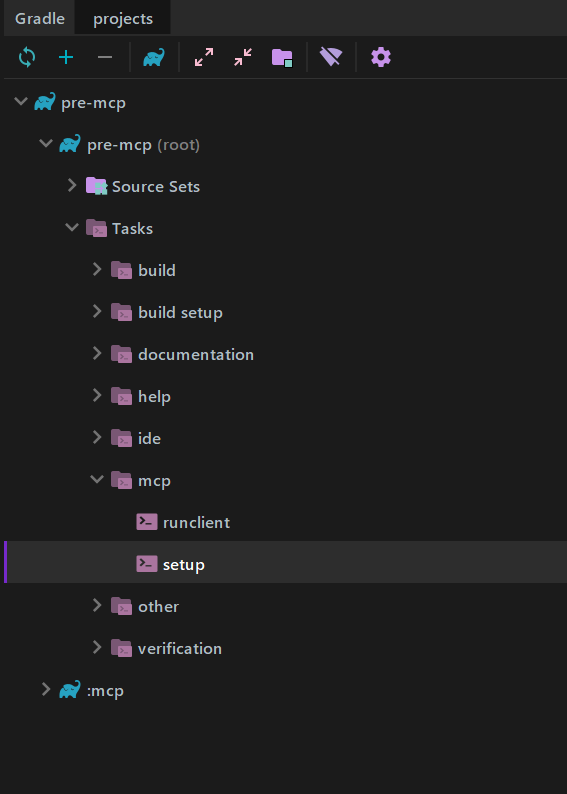
build.gradle. - Open Gradle panel → run
setuptask (inside themcpfolder). 
- After setup:
- Source code will appear in the
srcfolder. - Edit the code as needed.
- Source code will appear in the
- To test:
- Run
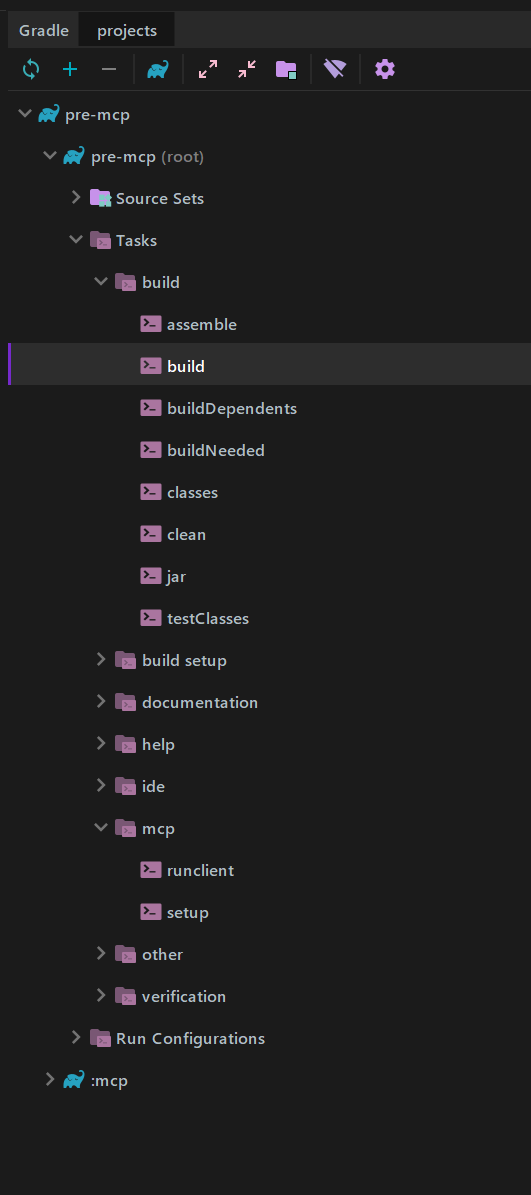
runclienttask, or use the generatedMinecraftrun configuration.
- Run
- To build:
- Run
buildtask. - Output file will be in
build/libs/.
- Run
Make the custom version runnable:
- Go to Minecraft
versionsfolder:- Windows:
AppData/Roaming/.minecraft/versions - Linux:
~/.minecraft/versions
- Windows:
- Copy a base version folder (example:
1.16.5) and rename it (example:1.16.5_custom). - Inside the new folder:
- Delete original
.jar - Rename
.jsonto match folder name - Edit
"id"in JSON to match the new name - Remove the
"downloads"section
- Delete original
- Copy your built
.jarinto this folder and rename it to match. - Open both JAR files and copy:
assetsfolderdatafolderpack.pngpack.mcmeta
- Delete
META-INFfolder inside your new JAR.
Run in launcher:
- Restart Minecraft Launcher.
- Create a new installation.
- Select your custom version.
- Click Play.
Requires:
- Java requirements:
1.17 and below→ JDK 161.18 – 1.20→ JDK 171.21+→ JDK 21
Mod Coder Pack (26.1, 1.20.1) Download Links
For Minecraft 1.14.4
For Minecraft 1.15.2
For Minecraft 1.16.5
MOJO Mappings version: Download from Server 1
For Minecraft 1.17.1
For Minecraft 1.18.2
For Minecraft 1.19.2
For Minecraft 1.19.4
For Minecraft 1.20.1
For Minecraft 1.20.2
For Minecraft 1.21+
Click to rate this post!
[Total: 0 Average: 0]
You May Also Like