
Ore Distribution Scanner Mod (26.3, 1.20.1) – Stop Guessing Where Ores Generate
 0
 0

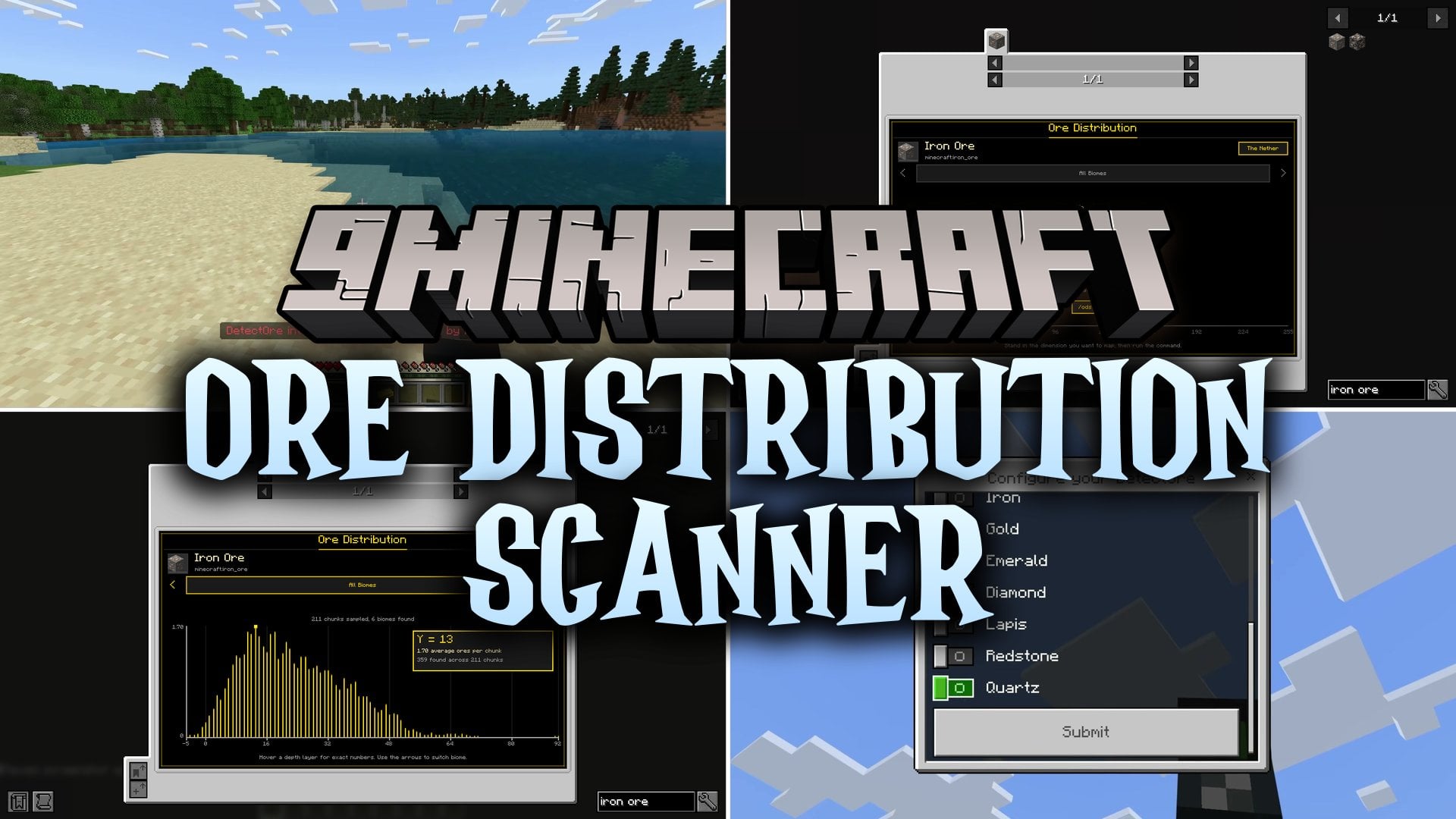
Ore Distribution Scanner Mod scans the terrain around you to show the exact Y level where any ore generates in your world. Instead of guessing where to strip-mine, you can check JEI, EMI, or REI to see real depth graphs based on your specific world seed and modpack. The mod runs in the background without stopping the server or changing any blocks. It works with both vanilla and modded ores, and it saves your scan data so you do not have to scan the same chunks twice.
Features:
- Background Terrain Scanning: Sweeps loaded chunks live and reads unloaded chunks straight from region files on a background worker.
- Recipe Viewer Graphs: Draws depth distribution graphs in JEI, EMI, and REI with depth from left to right and frequency shown as gold bars.
- Per-Biome Breakdown: Counts every ore by type and exact Y level, then groups the data by biome with a selector to switch between them.
- Read-Only Safety: Never generates new chunks or edits any blocks in your world during a scan.
- Modded Ore Compatibility: Detects modded ores automatically using ore tags, plus custom whitelist and blacklist options.
- Hovering over a point on the graph shows the exact average per chunk and the raw sample count.
- Biomes with very few sampled chunks get a low-confidence warning badge and discrete bars instead of a smooth graph.
- Saves scan results per world in an
ore_distribution_scannerfolder and sends them back to players when they rejoin. - Prints ore distribution info and peak depths directly in the chat or dedicated server console.
- Works in singleplayer without cheats enabled because all commands default to permission level 0.
- Checks for newer versions once per game start and notifies you in chat if an update is available.
Commands:
/ods scan: Scans the terrain in one dimension, a comma-separated list of dimensions, orall, with an optional radius./ods status: Reports the current scan progress./ods cancel: Stops the active scan./ods info <ore>: Prints the primary peak, secondary peak, top biomes, and total count found for a specific ore in chat./ods list <dimension>: Prints every scanned ore in a dimension along with its most common Y level./ods reload: Re-reads the config file without restarting the game./ods clear <dimension>: Deletes saved scan data for one dimension./ods clear all confirm: Deletes all saved scan data for the world.
Configuration:
scan_radius_chunks: Sets the chunk radius for each scan.biome_cluster_size: Controls how biome samples are grouped during a scan.chunk_budget: Limits the chunk processing load per scan cycle.progress_update_interval_seconds: Sets how often the scan reports progress updates.low_confidence_sample_threshold: Sets how few sampled chunks mark a biome as low-confidence.scan_permission_level: Sets who can run scan, cancel, clear, and reload commands (0 lets everyone use them).ore_whitelist: Adds comma-separated block IDs to count as ores.ore_blacklist: Removes comma-separated block IDs from counting as ores.check_for_updates: Turns the startup update check on or off inside the[updates]section.
How to Use:
- Load into your world and run
/ods scanin the chat to start scanning your existing terrain. - Wait for the scan to finish, or check its progress anytime with
/ods status. - Open your inventory and look up any ore in JEI, EMI, or REI to view its depth distribution graph.
- Click the biome arrows on the graph to switch between the dimension-wide view and specific biomes.
- Run
/ods infoor/ods listin chat if you prefer reading the results as text or if you play on a version without recipe viewer graphs.
Screenshots:


How to Install:
New to Minecraft? Follow our step-by-step guide to install Mods on your PC.View Guide
Requirements:
 NeoForge Required
 Minecraft Forge Required
 Fabric Loader Required
 Fabric API Required
Just Enough Items (JEI) Required
 Roughly Enough Items Mod Required
 Distraction Free Recipes Mod Required
 Cloth Config API Required
Architectury API Required
Ore Distribution Scanner Mod Download Links
For Minecraft
26.3,
26.2,
26.1.2
All Versions Covered
26.3
26.2
26.1.2
26.1.1
26.1
1.21.11
1.21.10
1.21.9
1.21.8
1.21.7
1.21.6
1.21.5
1.21.4
1.21.3
1.21.2
1.21.1
1.21
1.20.6
1.20.5
1.20.4
1.20.3
1.20.2
1.20.1
1.20
1.19.4
1.19.3
1.19.2
1.19.1
1.19
1.18.2
1.18.1
1.18
1.17.1
1.17
1.16.5
1.16.4
1.16.3
1.16.2
1.16.1
1.16
1.15.2
1.15.1
1.15
1.14.4
1.14.3
1.14.2
1.14.1
1.14
All Versions Covered
26.3
26.2
26.1.2
26.1.1
26.1
1.21.11
1.21.10
1.21.9
1.21.8
1.21.7
1.21.6
1.21.5
1.21.4
1.21.3
1.21.2
1.21.1
1.21
1.20.6
1.20.5
1.20.4
1.20.3
1.20.2
1.20.1
1.20
1.19.4
1.19.3
1.19.2
1.19.1
1.19
1.18.2
1.18.1
1.18
1.17.1
1.17
1.16.5
1.16.4
1.16.3
1.16.2
1.16.1
1.16
1.15.2
1.15.1
1.15
1.14.4
1.14.3
1.14.2
1.14.1
1.14
For Minecraft 1.12.2
Click to rate this post!
[Total: 0 Average: 0]
You May Also Like
Picked for this page
 Connected Glass Mod (26.3, 1.20.1) – Build Borderless Windows
 Ok Zoomer Mod (26.3, 1.20.1) – Spot Distant Targets with Smooth Camera Zooming
 Shulker Drops Two Mod (26.3, 1.20.1) – Farm Endless Shulker Shells
 Conduits Prevent Drowned Mod (26.3, 1.20.1) – Build Peaceful Underwater Bases
 AEInfinity Booster Mod (26.3, 1.20.1) – Open AE2 Storage Anywhere
 Expanded Armor Enchanting Mod (26.2, 1.20.1) – Combine Multiple Protection
 Controlling Mod (26.3, 1.20.1) – Quickly Find Conflicting Key Bindings
 Memory Settings Mod (26.3, 1.20.1) – Stop Lag and Freezes
 Daily Dad Mod (26.2, 1.20.1) – Get a New Dad Joke Every Time You Join
 Simple Radio Mod (1.21.11, 1.20.1) – Coordinate with Teammates
 Sticky Notes Mod (26.3, 1.21.1) – Never Lose Your Way Across Biomes Again
 Haybale Mod (1.21.8, 1.20.1) – Build Complex Systems Without Any Lag
Most viewed in Mods over the last 7 days
 Ala Industrial Mod (26.3) – Run Electric Power Grids and Automated Factories
 PleasureCraft Mod (26.3, 1.21.1) – Jenny Mod Remake for Fabric
 Jennycraft Mod (26.3, 1.20.1) – Virtual Girlfriend in Minecraft
 Fapcraft Mod (26.3, 1.12.2) – Comprehensive and Detailed Content
 Jenny Mod (Fapcraft) Official Complete Guide – How to use, Tutorial
 Meteor Client Mod (26.3, 1.20.1) – Xray, HUD, Fly
 Let it Walk Mod (1.21.1) – Pilot Spider Tanks and Mechs Built From Your Blocks
 BangCraft Mod (1.20.1) – Jenny, Ellie and Elliot
 OptiFine HD (26.3, 1.20.1) – Run Faster, FPS Boost, Shaders Support
 CatLean Client Mod (26.2, 1.21.11) – ThunderHack Recode Alternatives
- Fabric Loader (26.3, 1.20.1) – Fabric Installer for All Minecraft Versions
 SeedCrackerX Mod (26.3, 1.20.1) – Find Any World Seed
More from Mods
 TONI’s Weaponry Mod (26.3, 1.20.1) – Fight with Parries, Backstabs
 FF Food Spoilage and Preservation Mod (26.3, 1.21.1) – Keep Your Food Fresh
 Vanilla Animated Guns Mod (1.21.1, 1.20.1) – Fight Mobs with Blocky
 Faster Shadow Mapper FSM Mod (26.3, 1.20.1) – Keep Shaders Smooth in Sign-Heavy
 Weapons of War Mod (26.1.2) – Master 26 Weapons That Each Fight Their Own Way
 Lemon’s Dappled Update Mod (1.21.8) – Wander Colorful Forests and Tap Maple
 Wildlife Explorers Mod (1.20.1) – Track Real Wild Animals Across Every Biome
 Potions Return Mod (1.20.1) – Brew Luck Potions From Flower Forest Clovers
 Terra Firma Furniture Mod (1.21.1) – Furnish Every TFC Cabin, Kitchen, and Home
 Raid Wormhole Mod (1.21.1) – Walk Into Glowing Portals to Start Cobblemon Raids
 Chat Vote Mod (1.21.11, 1.21.1) – Let Your Server Settle Every Debate
 Backpacks OG Upgradable Backpacks & Bags Mod (26.3, 1.20.1)

This post has no comments yet. Be the first — your comment will appear here.