
Repeater Sound Mod (26.3, 1.20.1) – Hear Every Single Redstone Click
 387
 0


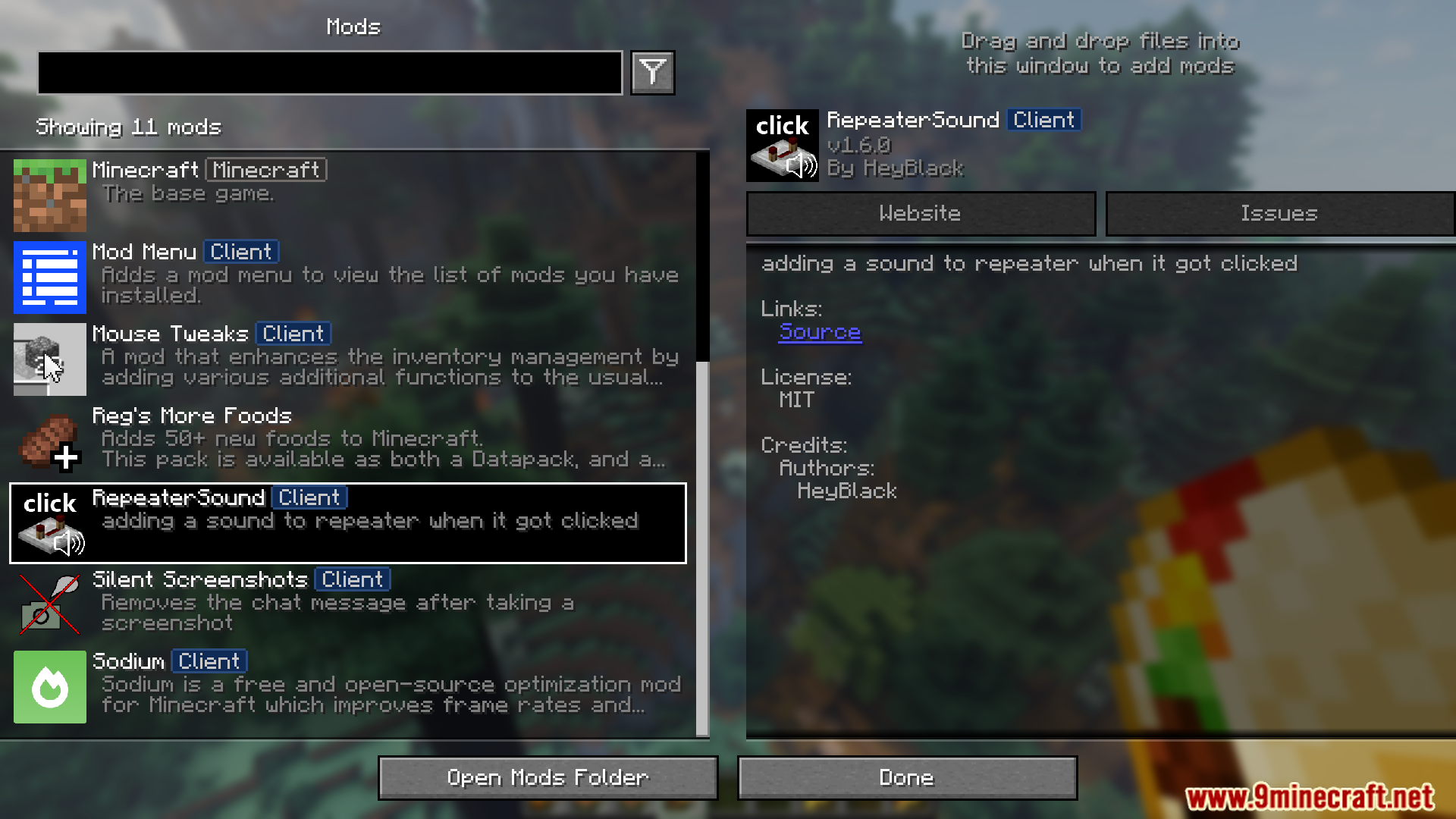
Repeater Sound Mod adds click sounds to key redstone components when players interact with them. It allows you to adjust pitch, volume, and interaction modes for a more immersive building experience. With flexible settings, the mod gives a practical and engaging way to monitor redstone interactions.

Features:
- Adds click sounds to redstone components such as repeaters, comparators, redstone wire, and daylight detectors.
- Provides adjustable sound settings, including pitch, volume, and random pitch offsets.
- Includes customizable interaction modes to change how blocks behave when clicked.
- Changes sound pitch based on repeater delay settings.
- Varies sound pitch with redstone wire shape and daylight detector mode.
- Sends chat alerts and supports commands for fine-tuned control over alarm messages.
Commands:
/repeatersound setBasePitch <pitch>: Adjusts the base pitch applied to sounds, requiring a float number./repeatersound useRandomPitch <random>: Sets if a random offset applies to the base pitch using a boolean value./repeatersound setVolume <volume>: Sets the volume of the sounds using a float number./repeatersound interactionMode <mode>: Switches between interaction modes like NORMAL, ALARM, and DISABLED./repeatersound alarmMessage <message>: Sets the message sent in ALARM interaction mode./repeatersound disabledMessage <message>: Sets the message displayed on screen in DISABLED interaction mode.
How to Use:
- Click on redstone components like repeaters, comparators, redstone wire, or daylight detectors to trigger custom sounds.
- Type
/repeatersound interactionMode <mode>in chat using uppercase arguments (NORMAL, ALARM, DISABLED) to change block behavior. - Use the in-game command options to adjust pitch, volume, and custom messages.
Screenshots:
How to Install:
New to Minecraft? Follow our step-by-step guide to install Mods on your PC.View Guide
Requirements:

Repeater Sound Mod Download Links
For Minecraft 26.3
For Minecraft 26.2
For Minecraft 26.1.2, 26.1.1, 26.1
For Minecraft 1.21.11
For Minecraft 1.21.4
For Minecraft 1.20.6
For Minecraft
1.20.4,
1.20.3,
1.20.2
All Versions Covered
1.20.4
1.20.3
1.20.2
1.20.1
1.20
1.19.4
1.19.3
All Versions Covered
1.20.4
1.20.3
1.20.2
1.20.1
1.20
1.19.4
1.19.3
For Minecraft
1.18.2,
1.18.1,
1.18
All Versions Covered
1.18.2
1.18.1
1.18
1.17.1
1.17
1.16.5
1.16.4
1.16.3
1.16.2
1.16.1
1.16
All Versions Covered
1.18.2
1.18.1
1.18
1.17.1
1.17
1.16.5
1.16.4
1.16.3
1.16.2
1.16.1
1.16
Click to rate this post!
[Total: 0 Average: 0]
You May Also Like
Picked for this page
 BetterHurtCam Mod (26.3, 1.20.1) – Camera Customization Unleashed
 All The Tweaks Mod (26.1.2, 1.20.1) – Useful for All The Mods Modpacks
 OpenBlocks Elevator Mod (26.3, 1.20.1) – Fastest Elevator Ever
 Reap Mod (26.3, 1.20.1) – Auto Tree Mining, Auto Farming
 Vanilla Refresh Mod (1.21.11, 1.20.1) – Elevating the Classic Minecraft Experience
 Anvil Restoration Mod (26.3, 1.20.1) – Repair Placed Anvils
 HCsCR Mod (26.1.2, 1.20.1) – Haram Clientside Crystal Remover
 Bigger Sponge Absorption Radius Mod (26.3, 1.20.1) – Expanded Absorption Radius
 Blur Plus Mod (26.3, 1.20.1) – Enhance Your GUI With Blur Effects
 Scoreboard Overhaul Mod (26.3, 1.20.1) – A Fresh Look For Your Sidebar
 Refined Advancements Mod (26.1.1, 1.20.1) – New Goals And Milestones
 Dye All The Things Mod (26.3, 1.20.1) – Ultimate Armor Dyeing Mod
Most viewed in Mods over the last 7 days
 Ala Industrial Mod (26.3) – Run Electric Power Grids and Automated Factories
 PleasureCraft Mod (26.3, 1.21.1) – Jenny Mod Remake for Fabric
 Jennycraft Mod (26.3, 1.20.1) – Virtual Girlfriend in Minecraft
 Fapcraft Mod (26.3, 1.12.2) – Comprehensive and Detailed Content
 Jenny Mod (Fapcraft) Official Complete Guide – How to use, Tutorial
 BangCraft Mod (1.20.1) – Jenny, Ellie and Elliot
 Fabric Loader (26.3, 1.20.1) – Fabric Installer for All Minecraft Versions
 The Shooting Star Demo Mod (26.3, 1.20.1) – Vaporize Terrain From Orbit
 Meteor Client Mod (26.3, 1.20.1) – Xray, HUD, Fly
 OptiFine HD (26.3, 1.20.1) – Run Faster, FPS Boost, Shaders Support
 Aristois Client Mod (1.21.4, 1.20.1) – World Class Minecraft Utility
 Prestige Client Mod (1.21.11, 1.21.4) – Powerful Ghost Features for Crystal & Sword PvP
More from Mods
 Simply Light 9minecraft Mod (26.3) – Decorate Builds Without Torches
 Alex’s Caves Continued Mod (26.3, 1.20.1) – Conquer Six Massive Underground
 Anvil Uses Mod (26.3, 1.20.1) – Track Item Anvil Usage
 Animal Info Mod (26.3, 1.21.11) – Quick Stats For Your Animals
 Timber Tales Dynamic Tree System Mod (26.3, 1.20.1) – Watch Entire Trees Topple
 Gabou’s Libs Mod (26.3, 1.20.1) – Keep Custom Weather and Survival Mods Stable
 /Sit Mod (26.3, 1.21.1) – Make The Player Sit Down
 Arcane Redstone Dial Mod (26.3, 1.20.1) – Trigger Commands and Shortcuts
 The Graveyard Mod (26.3, 1.20.1) – Cemeteries in Minecraft
 Enhanced Overlay Mod (26.3, 1.21.11) – Remove Screen Clutter
 Flint Mod (1.21.11) – Run DiamondFire Community Addons Without Crashing
 Not Just Sandwich Mod (26.3, 1.20.1) – Edibles, Sandwiches

This post has no comments yet. Be the first — your comment will appear here.