
Structure In One Click Addon (26.x, 1.21) – Spawn Complete Castles
 12,438
 0

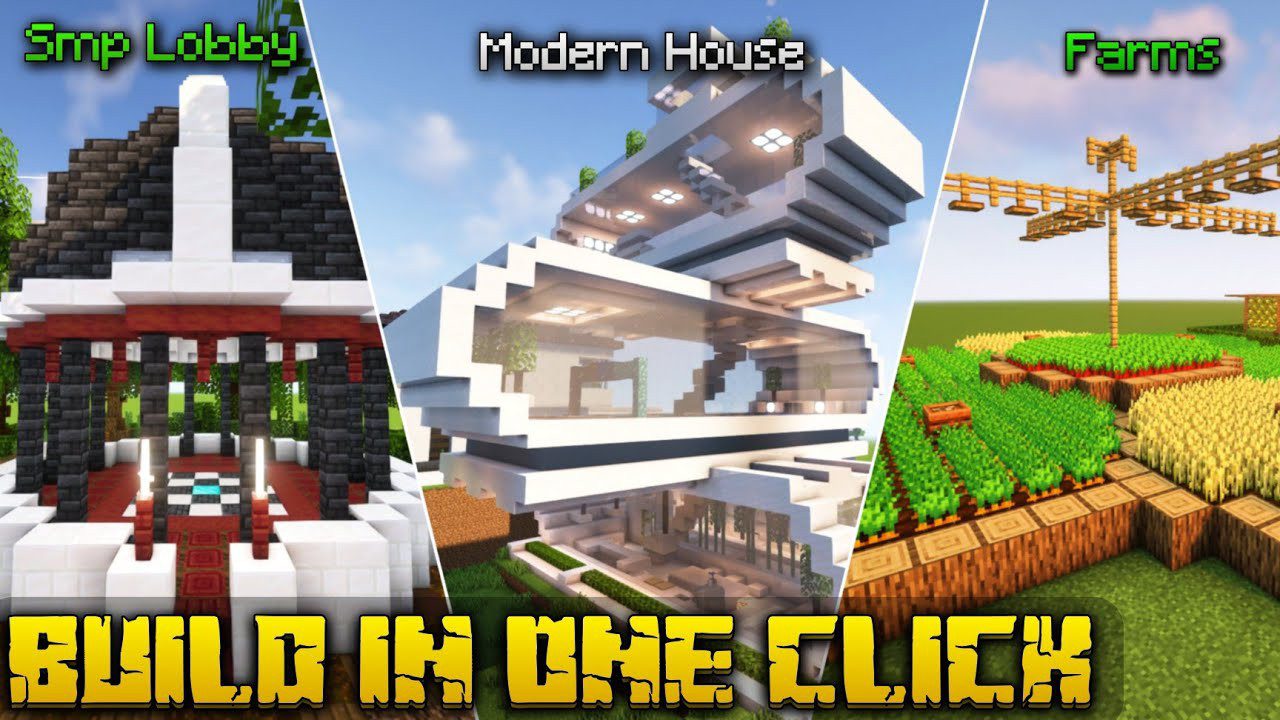
Structure In One Click Addon lets you place over 150 ready-made builds in your Minecraft world with one click. This addon adds a craftable Hammer tool that opens a simple category menu right on your screen. You can spawn modern houses, medieval homes, stone castles, treehouses, farms, custom Nether portals, underground bases, and minigames right in front of you. A green Undo button lets you remove your last build if you want to move it or try another one. It works in Survival Mode and keeps your world achievements turned on.
Features:
- Adds over 150 ready-made structures that appear right in front of you with one click.
- Includes a craftable Hammer made from 5 Iron Ingots and 2 Sticks that opens the building menu anywhere you want to build.
- Sorts all builds into clear menu categories so you can find the structure you want fast.
- Provides a green Undo button in the menu to remove the last structure you placed if you want to move it or pick another design.
- Works in Survival Mode without turning off your world achievements.
- Supports Structure Blocks and chat commands so you can check build lists and load structures by name.
Included Structure Types:
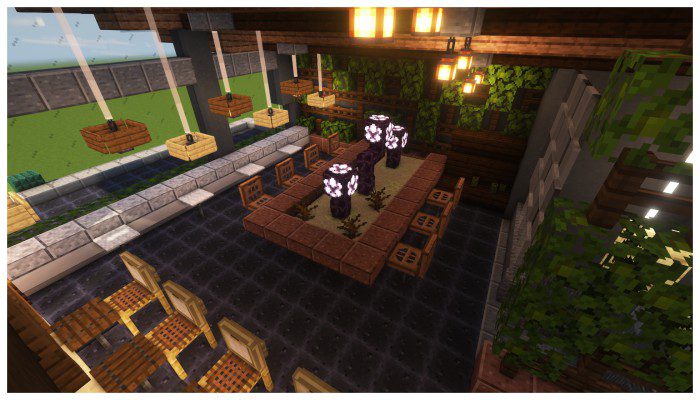
- Houses and bases: modern houses with wooden dining tables, chairs, and hanging lanterns, medieval houses, duo houses, treehouses, log shelters, stone castles, and underground houses.
- Farms and portals: ready-made farms and custom Nether portals built with cherry wood, stone bricks, and oak logs.
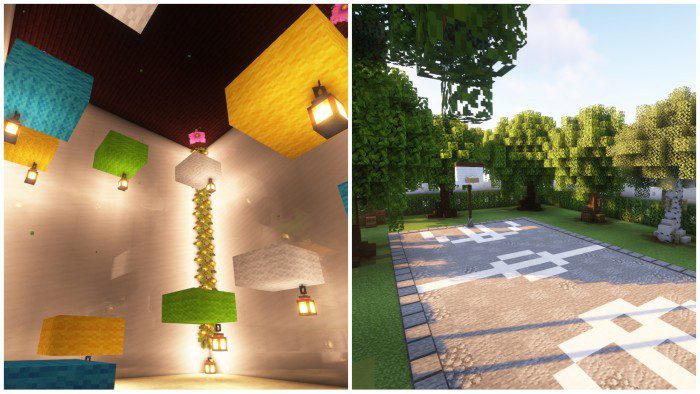
- Minigames and lobbies: SMP lobbies, outdoor basketball courts, and indoor parkour courses made with colorful blocks.
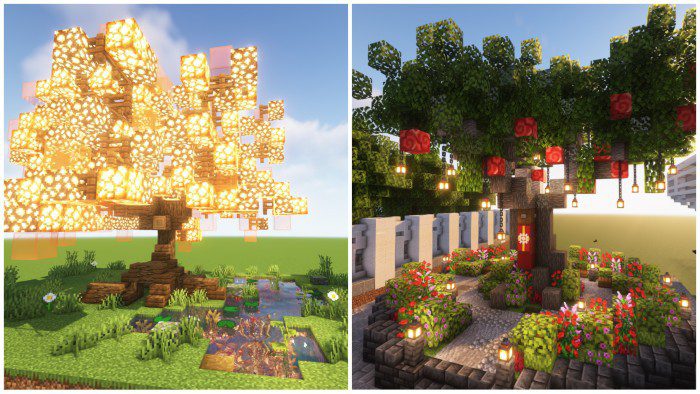
- Decorations: fountains, floor designs, custom decorative trees with glowing blocks and lanterns, and flower gardens next to ponds.
Commands:
/function list1: shows the first list of structure names in chat./function list2: shows the second list of structure names in chat./give @p structure_block: gives you a Structure Block to load builds by name.
How to Use:
Using the Hammer:
- Craft the Hammer using 5 Iron Ingots and 2 Sticks.
- Use the Hammer on any spot where you want to build to open the category menu.
- Select a category from the menu, such as houses, farms, portals, or underground bases.
- Pick a structure from the list and click its button; the build spawns right in front of you.
- Use the Hammer again and press the green Undo button to remove the last structure you placed.
Using a Structure Block:
- Open chat and type
/function list1or/function list2to view the available structure names. - Type
/give @p structure_blockin chat to get a Structure Block. - Place the Structure Block on the ground where you want the build to appear.
- Open the Structure Block and switch its mode from Save to Load.
- Type the name of your chosen build and click the Load button to spawn it.
Screenshots:
Decorations:
Minigames:
House With Interior Design:
How to Install:
New to Minecraft PE? Follow our step-by-step guide to install Mods/Addons on your Mobile.View Guide
Structure In One Click Addon Download Links
For MCPE/Bedrock 26.x, 1.21.x
For MCPE/Bedrock 1.21.x
For MCPE/Bedrock 1.19.x
You May Also Like
Picked for this page
 Raiyon’s Dynamic Lighting Addon (26.x, 1.21) – MCPE/Bedrock Mod
 Morphing Bracelet Addon (26.x, 1.21) – MCPE/Bedrock Edition Mod
 Definitive Tree Capitator Addon (26.x, 1.21) – Chop Down Tree Mod
 More Body Actions Addon (26.x, 1.21) – MCPE/Bedrock Mod
 Abandoned & Ruin Structures Addon (26.x, 1.21) – MCPE/Bedrock Mod
 Creepypasta From The Fog Addon (26.x, 1.21) – MCPE/Bedrock Mod
 NPC Expansion Addon (26.x, 1.21) – MCPE/Bedrock Custom NPC Mod
 Poke’s Fantasy Expansion Addon (26.x, 1.21) – MCPE/Bedrock Mod
 Sync Minecraft Time with Real-Time Addon (26.x, 1.21) – MCPE/Bedrock
 Buscando Aventuras Addon (26.x, 1.21) – MCPE/Bedrock Mod
 RPG Damage Indicator Addon (26.x, 1.21) – MCPE/Bedrock Mod
 No Spear Blindspot Addon (26.x, 1.21) – MCPE/Bedrock Mod
Most viewed in Mods & Addons over the last 7 days
 Mob Girls Addon (1.26+, 1.21) – MCPE/Bedrock Mod
 Secrets of Berk Addon (26.33+) – How To Train Your Dragon Mod MCPE/Bedrock
 Jenny Colette Version Addon (26.x, 1.21) – MCPE/Bedrock Mod
 Jujutsu Awakening Addon (1.26+, 1.21+) – Prison Realm Update
 New Jujutsu Awakening Addon (1.26+) – MCPE/Bedrock
 Jenny Add-on (Fapcraft) APK MCPE Full Guide – How to use, Tutorial
 Shadow Company Addon (26.x, 1.21) – MCPE/Bedrock Mod
 Titan Craft Addon (1.26+, 1.21) – MCPE/Bedrock Attack on Titan Mod
 Asa’s One Piece Addon (1.26+, 26.32) – MCPE/Bedrock Mod
 Raxiores of Raxiore Addon (1.26+) – MCPE/Bedrock
 Fapcraft Addon (1.26, 1.21) – MCPE/Bedrock Jenny Mod
 Naruto Jedy Addon V8 (26.30+, 1.18+) for MCPE/Bedrock Edition
More from Mods & Addons
 Fantasy Villagers Remake (26+, 1.21) – MCPE/Bedrock Addon
 Siren Head: The Siren’s Field (26+, 1.21) – MCPE/Bedrock Addon
 CocoaWarrior’s Minecraft Redone (26+) – MCPE/Bedrock Addon
 One-Way Ghost Blocks (26+, 1.21) – MCPE/Bedrock Addon
 BLOOD STEVE (26+) – MCPE/Bedrock Addon
 RS Craft Modpack (26+, 1.21) – MCPE/Bedrock Addon
 Fast And Furious Vehicle Pack (26+, 1.21) – MCPE/Bedrock Addon
 The Last Dragon (26+) – MCPE/Bedrock Addon
 KwZ’s Essence (26+) – MCPE/Bedrock Addon
 Cavern Calamity (26+) – MCPE/Bedrock Addon
 Advanced Dynamic Lighting (26+, 1.21) – MCPE/Bedrock Addon
 Guard Villagers (26+) – MCPE/Bedrock Addon

This post has no comments yet. Be the first — your comment will appear here.