
Spotify Control Mod (1.21.11, 1.21.1) – Stream Music with Floating 3D Lyrics
 11
 0

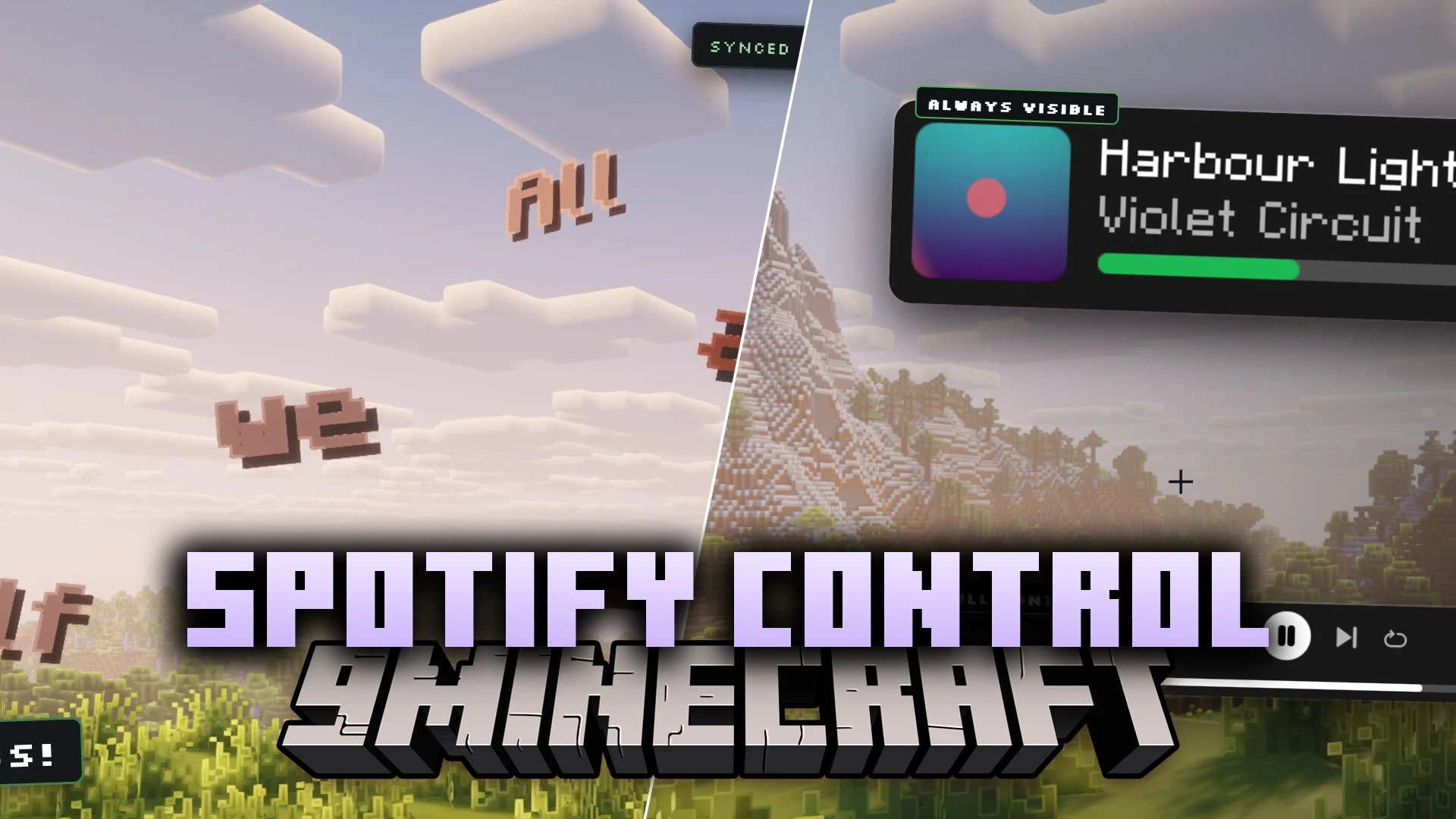
Spotify Control Mod adds a full Spotify overlay straight into Minecraft so you can control your music without leaving the game. Press Ctrl + M to open the menu, log into your account, browse your playlists, search for songs, and manage playback. The mod also lets you host multiplayer listening parties where friends on the server hear the exact same music, plus it spawns live 3D song lyrics floating in the world around you. Full playback control requires a Spotify Premium account, and broadcast listening parties use Simple Voice Chat to stream audio to other players.
Features:
- Full In-Game Spotify Overlay: Opens a full-screen menu using the official Spotify dark color theme (#121212 base and #1DB954 accent) with a sidebar, search page, library, playlist view, and bottom player bar.
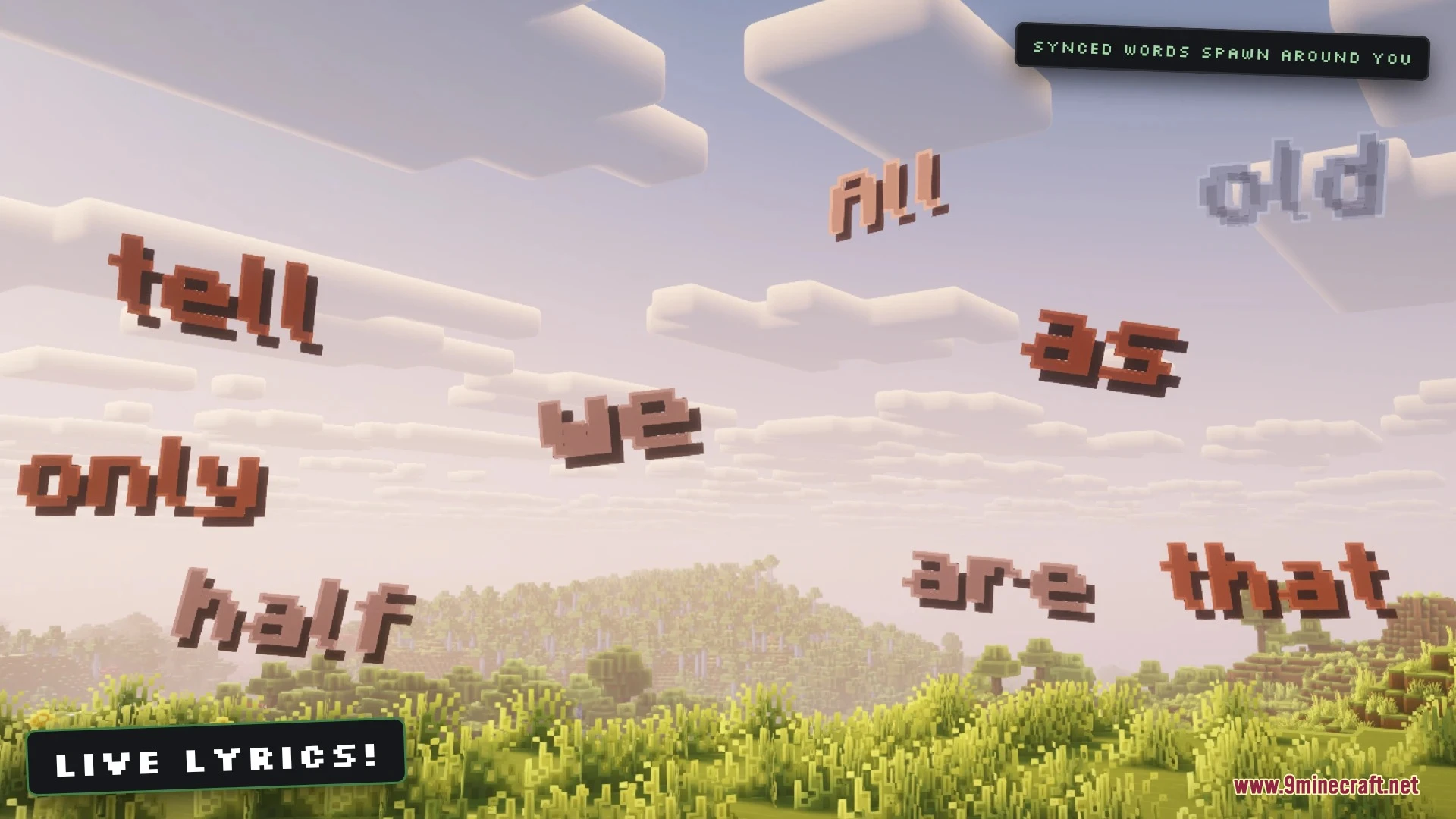
- 3D World Lyrics: Spawns synced lyrics from LRCLIB word by word as 3D text in front of you as the song plays, adjusting their distance and size in caves, forests, or while sprinting.
- Multiplayer Listening Parties: Lets you listen together with other players on the server using either account sync mode or live desktop audio streaming over Simple Voice Chat.
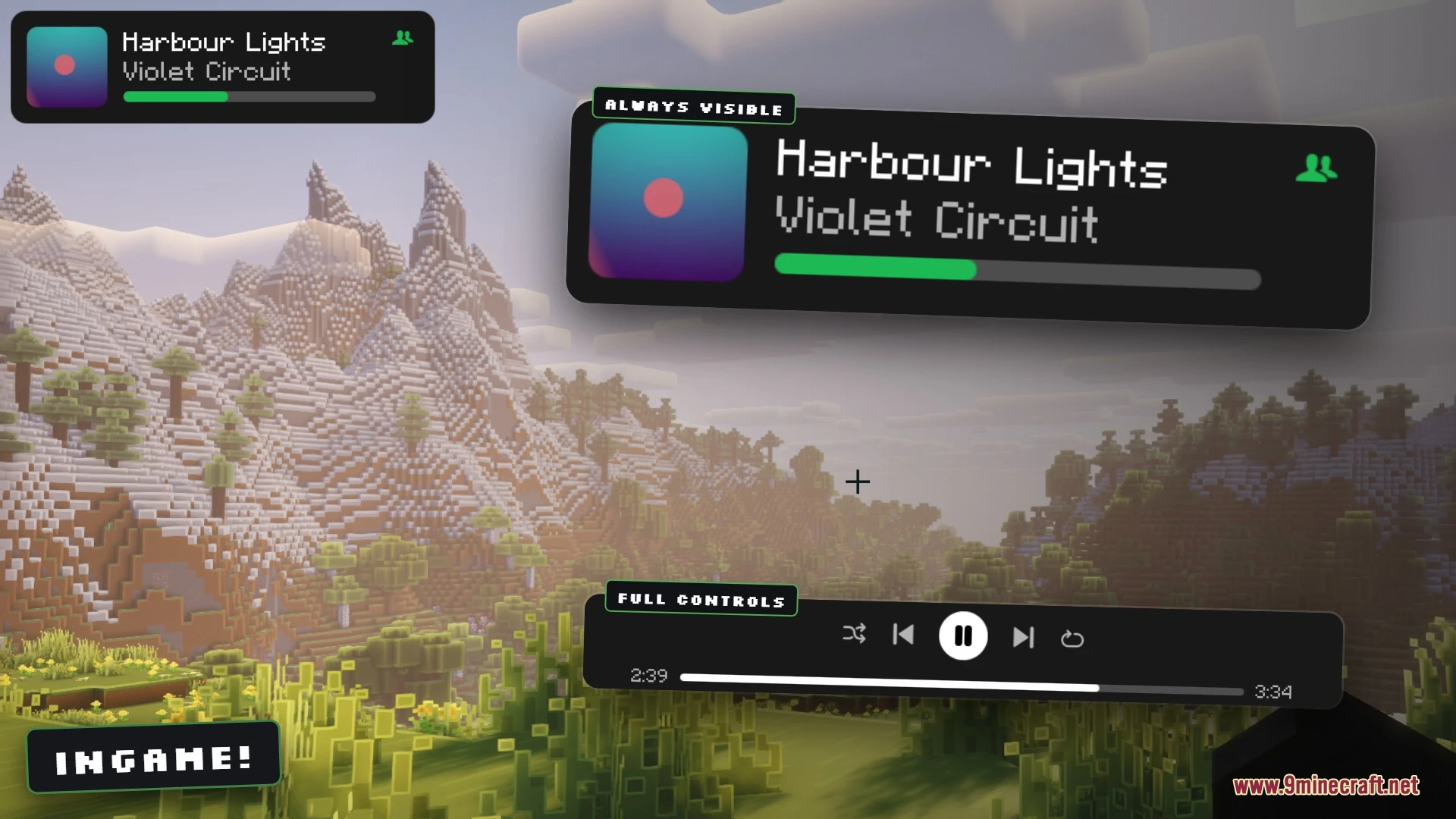
- Complete Playback Control: Lets you play, pause, skip to next or previous, seek through tracks, change volume, toggle shuffle or repeat, view the queue, and switch playback devices.
- Auto-Start Desktop App: Automatically starts the Spotify desktop app minimized in the background if no playback device is active when you press play.
- Corner Now-Playing HUD: Displays the current track, artist, and a progress bar in any corner of your screen while you play.
- Uses OAuth 2.0 login with PKCE where tokens are saved locally and refreshed automatically without needing a client secret.
- Browses your full library including personal playlists, Liked Songs, recently played tracks, top tracks, and individual playlist track lists.
- Shows a queue view with the current song on top that refreshes every 5 seconds and lets you click any track to jump straight to it.
- Searches across songs, playlists, albums, and artists with separate tabs for each type of result.
- Creates new playlists, adds or removes tracks from playlists, and likes or unlikes songs directly inside the game.
- Renders album cover art with rounded corners, downloading images on demand and caching them as GPU textures.
- Draws vector icons and panel corners at native screen resolution with anti-aliasing so the menu never looks blocky at any GUI scale.
- Renders the overlay at its own GUI scale (set to 2 by default) so it stays compact even when Minecraft runs at GUI scale 3 or 4.
- Includes six accent color palettes that apply instantly in the settings: green, orange, red, pink, purple, and blue.
- Works with Mod Menu so clicking the Configure button opens the overlay settings, even from the title screen.
- Translates the interface into seven languages: English, German, Russian, Spanish, French, Japanese, and Chinese.
3D World Lyrics Details:
- Each sung word appears on its own block, turns toward you once, and stays in place without covering other words or clipping into terrain.
- Words move closer and shrink in tight spaces like forests and caves, and spawn further ahead while you sprint.
- Lyrics fade out when their line finishes, after a set amount of time, or once a set word count is reached.
- A lyrics mark appears next to song titles in track lists to show which songs have synced lyrics available.
- A lyrics button next to the queue button turns world lyrics on or off; when switched off, no track titles or artist names are sent to LRCLIB.
Listening Party Modes:
- SYNC Mode (Default): The host sends the current track URI and timestamp to the server, which tells every party member’s client to play the exact same song and position on their own Spotify Premium account without sending audio through the server.
- BROADCAST Mode: Captures 20 ms frames of 48 kHz stereo audio from the host, downmixes them to mono, encodes them with Simple Voice Chat’s Opus encoder, and streams the live audio through the server to players who do not have Spotify.
- Broadcast Channels: Lets you choose between a locational broadcast where anyone within a set block radius hears the music, or static channels where only party members hear it anywhere in the world.
- Windows Audio Capture: Captures speaker sound automatically on Windows via “System sound (automatic)” with nothing extra to install, or lets you pick a manual loopback device like VB-Audio Virtual Cable or Stereo Mix to isolate Spotify from game and desktop sounds.
- Linux and macOS Audio Capture: Uses a selectable loopback input line such as the “Monitor of” source in PipeWire or PulseAudio on Linux, or a loopback driver like BlackHole on macOS.
How to Use:
Setting Up Your Spotify App:
- Open
developer.spotify.com/dashboardin your web browser and create a new app to get your own Client ID. - Add
http://127.0.0.1:8888/callbackas a Redirect URI in your Spotify app settings (if you changecallbackPortin the mod config, use that port number instead). - Copy the Client ID from your Spotify app page.
- In Minecraft, press Ctrl + M to open the overlay, click Settings in the sidebar, and paste your Client ID.
- Click Connect to Spotify; a browser tab will open for you to approve the permissions and then close itself automatically.
Controlling Music and Playback:
- Press Ctrl + M at any time in game to open or close the Spotify overlay.
- Click play on any song or playlist; if no Spotify device is running, the mod automatically launches the Spotify desktop app minimized in the background and transfers playback to it.
- Use the device menu in the bottom player bar if you want to switch playback to a web player, phone, or speaker.
- Note that a Spotify Premium account is required for play, pause, seek, and volume controls; free accounts can still browse the library, search, and see what is currently playing.
Screenshots:
How to Install:
New to Minecraft? Follow our step-by-step guide to install Mods on your PC.View Guide
Requirements:

Spotify Control Mod Download Links
For Minecraft
1.21.11,
1.21.10,
1.21.9
All Versions Covered
1.21.11
1.21.10
1.21.9
1.21.8
1.21.7
1.21.6
1.21.5
1.21.4
1.21.3
1.21.2
1.21.1
1.21
All Versions Covered
1.21.11
1.21.10
1.21.9
1.21.8
1.21.7
1.21.6
1.21.5
1.21.4
1.21.3
1.21.2
1.21.1
1.21
Click to rate this post!
[Total: 0 Average: 0]
You May Also Like
Picked for this page
 Gamingbarn’s Morphs Mod (26.3, 1.21.1) – Transform Into Any Creature
 Mo’ Villager Mod (26.3, 1.20.1) – Expand Village Life with New Specialized
 Squaremap Mod (26.3, 1.20.1) – Live Browser Map for Servers
 67 Client Mod (1.21.11) – Survive Anarchy Servers with Custom PvP Tools
 Limited Chunkloading Mod (26.3, 1.20.1) – Chunk Cleanup
 Little Joys Mod (26.3, 1.20.1) – Uncover Random Treasures While Mining
 Origins Legacy Mod (26.3, 1.21.1) – Play Classic Custom Origins
 Stonecutting Upgrade Mod (26.3, 1.21.1) – Craft Stone Blocks Faster
 Vivid Idle Exploration Mod (26.3, 1.21.1) – Watch Cinematic Camera Angles
 Simple Multiplayer Ping Mod (26.3, 1.21.1) – Coordinate with Friends
 Arcane Anvil Overhaul Mod (26.3, 1.20.1) – Repair and Clone Your Best Gear
 Gluttonous Bait Master Mod (1.21.1) – Queue Cobblemon Bait for Fair Hunts
Most viewed in Mods over the last 7 days
 Ala Industrial Mod (26.3) – Run Electric Power Grids and Automated Factories
 PleasureCraft Mod (26.3, 1.21.1) – Jenny Mod Remake for Fabric
 Jennycraft Mod (26.3, 1.20.1) – Virtual Girlfriend in Minecraft
 Fapcraft Mod (26.3, 1.12.2) – Comprehensive and Detailed Content
 Jenny Mod (Fapcraft) Official Complete Guide – How to use, Tutorial
 Meteor Client Mod (26.3, 1.20.1) – Xray, HUD, Fly
 BangCraft Mod (1.20.1) – Jenny, Ellie and Elliot
 OptiFine HD (26.3, 1.20.1) – Run Faster, FPS Boost, Shaders Support
 Fabric Loader (26.3, 1.20.1) – Fabric Installer for All Minecraft Versions
 SeedCrackerX Mod (26.3, 1.20.1) – Find Any World Seed
 CatLean Client Mod (26.2, 1.21.11) – ThunderHack Recode Alternatives
 Baritone Client Mod (26.3, 1.20.1) – Autominer, Build with AI, Xray
More from Mods
 Ranch OG Feeding Trough Pet Whistle & Animal Info Mod (26.3, 1.20.1)
 Fair Taming Book of Dragons Mod (1.21.1, 1.20.1) – Tame Dragons Without Resets
 Mob Strength Mod (26.3, 1.20.1) – Face Tougher Monsters Every Night
 WaterMedia Mod (26.3, 1.20.1) – Stream Videos and Images Easily
 Cobweb Mod (26.3, 1.20.1) – Load Packs Across Loaders
 EnvironmentZ Mod (26.3, 1.20.1) – Survive Freezing Cold and Extreme Heat
 Cinch’s Abandoned Houses Mod (26.3, 1.20.1) – Find Loot Inside Ruined Overworld
 TconDiadema Plus Mod (1.20.1) – Fight Any Mob Wielding Custom Domain Auras
 Singleplayer Jitter Fix True Singleplayer Mod (26.3, 1.20.1)
 DungeonZ Mod (26.3, 1.20.1) – Conquer Custom Dungeons with Friends
 Vtil Mod (1.20.1) – Pilot Custom Physics Airships Across Dimensions
 EarlyStage Mod (26.3, 1.20.1) – Survive Without Punching Trees First

This post has no comments yet. Be the first — your comment will appear here.