
FarmProtect Plugin (26.1.2, 1.20.1) – Keep Crops Safe From Grief
 701
 0


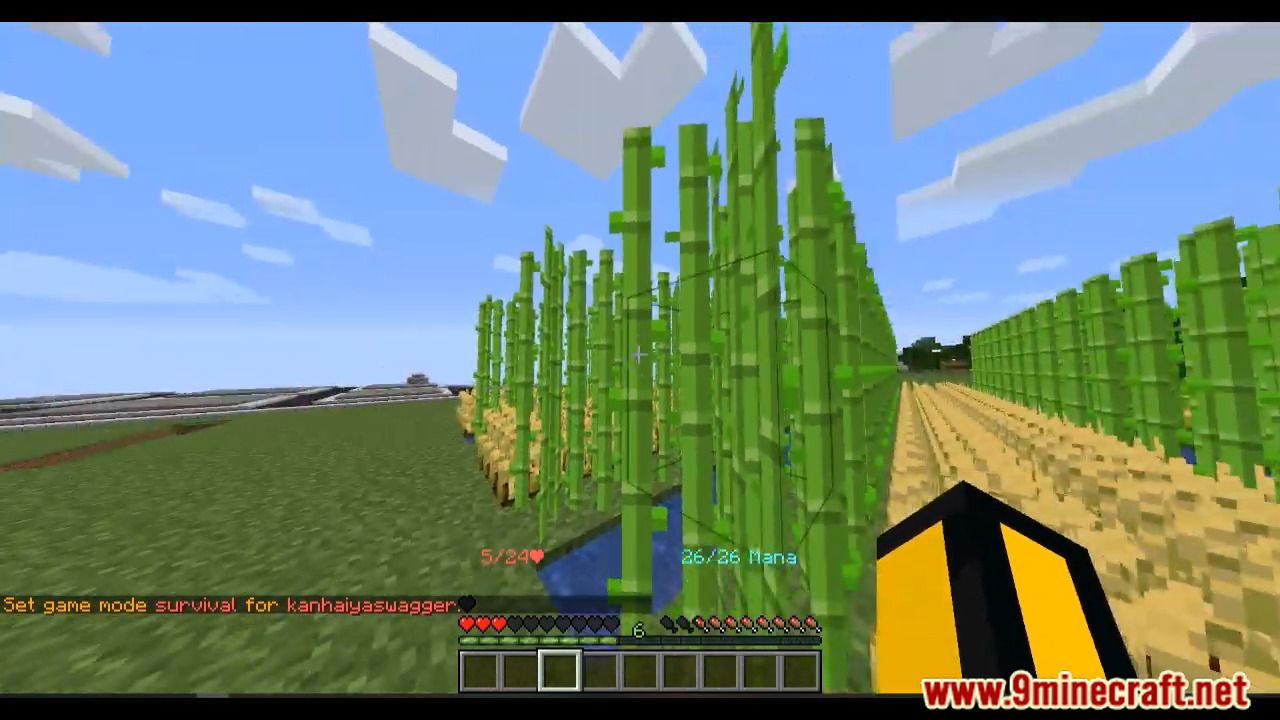
FarmProtect Plugin stops players and mobs from trampling your farmland by jumping or walking on it. It keeps crops safe while leaving the physical blocks breakable by hand. The plugin is lightweight and offers advanced options for server administrators to configure.

Features:
- Stops players and mobs from turning farmland back to normal dirt by walking or jumping.
- Protects popular crops including wheat, carrots, potatoes, melon seeds, and pumpkin seeds.
- Includes multiworld support to manage protection across different server worlds.
- Features explosion protection support to guard crops from blast damage.
- Packs auto-updating and update-checking tools through the config file.
- Records anonymous usage statistics using bStats, which you can opt out of at any time.
ExplosionProtect Support
Currently Supports the below crops:
- Wheat
- Melon Seeds
- Pumpkin Seeds
- Carrots
- Potatoes
UpdateChecking/AutoUpdating
This plugin uses Gravity’s Updater class. This means that the plugin will connect to the dev.bukkit.org website to gather information about the plugin when there is an update and whether to download it automatically. This is configurable inside of the config.yml so if you don’t want the functions feel free to set UpdateCheck/AutoUpdate to false Note: By default it is enabled
bStat Support
We currently record statistics using bStats from this plugin. If you would like to opt out. Go to plugins > bstat > config.yml




Commands:
/farmprotect reload: Reloads the config./farmprotect toggle: Toggle help menu./farmprotect toggle multiworld: Toggle MultiWorld Support./farmprotect toggle explosionprotect: Toggle ExplosionProtect Support./farmprotect add <world>: Adds a world to multiworld protect./farmprotect remove <world>: Removes a world from multiworld project.
How to Use:
- Place the plugin file into your server plugin folder.
- Start or restart your server to load the plugin.
- Edit the configuration file to adjust multiworld and explosion protection settings.
- Use in-game commands to manage features while running your server.
How to Install:
New to Minecraft? Follow our step-by-step guide to install Plugins on your PC.View Guide
FarmProtect Plugin Download Links
For Minecraft
26.1.2,
26.1.1,
26.1
All Versions Covered
26.1.2
26.1.1
26.1
1.21.11
1.21.10
1.21.9
1.21.8
1.21.7
1.21.6
1.21.5
1.21.4
1.21.3
1.21.2
1.21.1
1.21
1.20.6
1.20.5
1.20.4
1.20.3
1.20.2
1.20.1
1.20
For Minecraft
1.21.11,
1.21.10,
1.21.9
All Versions Covered
1.21.11
1.21.10
1.21.9
1.21.8
1.21.7
1.21.6
1.21.5
1.21.4
1.21.3
1.21.2
1.21.1
1.21
1.20.6
1.20.5
1.20.4
1.20.3
1.20.2
1.20.1
1.20
You May Also Like
Picked for this page
 WorldGuard Plugin (26.1.2, 1.20.1) – Bukkit, Spigot, Paper
 Quests Plugin (26.1.2, 1.20.1) – Bukkit, Spigot, Paper
 MultiWorld Plugin (26.1.2, 1.20.1) – Spigot
 Orebfuscator Plugin (26.1.2, 1.20.1) – Bukkit, Spigot, Paper
 ValhallaMMO Plugin (26.1.2, 1.20.1) – Bukkit, Spigot, Paper
 Fancy Holograms Plugin (26.1.2, 1.20.1) – Spigot
 SuperVanish Plugin (26.2, 1.20.1) – Bukkit, Spigot, Paper
 UberEnchant Plugin (1.21.11, 1.20.1) – Bukkit, Spigot, Paper
 Interaction Visualizer Plugin (26.1.2, 1.20.1) – Spigot
 BuildPaste Plugin (26.3, 1.20.1) – Bukkit, Spigot, Paper
 BeastWithdraw Plugin (1.21.11, 1.20.1) – Bukkit, Spigot, Paper
 BentoBox Plugin (26.1.2, 1.20.1) – Spigot
Most viewed in Plugins over the last 7 days
 Vulcan Anti Cheat Plugin (1.21.8, 1.20.1) – A Powerful Shield Against Cheating
 Dynmap 9minecraft Plugin (26.3) – A Live Google-Maps-Style View of Your Whole Server
 Citizens Plugin (1.21.10, 1.20.1) – The Best NPC Plugin
 Displaymotion Plugin (1.21.4) – Amaze Players with Custom Animations and No Client Mods
 WorldEdit Plugin (1.21.11, 1.20.1) – Easy In-Game Minecraft Map Editor
 Citizens2 Plugin (1.21.8, 1.20.1) – Craft Unique NPCs
 Ultimate Donut SMP Plugin (26.3, 1.20.1) – Build Teams Trade Goods
 MMOItems Premium Plugin (1.21.8, 1.20.1) – Create Stunning Custom Items
 MythicCrucible Plugin (1.21.8, 1.20.1) – Addon for MythicMobs
 MythicMobs Premium Plugin (1.21.9, 1.20.1) – Craft Epic Custom Mobs And Bosses
 L Claim Plugin (26.3, 1.20.1) – Build Protected Towns and Trade Peacefully
 Fish Rework Fishing Plugin (26.3, 1.21.1) – Turn Simple Fishing
More from Plugins
 ImageOnMapReborn Plugin (1.20) – Turn Every Wall Into a Custom Art Gallery
 Mls Network Plugin (1.16) – Keep PvP Battles Fair So Skill Always Wins
 WatchNeko Plugin (1.13) – Keep Every Fight Fair So Honest Players Can Win
 G1ax World Generator Plugin (1.21.11, 1.21.1) – Fresh Scenic Landscapes
 Just One Block Plugin (1.21.11, 1.21.1) – Team Up and Build a Sky Island
 Beaconfly Plugin (1.21) – Give Survival Builders Flight Around Their Bases
 AzuraBedWars Plugin (1.13) – Fierce Bed Battles That Keep Your Community Playing
 Essence Stress Free Server Utilities Plugin (26.3, 1.20.1)
 Economy Shop Sell Plugin (1.21.11, 1.21.1) – Turn Extra Loot Into Cash
 Dash Dashboard Plugin (26.3, 1.21.1) – Keep Gameplay Smooth and Answer Tickets
 Wormhole X Treme Plugin (26.3, 1.20.1) – Link Server Bases Instantly
 FakePlayer CE Plugin (1.20) – Keep Server Farms Running Even When Friends Log Off

This post has no comments yet. Be the first — your comment will appear here.