
Slimefun Plugin (1.20.6, 1.20.1) – Modded Fun with Zero Mods
 10,121
 0


Slimefun Plugin turns a normal Bukkit server into an FTB-style modpack experience without making players install a single mod. It adds many new items from backpacks to jetpacks, along with machines, research, Androids, and Cargo Nodes. You also get an in-game guide, player stats, lag checking tools, an OP debug tool, and permission controls to manage gameplay. This plugin comes with a built-in API and dozens of ready-to-use addons, plus an auto-updater, server metrics, and GitHub stats.

Auto-Updater, Metrics and GitHub Integration
All my Plugins are using an Auto-Updater to make sure, you’re always using the latest and hopefully most bug free version of my Plugin.
If you don’t want this Plugin to be auto-updated, you can turn it off in the config file at “options -> auto-update: true/false”
They also use a Metrics-System which collects the following Informations:
- A unique identifier
- The server’s version of Java
- Whether the server is in offline or online mode
- The plugin’s version
- The server’s version
- The OS version/name and architecture
- The core count for the CPU
- The number of players online
- The Metrics version
- Opting out of this service can be done by editing plugins/Plugin Metrics/config.yml and changing opt-out to true.
And lastly, Slimefun connects to GitHub to retrieve the following information:
- Lines of Code in the Plugin
- List of Authors and Contributors
- Amount of Forks of this Plugin’s Repository
- Amount of Issues posted on this Plugin’s Repository
- Date of the last Contribution to the Plugin



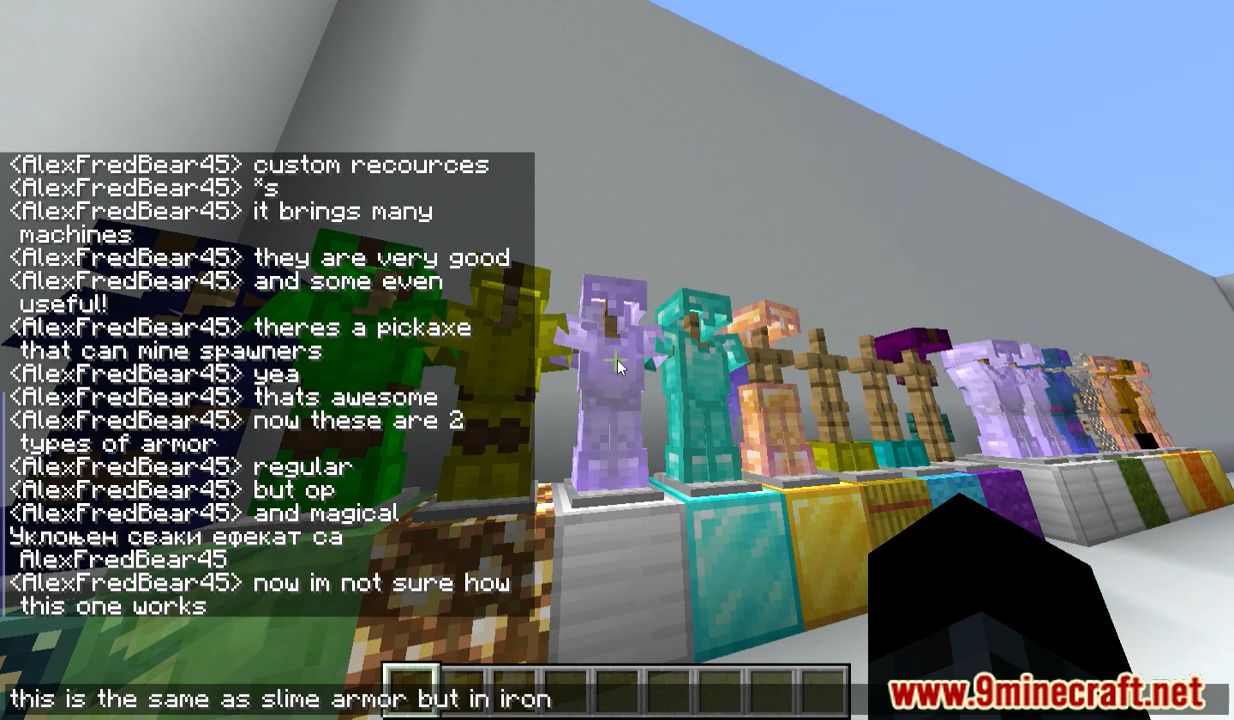

Features:
- Turns a normal Bukkit server into an FTB-style modpack without making players install a single mod.
- Adds a wide variety of new items and gear, from backpacks to jetpacks.
- Includes an in-game guide that players can receive or open right from chat.
- Features machines, a research system, Cargo Nodes, and Androids that support script uploads.
- Comes with a built-in API and works with dozens of available addons.
- Provides permission controls for spawning items, changing research, checking timings, viewing other players’ stats, uploading Android scripts, editing others’ Androids or Cargo Nodes, and opening machines in protected regions.
- Tracks player stats and offers a timings tool to find which blocks or chunks cause the most server lag.
- Gives OP players a debug tool to check block performance, view stored block data, and erase it.
- Includes an auto-updater to keep the server on the latest version, with a config setting to turn it off.
- Connects to a server metrics system (with an opt-out option) and GitHub to collect server and repository info.
Server Metrics Collected:
- Tracks a unique server identifier, the Metrics version, and the number of players currently online.
- Checks the plugin version, the server version, and whether the server runs in online or offline mode.
- Reads the server’s Java version, CPU core count, and operating system name, version, and architecture.
GitHub Information Retrieved:
- Counts the total lines of code in this plugin.
- Lists repository contributors.
- Tracks the number of repository forks and posted issues.
- Checks the date of the last contribution to this plugin.
Commands:
/slimefun: Shows all basic plugin commands./sf: Works as a short alias for/slimefun./sf cheat: Lets you spawn any item from this plugin./sf guide: Gives you the in-game guide./sf open_guide: Opens the in-game guide right away./sf give <Player> <SlimefunItem>: Gives the chosen item to a specific player./sf research <Player> <Research/all/reset>: Unlocks or resets research progress for a player./sf stats [Player]: Shows stats for you or the chosen player./sf timings: Shows how this plugin affects server performance and which blocks or chunks cause the most lag./sf debug_fish: Gives OP players a dev debug tool to check a block’s performance, view its data, and erase it.
Configuration:
slimefun.cheat.items: Allows using/sf giveand/sf cheat.slimefun.cheat.researches: Allows using/sf research.slimefun.command.timings: Allows using/sf timings.slimefun.stats.others: Allows viewing other players’ stats.slimefun.android.upload-script: Allows uploading Android scripts.slimefun.android.bypass: Allows editing Androids that you do not own.slimefun.cargo.bypass: Allows editing Cargo Nodes that you do not own.slimefun.inventory.bypass: Allows opening all plugin machines in protected regions.options -> auto-update: Turns automatic updates on (true) or off (false) in the plugin config file.opt-out: Turns off server metrics when set totrueinplugins/Plugin Metrics/config.yml.
How to Use:
- Type
/sf guidein chat to get the in-game guide, or enter/sf open_guideto open it right away. - Run
/sf stats [Player]to check your own stats, or include another player’s name (withslimefun.stats.others) to view theirs. - Use
/sf cheator/sf give <Player> <SlimefunItem>(requiresslimefun.cheat.items) to spawn or give items, and run/sf research <Player> <Research/all/reset>(requiresslimefun.cheat.researches) to unlock or reset research progress. - Enter
/sf timings(requiresslimefun.command.timings) to check server performance and spot blocks or chunks that cause lag. - Make sure you have OP status, then type
/sf debug_fishto receive the debug tool and use it to check block performance, view block data, or erase it. - Assign
slimefun.android.upload-scriptto allow uploading Android scripts,slimefun.android.bypassorslimefun.cargo.bypassto edit another player’s Androids or Cargo Nodes, andslimefun.inventory.bypassto open machines in protected regions. - Open the plugin config file and change
options -> auto-updatetofalseto stop automatic updates. - Open
plugins/Plugin Metrics/config.ymland setopt-outtotrueto opt out of server metrics.
How to Install:
New to Minecraft? Follow our step-by-step guide to install Plugins on your PC.View Guide
Slimefun Plugin Download Links
For All Versions from Minecraft 1.16.5 to Minecraft 1.20.6, 1.20.1
For Minecraft 1.12.2
You May Also Like
Picked for this page
 WorldGuard Plugin (26.1.2, 1.20.1) – Bukkit, Spigot, Paper
 Quests Plugin (26.1.2, 1.20.1) – Bukkit, Spigot, Paper
 MultiWorld Plugin (26.1.2, 1.20.1) – Spigot
 Orebfuscator Plugin (26.1.2, 1.20.1) – Bukkit, Spigot, Paper
 ValhallaMMO Plugin (26.1.2, 1.20.1) – Bukkit, Spigot, Paper
 SuperVanish Plugin (26.2, 1.20.1) – Bukkit, Spigot, Paper
 UberEnchant Plugin (1.21.11, 1.20.1) – Bukkit, Spigot, Paper
 Interaction Visualizer Plugin (26.1.2, 1.20.1) – Spigot
 BuildPaste Plugin (26.3, 1.20.1) – Bukkit, Spigot, Paper
 BeastWithdraw Plugin (1.21.11, 1.20.1) – Bukkit, Spigot, Paper
 Aj Leaderboards Plugin (26.1.2, 1.20.1) – Spigot
 BentoBox Plugin (26.1.2, 1.20.1) – Spigot
Most viewed in Plugins over the last 7 days
 Vulcan Anti Cheat Plugin (1.21.8, 1.20.1) – A Powerful Shield Against Cheating
 Citizens Plugin (1.21.10, 1.20.1) – The Best NPC Plugin
 Displaymotion Plugin (1.21.4) – Amaze Players with Custom Animations and No Client Mods
 Dynmap 9minecraft Plugin (26.3) – A Live Google-Maps-Style View of Your Whole Server
 Ultimate Donut SMP Plugin (26.3, 1.20.1) – Build Teams Trade Goods
 MMOItems Premium Plugin (1.21.8, 1.20.1) – Create Stunning Custom Items
 WorldEdit Plugin (1.21.11, 1.20.1) – Easy In-Game Minecraft Map Editor
 Citizens2 Plugin (1.21.8, 1.20.1) – Craft Unique NPCs
 Grim Anticheat Plugin (26.3, 1.20.1) – Realtime Cheat Detection Plugin
 MythicCrucible Plugin (1.21.8, 1.20.1) – Addon for MythicMobs
 MythicMobs Premium Plugin (1.21.9, 1.20.1) – Craft Epic Custom Mobs And Bosses
 Vehicles Plus Plugin (1.21.11, 1.20.1) – Realistic Vehicle Plugin
More from Plugins
 ImageOnMapReborn Plugin (1.20) – Turn Every Wall Into a Custom Art Gallery
 Mls Network Plugin (1.16) – Keep PvP Battles Fair So Skill Always Wins
 WatchNeko Plugin (1.13) – Keep Every Fight Fair So Honest Players Can Win
 G1ax World Generator Plugin (1.21.11, 1.21.1) – Fresh Scenic Landscapes
 Just One Block Plugin (1.21.11, 1.21.1) – Team Up and Build a Sky Island
 Beaconfly Plugin (1.21) – Give Survival Builders Flight Around Their Bases
 AzuraBedWars Plugin (1.13) – Fierce Bed Battles That Keep Your Community Playing
 Essence Stress Free Server Utilities Plugin (26.3, 1.20.1)
 Dash Dashboard Plugin (26.3, 1.21.1) – Keep Gameplay Smooth and Answer Tickets
 Wormhole X Treme Plugin (26.3, 1.20.1) – Link Server Bases Instantly
 FakePlayer CE Plugin (1.20) – Keep Server Farms Running Even When Friends Log Off
 Jext Reborn Plugin (1.14) – Play Brand New Songs Together at Every Jukebox

This post has no comments yet. Be the first — your comment will appear here.