
PlugManX Plugin (1.21.11, 1.20.1) – No More Sudden Kicks for Active Players

 0


PlugManX Plugin lets server admins manage plugins right from in-game chat or the server console without a server restart. It handles enabling, disabling, loading, unloading, reloading, and restarting plugins while your Bukkit server stays online. You can also list installed plugins, check for updates on dev.bukkit.org, look up which plugin owns a command, and save your plugin list to a file. All commands default to OP permissions and include tab completion for faster server control.

Features:
- Enable, disable, restart, load, reload, and unload plugins right from in-game chat or the server console.
- Keep your server online while managing plugins instead of restarting it every time you make a change.
- List all installed plugins in alphabetical order, with optional version numbers.
- View helpful details about any plugin, including its version and registered commands.
- Show all commands that a specific plugin has registered.
- Look up a command to find out which plugin owns it.
- Use built-in tab completion for both command names and plugin names.
- Save your full plugin list and version numbers straight to a file.
- Check if a plugin is up-to-date using dev.bukkit.org.
- Protect every command with permissions support, with all commands set to OP by default.
Commands:
/plugman help: Show help information./plugman list [-v]: List plugins in alphabetical order, and add-vto show version numbers./plugman info [plugin]: Show details about a plugin./plugman dump: Save plugin names and versions to a file./plugman usage [plugin]: List all commands registered by a plugin./plugman lookup [command]: Find the plugin that owns a command./plugman enable [plugin|all]: Enable one plugin or all plugins./plugman disable [plugin|all]: Disable one plugin or all plugins./plugman restart [plugin|all]: Restart one plugin or all plugins by disabling and enabling them./plugman load [plugin]: Load a plugin./plugman reload [plugin|all]: Reload one plugin or all plugins by unloading and loading them./plugman unload [plugin]: Unload a plugin./plugman check [plugin|all] [-f]: Check if one plugin or all plugins are up-to-date.
Permissions:
All permission nodes default to OP.
plugman.admin: Allows use of all commands.plugman.update: Allows the user to see update messages.plugman.help: Allows use of the help command.plugman.list: Allows use of the list command.plugman.info: Allows use of the info command.plugman.dump: Allows use of the dump command.plugman.usage: Allows use of the usage command.plugman.lookup: Allows use of the lookup command.plugman.enable: Allows use of the enable command.plugman.enable.all: Allows use of the enable all command.plugman.disable: Allows use of the disable command.plugman.disable.all: Allows use of the disable all command.plugman.restart: Allows use of the restart command.plugman.restart.all: Allows use of the restart all command.plugman.load: Allows use of the load command.plugman.reload: Allows use of the reload command.plugman.reload.all: Allows use of the reload all command.plugman.unload: Allows use of the unload command.plugman.check: Allows use of the check command.plugman.check.all: Allows use of the check all command.
Configuration:
Use config.yml to set ignored plugins, broken command removal notices, and automatic plugin loading, unloading, or reloading:
ignored-plugins: [PlugMan,PlugManX,ViaVersion,ViaBackwards,ViaRewind,ProtocolSupport,ProtocolLib]
notify-on-broken-command-removal: true
auto-load:
  enabled: false
  check-every-seconds: 10
auto-unload:
  enabled: false
  check-every-seconds: 10
auto-reload:
  enabled: false
  check-every-seconds: 10
Screenshots:

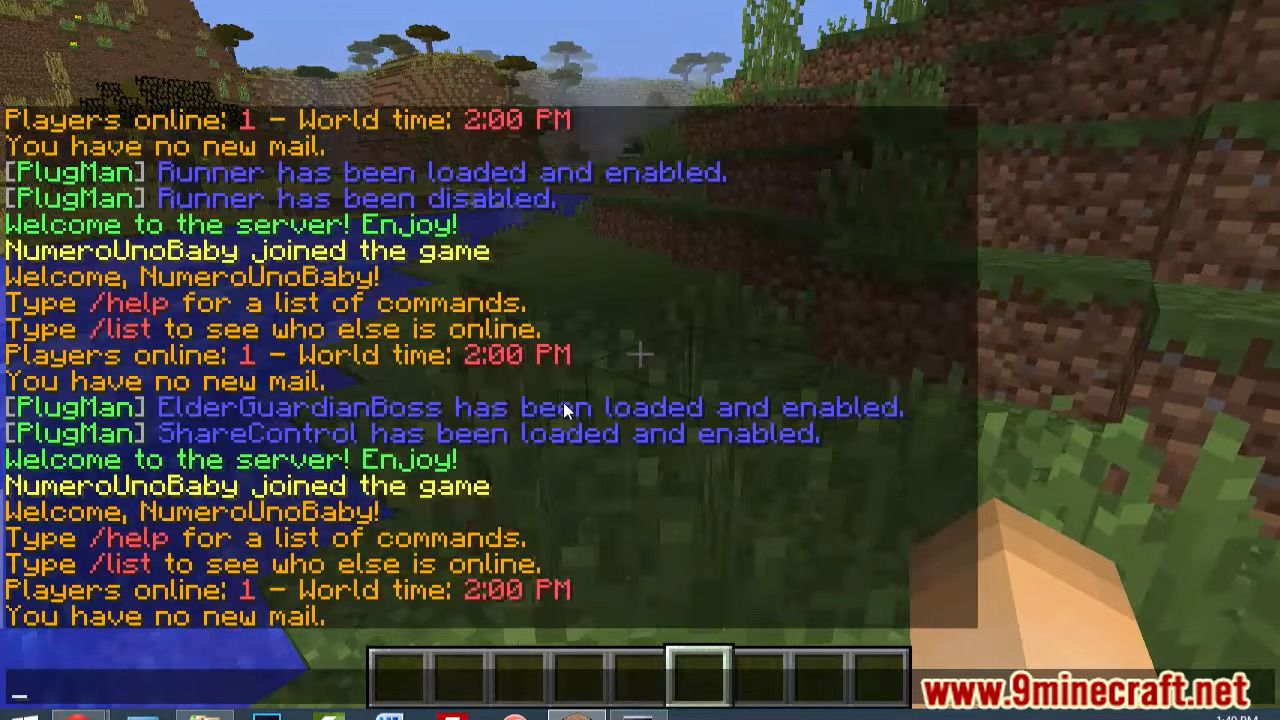



How to Install:
New to Minecraft? Follow our step-by-step guide to install Plugins on your PC.View Guide
PlugManX Plugin Download Links
For All Versions from 1.20.4 Minecraft from 1.21.8
For Minecraft 1.21.11, 1.21.10, 1.21.9
For Minecraft from 1.18 to 1.19
For All Versions from Minecraft 1.8 to Minecraft 1.18
You May Also Like
Picked for this page
 WorldGuard Plugin (26.1.2, 1.20.1) – Bukkit, Spigot, Paper
 Quests Plugin (26.1.2, 1.20.1) – Bukkit, Spigot, Paper
 MultiWorld Plugin (26.1.2, 1.20.1) – Spigot
 Orebfuscator Plugin (26.1.2, 1.20.1) – Bukkit, Spigot, Paper
 ValhallaMMO Plugin (26.1.2, 1.20.1) – Bukkit, Spigot, Paper
 Fancy Holograms Plugin (26.1.2, 1.20.1) – Spigot
 Infinite Villager Trades Plugin (1.21.11, 1.20.1) – Spigot
 SuperVanish Plugin (26.2, 1.20.1) – Bukkit, Spigot, Paper
 UberEnchant Plugin (1.21.11, 1.20.1) – Bukkit, Spigot, Paper
 Interaction Visualizer Plugin (26.1.2, 1.20.1) – Spigot
 BuildPaste Plugin (26.3, 1.20.1) – Bukkit, Spigot, Paper
 BeastWithdraw Plugin (1.21.11, 1.20.1) – Bukkit, Spigot, Paper
Most viewed in Plugins over the last 7 days
 Vulcan Anti Cheat Plugin (1.21.8, 1.20.1) – A Powerful Shield Against Cheating
 Dynmap 9minecraft Plugin (26.3) – A Live Google-Maps-Style View of Your Whole Server
 Citizens Plugin (1.21.10, 1.20.1) – The Best NPC Plugin
 Displaymotion Plugin (1.21.4) – Amaze Players with Custom Animations and No Client Mods
 WorldEdit Plugin (1.21.11, 1.20.1) – Easy In-Game Minecraft Map Editor
 Citizens2 Plugin (1.21.8, 1.20.1) – Craft Unique NPCs
 Ultimate Donut SMP Plugin (26.3, 1.20.1) – Build Teams Trade Goods
 MMOItems Premium Plugin (1.21.8, 1.20.1) – Create Stunning Custom Items
 MythicCrucible Plugin (1.21.8, 1.20.1) – Addon for MythicMobs
 MythicMobs Premium Plugin (1.21.9, 1.20.1) – Craft Epic Custom Mobs And Bosses
 L Claim Plugin (26.3, 1.20.1) – Build Protected Towns and Trade Peacefully
 Fish Rework Fishing Plugin (26.3, 1.21.1) – Turn Simple Fishing
More from Plugins
 FakePlayer CE Plugin (1.20) – Keep Server Farms Running Even When Friends Log Off
 Jext Reborn Plugin (1.14) – Play Brand New Songs Together at Every Jukebox
 Clan CL Plugin (26.3, 1.21.1) – Build Powerful Teams with Shared Bases and Banks
 Channel Chat Plugin (1.21.11, 1.21.1) – Stop Screen Spam with Clan Rooms
 Karmacore Plugin (26.3, 1.20.1) – Fuel Fierce Server Rivalries
 Aegis Guard Modern Land Protection & Economy Plugin (26.3, 1.20.1)
 RaspberryJuice Plugin (1.21) – Turn Your World Into a Shared Coding Playground
 AtlasPractice Plugin – Give Players Nonstop Ranked Duels and Arena Battles
 King in Yellow Plugin (26.3, 1.21.11) – Terrify Server Players with Cosmic
 Join Book by Nis Plugin (1.21.11, 1.21.1) – Welcome New Players
 PluginV2 Plugin (26.3) – Shield Players From Glitches While Testing New Ideas
 OPProtector Plugin (1.13) – Stop Power Abuse So Everyone Plays in Peace

This post has no comments yet. Be the first — your comment will appear here.