HavenPack Plugin (1.19.4, 1.18.2) – Spigot
 180
180
 0
0
 May 19, 2023
HavenPack Plugin serves as an alternative to the standard “texture-pack” value found in server.properties, offering enhanced customization options for your server. With HavenPack, you can unleash a multitude of personalized choices to tailor your server’s texture pack experience.
Features:
– Customizable Resource-pack Prompt:
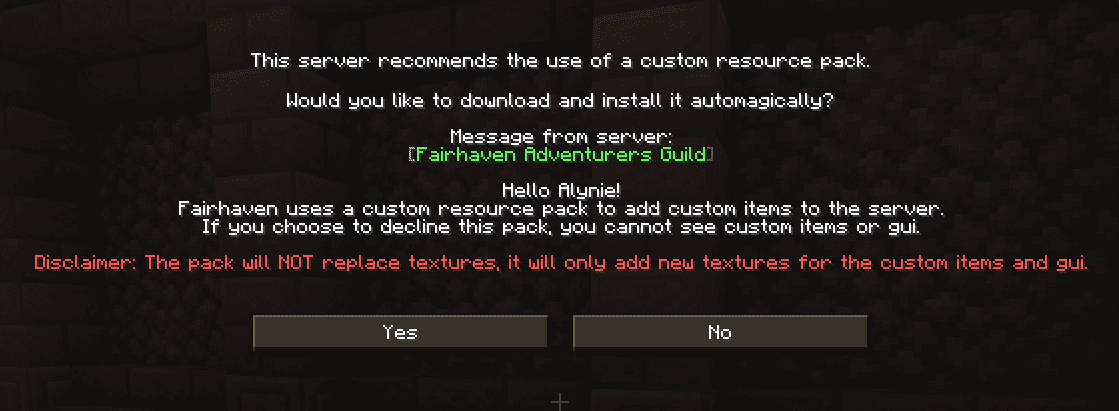
Change the prompt shown to players when they first join your server, while the server uses a custom resource pack.
You can also set the plugin to require the resource pack in order to play.
Commands:
– /havenpack- Main command, just sends you a message.
– /havenpack reload – Reloads config.yml and messages.yml
Permissions:
– havenpack.*
– havenpack.reload
How to install:
- Download a plugin of your choice.
- Place the .jar and any other files in your plugin’s directory.
- Run the server and wait for it to fully load.
- Type stop in your Minecraft server console to bring the server to a clean stop.
- Run the server.
- All done! Your plugin should be installed and ready to be used.
HavenPack Plugin Download Links
For Minecraft Spigot 1.18 to Minecraft Spigot 1.19.4
Click to rate this post!
[Total: 0 Average: 0]
You May Also Like