
Just Enough Structures Mod (26.3, 1.20.1) – Inspect 3D Structures
 0
 0

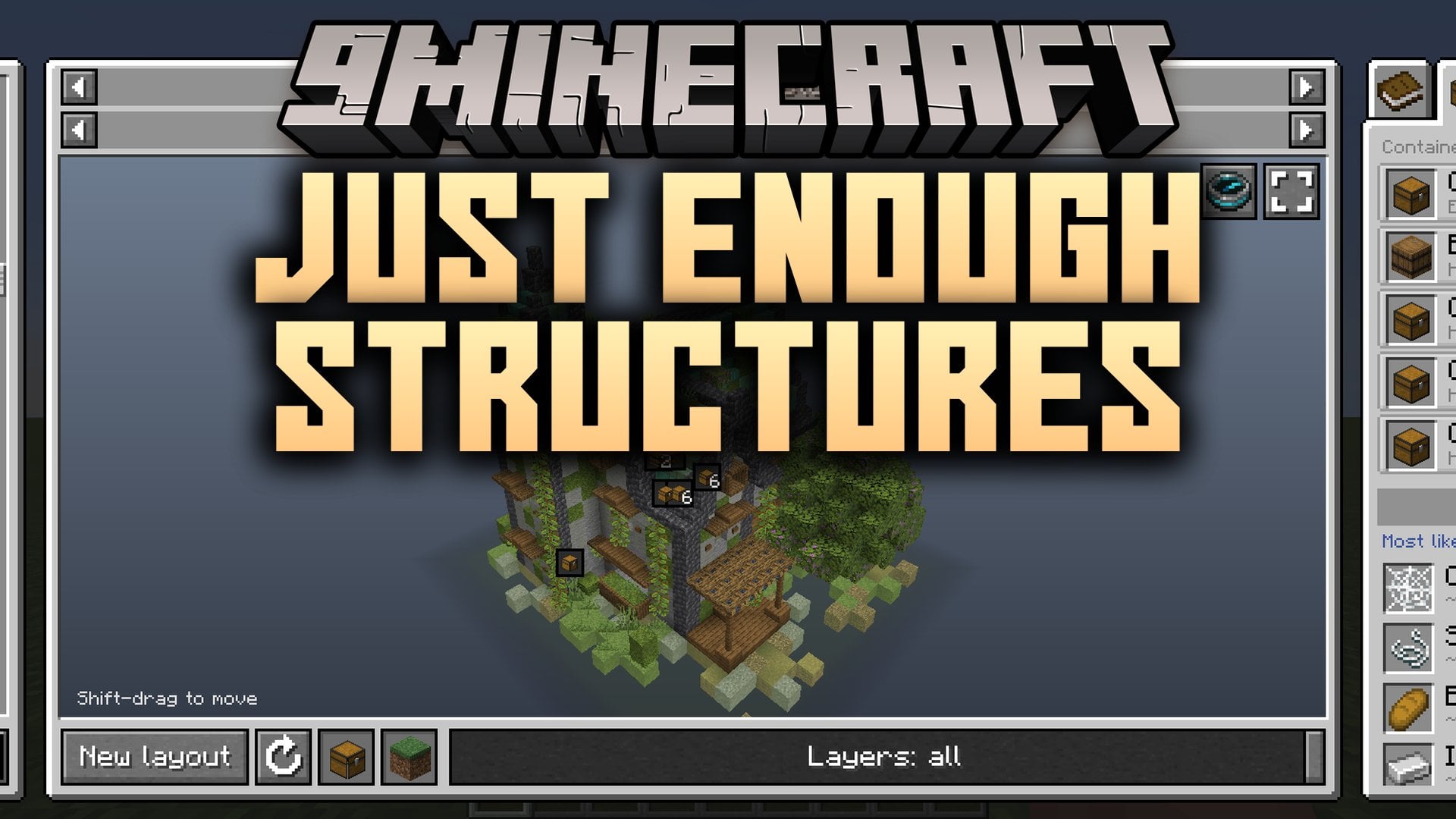
Just Enough Structures Mod adds an in-game 3D browser for every structure from vanilla Minecraft, mods, and data packs. Players can press K to inspect buildings across all dimensions, slice through them layer by layer, and check the exact loot, mobs, and blocks inside. It builds each preview using the structure’s own generation code so the layout matches what spawns in an actual world. The mod also includes editing tools for modpack makers and server owners to customize loot tables and mob spawners directly in the game.
Features:
- 3D Structure Browser: Generates an accurate 3D preview of any vanilla, modded, or data pack structure across all dimensions.
- Interactive Loot Inspector: Lets you click on chests inside the preview to roll sample loot, reroll items, and view exact drop chances.
- Detailed Info Tabs: Displays dedicated tabs for structure loot probabilities, mob placements, spawner outputs, and a full block material list.
- Recipe Viewer Compatibility: Shows which structures contain a specific item directly inside the recipe screens of JEI, EMI, or REI.
- In-Game Pack Tools: Gives server owners and modpack creators tools to edit loot tables, change spawner mobs, and leave notes for players.
- Generates previews using each mod’s native world generation code so the browser shows what actually spawns in the world.
- Lets you rotate, zoom, pan, and cut the 3D preview down layer by layer to see hidden rooms inside.
- Includes a new layout button that rebuilds the structure preview using a fresh random seed.
- Allows you to star specific structures to save them in a favorites list.
- Groups containers that share the same loot table together and lets you cycle through them with arrow buttons.
- Highlights every container type in the 3D view when you open the Loot tab and lists item drop chances across the whole building.
Pack Tools & Update Safety:
- Available in singleplayer worlds with cheats turned on, or on servers for players who are granted access.
- Lets you edit any existing loot table or point a specific chest in a structure to a different or newly created loot table.
- Allows you to assign a different mob to any spawner inside a structure.
- Lets you write custom notes on a structure for players to read, hide specific structures from the browser, or hide loot locations.
- Saves all custom edits in the config folder instead of altering original mod files, making it easy to ship changes with a modpack.
- Provides a one-click merge option when another mod updates a loot table you previously edited, keeping all your custom changes intact.
- Keeps applying your chest and spawner edits even if a mod updates a structure, and safely skips them if that specific chest or spawner is removed.
- Retains your saved edits if a mod or data pack is removed so they are ready if you add it back later.
- Automatically detects and displays new structures whenever a new mod or data pack is added.
- Leaves broken blocks or mobs from other mods out of the 3D preview rather than crashing the game.
- Refuses to save edits that the game cannot load, ignores manually broken config files until fixed, and backs up removed changes to prevent data loss during crashes.
How to Use:
- Press K in-game to open the structure browser and view structures from vanilla, mods, and data packs.
- Type in the search bar to find a structure by name, type
@followed by a mod name to filter by mod, or type$followed by an item name to find structures that carry that item in their loot. - Drag and scroll on the 3D preview to turn, zoom, and move the structure, or use the layer controls to slice it layer by layer.
- Click the new layout option to regenerate the structure preview from a new seed, or click the star icon to mark a structure as a favorite.
- Click directly on any chest inside the 3D preview to see a real loot roll, click again to reroll, or switch to see every item’s drop percentage.
- Use the arrow buttons on the chest screen to jump between different containers that share the same loot table.
- Switch between the Loot, Mobs, and Blocks tabs to highlight containers, see placed mobs and spawner types, or read the full block material list.
- If you have cheats enabled in singleplayer or proper access on a server, use the pack tools menu to edit loot tables, reassign individual chests, change spawner mobs, add player notes, or hide structures and loot locations.
How to Install:
New to Minecraft? Follow our step-by-step guide to install Mods on your PC.View Guide
Requirements:







Just Enough Structures Mod Download Links
For Minecraft 26.3
For Minecraft 26.2
For Minecraft 26.1.2, 26.1.1, 26.1
For Minecraft
1.21.11,
1.21.10,
1.21.9
All Versions Covered
1.21.11
1.21.10
1.21.9
1.21.8
1.21.7
1.21.6
1.21.5
1.21.4
1.21.1
1.21
All Versions Covered
1.21.11
1.21.10
1.21.9
1.21.8
1.21.7
1.21.6
1.21.5
1.21.4
1.21.1
1.21
For Minecraft 1.21.1, 1.21
For Minecraft 1.20.1, 1.20
Click to rate this post!
[Total: 0 Average: 0]
You May Also Like
Picked for this page
 Coordinates Display Mod (26.2, 1.20.1) – Track Locations and Death Spots
 No Darkness Effect Mod (26.3, 1.20.1) – Explore Deep Caves Without Warden
 Crosshair Indicator Mod (26.2, 1.20.1) – Land Clean Strikes in Fast PvP Duels
 More Armor Trims Mod (26.3, 1.20.1) – Hunt Rare Styles Across Every Biome
 InventoryTweak Mod (26.3, 1.21.1) – Never Waste Time Sorting Loot Chests Again
 Loot Journal Mod (26.1.2, 1.20.1) – Never Miss Rare Drops While Exploring
 Arcane Lanterns Mod (26.3, 1.20.1) – Cast Spells with Magical Lanterns
 Who Am I? Mod (26.2, 1.20.1) – Always See Your Own Nametag
 Applied Flux Mod (26.1.2, 1.20.1) – Store FE in Your ME System
 Craftable Chainmail Armor Mod (26.3, 1.20.1) – Craft Chainmail Protection
 No Portals Mod (26.3, 1.20.1) – Disable Nether and End Portals Anywhere
 Health Indicator Next Mod (26.3, 1.21.1) – See Enemy Health and Armor Overhead
Most viewed in Mods over the last 7 days
 Ala Industrial Mod (26.3) – Run Electric Power Grids and Automated Factories
 PleasureCraft Mod (26.3, 1.21.1) – Jenny Mod Remake for Fabric
 Jennycraft Mod (26.3, 1.20.1) – Virtual Girlfriend in Minecraft
 Fapcraft Mod (26.3, 1.12.2) – Comprehensive and Detailed Content
 Jenny Mod (Fapcraft) Official Complete Guide – How to use, Tutorial
 Meteor Client Mod (26.3, 1.20.1) – Xray, HUD, Fly
 OptiFine HD (26.3, 1.20.1) – Run Faster, FPS Boost, Shaders Support
 BangCraft Mod (1.20.1) – Jenny, Ellie and Elliot
 Fabric Loader (26.3, 1.20.1) – Fabric Installer for All Minecraft Versions
 SeedCrackerX Mod (26.3, 1.20.1) – Find Any World Seed
 Patched Mod (26.3, 1.20.1) – Edit Game Files Without Breaking Packs
 CatLean Client Mod (26.2, 1.21.11) – ThunderHack Recode Alternatives
More from Mods
 Decay Play’s Guidebooks Mod (1.21.1) – Build Complex Multiblocks
 More Keybinds Mod (26.3, 1.20.1) – Play Comfortably with Alternate Buttons
 Aerion Screens Mod (1.21.11) – Track Vital Survival Stats Right on Your Screen
 Impetus Mod (1.12.2) – Play Heavy Modpacks with Shaders at Smooth Framerates
 XP Hopper Mod (26.3, 1.20.1) – Bank Your Hard-Earned XP Directly
 Config Guard Mod (26.3, 1.21.1) – Safely Tweak Modpack Settings
 Cobblemon ZA Mega Shards Mod (1.21.1) – Never Run Out of Mega Stones
 Show & Tell Mod (26.3, 26.1.2) – Share Loot and Coordinates Directly
 Ghostbys Zoom Mod (26.2, 1.21.1) – Scout Distant Horizons and Spot Faraway Mobs
 SayIt Mod (1.20.1) – Speak Real Languages Out Loud to Keep Your Survival Items
 Numby Hack Mod (26.3) – Master Every In-Game Action on Strict Anarchy Worlds
 Ghostbys FPS & Ping HUD Mod (26.2, 1.21.1) – Track Performance

This post has no comments yet. Be the first — your comment will appear here.