


Mace Attack Assistance Mod (1.21.11, 1.21.1) – Auto Attack, Aim Assist, Jump Assist

 January 26, 2026
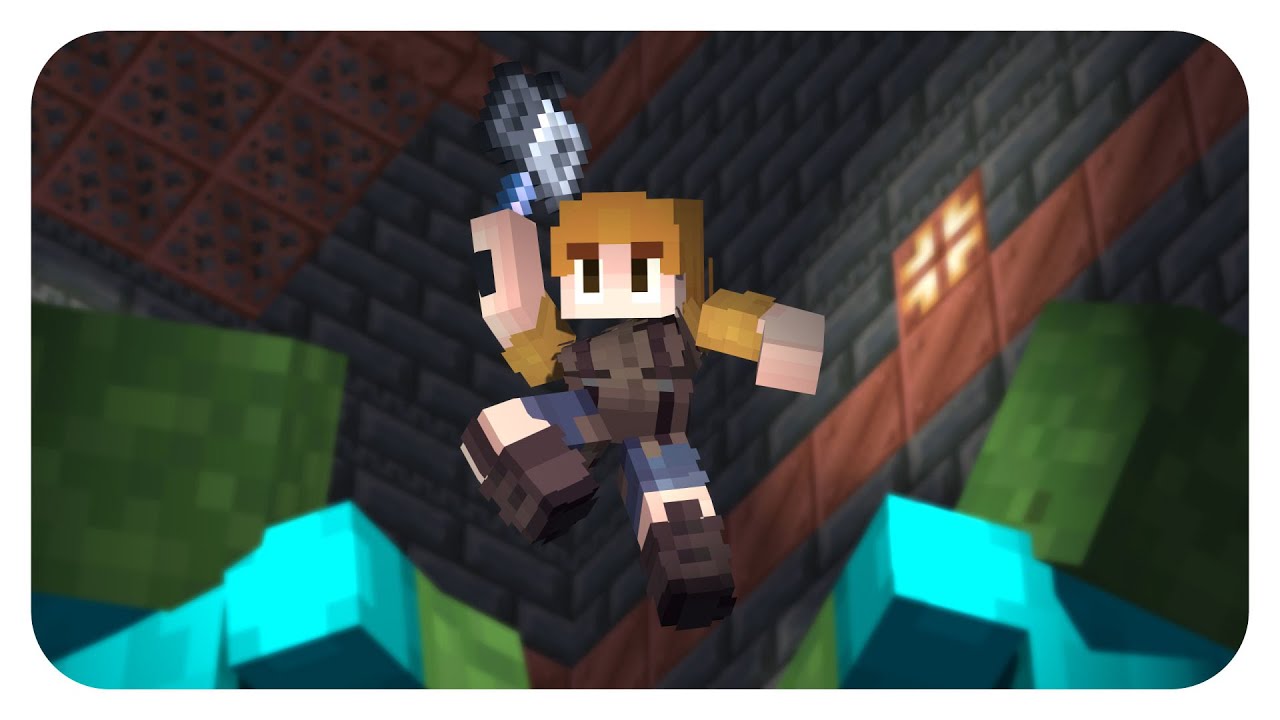
Mace Attack Assistance Mod (1.21.11, 1.21.1) assists players in attacking with the Mace by adding features such as auto-attack, aim assist, jump assist, and more.
Features:
Attack Assist
- While Falling
- [Hold Attack Button] – Automatically attacks when your crosshair is on a valid target.
- Swing Lock / Unlock
- Prevents arm swing animation while falling to avoid early attack.
- Temporary Toggle Key (Left Shift): temporarily inverts the swing-lock setting while held (configurable).
During Falling Attacks
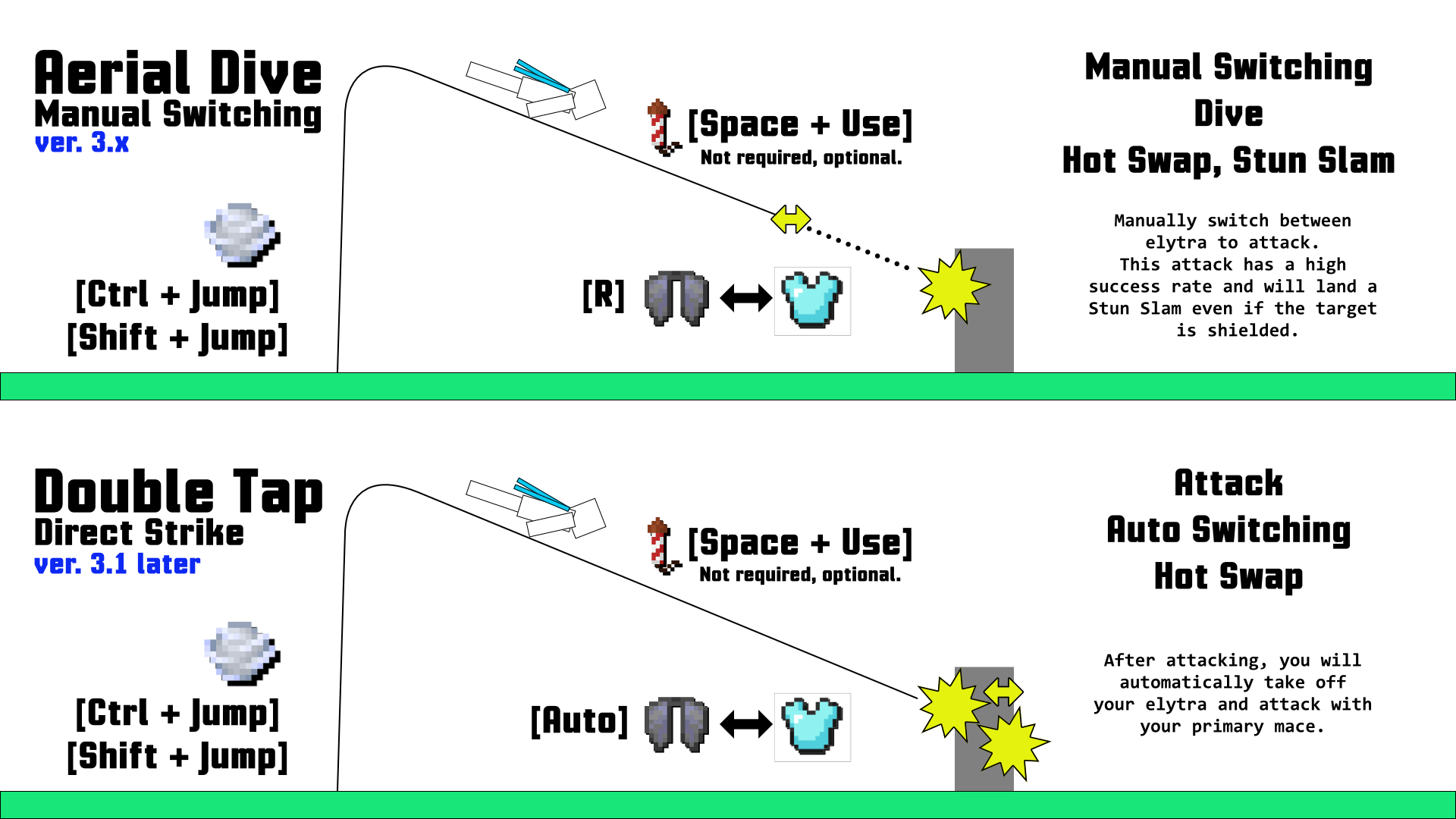
- Hot Swap
- Automatically switches to your Primary Mace before landing.
- If you were holding a sword or axe before swapping, slightly increases total damage output.
- Stun Slam
- When hitting a target with a shield, automatically switches to your axe to disable it, then switches back.
- Does not guarantee a perfect hit.
- When attacking from height, move your crosshair toward the target as you fall to maintain accuracy.
- If attack is pressed during a fall and the target holds a shield, the mod will auto-swap to axe.
- Breach Swap
- When performing a jump attack, automatically switches to your Breach Mace to increase damage.
- Requires a Mace with the Breach enchantment.
- Can be configured to trigger on any target or without requiring a jump.
- Snapback
- Activates when the player is above a configurable altitude and falling slower than the target.
- Uses the Breach Mace to counterattack quickly.
- Height and fall speed thresholds are adjustable in settings.
- Double Tap
- (While flying) [Hold Attack]
- Sequence: Elytra → Chestplate → Mace Attack.
- Hold attack while flying toward a target to automatically strike.
- Includes a light auto-aim assist within 3 blocks (minimal accuracy; manual aim recommended).
- Flight speed equals a fall from 1.5 blocks in height.
- Auto Rewear
- After performing a Double Tap, automatically re-equips the Elytra after the attack.
- [M] toggles this feature; delay time before re-equipping is configurable.
- Shield Draining
- Uses the Primary Mace if the target holds a shield and you lack an axe.
- Heavily damages the opponent’s shield durability.
- Requires fall velocity equal to falling from 2 blocks.
Aim Assist
- While Falling
- [Hold Attack Button] – Automatically adjusts your aim toward nearby targets while falling (does not work while flying with Elytra).
- You can configure which types of entities are detected as valid targets.
- Legacy Aim Mode
- Does not change camera direction until the target approaches within range.
- Automatically faces toward the target when entering attack distance.
Jump Assist
- With Wind Charge – [Ctrl + Jump] or [Shift + Jump]
- Throws a Wind Charge when jumping from solid ground.
- Works both while crouching and standing.
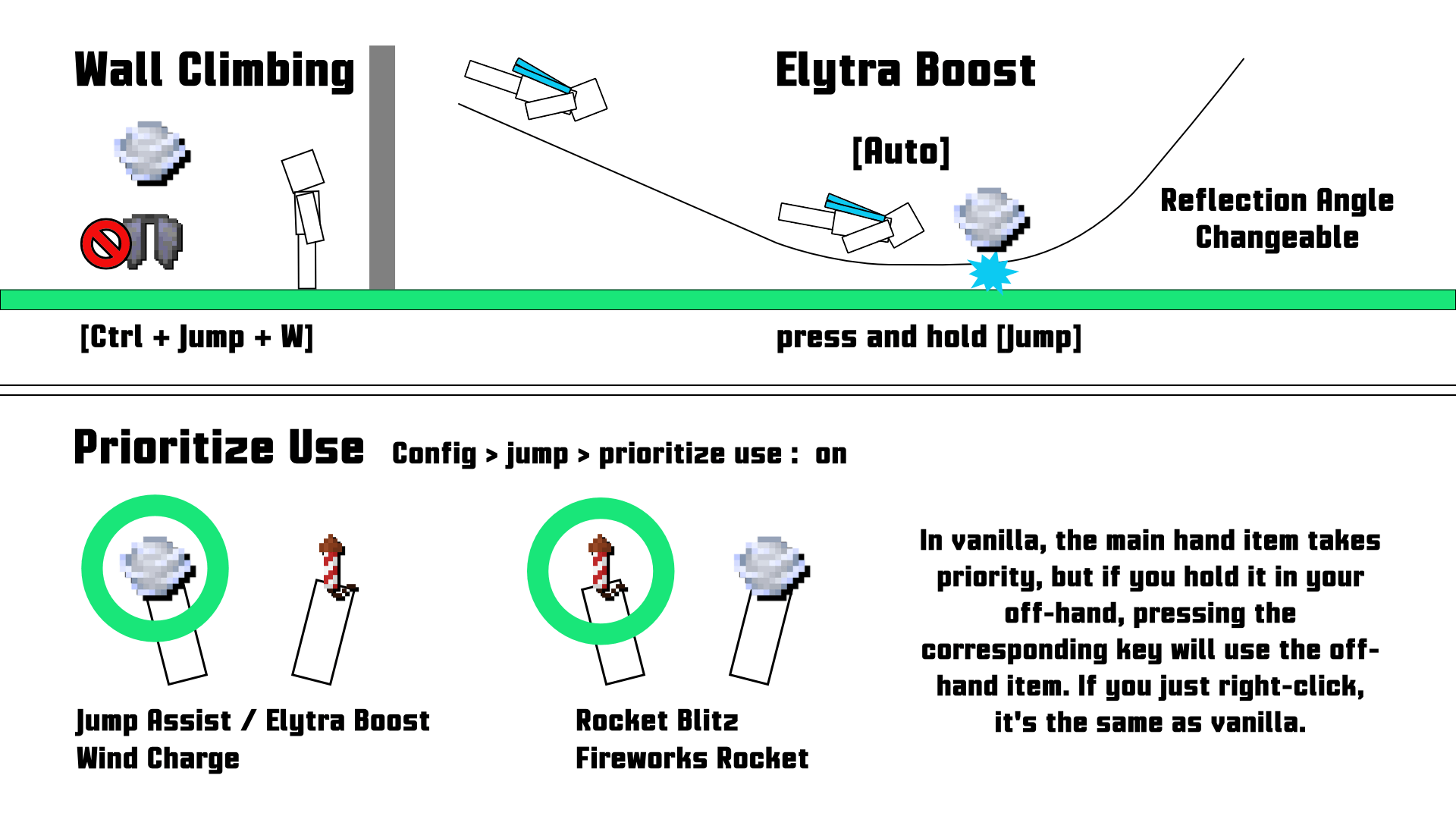
- Wall Climbing – [Ctrl + Jump + Forward]
- Throws a Wind Charge forward when facing a wall within 90° of your direction.
- Can be chained repeatedly to climb walls.
- Works better when looking slightly upward.
- Disabled while wearing Elytra.
- Jump Mode Switching
- Applies only to Wind Charge jumps.
- Modes available: High / Low / Toggle.
- Example: High while wearing Elytra, Toggle while not.
- [J] switches between High and Low modes.
Elytra Extensions
- Jump Spam – [Hold Jump + Ctrl]
- Increases lift height before transitioning into flight.
- Toggle Elytra – [R]
- Switches between Elytra and Chestplate instantly.
- Rocket Blitz – [Space + Right Click]
- Uses firework rockets mid-flight.
- Automatically selects a rocket from hotbar.
- Elytra Boost – [Hold Jump]
- Throws a Wind Charge near the ground to gain height.
- Custom Crosshair
- Changes crosshair style while wearing Elytra for better flight tracking.
Item Use Tweaks
- Item Use Priority – Prioritizes using Wind Charge or Rocket in the offhand.
- Auto Refill – Automatically refills stackable items from inventory.
- Bulk Refill – [V] instantly refills all hotbar slots.
- Throw Ender Pearl – [Z] throws an Ender Pearl toward crosshair.
- Throw Wind Charge – [Z] (pressed again during Ender Pearl cooldown) to throw a Wind Charge instead.
- Automatic WindCharge Selector – Automatically selects Wind Charge when gliding, jumping, or falling fast.
Slot Configuration
- Configure hotbar slot numbers (1–9), or use 0 = Auto.
- Primary Mace: usually a Density-enchanted mace.
- Breach Mace: a mace with the Breach enchantment.
- Auto mode searches for Primary Mace from left to right, Breach Mace from right to left.
Recon Camera – [N]
- Allows free camera control while flying.
- Keeps camera stable; use Ctrl + Mouse Wheel to zoom in/out.
- [Jump + Attack + Use] exits Recon mode and performs the intended action without altering view direction.
Target Marker
- Displays a visual marker on your current target when Aim Assist is active.
- Marker Types: Beam, Spiral, Frame (color, motion, and detection range configurable).
- [L] toggles constant marker visibility; search angle and range can be adjusted.
Tips and Tricks
- Do not rely solely on Aim Assist – practice manual aiming for better consistency.
- When near walls, Swing Lock prevents hitting blocks accidentally.
- Approach targets while flying, then unequip Elytra just before impact for optimal damage.
- Climb diagonally by slightly tilting your view upward.
Friend Protection – (3.2beta+)
- Prevents attacking registered friends.
- [Alt + T] toggle, [Ctrl + T] add friend, [Shift + T] remove friend, [T] open Friend Manager UI.
- Displays friend icons in the player list.
KeyBinds
- In-Game Actions
- [Ctrl + Jump]: Jump Assist
- [Ctrl + Use]: Throw Wind Charge while falling
- [Jump + Use]: Use rocket mid-flight
- [Jump]: Elytra Boost
- [Jump + Attack + Use]: Recon Quick Attack
- [Z]: Throw Ender Pearl
- [R]: Toggle Elytra
- [V]: Bulk Refill
- Settings & Toggles
- [I]: Open Config Screen
- [F7]: Toggle Aim Assist
- [F6]: Toggle Attack Assist
- [H]: Auto WindCharge
- [M]: Auto Rewear
- [O]: Breach Swap
- [P]: Double Tap
- [U]: Elytra Boost
- [K]: Jump Assist
- [N]: Recon Camera
- [L]: Target Search
- [J]: Jump Mode Switch
- [Alt/Ctrl/Shift + T]: Friend Protection / Add / Remove
Screenshots:
Requires:
How to install:
Click the following link to view details: How to Install Mods for Minecraft Java Edition on PC: A Beginner Guide
Mace Attack Assistance Mod (1.21.11, 1.21.1) Download Links
For Minecraft 1.20.6
NeoForge version: Download from Server 1 – Download from Server 2
For Minecraft 1.21.1, 1.21
NeoForge version: Download from Server 1 – Download from Server 2
Fabric version: Download from Server 1 – Download from Server 2
For Minecraft 1.21.3
Fabric version: Download from Server 1 – Download from Server 2
For Minecraft 1.21.4
NeoForge version: Download from Server 1 – Download from Server 2
Fabric version: Download from Server 1 – Download from Server 2
For Minecraft 1.21.5
Fabric version: Download from Server 1 – Download from Server 2
For Minecraft 1.21.8, 1.21.7, 1.21.6
NeoForge version: Download from Server 1 – Download from Server 2
Fabric version: Download from Server 1 – Download from Server 2
For Minecraft 1.21.10, 1.21.9
NeoForge version: Download from Server 1 – Download from Server 2
Fabric version: Download from Server 1 – Download from Server 2
For Minecraft 1.21.11
Fabric version: Download from Server 1 – Download from Server 2

10 Comments
I really want to hear your opinion. Please leave a comment! 😊✨
You May Also Like




















don`t work with mod wWaypoints, pleath fix it
buddy this does not work at all
It doesnt work on multiplayer
pls make it 1.21.11
1.21.10 pleeease allso it would be amazing if you improoved shield breaking i would donate you if you do
it isnt downloading for 1.21.4
na it worked
sry the mods good or lets say excelent
Pls make 1.21.10
Plsssss broooo 1.21.11
Pls givee 1.21.6 mod about mace attack assistance