
Particle Filter Mod (1.21.1, 1.20.1) – Hide Noisy Particles Without Losing
 2
 0

Particle Filter Mod lets you scan nearby Minecraft effects and hide only the particles you do not want, either across your whole world or inside custom 3D zones. Instead of lowering global particle settings and losing decorative atmosphere everywhere, this mod clears noisy block debris, sparks, and modded machine effects in one room or farm while leaving blocks and machines untouched. It works with both vanilla and modded particles, comes with a 5-second live scanner, filters block-breaking particles by block ID, mod namespace, or tag, and includes four chat commands plus six optional keybinds. This client-side utility requires no extra dependencies, needs no manual config edits, and runs on multiplayer servers without any server-side installation.
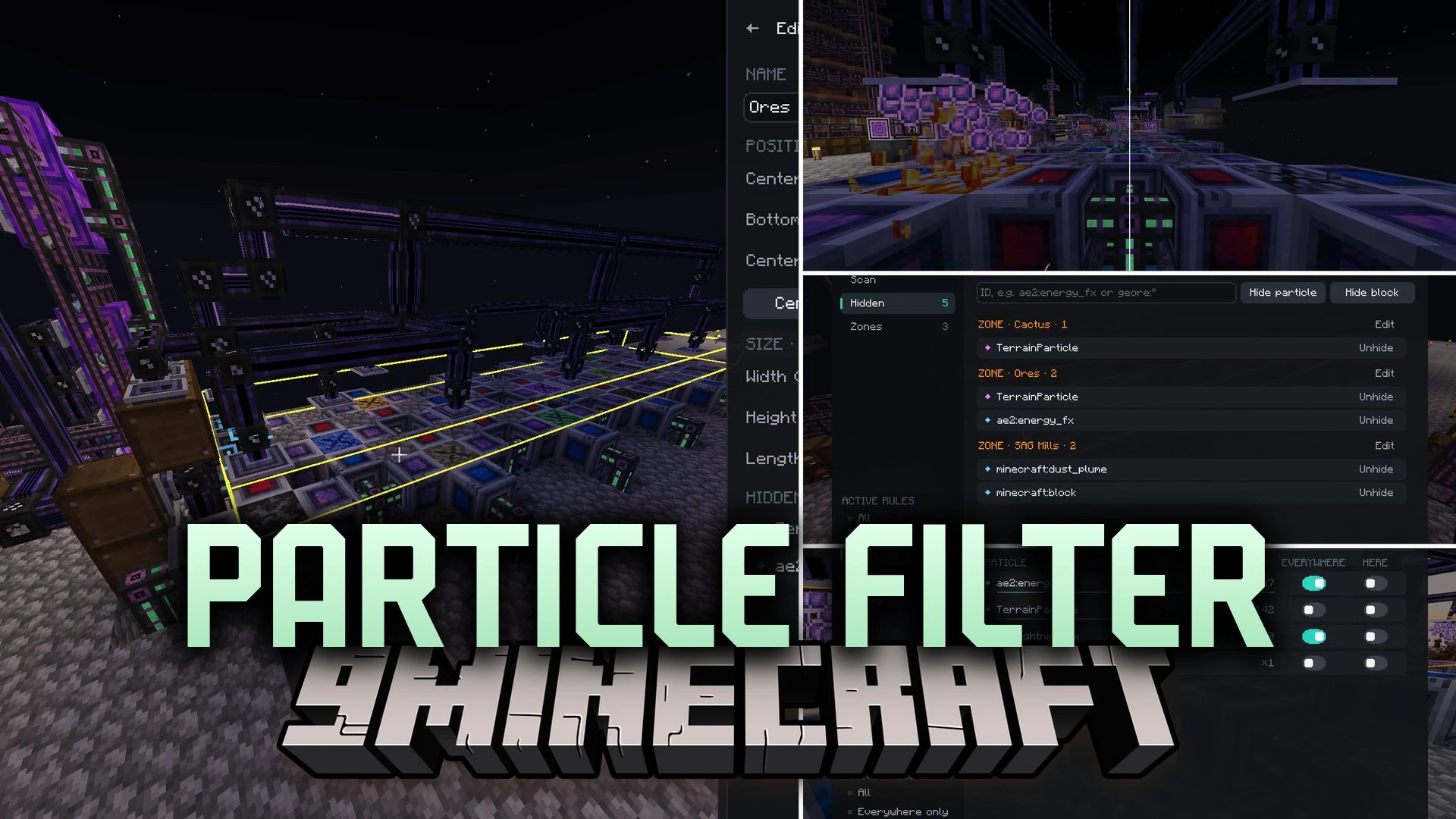
Features:
- Live 5-Second Particle Scanner: Records every particle spawning within 6 blocks for five seconds when you press Scan, listing exact IDs and spawn counts so you never have to guess names from a long list. It also detects modded particles by class name whenever a standard particle type ID is missing.
- Global and Zone-Based Filtering: Hides any selected particle with Everywhere for a world-wide rule or Here to suppress it only inside a chosen area. When no zone exists yet, this mod proposes a 9x5x9 box around the scanned spot with a live preview before you save it.
- Live 3D Zone Editor: Lets you create named, movable, and resizable 3D zones through a side panel while watching the zone outline update right in your world. You can change width, height, and length or snap a zone directly to your player position or crosshair.
- Block-Breaking Particle Rules: Hides mining, breaking, and block-dust effects for individual blocks, every block from one mod (such as
geore:*), or block tags (such as#c:ores) without turning off breaking effects for all blocks. - One-Place Rule Management: Groups every hidden rule inside the Hidden tab by scope – everywhere, per zone, or block breaking – with a one-click Unhide button and mode toggles that switch rules on or off without erasing your list.
- Client-Side With No Dependencies: Runs purely on your client with no server installation, no required library mods, and no manual config file editing needed.
- Draws zone outlines in the world whenever the menu is open, or keeps them visible during gameplay when you turn on Show outlines while playing.
- Highlights any saved zone inside the world when you hover over its entry in the Zones tab, showing its size, position, and hidden particle count.
- Scopes every saved zone to its specific world or server and dimension, tying multiplayer zones to the exact server address you used to connect.
- Lets you hold a keybind to reveal every hidden particle for a quick live before-and-after check.
- Works smoothly alongside Sodium, Particle Core, and heavy modded packs such as All the Mods 10: To the Sky.
- Stops selected particles from being created in noisy spots to reduce particle processing and rendering load, though FPS gains depend on your setup and it does not fix server lag or unrelated bottlenecks.
- Leaves particle effects drawn through a mod’s own custom renderer untouched, since only particles passing through Minecraft’s particle system can be filtered.
Active Rule Modes:
- All: Applies both global rules and custom zone rules at the same time.
- Everywhere only: Runs only your global particle filters while pausing zone-specific rules.
- Zones only: Runs only your custom 3D zone filters while keeping global rules paused.
- None: Turns off all filtering so every particle shows again without deleting your saved rules.
Available Keybinds:
- Open Menu: Opens the main interface directly without typing a chat command (unbound by default).
- Scan Particles: Starts a 5-second nearby particle scan at your crosshair (unbound by default).
- Toggle Block-Breaking Particles: Toggles breaking and mining particles for the exact block you are looking at (unbound by default).
- Show Zone Outlines: Toggles in-world 3D zone borders on or off (unbound by default).
- Cycle Active Rules: Switches through All, Everywhere only, Zones only, and None in one press (unbound by default).
- Temporarily Show All Particles: Reveals every hidden particle while held down for an instant comparison (unbound by default).
Best Use Cases:
- Tech and Automation Bases: Quiet down particle-heavy crystal farms, Applied Energistics 2 Growth Accelerators, and automated machines without hiding useful effects while exploring.
- Builders and Atmosphere: Hide distracting effects in one room or build while keeping campfire smoke, decorative particles, and ambient effects everywhere else.
- Noisy Particle Cleanup: Reduce particle creation inside crowded machine rooms where heavy particle spam slows down your screen.
- Recording and Streaming: Clear visual clutter around your base without changing server settings or turning off effects across the whole world.
Commands:
/particles: Opens the main particle filter menu./particles scan: Runs a scan at your crosshair and opens the list of nearby particles and counts./particles hidden: Opens the Hidden tab to view, add, or unhide particle and block rules./particles zones: Opens the Zones tab to view, create, edit, or delete 3D filter zones.
How to Use:
- Look toward the unwanted particles in your base or stand nearby, then type
/particlesin chat (or press your menu keybind) to open the menu. - Click Scan (or run
/particles scan) and wait 5 seconds; the scanner lists every particle that spawns within 6 blocks along with its exact ID and spawn count. - Select a particle from the scan results and click Everywhere to hide it across your entire world, or click Here to hide it only inside a local zone.
- Preview the proposed 9x5x9 box if no zone exists at that spot yet, then confirm to create the zone and immediately hide the chosen particle inside it.
- Open the Zones tab (or run
/particles zones) and edit a zone to open the live side panel; adjust its size or snap it to your position or crosshair while watching the 3D outline update in your world. - Turn on Show outlines while playing inside the Zones tab if you want zone boxes to stay visible after closing the menu, or hover over a zone entry to highlight it.
- Open the Hidden tab (or run
/particles hidden) to hide specific block-breaking particles by exact block ID, mod namespace such asgeore:*, or block tag such as#c:ores, or click Unhide to restore any rule in one click. - Use the Active Rules selector at the bottom left to switch between All, Everywhere only, Zones only, and None without losing your saved list.
- Open Controls and scroll to Particle Filter to bind optional keys for opening the menu, scanning, toggling block-breaking particles on the targeted block, showing zone outlines, cycling active rules, or holding a key to temporarily show all particles.
Screenshots:


How to Install:
New to Minecraft? Follow our step-by-step guide to install Mods on your PC.View Guide
Requirements:


Particle Filter Mod Download Links
For Minecraft 1.21.1, 1.21
For Minecraft 1.20.1, 1.20
Which mod loader do you use the most often?
18 responses · See the full results →
You May Also Like
Picked for this page
 Ultimate Car Mod (26.3, 1.20.1) – Cruise Modern Highways Between Bases
 Alex’s Mob Mod (1.21.1, 1.20.1) – Bring Every Biome to Life
 Cascades Mod (26.3, 1.20.1) – Sail Wide Rivers Past Soaring Cliffs
 Coords Mod (26.3, 1.20.1) – Track Your Exact Position Without Opening F3
 Sword Blocking Mechanics Mod (26.3, 1.20.1) – Defend Against Attacks
 Nether Invader Mod (1.21.11, 1.20.1) – Piglins Raid Your World
 Async Mod (26.3, 1.21.1) – Run Huge Farms Without Lag
 Villagers Buy Ender Pearls Mod (1.21.11, 1.21) – Clerics Trade Ender Pearls
 Re-Dye Concrete Powder Mod (26.3, 1.20.1) – Recolor Blocks Without Wasting
 Re-Dye Glass Mod (26.3, 1.20.1) – Recolor Existing Glass Blocks Without Losing
 Cobblemarks Plus Mod (1.21.1, 1.21) – Collect Rare Titles for Your Party
 BJ Map Edit Mod (1.21.11, 1.20.1) – Build Custom Maps and Datapacks
Most viewed in Mods over the last 7 days
 Ala Industrial Mod (26.3) – Run Electric Power Grids and Automated Factories
 PleasureCraft Mod (26.3, 1.21.1) – Jenny Mod Remake for Fabric
 Jennycraft Mod (26.3, 1.20.1) – Virtual Girlfriend in Minecraft
 Fapcraft Mod (26.3, 1.12.2) – Comprehensive and Detailed Content
 Meteor Client Mod (26.3, 1.20.1) – Xray, HUD, Fly
 Jenny Mod (Fapcraft) Official Complete Guide – How to use, Tutorial
 BangCraft Mod (1.20.1) – Jenny, Ellie and Elliot
 OptiFine HD (26.3, 1.20.1) – Run Faster, FPS Boost, Shaders Support
 CatLean Client Mod (26.2, 1.21.11) – ThunderHack Recode Alternatives
 Fabric Loader (26.3, 1.20.1) – Fabric Installer for All Minecraft Versions
 Patched Mod (26.3, 1.20.1) – Edit Game Files Without Breaking Packs
 Meteor Client Addons (26.3, 1.20.1) – Modify Almost Anything in Meteor
More from Mods
 Redstonoscope Mod (26.3) – Plot Live Redstone Signal Waves Right on Your Screen
 The Mi Alliance Invasion Mod (1.20.1) – Survive a Base-Building Army
 Bubie Mod (26.3, 1.20.1) – Automate Daily Base Chores with Custom CRT Helper
 Balanced Ore Detector Mod (26.3, 1.21.1) – Find Hidden Ores Without Strip Mining
 O O kowo-lib Mod (1.21.11, 1.21.1) – Write Cleaner Kotlin UI Screens
 Cobblemon Pride Dittos Mod (1.21.1) – Dress Ditto in Pride Flag Cosmetics
 Spooky Trees Mod (26.3, 1.20.1) – Scavenge Haunted Forests
 Spice of Life Stick Edition Mod (1.21.1) – Rotate Meals for Full Nutrition
 IvToolkit TF-E Mod (1.7.10) – Core Modding Toolkit Required to Run Recurrent
 Not Enough Wands Mod (26.3, 1.20.1) – Magical Wands to Simplify Any Task
 Quacked SMP Server Management Panel Mod (26.3, 1.21.11)
 Gun Core Mod (26.3, 1.21.11) – Hunt Mobs with Firepower

This post has no comments yet. Be the first — your comment will appear here.