Server Variables Plugin (1.21.1, 1.20.1) – Spigot

 0
0  June 16, 2024
Server Variables Plugin lets server administrators create and manage custom variables for players and the server itself. These variables can store data like text, integers, or decimals.
Features:
- Simple Configuration: Server Variables simplifies the process of adjusting server settings by providing an intuitive configuration interface.
- Gameplay Control: Modify critical gameplay elements such as player health, hunger rates, experience gain, and more. Experiment with different settings to create a gameplay experience that aligns with your server’s theme.
- World Generation Flexibility: Tweak world generation parameters to influence terrain, biome distribution, ore generation, and other aspects of your server’s environment. Shape the landscapes your players will explore and build upon.
- Weather and Time Management: Take charge of weather patterns and time progression. Whether you want a server with constant sunshine or periodic rain, Server Variables lets you dictate the atmosphere.
- Custom Events: Set up unique in-game events triggered by specific conditions, player actions, or time intervals. Engage your players with dynamic experiences that keep them coming back for more.
Commands:
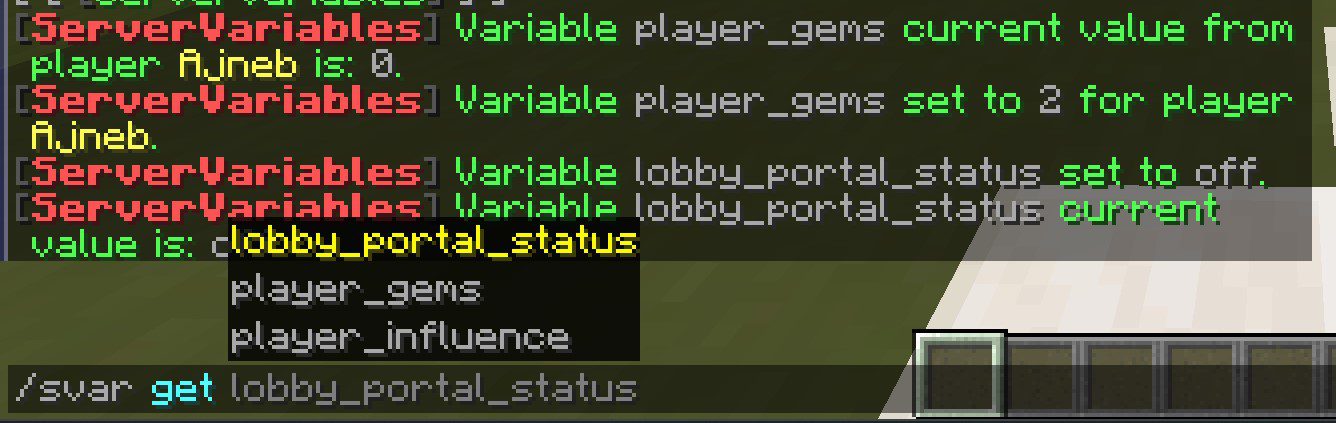
The Server Variables plugin offers a range of commands to manage and customize server variables:
/servervariables set <variable> <value>: Set the value of a specific server variable./servervariables get <variable>: Retrieve the current value of a server variable./servervariables reset <variable>: Reset a server variable to its default value./servervariables reload: Reload the plugin’s configuration.
Permissions:
Control access to the plugin’s commands with the following permissions:
servervariables.admin: Grants access to all plugin commands.servervariables.set: Allows players to set server variables.servervariables.get: Permits players to view server variable values.servervariables.reset: Enables players to reset server variables.servervariables.reload: Allows players to reload the plugin’s configuration.
Server Variables Plugin Download Links
For All Versions from Minecraft Spigot 1.8 to Minecraft Spigot 1.20.1
For Minecraft Spigot 1.20.4
For Minecraft Spigot 1.21.1, 1.21
Click to rate this post!
[Total: 0 Average: 0]
You May Also Like