
Skin Creator Mod (26.3, 1.20.1) – Craft and Switch Custom Outfits
 43
 0

Skin Creator Mod puts a full skin editor directly inside your Minecraft menu. It lets you mix clothing pieces, customize facial features, adjust color layers, and see preview changes on your character in real time. You can update your look on your official account with one click without restarting the game or opening a web browser. The mod runs on the client side, meaning you can open the studio in singleplayer worlds or while playing on multiplayer servers.
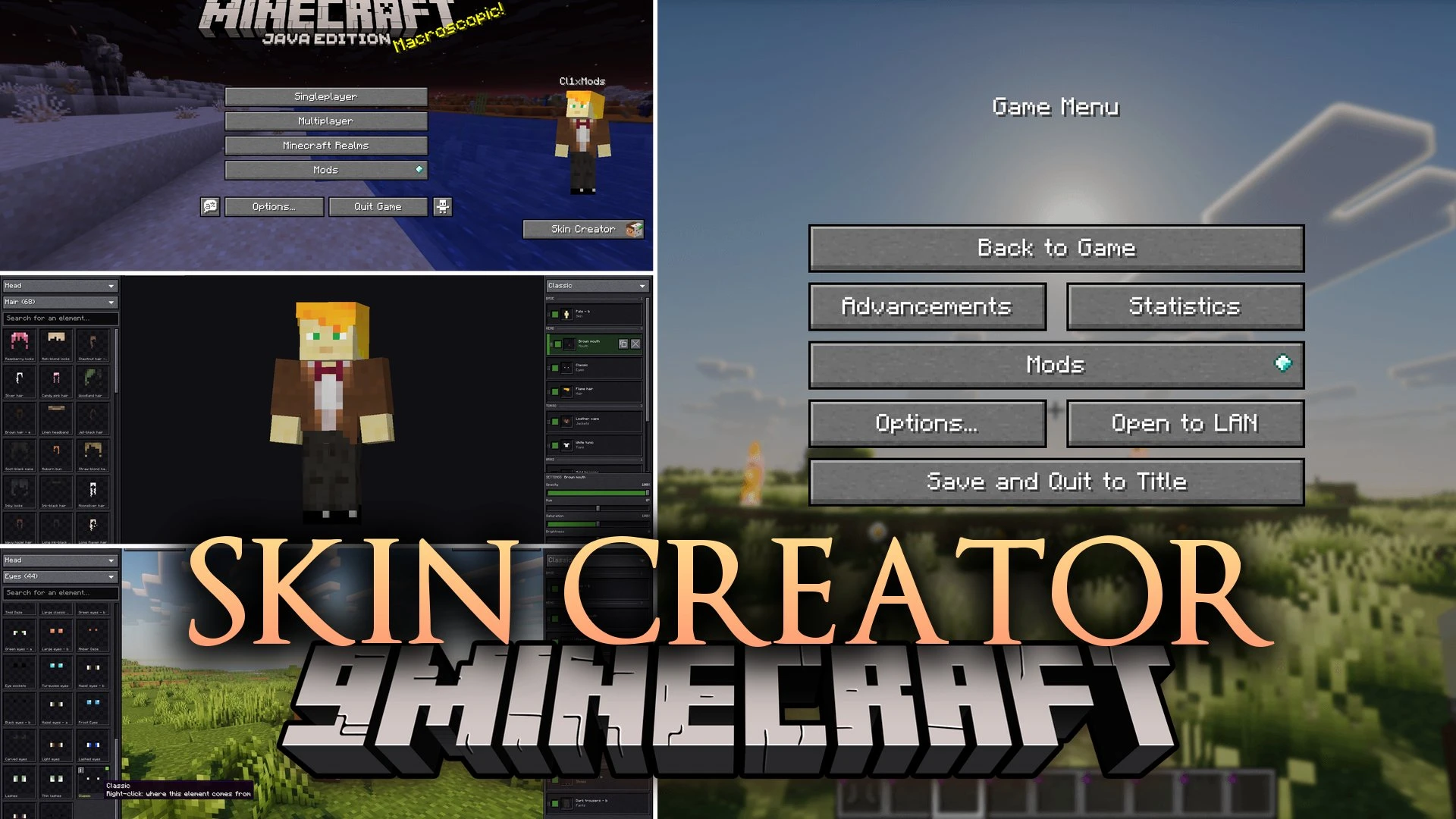
Features:
- In-Game Skin Editor: Lets you build custom character looks directly from the title screen or pause menu.
- One-Click Account Upload: Sends your finished skin directly to your account without restarting the launcher.
- Offers a library of pre-made hair, facial expressions, clothes, and full outfit templates.
- Provides real-time character previews so you can test clothing parts before keeping them.
- Lets you stack, reorder, hide, and tweak the opacity or color of individual texture layers.
- Includes an undo button to step back through any design changes at your own pace.
- Saves your creations online so you can access them again across different game sessions.
- Exports your look as a standard 64×64 skin file or as a full-body character image.
- Works on the client side across singleplayer worlds and multiplayer servers.
- Includes English, French, and Spanish language options in the user interface.
How to Use:
- Open the title screen or pause your game during play.
- Click the Skin Creator button on the side of the screen to open the editor.
- Pick items from the library on the left or select a full preset outfit.
- Adjust layers, colors, and opacity using the controls on the right side of the screen.
- Click Apply to send the skin directly to your account, or export it as an image file.
Screenshots:


How to Install:
New to Minecraft? Follow our step-by-step guide to install Mods on your PC.View Guide
Requirements:




Skin Creator Mod Download Links
For Minecraft 26.3
For Minecraft 26.2
For Minecraft 26.1.2, 26.1.1, 26.1
For Minecraft 1.21.11
For Minecraft 1.21.10, 1.21.9
For Minecraft 1.21.8, 1.21.7, 1.21.6
For Minecraft 1.21.5
For Minecraft 1.21.4
For Minecraft 1.21.1, 1.21
For Minecraft 1.20.1, 1.20
Click to rate this post!
[Total: 0 Average: 0]
You May Also Like
Picked for this page
 Architectury API Mod (26.3, 1.20.1) – Hooks, Game Features
 Pufferfish’s Skills Mod (26.3, 1.20.1) – Level Up Your Abilities
 Bigger Stack Size Mod (26.3, 1.20.1) – Increased Stack Sizes
 TAB Mod (1.21.11, 1.20.1) – An All-In-One Solution That Works
 Extract Poison Mod (26.3, 1.20.1) – Harvest Poison from Certain Mobs
 Mama’s Herbs And Harvest Mod (26.1.2, 1.21.1) – Herbs And Harvest Enhancement
 Soul Fire’d Mod (26.1.2, 1.20.1) – Consistent Soul Fire Damage
 Inventory Interactions Mod (26.3, 1.20.1) – Right Click Repairs And More
 Fishing Rod Fix Mod (26.3, 1.20.1) – Fixing Fishing Line Bugs In Minecraft
 Native Persona Skinning Mod (26.3, 1.20.1) – Swap Character Outfits
 Editable World Generation Mod (26.3, 1.20.1) – Reshape Biomes Caves
 Family Tree for Minecraft Pets Mod (26.3, 1.21.1) – Preserve the Lineage
Most viewed in Mods over the last 7 days
 Ala Industrial Mod (26.3) – Run Electric Power Grids and Automated Factories
 PleasureCraft Mod (26.3, 1.21.1) – Jenny Mod Remake for Fabric
 Jennycraft Mod (26.3, 1.20.1) – Virtual Girlfriend in Minecraft
 Fapcraft Mod (26.3, 1.12.2) – Comprehensive and Detailed Content
 Jenny Mod (Fapcraft) Official Complete Guide – How to use, Tutorial
 BangCraft Mod (1.20.1) – Jenny, Ellie and Elliot
 Fabric Loader (26.3, 1.20.1) – Fabric Installer for All Minecraft Versions
 The Shooting Star Demo Mod (26.3, 1.20.1) – Vaporize Terrain From Orbit
 Meteor Client Mod (26.3, 1.20.1) – Xray, HUD, Fly
 OptiFine HD (26.3, 1.20.1) – Run Faster, FPS Boost, Shaders Support
 Aristois Client Mod (1.21.4, 1.20.1) – World Class Minecraft Utility
 Prestige Client Mod (1.21.11, 1.21.4) – Powerful Ghost Features for Crystal & Sword PvP
More from Mods
 Primal Plushies Paleo Pals Mod (1.21.1, 1.20.1) – Decorate Your Base
 Ipla Mod (26.3, 1.20.1) – Showcase Your Favorite Items
 MesdagPortLib Mod (1.20.1) – Run Modern Minecraft Mechanics on Older Versions
 Hellion’s API Mod (1.21.11, 1.21.1) – Play Hellion Series Addons Without Crashes
 Terrestria Mod (26.3, 1.20.1) – Highly Detailed Biomes
 Tre’s Tack Library Mod (1.20.1) – Outfit Your Horses with Fully Detailed Tack
 YDM’s coreX Library Mod (1.20.1) – Loot RPG Gear with Random Names
 Gunpowder Recipe Mod (26.3, 1.20.1) – Gunpowder is Craftable
 Villager Timetable Mod (26.3, 1.20.1) – Master Villager Schedules
 Artemis Laboratory Blocks Mod (26.3, 1.20.1) – Lab Blocks And Dynamic Decorations
 Fabric ORM Jimmer Mod (26.3, 1.20.1) – Prevent Sudden Server Crashes
 Cafe Core Mod (26.2, 1.21.1) – Bypass Anvil Limits and Tame Pets in Seconds

This post has no comments yet. Be the first — your comment will appear here.