


TabbyChat Mod
 283
283
 1
1


TabbyChat Mod Features/Functionality:
TabbyChat is a client-side mod for Minecraft that aims to make the multiplayer chat interface more organized, managable, and user-friendly. It can be installed (or loaded) into the Minecraft client by patching minecraft.jar or loaded at runtime via several different supported APIs.
Primary Features:
The primary feature of TabbyChat is to organize chat messages into different channels, and to represent those channels via tab-like buttons displayed above the chat interface. There are several different ways to configure TabbyChat to organize chat, including:
- Auto-searching for new chat channels or PM messages
- Selecting the appropriate Chat-Channel delimiters and manually creating the desired tabs
- Using custom filters to direct messages matching the desired expression to a specific tab
Custom Filters:
Custom filters allow the user to tell TabbyChat to perform various actions when a chat message matches the defined Regular Expression. These actions include the following:
- Highlight the matching text (with color and/or formatting)
- Play a notification sound
- Send the message to a specific tab
- Send the message to all tabs
- Prevent the message from displaying
Additional Features:
- Unread Message Notifications
- Timestamps prepended to chat messages
- Suppress spammed chat messages
- Log all chat to logfile with timestamps
- Force Unicode font rendering
- Interactive scroll bar
- Dynamically movable/resizable chat box
- Customize the number of messages retained (displayed) for each tab
- Customize the length of time a message remains on-screen during normal gameplay
- Each tab can have a ‘command prefix’ that can be applied to your messages
- Multi-line chat with configurable transmission delay
- New mouse controls and Key-binds added for interacting with TabbyChat
TabbyChat Mod Screenshots:
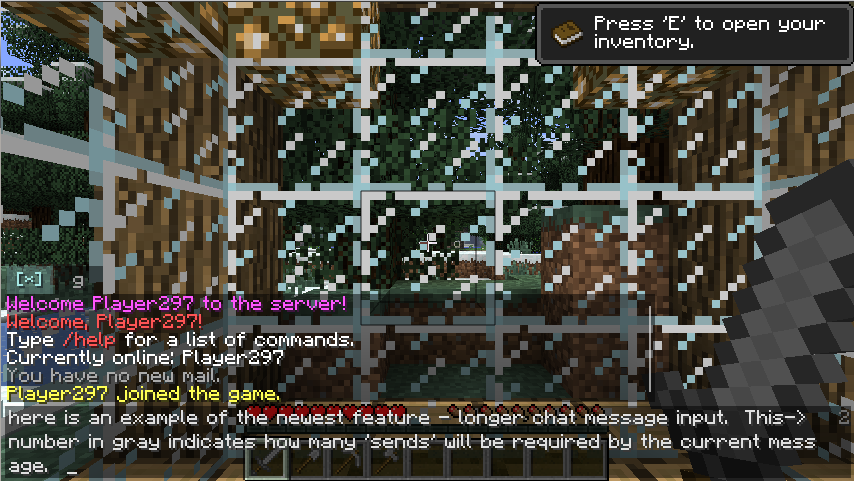
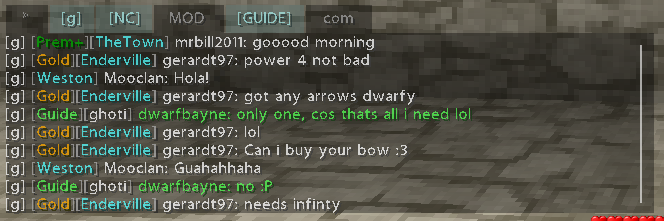
(note – fonts in these screenies courtesy of BetterFonts mod)
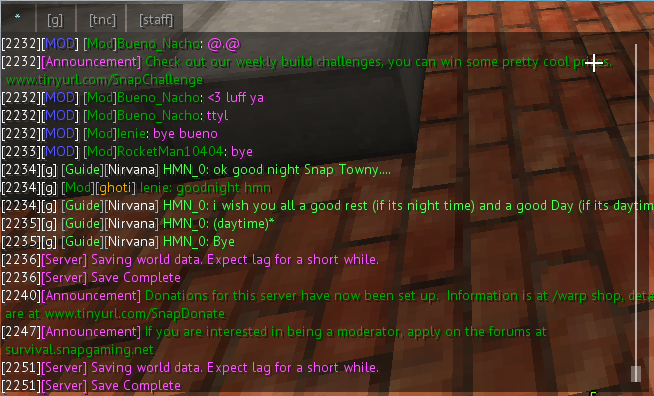
TabbyChat Mod Settings (shift-click on * tab):
General Config
Show More
TabbyChat Enabled: Enabled/disables TabbyChat. When disabled, tabs will be destroyed and all chat will appear in the same window as it does without this mod.
Save chat to local log: When on, TabbyChat will save all chat to a text file in a .minecraft/TabbyChatLogs folder. A new log file will be created each day, but the same log will be used for multiple servers. This log will contain timestamps if the Timestamp dispay option is on.
Timestamps: When on, each chat line will begin with the current time in preset format. A small number of timestamp format presets are currently available, left or right-click on the time displayed in the gray box to select.
Consolidate spammed chat: For each channel/tab, new chat messages will be compared with the previous message, and if they are the same, TabbyChat will append a message counter on the end of the previous message instead of adding the new message. Note: this may option may be resource-intensive, YMMV.
Unread notification flashing: When on, new chat messages that arrive to background tabs will cause those tabs to flash red in the chatbox area when the chatbox is not active/focused.
Server Config
Show More
Auto search for new channels: When on, coupled with the Chat-Channel Delimiter server setting, TabbyChat will attempt to identify new chat channels by looking for channel names surrounded by the delimiters at the beginning of each chat message (e.g. “<G>”, or “[G]”, or whatever). When found, a new tab will be created with this name and will contain only those messages. When off, TabbyChat will still attempt to match chat messages to currently-existing tabs and filter rules, but new tabs will not be automatically created.
Chat-channel delimiters: This tells TabbyChat what characters to watch for when trying to determine the chat channel, either automatically or otherwise. For example, “[G]” may indicate the Global chat channel, which is delimited by brackets on either side of the name. Available options are Angles <>, Braces {}, Brackets [], and Parenthesis ().
Delimiter formatting: Force TabbyChat to only consider new channel delimiters that adhere to a defined text color/style here (actually only the first delimiter must match). Left or right-click on this box to move forward/backward between available text colors and styles.
Default channels: This box should contain a comma-separated list of chat tabs that you want to be created everytime you sign on the server, regardless of whether or not TabbyChat has seen chat in that channel yet. For example, if you specify “G, N, Local”, then TabbyChat will automatically create these tabs right away and not wait until chat in that channel appears. This helps you control the tab display order (since these are created first), and they will also still work when auto-search is turned off.
Ignored channels: This is a comma-separated list of names that TabbyChat may think are chat channels, but that you want it to ignore. For instance, if you occasionally see chat messages beginning with “<Server>” that TabbyChat creates a tab for, but you don’t want a tab, you can specify “Server” in the ignored channels list.
Custom Filters
Show More
Filter Name: The topmost textbox is for the filter name. This is primarily to help you remember what the filter is for. Use the “<>” buttons to flip between filters, and “New”/”Delete” buttons at the bottom-left to make more/less.
Send matches to tab: Chat messages that match this filter (or don’t, if “Inverse match” is on) will be sent to and show up in the tab you specify in “Tab Name”, or to all tabs if “All tabs” is checked.
Hide matches from chat: If this is checked, chat messages matching the filter will not be shown in any tab except the * (asterisk) tab (which is purposely left untouched). “Send matches to tab” and “Highlight matches” must be unchecked to enable this option.
Highlight matches: The portion of the chat message matching the filter will be highlighted/formatted as defined in the below “Color” and “Format” boxes.
Audio Notification: Plays a sound when a filter finds a match. Click on the box next to “Sound” to configure the desired notification sound.
Inverse match: If this is on, TabbyChat will flag chat messages that DON’T match this filter. This option doesn’t work in conjunction with highlighting, and is most useful with the “Send matches to tab” option. This essentially will let you make a new chat tab containing all chat messages EXCEPT a certain type.
Case-sensitive: When on, the filter is applied in a case-sensitive fashion (i.e. upper-case letters in the expression must match in the chat)
Filter expression: This is the key setting that determines what this filter matches. This is defined using regular expression syntax, which TabbyChat will use to comb through chat messages for a match. More details and explanation in the below post.
Advanced Settings
Show More
Chat history to retain: How many lines of chat to keep in the chat window for each tab (accessible by scrolling up/down)
Channel name max. length: When auto-search is enabled, this helps TabbyChat know a realistic number of letters to expect in chat-channel names. So, a setting of 10 would catch [Nether] but not [Announcement].
Multi-chat send delay: If you compose and send a chat that requires multiple ‘sends’ (denoted by the gray number on the far right of the chat input box), this time delay will be enforced between each ‘send’.
Custom Chatbox size: <deprecated, replaced by dynamic chatbox functionality> The unfocused height slider remains, and defines the percentage of the focused chatbox height to use as a maximum height allowed for unfocused chat.
Chat fade time: When a chat message is received and the chat screen is not currently active, the message typically displays for a period of time on your screen and then fades away. This slider controls how long the message should stay visible (the Unfocused chatbox height controls how many you may see at one time).
Tab Settings (right-click on tab to access)
Show More
Alias: This will be the name displayed on the tab. It will default to the tab’s name on creation.
Unread Notifications: Enable/disable unread notifications for this tab.
Chat command prefix: If this tab (and only this tab) is activate when the chat input field is brought up, the contents of this box will be put into the beginning of the input field. Any spaces before or after the full contents will be trimmed, and a trailing space will be added. When switching tabs, if the input field’s only content is the command prefix from the previous tab, it will be removed, and the new tab’s command prefix will be added. Otherwise, the input field’s contents will be left alone.
Position: Use the Left/Right arrows to move the tab forward/backward (respectively) in display order. No tab can be placed before the [*] tab.
How to Install:
New to Minecraft? Follow our step-by-step guide to install Mods on your PC.View Guide
TabbyChat Mod Download Links
For Minecraft 1.6.4
For Minecraft 1.6.2
For Minecraft 1.5.2
You May Also Like








This post has no comments yet. Be the first — your comment will appear here.