
Witch Hut Schematic (1.21.x) – Detailed Fantasy Medieval House Build

 0


Witch Hut Schematic adds a detailed fantasy-themed house to your Minecraft world. This build features a medieval style that looks great in magical or spooky settings. It uses nearly 30,000 blocks to create a large and complex structure. The build comes in a .litematic format, which helps you place it in your own world. It works with Minecraft 1.21.4 and newer versions without needing any extra mods.
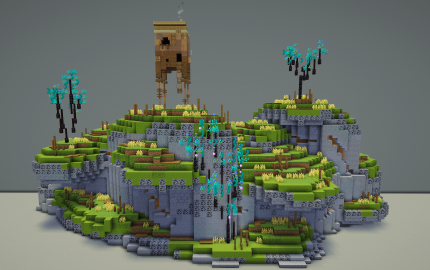
3D Preview & Editor:
Materials
54 types · 29,752 blocks
| Black Concrete | 15,526 | Andesite | 3,751 | Grass Block | 2,602 | |||
| Gravel | 1,801 | Coal Ore | 1,212 | Light Gray Wool | 1,127 | |||
| Moss Block | 884 | Cracked Stone Bricks | 733 | Green Concrete Powder | 561 | |||
| Wheat | 209 | Spruce Fence | 157 | Spruce Trapdoor | 120 | |||
| Glow Lichen | 111 | Nether Brick Fence | 80 | Light Gray Concrete Powder | 64 | |||
| Orange Stained Glass | 63 | Twisting Vines Plant | 63 | Spruce Wood | 59 | |||
| Blue Orchid | 51 | Warped Roots | 45 | Cornflower | 45 | |||
| Stone Slab | 38 | Blackstone Wall | 37 | Oak Slab | 36 | |||
| Brown Concrete Powder | 32 | Brown Stained Glass Pane | 31 | Orange Stained Glass Pane | 27 | |||
| Packed Mud | 27 | Spruce Fence Gate | 26 | Andesite Slab | 25 | |||
| Stripped Jungle Wood | 23 | Oak Wood | 20 | Spruce Planks | 18 | |||
| Spruce Wall Sign | 17 | Birch Wall Sign | 13 | Jungle Slab | 12 | |||
| Oak Planks | 11 | Andesite Stairs | 9 | Smooth Basalt | 9 | |||
| Spruce Slab | 9 | Jungle Fence | 8 | Jungle Trapdoor | 8 | |||
| Allium | 7 | Campfire | 7 | Beehive | 7 | |||
| Dark Oak Wood | 6 | Ladder | 6 | Stripped Spruce Wood | 6 | |||
| Barrel | 4 | Polished Basalt | 2 | Glass | 2 | |||
| Spruce Pressure Plate | 2 | Jungle Stairs | 2 | Spruce Stairs | 1 |
How to place this schematic
.litematic This is a Litematica schematic. You place it with the Litematica mod, which shows the build as a ghost overlay you fill in.
| 1 | Install Litematica (plus MaLiLib) for your Minecraft version. |
| 2 | Put the .litematic file in .minecraft/schematics. |
| 3 | In game press M → Load Schematics, pick the file, then Load. |
| 4 | Position the ghost preview, then build it by hand — or turn on Easy Place to place blocks straight from your hotbar. |
| 1 | Download the .litematic file for the house. |
| 2 | Put the file into the schematics folder in your game files. |
| 3 | Load the build using the Litematica mod menu in-game. |
| 4 | Move the schematic outline to the spot where you want to build. |
| 5 | Use the ghost blocks as a guide to place the real blocks. |
Features:
- Uses a fantasy medieval theme that fits perfectly in swamp biomes.
- Includes a massive structure built with 29,752 blocks.
- Ships as a .litematic file for use with the Litematica mod.
- Features a size of 75 blocks wide and 42 blocks tall.
- Works with vanilla Minecraft blocks so the build looks correct for everyone.
Schematic Specs:
 Minecraft1.21.x
 Dimensions75×42×31
 Total Blocks29,752
 Top Blocks Used
Witch Hut Schematic Download Links
For Minecraft 1.21.x
If Mojang added an official, built-in blueprint and hologram system to vanilla Survival Minecraft, how would you react?
0 responses · See the full results →
You May Also Like
Picked for this page
 Pokémon Temple Arena Japanese Litematica Schematic (1.21.x) – Large Asian Fortress With Fighting Rin
 Four Masted Barque Schematic (1.21.x) – Large Sailing Ship Build With Four Masts
 Melon Farm Mega Without Dispenser Schematic (1.21.x) – Large Automated Melon Farm For Survival
 Mini Freddy Pizzeria Schematic (1.21.x) – A Small FNAF Restaurant Build For Your World
 9×9 Elevator Schematic (1.21.x) – Fully Working Vanilla Flying Machine
 Oak Tree Schematic (1.21.x) – Large Custom Vanilla Oak Tree Build
 AirShip Easy to Build in Survival Schematic (1.21.x) – Small Medieval Flying Machine Build
 Void Death Schematic (1.21.x) – Simple Redstone Void Trap Build
 Bombtruck Schematic (1.20.x) – Large Vanilla Bomb Truck Build For Your World
 Small House 10 Schematic (1.20.x) – A Compact Vanilla Home Blueprint For Players
 Rocket Buggy Schematic (1.20.x) – Compact Rocket Buggy Build For Your World
 Vw Passat Variant R Line Schematic (1.21.x) – Build A Modern Car In Your World
Most viewed in Schematics over the last 7 days
 Fastest Bonemeal Farm Donut Smp Schematic (1.21.x) – Fast Redstone Bonemeal Farm Build
 64 Module Cobblestone Farm Schematic (1.21.x) – Massive Automated Stone Gathering Build
 KelpFarmV9.9 Schematic (1.21.x) – Compact And Simple Seaweed Farm Build
 Gold Farm Schematic (1.21.x) – Automatic Nether Roof Gold Farm
 Villager Trading Hall Schematic (1.21.x) – Modern Shop Build For 48 Villagers
 Bamboo Farm Schematic (1.21.x) – Small Automated Redstone Bamboo Farm
 Best Railgun Tp Trap on Donutsmp Schematic (1.21.x) – Unescapable Multiplayer Redstone Trap Build
 Minutes End Base Before Spoke Null End Video Schematic (1.21.x) – Giant Unstable SMP End Base Schema
 Bamboss V2 800k Bamboo per Hour Schematic (1.21.x) – High Speed Automated Bamboo Farm Schematic
 36 Module Cobble Farm 18m per Hour Donut SMP Schematic (1.21.x) – Massive Automated Stone Generator
 Donut Smp Stash and Regear Schematic (1.21.x) – Large Storage And Regear Room Build
 Unstable SMP S Bomer Schematic (1.21.x) – Large Bomber Machine Build For Worlds
More from Schematics
 Mapart Sad Minion Schematic (1.21.x) – Build A Detailed Map Art Minion
 Black Car Schematic (1.21.x) – Sleek Modern Vehicle for City Streets
 Orange Pick up Schematic (1.21.x) – Build a Stylish Modern Orange Truck
 White and Red Truck Schematic (1.21.x) – Compact Modern Semi Truck Build
 2×2 Ground Door Schematic (1.21.x) – Simple Hidden Floor Entrance for Minecraft
 Bamboo Farm 2.0 Donut SMP Schematic (1.21.x) – Automatic High Yield Bamboo Farming System
 Medieval Village House Schematic (1.21.x) – A Cozy Medieval Home With Prismarine Roof
 Given 3d Download Schematic (1.19.x) – Detailed 3D Fantasy Statue Schematic for Minecraft
 Crimson Witch Hut Schematic (1.21.x) – Magical Small Medieval Witch House Build
 Grand Medieval Castle Schematic (1.21.x) – Massive Red Roofed Medieval Fortress Build
 Medieval Riverside Cottage Schematic (1.21.x) – Cozy Medieval House With Market Stall
 Medieval Wizard’s Tower Schematic (1.21.x) – Magical Medieval Tower For Your World

This post has no comments yet. Be the first — your comment will appear here.