


Cubes Without Borders Mod (26.2, 1.20.1) – Alt-Tab Without Minimizing
 8,835
8,835
 0
0


🌐 Read this article in your language! Choose your preferred language below.
Or pick the one you like:
Cubes Without Borders Mod lets you play Minecraft in a borderless fullscreen window. This allows you to have the game open on one monitor and use other apps on a different monitor without Minecraft minimizing.
Features:
- Play in a borderless fullscreen window that doesn’t minimize when you click away.
- Works on Windows, macOS, and Linux for a consistent experience.
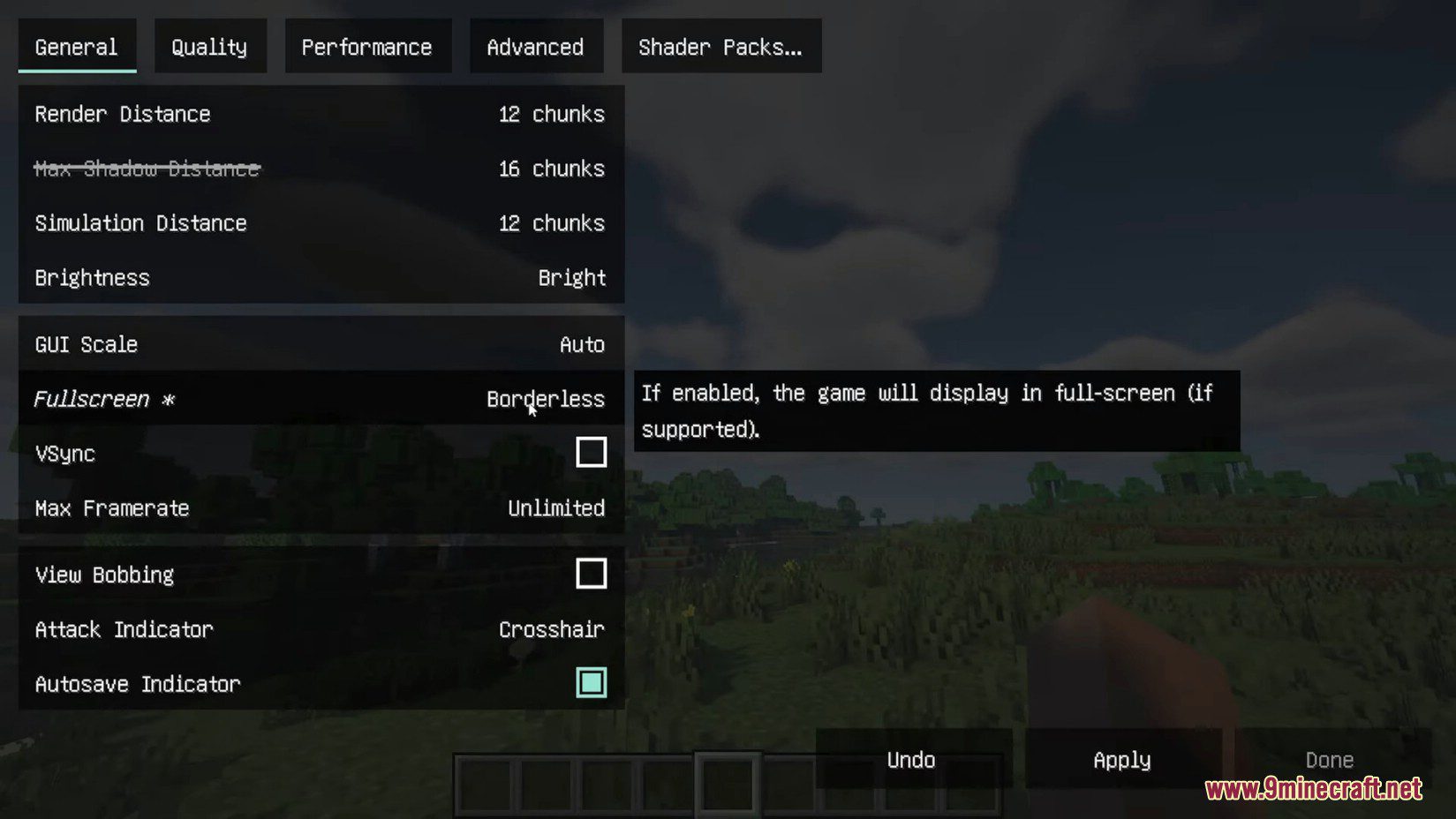
- Adds a new “Borderless” option to the existing “Fullscreen” setting in Video Settings.
- Does not add extra input latency, keeping your gameplay responsive.
- Includes a startup flag to force the game to launch in borderless mode.
- Offers several different fullscreen types in its configuration for advanced users.
Configuration:
This mod adds a startup flag, --borderless, which forces the game to launch in borderless fullscreen mode. For more options, you can edit the cwb.json file directly. If you have YACL or Cloth Config installed, a settings screen will also be available in the game.
How to Use:
- Go to the Video Settings menu in the game.
- Find the Fullscreen setting.
- Change the option to the new Borderless setting.
- Click Apply or Done to save your changes.
- You can also press F11 to switch directly into borderless mode, as it becomes the new default for fullscreen.
Screenshots:
How to Install:
New to Minecraft? Follow our step-by-step guide to install Mods on your PC.View Guide
Requirements:
 Minecraft Forge Required
 Fabric Loader Required
 Fabric API Required
 NeoForge Required
Quilt Loader Required
YetAnotherConfigLib (YACL) Optional


Cubes Without Borders Mod Download Links
For Minecraft 26.2
For Minecraft 26.1.2, 26.1.1, 26.1
For Minecraft
1.21.81.21.6,
1.21.8,
1.21.7
All Versions Covered
1.21.81.21.6
1.21.8
1.21.7
1.21.6
All Versions Covered
1.21.81.21.6
1.21.8
1.21.7
1.21.6
For Minecraft
1.21.11,
1.21.10,
1.21.9
All Versions Covered
1.21.11
1.21.10
1.21.9
1.21.8
1.21.7
1.21.6
1.21.5
1.21.4
All Versions Covered
1.21.11
1.21.10
1.21.9
1.21.8
1.21.7
1.21.6
1.21.5
1.21.4
For Minecraft 1.21.10, 1.21.9
For Minecraft 1.21.5
For Minecraft 1.21.4
For Minecraft 1.21.3, 1.21.2
For Minecraft 1.21.1, 1.21
For Minecraft 1.20.6
For Minecraft
1.20.4,
1.20.3,
1.20.2
All Versions Covered
1.20.4
1.20.3
1.20.2
1.20.1
1.20
All Versions Covered
1.20.4
1.20.3
1.20.2
1.20.1
1.20
For Minecraft 1.19.4, 1.19.3
For Minecraft 1.19.2, 1.19.1, 1.19
For Minecraft 1.18.2, 1.18.1, 1.18
For Minecraft 1.17.1
For Minecraft 1.16.5
Click to rate this post!
[Total: 1 Average: 5]
You May Also Like

This post has no comments yet. Be the first — your comment will appear here.