


Potion Bar Mod (26.2, 1.20.1) – Stop Guessing When Your Potion Effects Will Fade

 0
0 

🌐 Read this article in your language! Choose your preferred language below.
Or pick the one you like:
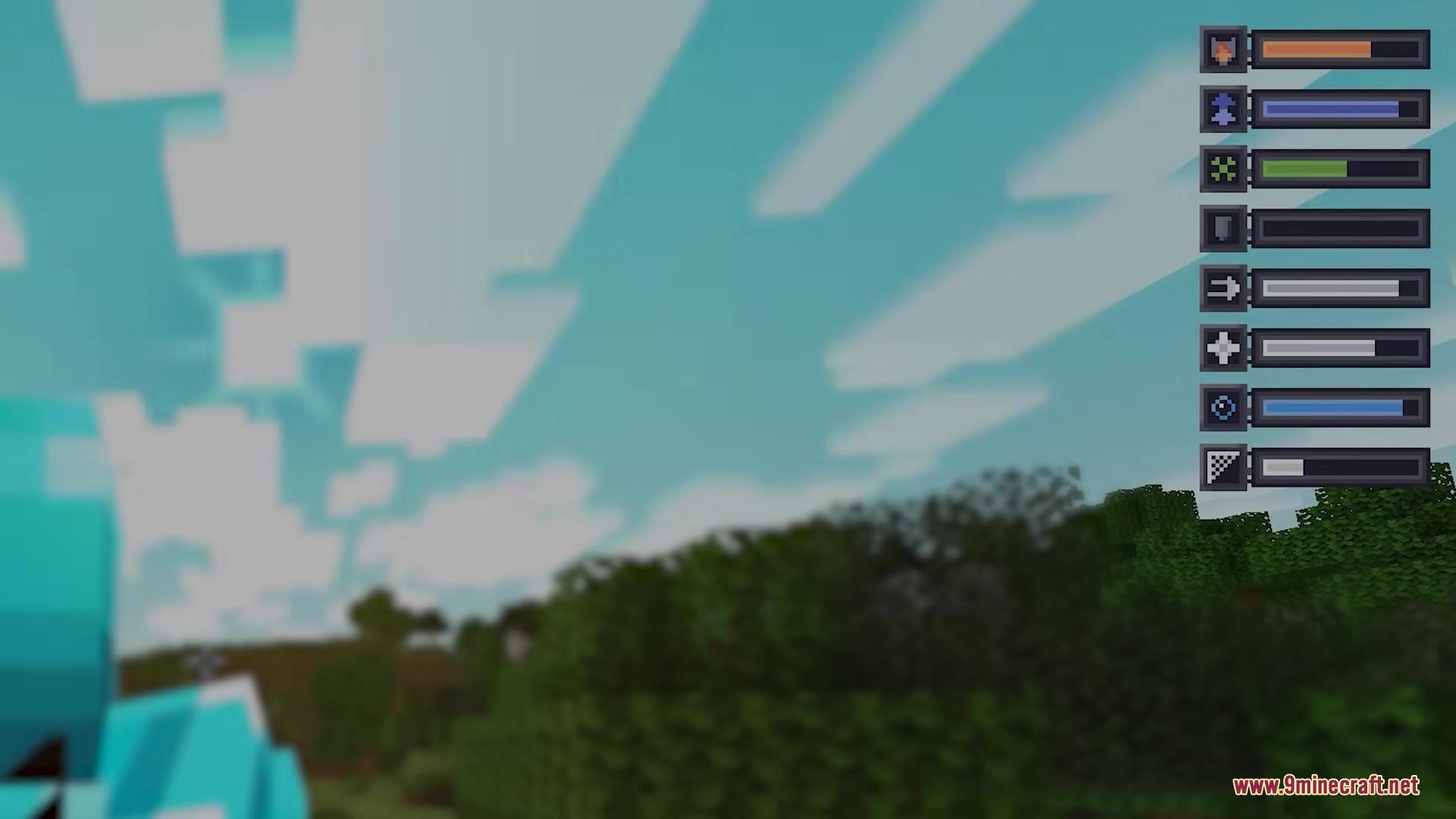
Potion Bar Mod adds a simple progress bar to your screen for active potion effects. It takes away the guesswork by showing exactly how much time you have left before your magic runs out. You get a clear bar and an icon on the side of your screen, making it easy to track multiple effects at once.
Features:
- Adds a clean progress bar to your screen that tracks how long your potion will last.
- Changes the color of the progress bar to match the type of potion you drank.
- Shows a clear icon next to the bar so you know exactly which effect is active.
- Works completely on your side of the game, so you can join multiplayer servers without needing the server to have it installed.
Commands:
/potionbar position [center/left/right/custom]moves the bar on your screen. The custom option opens an editor where you can drag and drop the bar./potionbar vanilaEffects [show/hide]controls if standard game effects appear in the list./potionbar timer [on/off/left/right/above/below]turns the number timer on or off and moves it around the icon./potionbar CustomIcons [on/off]swaps between custom textures and normal game textures.
How to Use:
- Drink any potion in the game to see the new bar appear on your screen.
- Type
/potionbar position customin the chat to open the screen editor. - Click and drag the bar to place it exactly where you want it.
- Type
/potionbar timer onif you want to see exact numbers next to the bar.
Screenshots:
How to Install:
New to Minecraft? Follow our step-by-step guide to install Mods on your PC.View Guide



Potion Bar Mod Download Links
For Minecraft 26.2
For Minecraft 26.1.2, 26.1.1, 26.1
For Minecraft
1.21.11,
1.21.10,
1.21.9
All Versions Covered
1.21.11
1.21.10
1.21.9
1.21.8
1.21.7
1.21.6
All Versions Covered
1.21.11
1.21.10
1.21.9
1.21.8
1.21.7
1.21.6
For Minecraft
1.21.5,
1.21.4,
1.21.3
All Versions Covered
1.21.5
1.21.4
1.21.3
1.21.2
All Versions Covered
1.21.5
1.21.4
1.21.3
1.21.2
For Minecraft 1.21.1, 1.21
For Minecraft
1.20.4,
1.20.3,
1.20.2
All Versions Covered
1.20.4
1.20.3
1.20.2
1.20.1
1.20
All Versions Covered
1.20.4
1.20.3
1.20.2
1.20.1
1.20
Click to rate this post!
[Total: 0 Average: 0]
You May Also Like

This post has no comments yet. Be the first — your comment will appear here.