
Checklist Mod (1.20.1, 1.16.5) – Never Forget Your Survival Tasks

 0


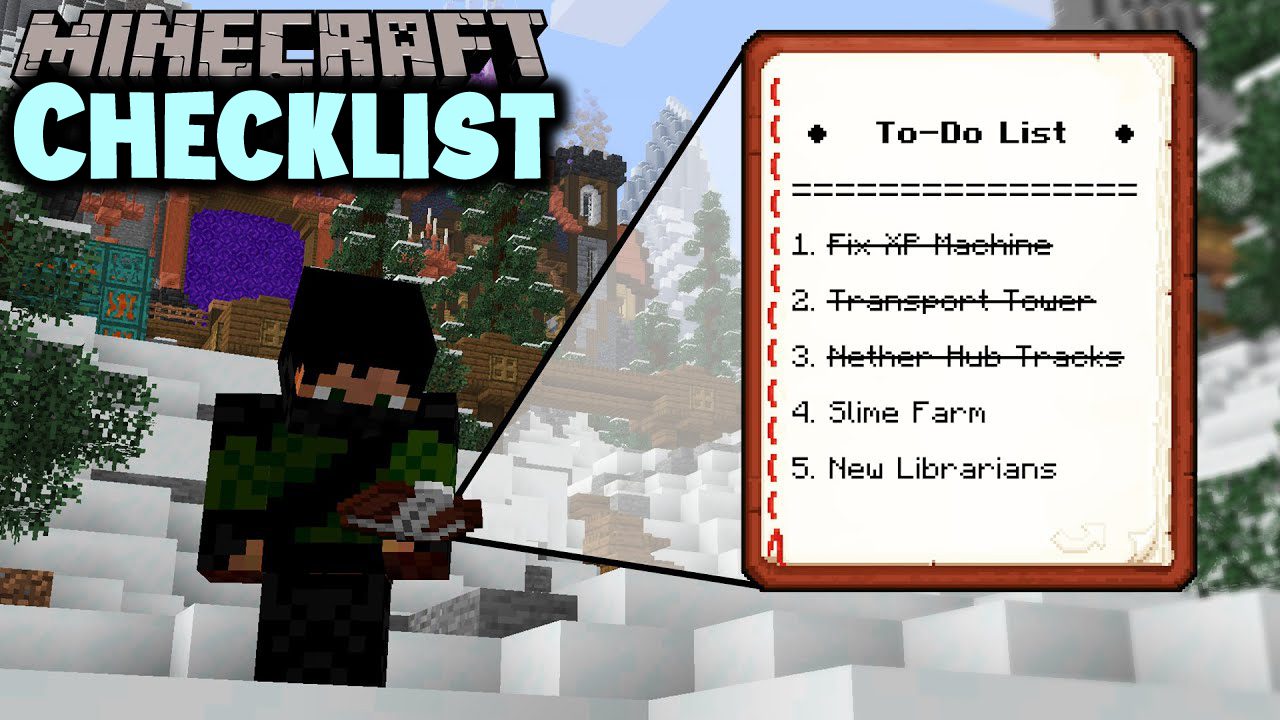
Checklist Mod brings a simple to-do list system to custom modpacks. It adds a Task Book and a Task Table so you can track goals and check off finished tasks by hand as you play. All tasks stay in a plain text file that supports comments, clickable links, and multiple pages, along with an option to give players a book when they first join a world. This mod also works with custom datapack advancements and lets you reload changes in-game without restarting.
Features:
- Task Book: Opens an in-game GUI that shows your current list of goals across one or more pages.
- Task Table: Holds and displays a Task Book as a block, letting you open the task list straight from the table.
- Manual Task Tracking: Requires you to click each task yourself when you finish it, with no automatic checking.
- Saves all tasks inside a plain text file so you can easily build custom goal lists for modpacks.
- Supports normal comment lines, line breaks, clickable web links, and multi-page layouts inside the book.
- Gives players a Task Book automatically when they first join a world if the first-join config option is turned on.
- Lets you create custom datapack advancements using the
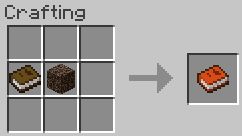
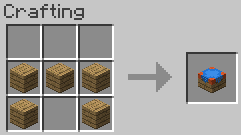
checklist:achievementtrigger so clicking a link in the book can unlock an advancement or quest. - Includes default crafting recipes for both the Task Book and the Task Table.
- Works with optional theme resource packs, including the Pokehaan Theme and the Farming Theme, to change the look of the book.
Commands:
/checklist reload: Reloads the Task Book with your latest file changes so you do not have to restart the modpack.
Configuration:
config/checklist/config.json: Holds thefirstJoinboolean option to give players a Task Book when they first join a world.config/checklist/tasks.txt: Stores all tasks for the book, with each new line creating a new task.#: Turns a line into normal text so you can add titles or comments inside the book.n: Splits text onto separate lines.[link text](URL): Adds a clickable link to a page in the book.===: Starts a new page in the Task Book.
How to Use:
- Craft a Task Book, or get one when you first join a world if
firstJoinis enabled in the config. - Right-click while holding the Task Book to open the task GUI and view your goals.
- Click any task inside the GUI to manually check it off once you finish it.
- Right-click a Task Table while holding the Task Book to place the book on the table.
- Right-click a Task Table that holds a Task Book to open the task GUI directly from the block.
- Hold Shift and Right-click the Task Table to pick the Task Book back up.
- Edit
config/checklist/tasks.txtto update your task list, then run/checklist reloadin chat to refresh the book without restarting the game.
Crafting Recipes:
Task Book
Task Table
How to Install:
New to Minecraft? Follow our step-by-step guide to install Mods on your PC.View Guide
Checklist Mod Download Links
For Minecraft 1.20.1, 1.20
Forge/NeoForge version: Download from Server 1 – Download from Server 2
For Minecraft 1.16.5
Forge version: Download from Server 1 – Download from Server 2
For Minecraft 1.12.2
Forge version: Download from Server 1 – Download from Server 2
For Minecraft 1.10.2
Forge version: Download from Server 1
How do you feel about 'expert' modpacks that change recipes to be much harder and interconnected?
0 responses · See the full results →
You May Also Like
Picked for this page
 Reterraforged Mod (26.3, 26.2) – The Best Terrain Generation
 Friends and Foes Mod (26.3, 1.20.1) – Eliminated & Forgotten Mobs
 Cascades Mod (26.3, 1.20.1) – Better Terrain Generation & New Biomes
 MAtmos Ambient Sound Mod (26.3, 1.20.1) – Adjusts Sounds Based On The Environment
 HighLight Item Mod (1.21.11, 1.20.1) – Highlights Similar Items To Selected One In Inventory
 Better Conduit Placement Mod (26.3, 1.20.1) – Placing Conduit Prismarine Blocks Easier
 Item Transform Helper Mod (26.3, 1.20.1) – Set Size & Location Of Items
 Modify Player Data Mod (26.3, 1.20.1) – Allows Data Commands To Modify Player Data
 PBOSB Mod (1.21.1, 1.20.1) – Projectiles Bounce Off Slime Blocks
 Server Sided Portals Mod (26.1.2, 1.20.1) – Custom Portals & Dimensions Compatible With Any Client
 Create: More Drill Heads Mod (1.21.1, 1.20.1) – 6 Types of Drill Heads
 Expansion Of Border Mod (26.3, 1.21.1) – Limited World Access
Most viewed in Mods over the last 7 days
 Ala Industrial Mod (26.3) – Run Electric Power Grids and Automated Factories
 PleasureCraft Mod (26.3, 1.21.1) – Jenny Mod Remake for Fabric
 Jennycraft Mod (26.3, 1.20.1) – Virtual Girlfriend in Minecraft
 Fapcraft Mod (26.3, 1.12.2) – Comprehensive and Detailed Content
 Jenny Mod (Fapcraft) Official Complete Guide – How to use, Tutorial
 BangCraft Mod (1.20.1) – Jenny, Ellie and Elliot
 Fabric Loader (26.3, 1.20.1) – Fabric Installer for All Minecraft Versions
 Meteor Client Mod (26.3, 1.20.1) – Xray, HUD, Fly
 The Shooting Star Demo Mod (26.3, 1.20.1) – Vaporize Terrain From Orbit
 OptiFine HD (26.3, 1.20.1) – Run Faster, FPS Boost, Shaders Support
 Aristois Client Mod (1.21.4, 1.20.1) – World Class Minecraft Utility
 Prestige Client Mod (1.21.11, 1.21.4) – Powerful Ghost Features for Crystal & Sword PvP
More from Mods
 Universe3090 Mod (1.20.1) – Survive Corrupted Dimensions Filled
 Wireless Automate Mod (1.21.1) – Automate Base Logistics Without Messy Pipes
 Vaskars Opus Faction War Quests & Bosses Mod (1.21.11, 1.20.1)
 Multitools and More Mod (26.3, 1.20.1) – Clear Your Hotbar and Travel
 Luxium Let There Be Light Mod (1.20.1) – Stunning Lighting on Low-End Computers
 Soulscraft Tarnished Legacy Mod (1.21.1) – Hunt Relics to Forge Dark Fantasy
 Fetzi’s Displays Mod (26.1.2, 1.20.1) – Turn Rare Gear and Weapons
 Primal Plushies Paleo Pals Mod (1.21.1, 1.20.1) – Decorate Your Base
 Ipla Mod (26.3, 1.20.1) – Showcase Your Favorite Items
 MesdagPortLib Mod (1.20.1) – Run Modern Minecraft Mechanics on Older Versions
 Hellion’s API Mod (1.21.11, 1.21.1) – Play Hellion Series Addons Without Crashes
 Terrestria Mod (26.3, 1.20.1) – Highly Detailed Biomes

This post has no comments yet. Be the first — your comment will appear here.