
Improved Windows Mod (1.16.5) – Connect Glass Panes Directly to Stairs and Slabs
 2
 0

Improved Windows Mod lets you place any pane block directly into slabs and stairs. Instead of leaving ugly gaps around window frames, this mod connects panes neatly with partial blocks. It works with standard glass panes, stained glass panes, iron bars, and even custom panes added by other mods. You can also take the panes back out using a simple stick whenever you want to change your build.
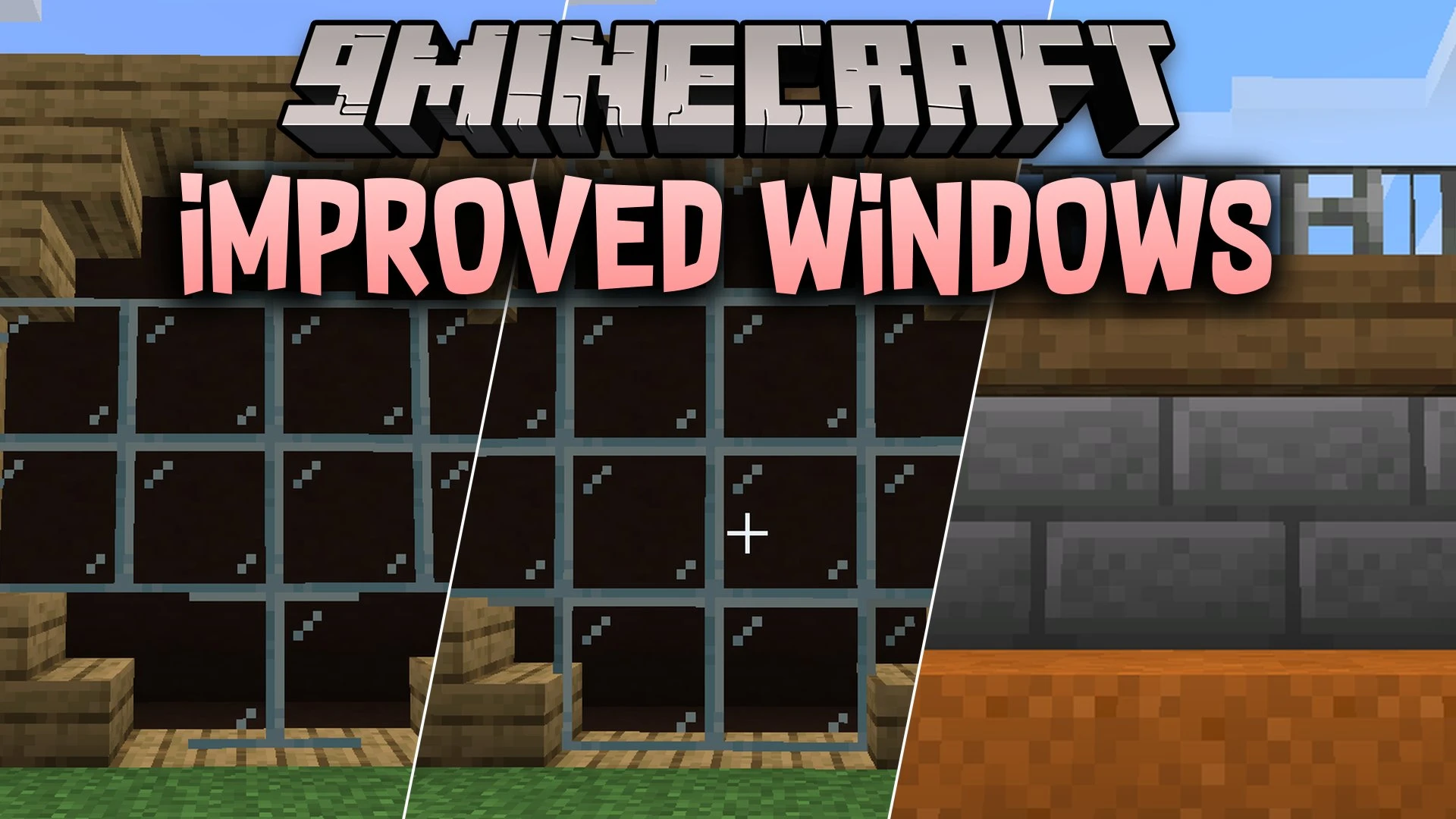
Features:
- Pane and Block Merging: Lets you place panes directly onto slabs and stairs to close empty gaps in your walls and windows.
- Full Pane Compatibility: Works with regular glass panes, stained colored glass panes, and iron bars.
- Connects panes added by other mods to slabs and stairs without leaving unconnected edges.
- Allows easy removal of placed panes from stairs or slabs by using a regular stick.
How to Use:
- Place a pane block onto a slab or stair block to fill the empty space.
- Hold a stick and Right-click on the stair or slab to remove the pane from it.
Screenshots:


How to Install:
New to Minecraft? Follow our step-by-step guide to install Mods on your PC.View Guide
Requirements:

Improved Windows Mod Download Links
For Minecraft 1.16.5, 1.16.4, 1.16.3
Click to rate this post!
[Total: 0 Average: 0]
You May Also Like
Picked for this page
 Extra Disks Mod (26.1.2, 1.20.1) – Never Run Out of Storage
 Tan’s Huge Trees Mod (1.21.1, 1.20.1) – Explore Massive Forests
 SuperMartijn642s Config Lib (26.3, 1.20.1) – Sync and Reload Settings
 Dark Glint Mod (26.3, 1.20.1) – Wield Glowing Cosmic Gear in the Dark
 SlimyBoyos Mod (26.3, 1.20.1) – Slimes Steal Loot From Ground
 I Dont Want Portal Yet Mod (1.20.1) – Control Access to the Nether
 NaNny Mod (26.1.2, 1.20.1) – Keep Modded Adventures Free From Crashes
 Inventory Tabs Mod (1.21.1, 1.20.1) – Access Nearby Chests Without Opening Doors
 ModList Command Mod (26.2, 1.20.1) – Check All Active Content From Chat
 Horizon XP Tracker Mod (26.3, 26.1.2) – Track Every Survival Day
 Legends Mod Core Mod (1.20.1) – Fight As Superheroes and Anime Legends
 SnAssets Library – Engines Mod (26.2, 1.20.1) – Realistic Engine Roars
Most viewed in Mods over the last 7 days
 Ala Industrial Mod (26.3) – Run Electric Power Grids and Automated Factories
 PleasureCraft Mod (26.3, 1.21.1) – Jenny Mod Remake for Fabric
 Jennycraft Mod (26.3, 1.20.1) – Virtual Girlfriend in Minecraft
 Fapcraft Mod (26.3, 1.12.2) – Comprehensive and Detailed Content
 Meteor Client Mod (26.3, 1.20.1) – Xray, HUD, Fly
 Jenny Mod (Fapcraft) Official Complete Guide – How to use, Tutorial
 BangCraft Mod (1.20.1) – Jenny, Ellie and Elliot
 OptiFine HD (26.3, 1.20.1) – Run Faster, FPS Boost, Shaders Support
 Fabric Loader (26.3, 1.20.1) – Fabric Installer for All Minecraft Versions
 Patched Mod (26.3, 1.20.1) – Edit Game Files Without Breaking Packs
 CatLean Client Mod (26.2, 1.21.11) – ThunderHack Recode Alternatives
 Baritone Client Mod (26.3, 1.20.1) – Autominer, Build with AI, Xray
More from Mods
 Realistic Night Vision Goggles Mod (1.21.1) – Explore Dark Caves Without Torches
 Recruits Null Mod (1.20.1) – Tame Lethal End Soldiers Wearing Maxed Netherite
 VOLLEYBALL Mod (26.3) – Host Multiplayer Sports Tournaments Inside Custom Arenas
 MintyIRL Planets Mod (26.1.2) – Explore Mars, Saturn, and Bizarre Lunar Biomes
 Jo Jo’s Steel Ball Spin Mod (26.2) – Throw Spinning Projectiles to Freeze Mobs
 Soft Combat Duels Mod (1.21.11) – Spar Friends Without Losing Health
 Cobblemon Party on Display Mod (1.21.1) – Wear Your Poke Balls on Your Skin
 Pack Relay Mod (26.3, 1.21.11) – Open a Shared Backpack Anytime on Servers
 Multiverse Heroes Rise of Doom Mod (1.21.1, 1.20.1) – Play As Iconic Superheroes
 Shod’s Create and TacZ Bridge Mod (1.21.1) – Build Automated Bullet Factories
 Dr. Stone Kingdom of Science Addon Mod (1.21.1) – Brew Chemicals to Cure Stone
 Create the Rivets Mod (1.21.1) – Rotate and Tilt Blocks Off the Grid

This post has no comments yet. Be the first — your comment will appear here.