
Market Fluent Interface Mod (1.21.1, 1.20.1) – Speed Up Your Create Mod Factory
 4
4
 0
0

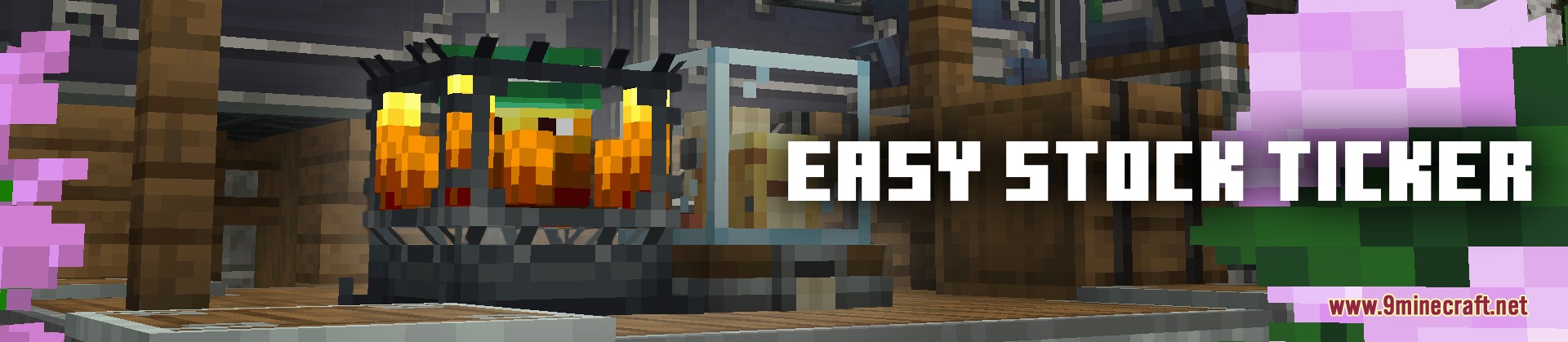
Market Fluent Interface Mod improves the stock ticker interface for the Create mod. It speeds up how you select items and adjust order amounts in logistics networks. Every adjustment happens on the client side, meaning you can join any server running Create without server-side setup.
Features:
- The search box automatically gains focus as soon as you open the menu so you can type immediately.
- Holding Shift while scrolling jumps the count by 16 items at a time.
- Holding Ctrl while scrolling changes order numbers in steps of 10 items.
- Right-clicking on an order halves the current requested item count.
- Scrolling down past 1 in the order tab will not clear the selected item stack.
- Custom formulas like
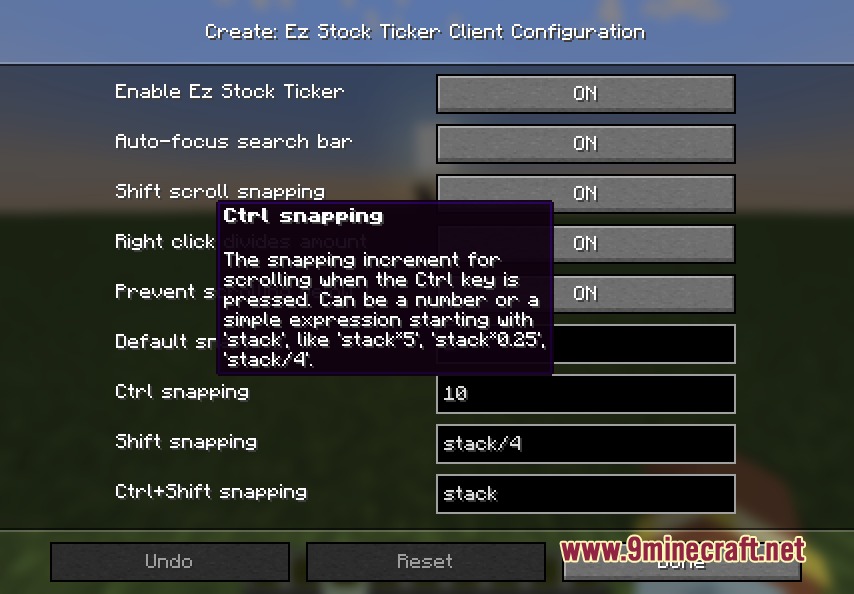
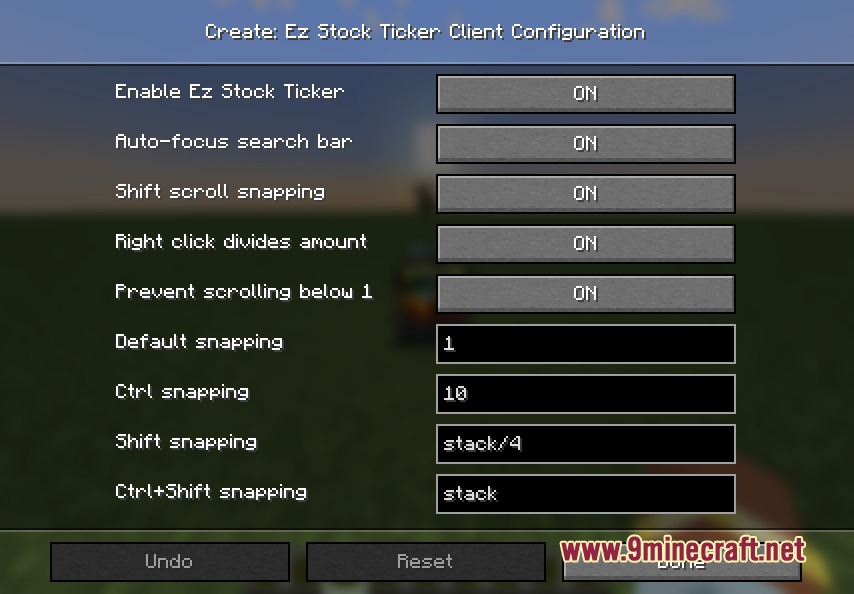
stack*4orstack/2let you set custom snap amounts in the settings. - A settings button inside the stock keeper menu lets you toggle individual options on or off.
How to Use:
- Open the stock ticker menu to start searching without clicking the text bar.
- Hold Shift or Ctrl while moving the mouse wheel to change numbers in big steps.
- Right-click on your selected order to divide the amount by two.
- Open the in-game settings screen to customize your scroll snap multipliers.
Screenshots:
How to Install:
New to Minecraft? Follow our step-by-step guide to install Mods on your PC.View Guide
Requirements:


Market Fluent Interface Mod Download Links
For Minecraft 1.21.1, 1.21
For Minecraft 1.20.1, 1.20
Click to rate this post!
[Total: 0 Average: 0]
You May Also Like
Picked for this page
 Create Crafts and Additions Mod (1.21.1, 1.20.1) – Electrifying the Create Mod
 Draconic Evolution Mod (1.21.1, 1.20.1) – Wield Power Beyond Diamond
 WATERFrAMES Mod (1.21.5, 1.20.1) – Image Displaying, Show Pictures, Videos
 Ice Track Mod (26.3, 1.20.1) – Ride Boats To Generate Ice Tracks
 Spanish Delight Refabricated Mod (26.3, 1.20.1) – New Foods And Ingredients
 Radical Gyms And Structures Mod (1.21.1, 1.21) – Trainer Structure Spawns
 Peak Stamina Mod (1.21.1, 1.20.1) – Survive with Realistic Energy
 Digital Frontier Fusion Mod (1.21.1, 1.20.1) – Catch and Evolve Wild Digimon
 Coasters Simulated Track Styles Mod (1.21.1) – Design Realistic Theme Park
 Vanquish Vanguard Logic Mod (1.21.1, 1.20.1) – Automate Mob Battles
 Geopolitical Radar Extension Mod (26.3, 1.21.11) – Track Nation Borders
 Alchemical Resonance Mod (1.21.1, 1.20.1) – Automate Endless EMC and Craft
Most viewed in Mods over the last 7 days
 Ala Industrial Mod (26.3) – Run Electric Power Grids and Automated Factories
 PleasureCraft Mod (26.3, 1.21.1) – Jenny Mod Remake for Fabric
 Jennycraft Mod (26.3, 1.20.1) – Virtual Girlfriend in Minecraft
 Fapcraft Mod (26.3, 1.12.2) – Comprehensive and Detailed Content
 Jenny Mod (Fapcraft) Official Complete Guide – How to use, Tutorial
 BangCraft Mod (1.20.1) – Jenny, Ellie and Elliot
 Fabric Loader (26.3, 1.20.1) – Fabric Installer for All Minecraft Versions
 The Shooting Star Demo Mod (26.3, 1.20.1) – Vaporize Terrain From Orbit
 Meteor Client Mod (26.3, 1.20.1) – Xray, HUD, Fly
 OptiFine HD (26.3, 1.20.1) – Run Faster, FPS Boost, Shaders Support
 Aristois Client Mod (1.21.4, 1.20.1) – World Class Minecraft Utility
 Prestige Client Mod (1.21.11, 1.21.4) – Powerful Ghost Features for Crystal & Sword PvP
More from Mods
 Flint Mod (1.21.11) – Run DiamondFire Community Addons Without Crashing
 Not Just Sandwich Mod (26.3, 1.20.1) – Edibles, Sandwiches
 Waddles Mod (26.3, 1.20.1) – Make Icy Biomes Feel Alive
 Artemis’ Thin Logs Mod (26.3, 1.20.1) – Build Custom Trees and Detailed Wood
 Asterion Mod (26.3, 1.20.1) – Survive Ancient Mazes and Slay the Legendary Minotaur
 Passthrough Signs Mod (26.3, 1.20.1) – Right-Click Through Wall Signs
 Packing Tape Mod (26.3, 1.20.1) – Move Chests, Machines
 No XP Anvils Mod (26.3, 1.20.1) – Repair And Enchant Without XP
 Naruto Shippuden Mod (26.3, 1.16.5) – Immerse Yourself in The World of Ninja
 Araxer’s Bestiary Mod (26.3, 1.20.1) – Build an In-Game Encyclopedia of Every Mob
 Villagers Plus Mod (26.3, 1.20.1) – Expanded Villager Types and Villages
 Ore Excavation 9minecraft Mod (26.3) – Mine Ores and Chop Trees in a Single Swing

This post has no comments yet. Be the first — your comment will appear here.