
Masa Gadget Mod (1.21.5, 1.20.1) – Track Every Villager Path
 2,631
 0


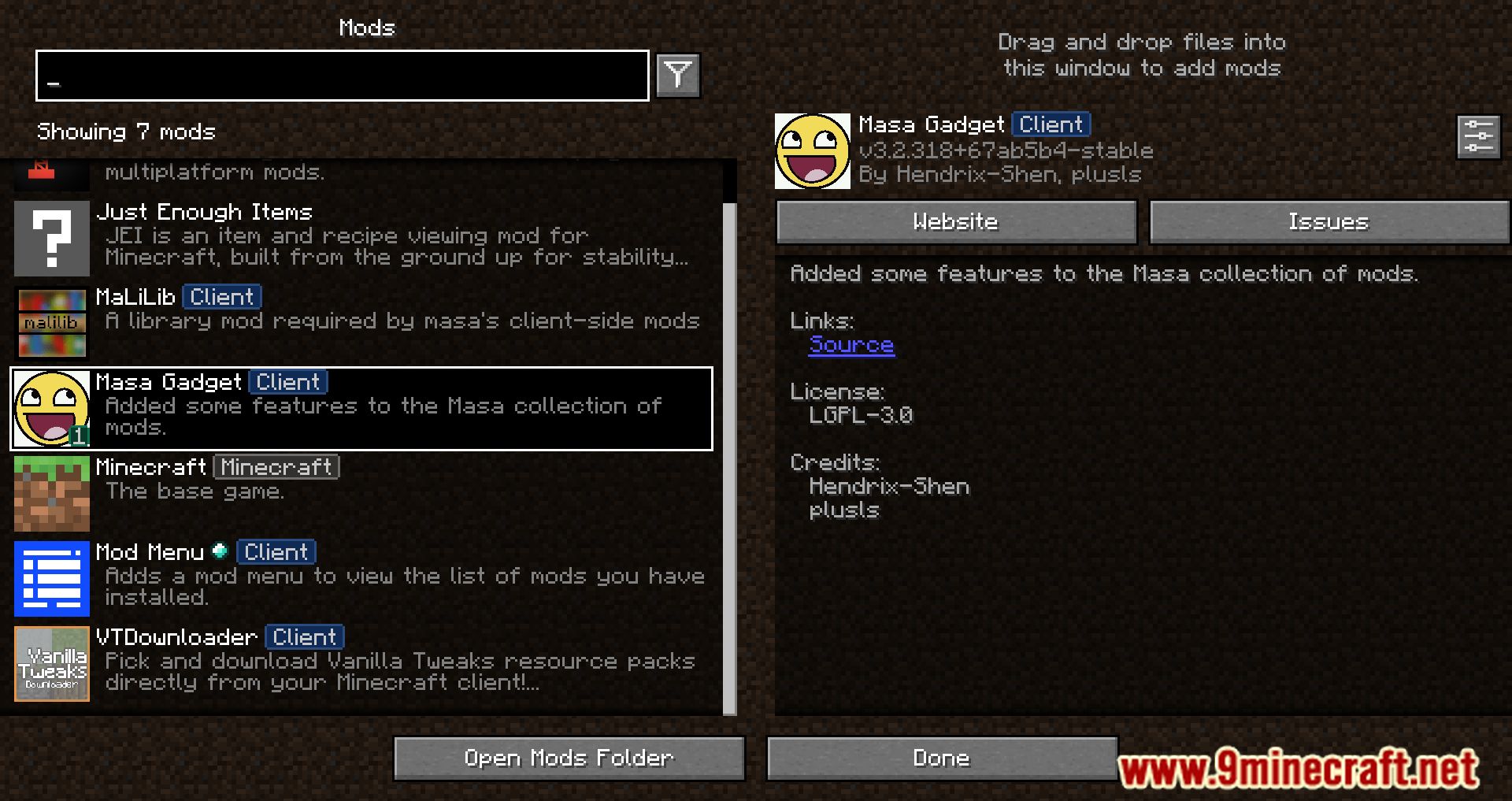
Masa Gadget Mod extends the Masa collection of mods with handy tools for villager tracking, building, menus, and container previews. It shows floating enchanted book trade prices and restock timers above villagers, and draws colored lines straight to their beds and job sites. The mod also brings upgrades for Litematica, MaliLib, MiniHUD, and Tweakeroo, such as better Easy Place controls, quick config switching, mob spawn point checks, and 2×2 auto-crafting. These tools make checking trades, inspecting chests, and syncing server data much faster in everyday play. This mod requires Fabric-API, Magiclib, and MaliLib to run. You can also pair it with optional mods like Litematica, MiniHUD, Tweakeroo, ItemScroller, Mod Menu, and Plusls-Carpet-Addition to unlock extra features.

Features:
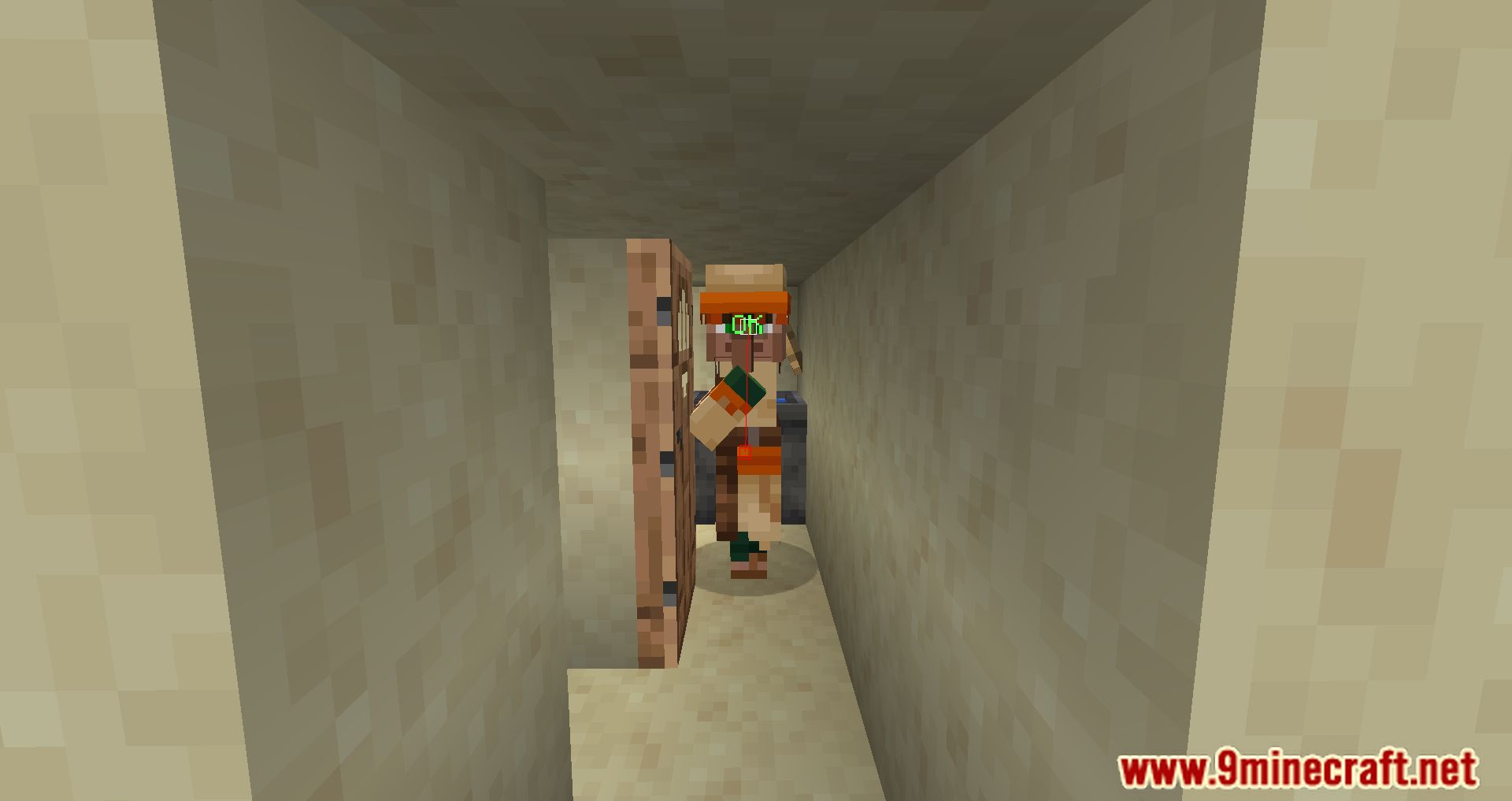
- Villager Trade Previews: Shows floating text above villagers so you can see their enchanted book trades and prices at a glance.
- Restock Timers: Displays a timer above each villager to show when they restock their trades next.
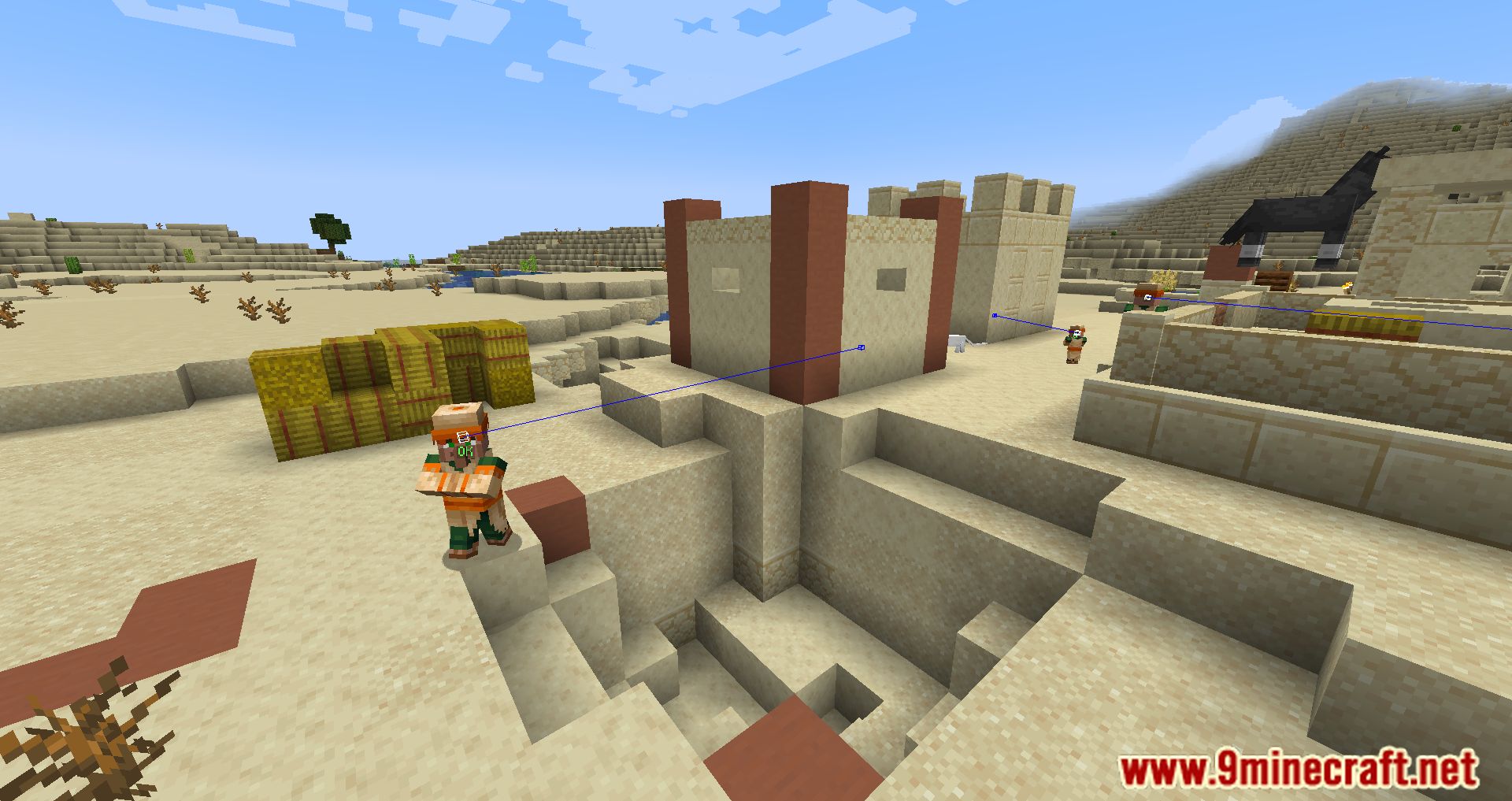
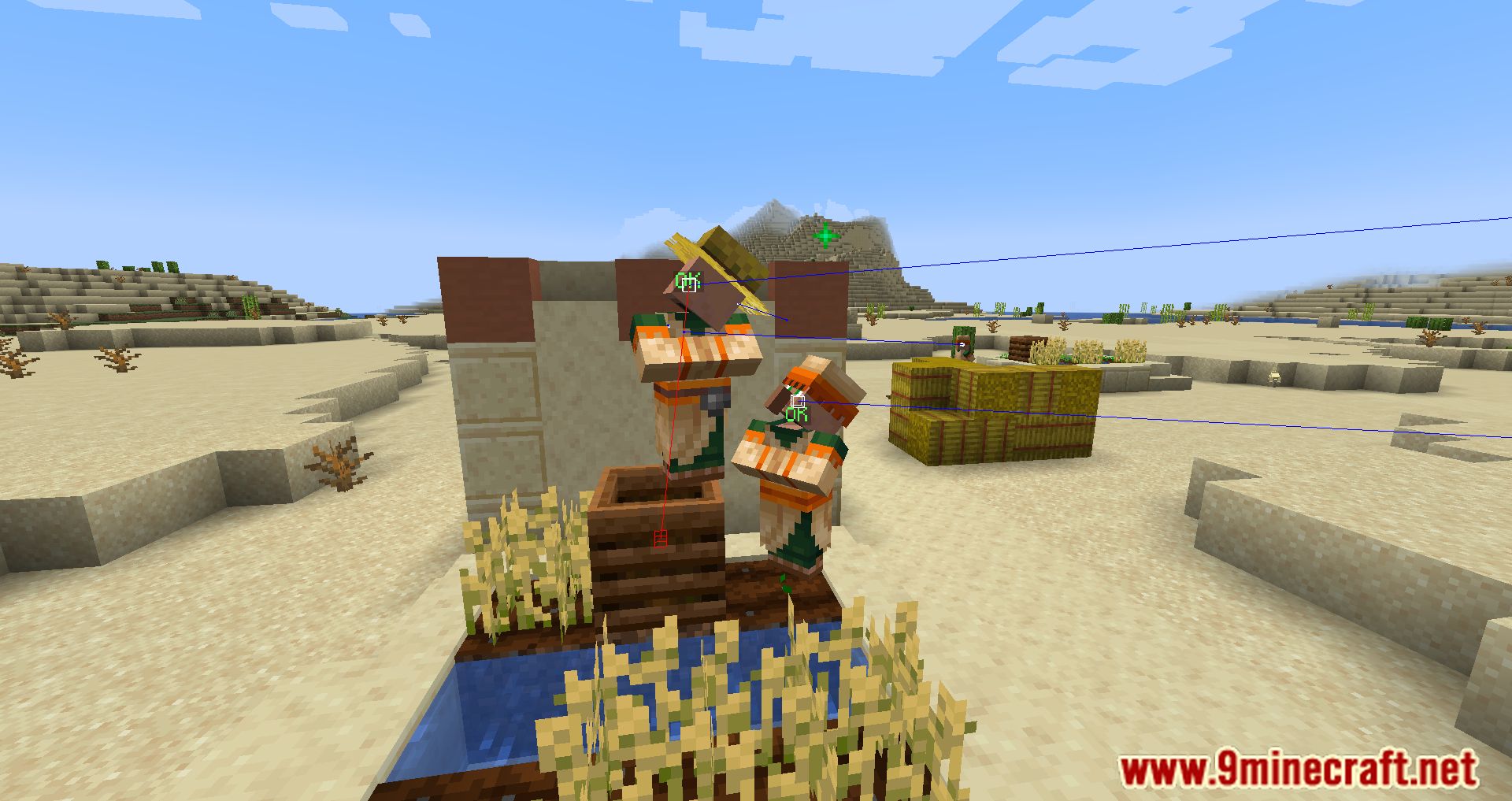
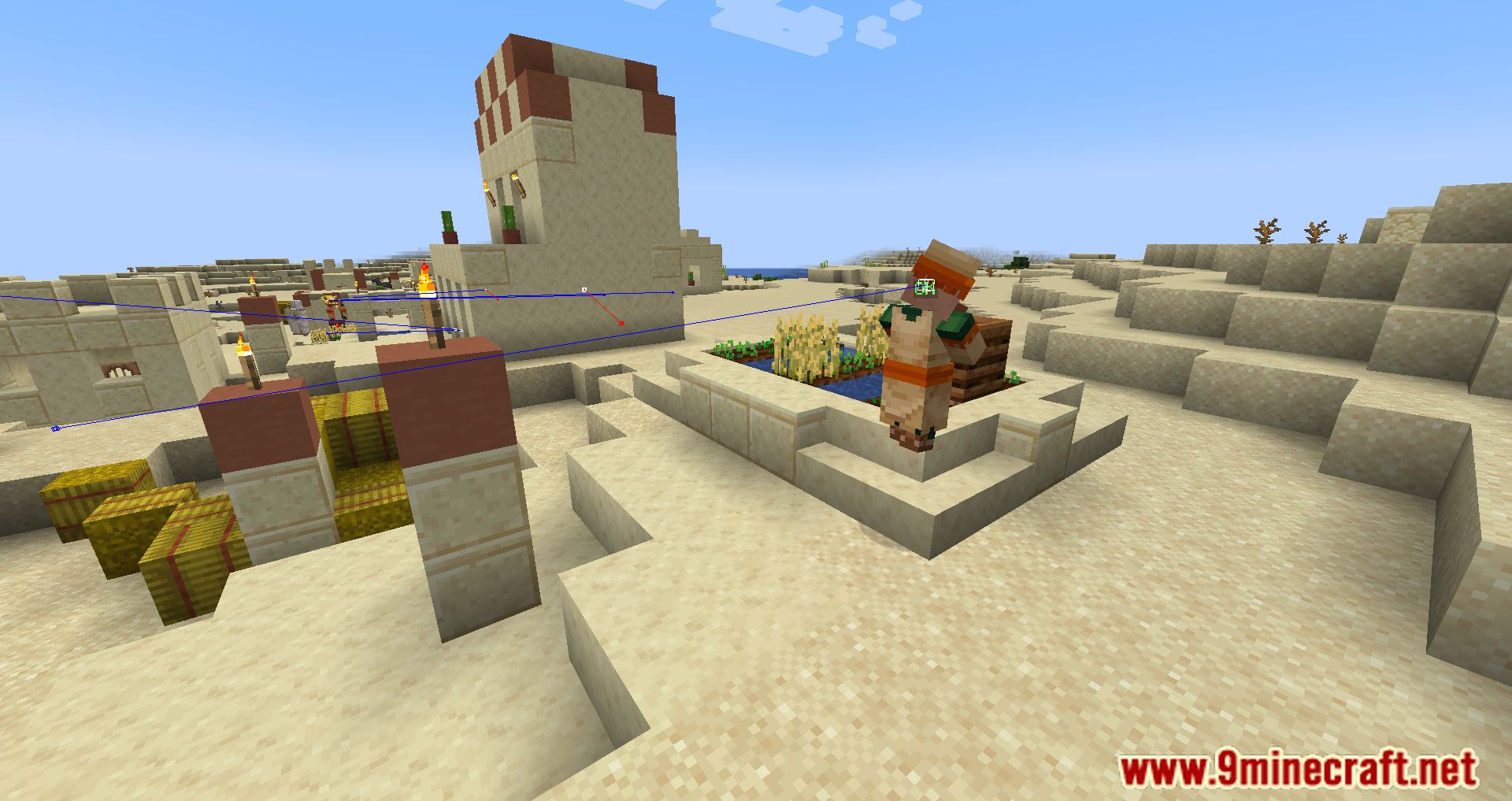
- Bed and Job Site Tracers: Draws colored tracking lines from villagers to their home beds (default color
#500000FF) and job sites (default color#50FF0000), with custom colors for both. - Server Data Sync: Uses
pcaSyncProtocolto sync mob and container data from the server automatically, and adds a hotkey to sync all data at once. - Caches container inventory data from the server whenever you open a container.
- Searches for mob spawn points using MiniHUD’s Despawn Sphere and
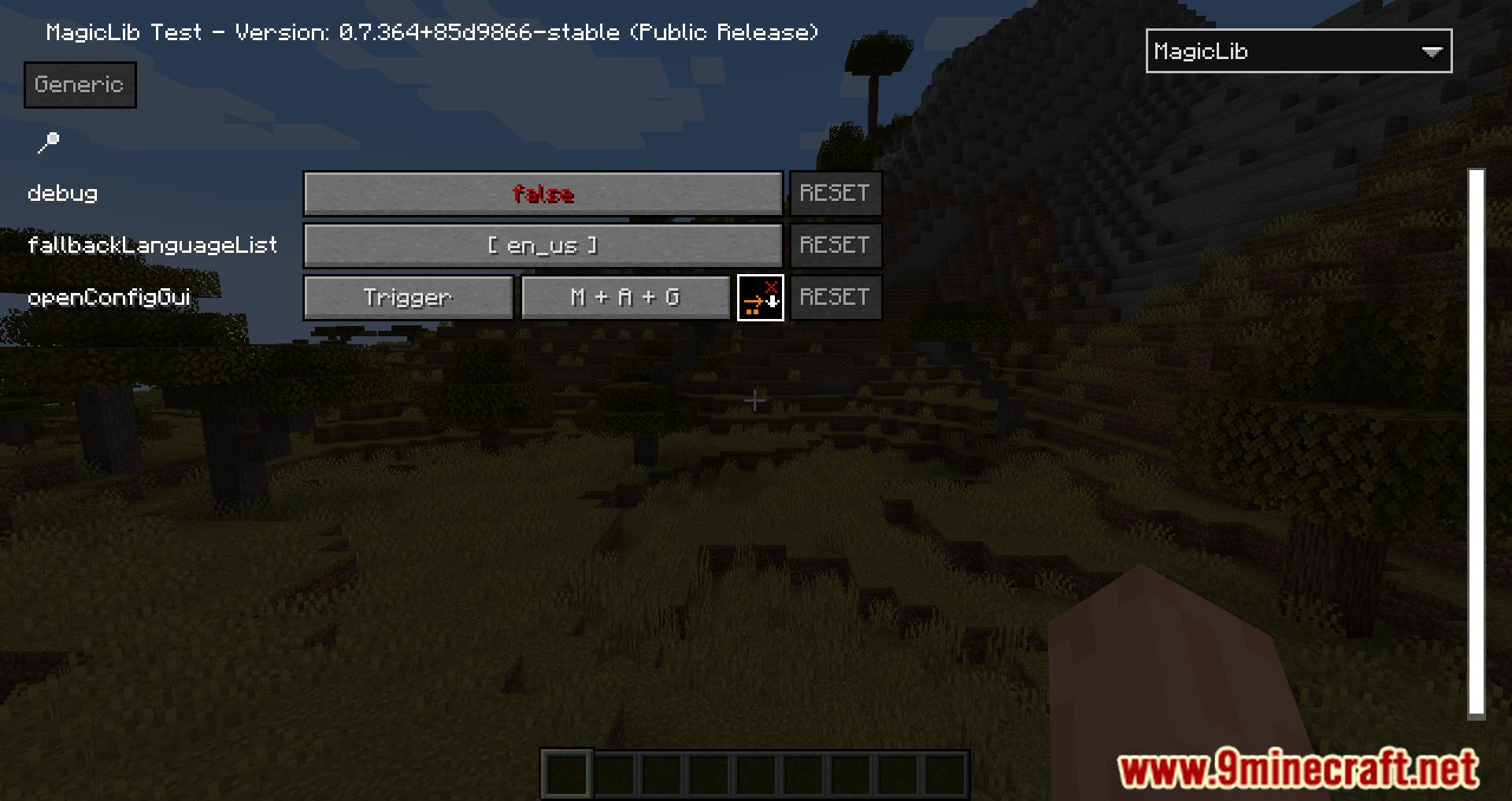
lightLevelThresholdSaferule, with a blacklist to skip chosen blocks. - Opens the in-game config menu with a quick hotkey (default G + C) and lets you toggle debug messages.
Litematica Features:
- Lets you open containers like chests and hoppers and use beacons while Easy Place mode is on.
- Turns off the annoying pop-up window whenever Easy Place fails.
- Fixes accurate protocol support when placing blocks.
- Lets you nudge Litematica selections while using Tweakeroo’s Free Camera mode.
- Uses
pcaSyncProtocolto sync server inventory data locally and save it inside your schematics. - Lets you save and load schematic files with relative file paths.
Malilib Features:
- Adds a drop-down menu (requires Mod Menu) so you can switch between other Masa mod config screens quickly.
- Lets you mark favorite config options and filter the list to find the ones you use most.
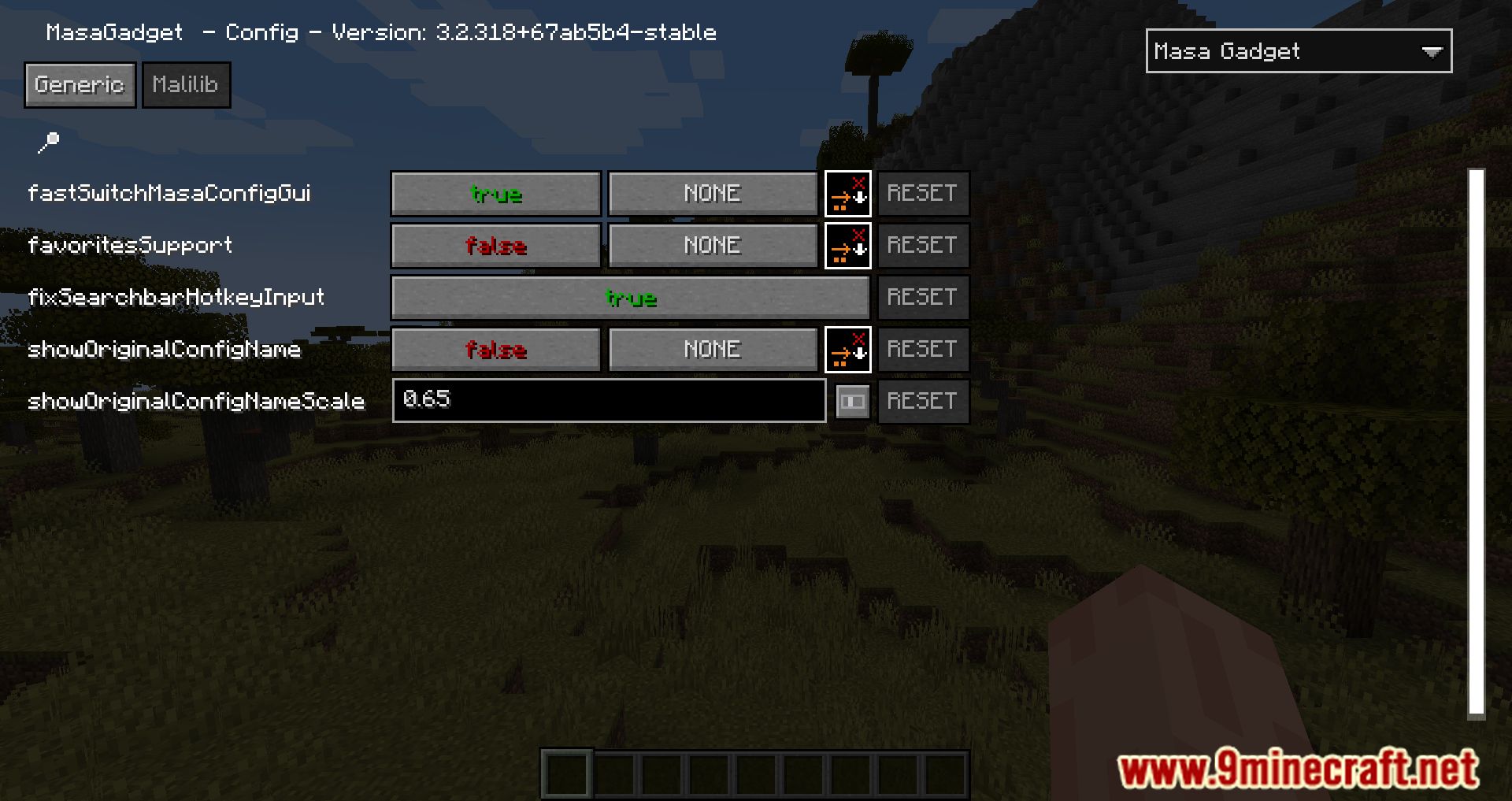
- Shows the original config name when the translated display name is different, with an adjustable font scale from
0.0to2.0(default0.65). - Fixes the config search bar so pressing a hotkey to open the menu does not type into the search box.
- Improves config search to support uppercase letters, translated text, and typing
modifiedto find changed settings. - Adds backported translation (i18n) support for Masa mods.
- Uses the length of
getTranslatedGuiDisplayNameas the config widget width so translated names fit cleanly. - Fixes inventory type detection for furnace blocks (
AbstractFurnaceBlock).
MiniHUD Features:
- Translates MiniHUD display text into other languages with i18n support.
- Syncs beehive data through the PCA sync protocol when you press Tweakeroo’s
inventoryPreviewhotkey.
Tweakeroo Features:
- Shows the redstone comparator signal output inside the inventory preview.
- Lets you use inventory preview to see another player’s inventory and ender chest.
- Lets you scroll the mouse wheel during inventory preview to pick items and view their enchantments, and press the scroll wheel on a shulker box inside a chest to preview the items inside.
- Supports inventory preview for dropped shulker box items.
- Shows a villager’s trade offer list inside the inventory preview.
- Uses
pcaSyncProtocolto sync block and mob data, like chests and villagers, from the server when you toggle inventory preview. - Lets you open containers to sync their inventory data when using inventory preview on the client side.
- Gets inventory preview hit results from cache to reduce lag while rendering.
- Automatically crafts missing items in the 2×2 crafting grid when Tweakeroo cannot find them, using 2×2 recipe indexes saved in ItemScroller.
Configuration:
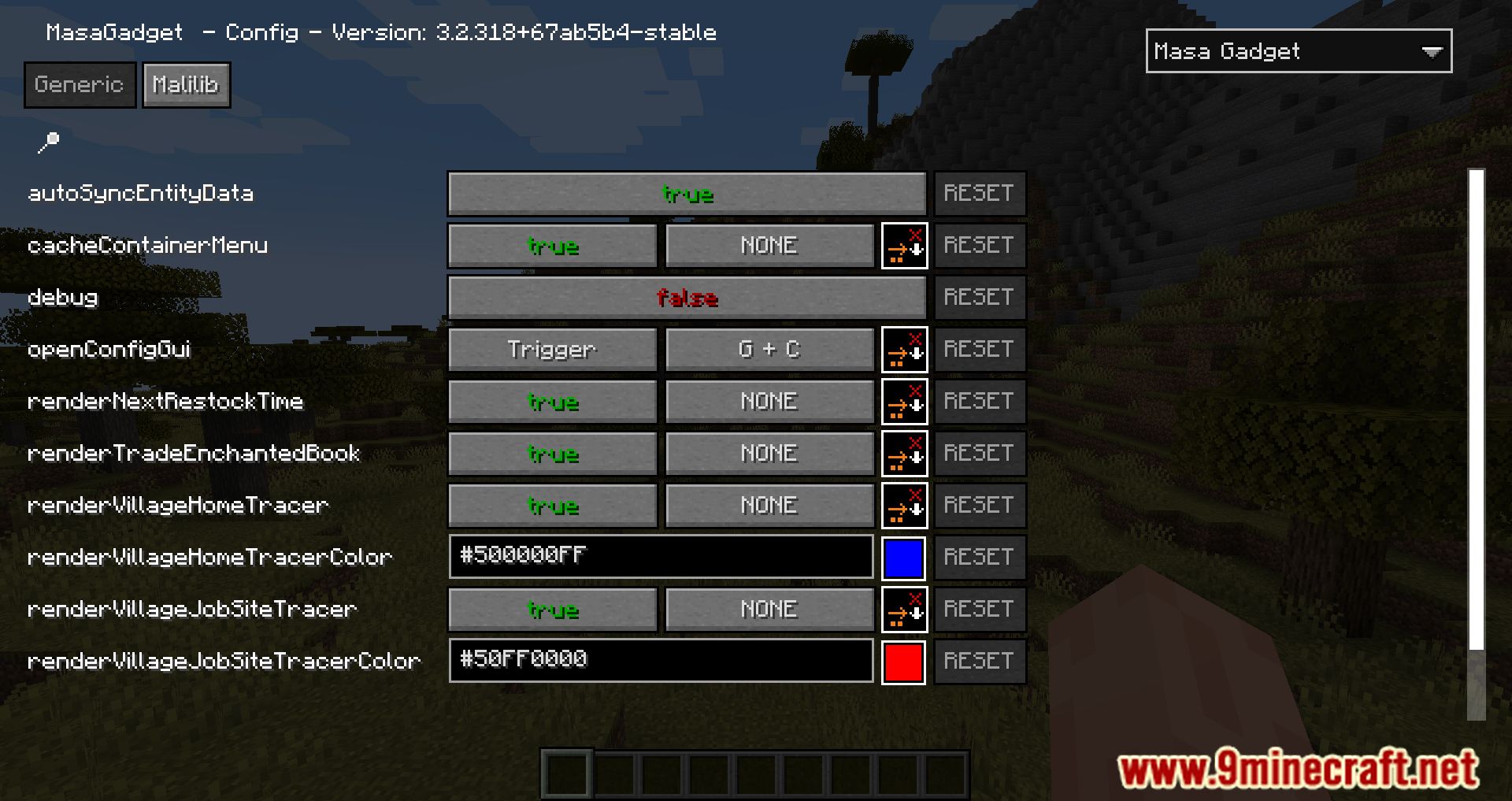
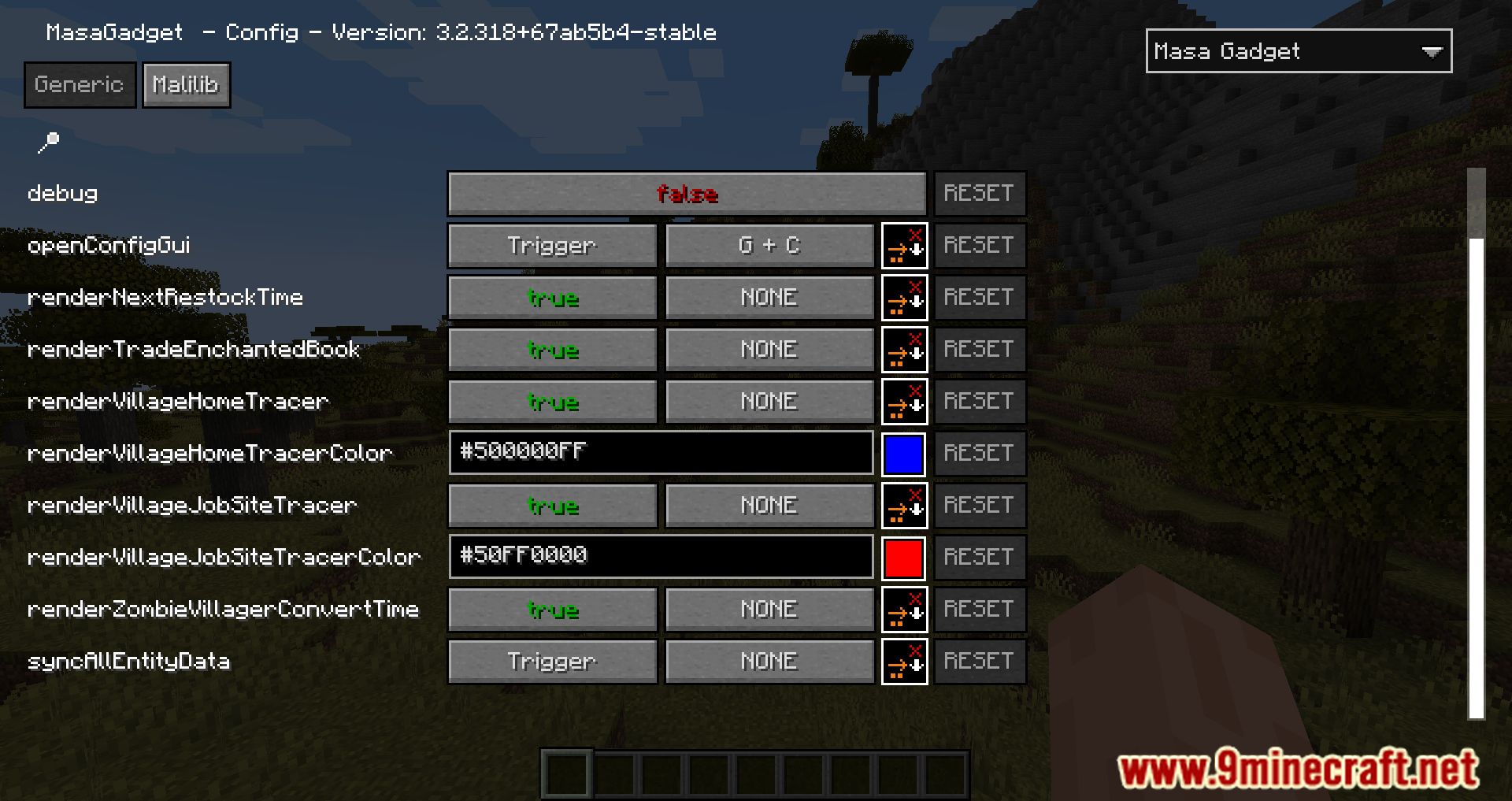
openConfigGui: Sets the hotkey to open the in-game config menu (default:G, C).autoSyncEntityData: Automatically usespcaSyncProtocolto sync mob and container data (default:true).cacheContainerMenu: Caches container inventory data from the server when you open an inventory (default:true, no hotkey).debug: Shows debug messages (default:false).renderNextRestockTime: Shows the next restock timer above villagers (default:true, no hotkey).renderTradeEnchantedBook: Shows enchanted book trade text above villagers (default:true, no hotkey).renderVillageHomeTracer: Draws a tracking line from villagers to their home bed (default:true, no hotkey).renderVillageHomeTracerColor: Sets the color of the villager home tracer line (default:#500000FF).renderVillageJobSiteTracer: Draws a tracking line from villagers to their job site (default:true, no hotkey).renderVillageJobSiteTracerColor: Sets the color of the villager job site tracer line (default:#50FF0000).searchMobSpawnPoint: Hotkey to search for mob spawn points using MiniHUD’s Despawn Sphere andlightLevelThresholdSafe(default: no hotkey, requires MiniHUD).searchMobSpawnPointBlackList: Lists blocks to skip when searching for mob spawn points (default:[], requires MiniHUD).syncAllEntityData: Hotkey to sync all mob and container data usingpcaSyncProtocol(default: no hotkey).betterEasyPlaceMode: Lets you open chests, hoppers, and other containers and use beacons during Easy Place mode (default:false, no hotkey, requires Litematica).disableLitematicaEasyPlaceFailTip: Turns off the pop-up window when Easy Place fails (default:false, no hotkey, requires Litematica).fixAccurateProtocol: Fixes accurate protocol support in Litematica (default:false, no hotkey, requires Litematica).nudgeSelectionSupportFreeCamera: Lets you nudge Litematica selections in Free Camera mode (default:true, requires Litematica and Tweakeroo).saveInventoryToSchematicInServer: Syncs server inventory data locally withpcaSyncProtocoland saves it to schematics (default:false, requires Litematica).useRelativePath: Uses relative file paths when saving and loading schematics (default:false, requires Litematica).backportI18nSupport: Turns on backported translation (i18n) support for Masa mods (default:true).fastSwitchMasaConfigGui: Shows a drop-down menu to switch between other Masa mod config screens quickly (default:true, no hotkey, requires Mod Menu).favoritesSupport: Lets you favorite and filter your most used config options (default:false, no hotkey).fixConfigWidgetWidth: Uses the length ofgetTranslatedGuiDisplayNameas the config widget width (default:true).fixGetInventoryType: Fixes the inventory type forAbstractFurnaceBlock(default:true).fixSearchbarHotkeyInput: Fixes the search bar so opening the config menu with a hotkey does not type into it (default:true).optimizeConfigWidgetSearch: Lets config search support uppercase letters, translated text, and typingmodifiedto find changed settings (default:true).showOriginalConfigName: Shows the original config name when the translated display name is different (default:false, no hotkey).showOriginalConfigNameScale: Sets the font scale for the original config name, from0.0to2.0(default:0.65).minihudI18n: Turns on i18n translation for MiniHUD display text (default:true, no hotkey, requires MiniHUD).pcaSyncProtocolSyncBeehive: Syncs beehive data with the PCA sync protocol when you press theinventoryPreviewhotkey (default:true, requires MiniHUD and Tweakeroo).inventoryPreviewSupportComparator: Shows the redstone comparator output inside the inventory preview (default:true, requires Tweakeroo).inventoryPreviewSupportPlayer: Shows another player’s inventory and ender chest in the inventory preview (default:true, requires Tweakeroo).inventoryPreviewSupportSelect: Lets you use the mouse wheel to pick items and check enchantments, and press the scroll wheel on a shulker box in a chest to preview inside it (default:true, no hotkey, requires Tweakeroo).inventoryPreviewSupportShulkerBoxItemEntity: Supports inventory preview for dropped shulker box items (default:true, requires Tweakeroo).inventoryPreviewSupportTradeOfferList: Shows a merchant’s trade offer list inside the inventory preview (default:true, requires Tweakeroo).inventoryPreviewSyncData: UsespcaSyncProtocolto sync block and mob data like chests and villagers from the server when you toggle inventory preview (default:true, no hotkey, requires Tweakeroo).inventoryPreviewSyncDataClientOnly: Opens a container to sync inventory data when you use inventory preview (default:false, no hotkey, requires Tweakeroo).inventoryPreviewUseCache: Uses cached hit results for inventory preview to reduce lag (default:true, requires Tweakeroo).restockWithCrafting: Automatically crafts missing items in the 2×2 crafting grid when Tweakeroo cannot find them (default:true, no hotkey, requires Tweakeroo and ItemScroller).restockWithCraftingRecipes: Lists ItemScroller recipe storage indexes for 2×2 auto-crafting (default:[], requires Tweakeroo and ItemScroller).
How to Use:
- Load Fabric-API, Magiclib, and MaliLib first, along with any optional mods you want to pair with it, such as Litematica, MiniHUD, Tweakeroo, ItemScroller, Mod Menu, or Plusls-Carpet-Addition.
- Press G + C in game to open the Masa Gadget Mod config menu.
- Open the Generic, Litematica, Malilib, MiniHUD, or Tweakeroo category to turn features on or off and set custom hotkeys.
- Click the drop-down switcher in the config menu (with Mod Menu loaded and
fastSwitchMasaConfigGuiturned on) to jump straight to another Masa mod’s config screen, or turn onfavoritesSupportto star and filter the options you use most. - Walk near villagers with
renderTradeEnchantedBook,renderNextRestockTime,renderVillageHomeTracer, andrenderVillageJobSiteTracerenabled to see floating enchanted book offers, restock timers, and colored lines linking them to their beds and job sites. - Set a Despawn Sphere and
lightLevelThresholdSafevalue in MiniHUD, then press yoursearchMobSpawnPointhotkey to find valid mob spawn spots while skipping any blocks listed insearchMobSpawnPointBlackList. - Press Tweakeroo’s
inventoryPreviewhotkey while looking at a chest, villager, player, beehive, or dropped shulker box to inspect it; roll the mouse wheel to pick an item and view its enchantments, or press the scroll wheel on a shulker box inside a chest to look inside it. - Add 2×2 recipe indexes from ItemScroller into
restockWithCraftingRecipesand keeprestockWithCraftingturned on so missing items craft automatically in the 2×2 grid when Tweakeroo runs out.
Screenshots:

How to Install:
New to Minecraft? Follow our step-by-step guide to install Mods on your PC.View Guide
Requirements:









Masa Gadget Mod Download Links
For Minecraft 1.21.5
Fabric/Quilt version: Download from Server 1 – Download from Server 2
For Minecraft 1.21.1, 1.21
Fabric version: Download from Server 1 – Download from Server 2
For Minecraft 1.20.6
Fabric version: Download from Server 1 – Download from Server 2
For All Versions from Minecraft 1.14.4 to Minecraft 1.20.4
Fabric version: Download from Server 1 – Download from Server 2
For All Versions from Minecraft 1.14.4 to Minecraft 1.20.1
Fabric version: Download from Server 1 – Download from Server 2
What do you do when a mod you love is abandoned by its creator?
19 responses · See the full results →
You May Also Like
Picked for this page
 Respawnable Pets Mod (26.3, 1.20.1) – Your Pets Respawn After Death
 Conduits Prevent Drowned Mod (26.3, 1.20.1) – Peaceful Underwater Cities
 Rapid Leaf Decay Mod (26.3, 1.20.1) – Realistic Decaying
 Item Collectors Mod (26.3, 1.20.1) – Automatic Object Collectors with Defined Range
 TrashSlot Mod (26.3, 1.20.1) – Get Rid of Unwanted Items
 Mine Treasure Mod (26.3, 1.20.1) – A Treasure Trove of Mining Excitement
 Iron Bookshelves Mod (26.3, 1.20.1) – More Enchantment Power
 Who Am I? Mod (26.2, 1.20.1) – Never Lose Yourself In Minecraft
 Koopa’s Critters Mod (1.21.1, 1.20.1) – 30+ New Animals
 Ore Detector Mod (26.3, 1.21.1) – Advanced Finders
 CoffeeG’s Wall Climbing Mod (1.21.11, 1.20.1) – Climb Walls Like A Pro
 Doctor Who: Weeping Angels Mod (1.21.11, 1.20.1) – Do Not Blink
Most viewed in Mods over the last 7 days
 Ala Industrial Mod (26.3) – Run Electric Power Grids and Automated Factories
 PleasureCraft Mod (26.3, 1.21.1) – Jenny Mod Remake for Fabric
 Jennycraft Mod (26.3, 1.20.1) – Virtual Girlfriend in Minecraft
 Fapcraft Mod (26.3, 1.12.2) – Comprehensive and Detailed Content
 Jenny Mod (Fapcraft) Official Complete Guide – How to use, Tutorial
 BangCraft Mod (1.20.1) – Jenny, Ellie and Elliot
 Fabric Loader (26.3, 1.20.1) – Fabric Installer for All Minecraft Versions
 The Shooting Star Demo Mod (26.3, 1.20.1) – Vaporize Terrain From Orbit
 Meteor Client Mod (26.3, 1.20.1) – Xray, HUD, Fly
 OptiFine HD (26.3, 1.20.1) – Run Faster, FPS Boost, Shaders Support
 Aristois Client Mod (1.21.4, 1.20.1) – World Class Minecraft Utility
 Prestige Client Mod (1.21.11, 1.21.4) – Powerful Ghost Features for Crystal & Sword PvP
More from Mods
 Ore Excavation 9minecraft Mod (26.3) – Mine Ores and Chop Trees in a Single Swing
 Dirigo Mod (26.1.2, 1.21.1) – Walk Across Nether Lava Seas and Automate Animal
 HandLib Mod (26.3, 1.21.1) – Keep Your Multiplayer World Stable
 Happy Ghasts Boost Mod (26.1.2, 1.20.1) – Fly Across Vast Distances at Top Speed
 LiquidBounce Client Mod (26.3, 1.20.1) – LiquidLauncher, A Free Client
 Create Hand Made Mod (1.21.1) – Craft Create Recipes By Hand in Your Workshop
 Seed Map for Xaero Mod (26.1) – See Rare Biomes and Dungeons Before You Travel
 MCPersist Mod (26.3) – Keep Your World Online for Friends Even After Logging Off
 Minecraft Java MCP Server Mod (1.21.11) – Command Your World Through External AI Tools
 Arcanism Mod (26.2) – Build Magic Factories and Program Custom Spells
 Archangel Client Mod (1.21.11) – Master Every PvP Duel with Clean Screen Stats
 Block Front Survival Patch Mod (1.21.1) – Wage Tactical Warfare in Survival

This post has no comments yet. Be the first — your comment will appear here.