
Simple Challenge Roulette Mod (26.3, 1.20.1) – Spin the Wheel for Timed Item
 1
 0

Simple Challenge Roulette Mod turns every new Minecraft world into a timed item hunt. Before your world loads, you spin a wheel to get a random target item and a special gameplay rule, such as No Sprinting or No Armor. Your goal is to find or craft that item as fast as possible while following the rule. You can play alone in Solo mode or compete against friends in Race mode. Winning runs unlocks harder items and tougher rules for future worlds.
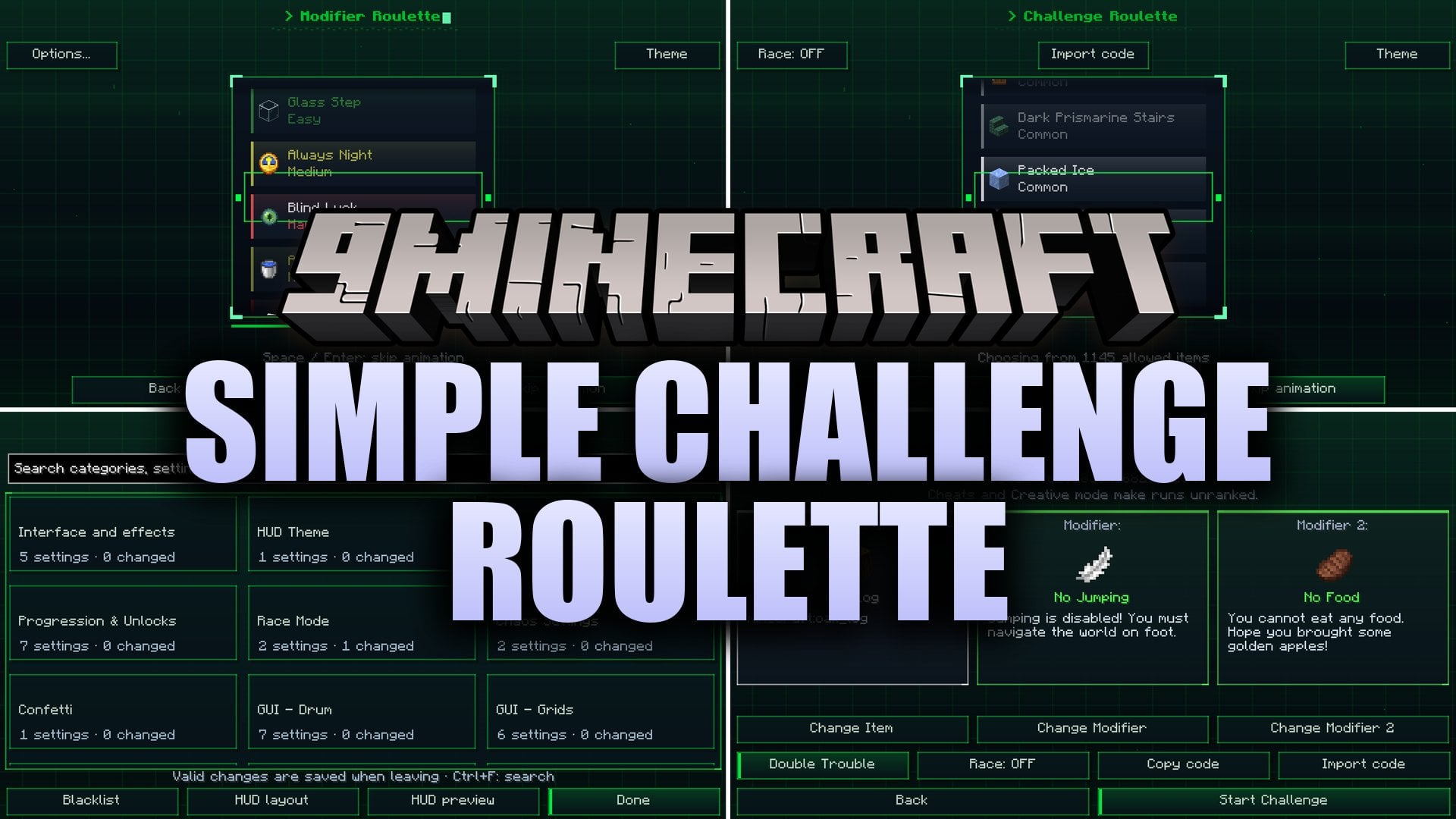
Features:
- Progression System: Winning runs unlocks harder target items and tougher modifiers that carry over to your future worlds.
- Double Trouble: Combines two compatible modifiers at the same time for an extra hard challenge.
- Breather Mode: Lets you hunt for your target item normally without any extra gameplay restrictions.
- Challenge Codes: Saves your target item, modifiers, game mode, and world seed into a text code starting with CR2: so you can share the exact setup with friends.
- Tracks your personal best times and lets you replay old challenges from your history menu.
- Includes a draggable HUD that shows your current target item, active rules, and timer on screen.
- Provides searchable settings, item blacklists, animated themes, and reduced-motion controls.
- Marks runs as unranked if you turn on cheats, enter Creative mode, or use helpful commands, meaning those runs stay in your history but give no wins, records, or unlocks.
How to Use:
- Set up your world options and click Create New World to open the roulette screens before the game starts.
- Spin the Item Roulette and the Modifier Roulette, and hover your mouse over any modifier to read its rules.
- Check your challenge preview, change your unlocked selections if you want, pick Solo or Race mode, and start the game.
- Put the target item into your inventory to finish the run automatically.
- To share a run, click Copy code on the preview or victory screen and send the full text string (including the CR2: part) to a friend.
- To play a friend’s code, open Stats from the main menu or preview screen, click Import code, select Paste, click Open preview, and press Start Challenge.
- To try an old setup again, pick Replay conditions from your results screen or history menu.
Screenshots:


How to Install:
New to Minecraft? Follow our step-by-step guide to install Mods on your PC.View Guide
Requirements:
Simple Challenge Roulette Mod Download Links
For Minecraft 26.3
For Minecraft 1.21.8, 1.21.7, 1.21.6
For Minecraft 1.20.1, 1.20
Click to rate this post!
[Total: 0 Average: 0]
You May Also Like
Picked for this page
 XyCraft World Mod (26.1.2, 1.20.1) – Uncover Glowing Ores Underground
 Trimmable Tools Mod (26.2, 1.20.1) – Match Your Weapons to Your Armor Trims
 Chat Tools Mod (26.3, 1.20.1) – Keep Track of Every Message and Command Easily
 Illager Expansions Mod (1.21.1, 1.20.1) – Defend Villages From Harder Raids
 Rapid Rail Artisan Mod (1.21.4, 1.20.1) – Build Massive Train Stations
 Freedom Chat Mod (26.3, 1.21.11) – Disable Vanilla Chat Reporting
 Panoramic Sightlines Mod (26.3, 1.20.1) – Play on Big Screens Without Any HUD
 Lapis Reserve Reborn Mod (26.3, 1.21.1) – Keep Lapis in Enchanting Tables
 Antygravity Mod (1.21.4, 1.20.1) – Flip Gravity Upside Down and Walk
 Homes by Juix Mod (26.3, 1.21.11) – Teleport Back to Your Base From Anywhere
 Let’s Do Legacy Mod (1.21.1) – Display Your Survival Milestones Above Your Head
 Voxel Particles Mod (26.2, 1.20.1) – Transform Flat Particles Into Detailed 3D
Most viewed in Mods over the last 7 days
 Ala Industrial Mod (26.3) – Run Electric Power Grids and Automated Factories
 PleasureCraft Mod (26.3, 1.21.1) – Jenny Mod Remake for Fabric
 Jennycraft Mod (26.3, 1.20.1) – Virtual Girlfriend in Minecraft
 Fapcraft Mod (26.3, 1.12.2) – Comprehensive and Detailed Content
 Jenny Mod (Fapcraft) Official Complete Guide – How to use, Tutorial
 Meteor Client Mod (26.3, 1.20.1) – Xray, HUD, Fly
 BangCraft Mod (1.20.1) – Jenny, Ellie and Elliot
 Let it Walk Mod (1.21.1) – Pilot Spider Tanks and Mechs Built From Your Blocks
 OptiFine HD (26.3, 1.20.1) – Run Faster, FPS Boost, Shaders Support
 CatLean Client Mod (26.2, 1.21.11) – ThunderHack Recode Alternatives
 Fabric Loader (26.3, 1.20.1) – Fabric Installer for All Minecraft Versions
 SeedCrackerX Mod (26.3, 1.20.1) – Find Any World Seed
More from Mods
 PinLib Mod (1.19.2) – Add Custom Map Pins and Waystone Markers to Your World
 Hydrogen Performance Mod (26.3, 1.20.1) – Auto-Tune Your PC Hardware
 Team Tasks Todo List Mod (26.3, 1.20.1) – Organize Big Base Projects
 B100Lib Mod (26.3, 1.20.1) – Core Library with Custom Mod Menu Screens
 The Obsidian Boat Mod (26.3, 1.20.1) – Sail Across Fiery Lakes in Nether
 No Frills Mod (26.3, 1.21.11) – Master Hypixel Skyblock Dungeons
 Fake Fabric Loader Mod (26.3, 1.20.1) – Play Incompatible Mods Without Errors
 Spoiled Mod (26.3, 1.20.1) – Preserve Food Before It Rots
 Cinch’s Lost Mob Grinders Mod (26.3, 1.20.1) – Repair Ruined Mob Farms Deep
 Alexandria Mod (26.3, 1.21.1) – Keep Your Modded World Running Without Conflicts
 Translucent Glass Mod (26.3, 1.20.1) – Clear Windows Without Visual Obstacles
 Another Liquid Milk Mod (26.3, 1.20.1) – Pour Milk As a Liquid Block

This post has no comments yet. Be the first — your comment will appear here.