
Simple Hot Air Balloons Mod (1.20.4, 1.20.1) – Drift Across Every Biome

 0


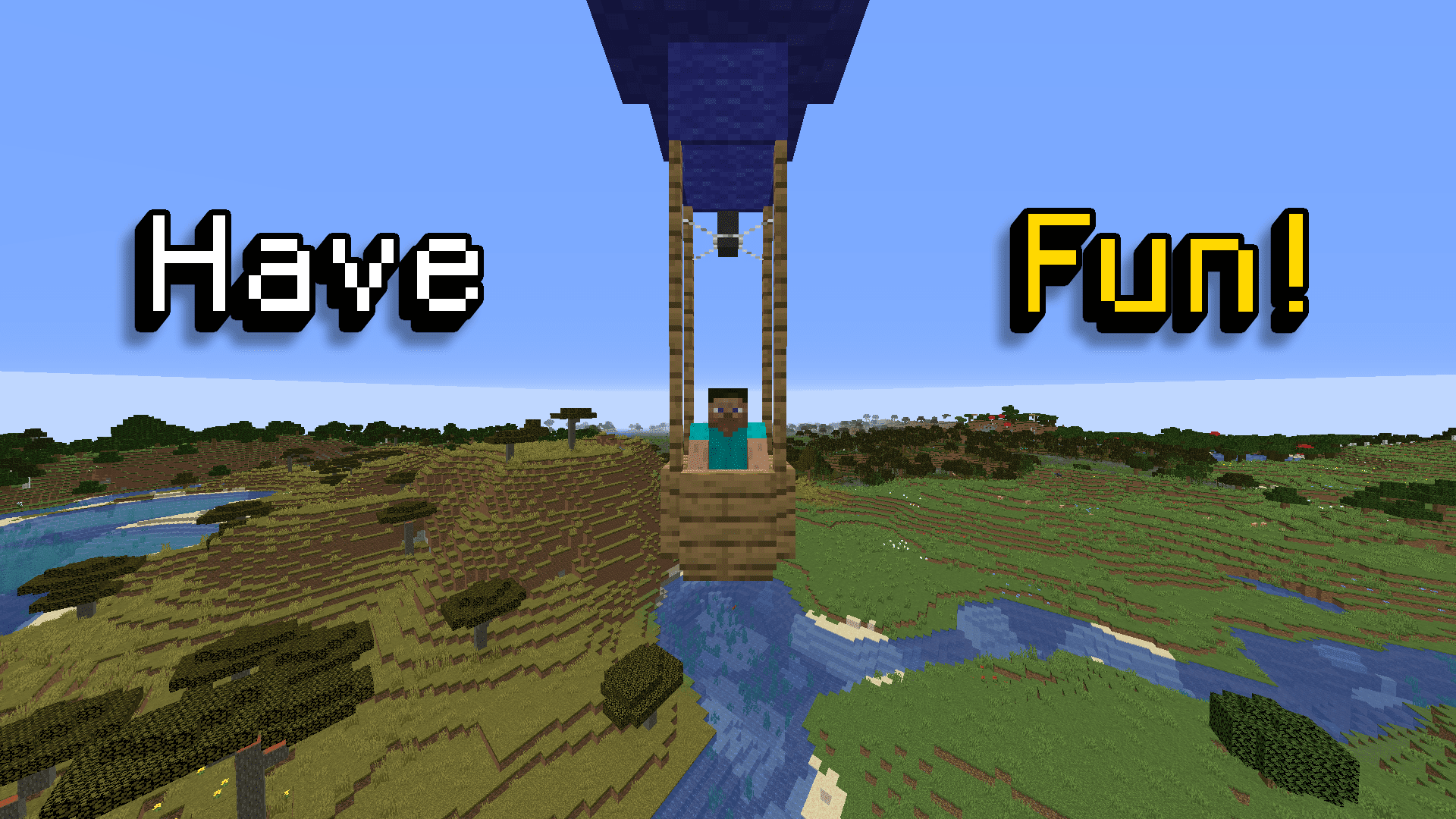
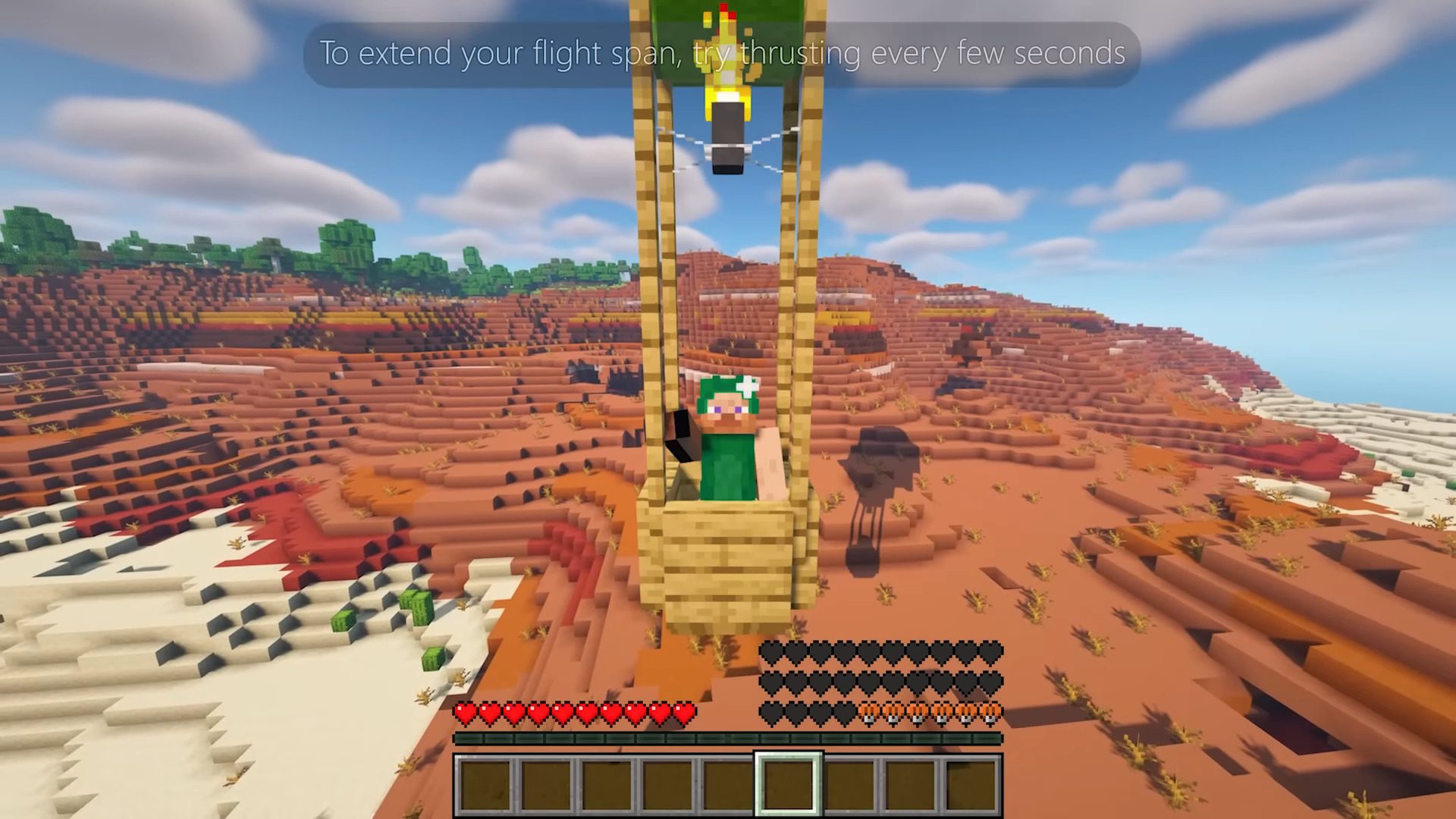
Simple Hot Air Balloons Mod lets you craft hot air balloons from basic vanilla items and fly into the sky. This mod adds balloons and envelope gliders in all colors, along with a coal flame thrower and its fuel. While flying, you can drop blocks, TNT, arrows, flint and steel, or lava buckets below, and you can use the flame thrower to set mobs on fire. All models and flight mechanics are based on real hot air balloons, and all sound effects come from real recordings.

Features:
- Hot Air Balloons: You can craft and fly hot air balloons in all colors using simple vanilla materials.
- Envelope Gliders: Adds Envelope Gliders available in all colors.
- Coal Flame Thrower: Includes a Coal Flame Thrower and Flame Thrower Fuel so you can set mobs on fire.
- Lets you drop any block, TNT, arrows, flint and steel, lava buckets, and more straight from your balloon while flying.
- Bases all models and flight mechanics on real hot air balloons, with audio recorded from real ones.
Balloon Parts:
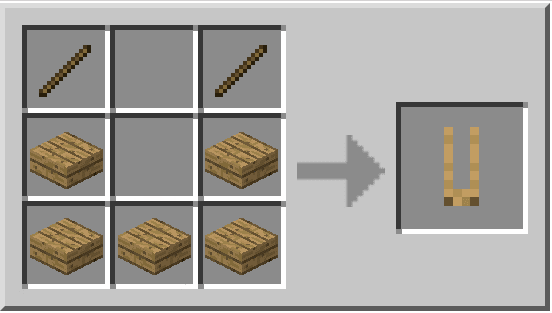
- Hot Air Balloon Basket: Crafted with any wood slab and sticks.
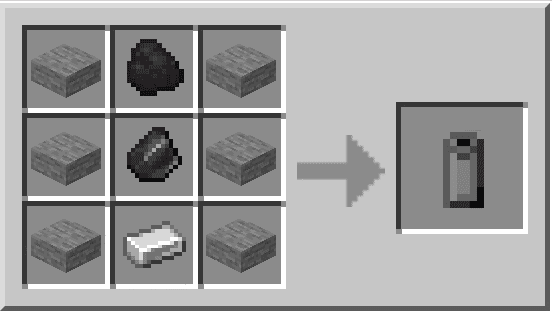
- Coal Burner: Crafted with any stone slab, coal, and iron.
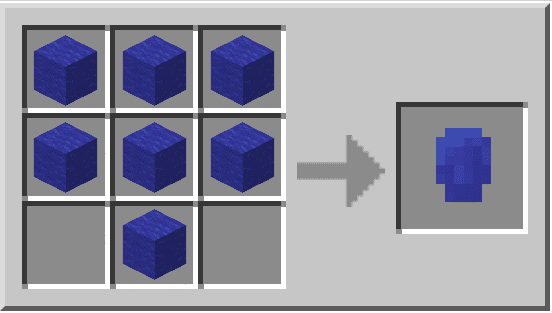
- Balloon Envelopes: Crafted with any wool and available in all colors.
How to Use:
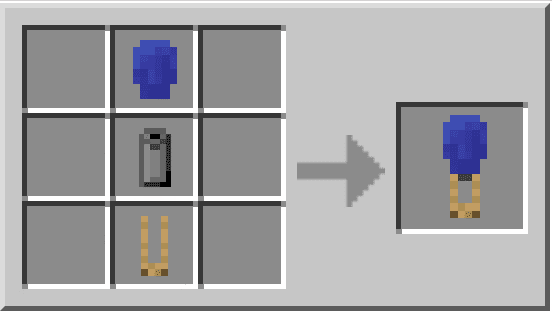
- Craft a Coal Burner, a Hot Air Balloon Basket, and a Balloon Envelope, then combine them on a crafting table to make your hot air balloon.
- Hold coal or charcoal in your hand and Right-Click your hot air balloon to add fuel.
- Thrust every few seconds while in the air to make your flight last longer.
- Press Left Ctrl to make your hot air balloon go down quickly.
- Sneak + Right-Click your hot air balloon to turn it back into an item and pick it up.
Crafting Recipes:
Hot Air Balloon Basket (Any Wood Slab)
Coal Burner (Any Stone Slab)
Hot Air Balloon Envelope (Any Wool)
Hot Air Balloon
Screenshots:



How to Install:
New to Minecraft? Follow our step-by-step guide to install Mods on your PC.View Guide
Simple Hot Air Balloons Mod Download Links
For Minecraft 1.20.4
NeoForge version: Download from Server 1 – Download from Server 2
For Minecraft 1.20.1, 1.20
Forge version: Download from Server 1 – Download from Server 2
For Minecraft 1.19.4, 1.19.3, 1.19.2, 1.19.1, 1.19
Forge version: Download from Server 1 – Download from Server 2
For Minecraft 1.18.2
Forge version: Download from Server 1 – Download from Server 2
For Minecraft 1.16.5
Forge version: Download from Server 1 – Download from Server 2
How often do you tweak mod configuration files (.cfg or .toml)?
29 responses · See the full results →
You May Also Like
Picked for this page
 Alex’s Mob Mod (1.21.1, 1.20.1) – Real Animals and Fantastic Creatures
 Freecam Mod (26.3, 1.20.1) – Explore Through Solid Walls
 Scalable Cat’s Force Mod (26.3, 1.20.1) – Scala Standard Library
 Useful Hats Mod (26.3, 1.20.1) – Utiltity Headwears
 Liquid Blocks Mod (1.21.11, 1.20.1) – Solidifying Liquid Building Blocks
 Language Reload Mod (26.3, 1.20.1) – Quick Language Switching
 Interdimensional Map Markers Mod (26.3, 1.20.1) – Cross-Dimensional Mapping Made Easy
 Hopper The Hedgehog Mod (26.3, 1.20.1) – Speeds Up Item Transfer
 PingHUD Mod (26.3, 1.20.1) – Accurate Ping Monitoring
 Tactical Shield Overhaul Mod (26.3, 1.20.1) – Unique Shield Stats
 Arda Paths Mod (26.3, 1.20.1) – Immersive Trails And Roads For Middle Earth
 Animal Garden Prairie Dog Mod (26.3, 1.20.1) – Adds Tamable Prairie Dogs
Most viewed in Mods over the last 7 days
 Ala Industrial Mod (26.3) – Run Electric Power Grids and Automated Factories
 PleasureCraft Mod (26.3, 1.21.1) – Jenny Mod Remake for Fabric
 Jennycraft Mod (26.3, 1.20.1) – Virtual Girlfriend in Minecraft
 Fapcraft Mod (26.3, 1.12.2) – Comprehensive and Detailed Content
 Jenny Mod (Fapcraft) Official Complete Guide – How to use, Tutorial
 BangCraft Mod (1.20.1) – Jenny, Ellie and Elliot
 Fabric Loader (26.3, 1.20.1) – Fabric Installer for All Minecraft Versions
 Meteor Client Mod (26.3, 1.20.1) – Xray, HUD, Fly
 The Shooting Star Demo Mod (26.3, 1.20.1) – Vaporize Terrain From Orbit
 OptiFine HD (26.3, 1.20.1) – Run Faster, FPS Boost, Shaders Support
 Aristois Client Mod (1.21.4, 1.20.1) – World Class Minecraft Utility
 Prestige Client Mod (1.21.11, 1.21.4) – Powerful Ghost Features for Crystal & Sword PvP
More from Mods
 Bonsai Trees 9minecraft Mod (26.3, 26.2) – Automate Wood Farming in Tiny Pots
 Enhanced Block Entities 9minecraft Mod (26.3) – Build Lag-Free Storage Rooms
 Better Nether 9minecraft Mod (26.3, 26.2) – Survive Forever in the Nether
 BCLib 9minecraft Mod (26.3, 26.2) – Power Custom Nether and End Overhauls
 ForgedLoaderAPI Mod (1.19.2, 1.18.2) – Bring Ported Fabric Creations
 Shield System Mod (1.21.1) – Tank Heavy Monster Hits Without Losing Hearts
 Shin’s Tensura Race Models Mod (1.19.2) – Play As Unique 3D Anime Race
 Offgrid Mod (26.3, 1.20.1) – Furnish Compact Interiors Without Strict Grid
 Tempest Almanac Iron’s Spells ‘n Spellbooks Mod (1.21.1, 1.20.1)
 Chat Guides Mod (26.3, 1.21.11) – Never Memorize Complex Server Commands Again
 TRMT Reimagined the Roads More Travelled Mod (26.3, 1.20.1)
 Morrowless Mod (1.21.1) – Defend Your Shelter From Nightmare Creatures

This post has no comments yet. Be the first — your comment will appear here.